
pm2 相关命令
pm2 相关命令
二、安装
Linux Binaries下载地址:https://nodejs.org/dist
- cd oneinstack/src
- wget https://nodejs.org/dist/v4.2.4/node-v4.2.4-linux-x64.tar.gz
- tar xzf node-v4.2.4-linux-x64.tar.gz
- cp node-v4.2.4-linux-x64/bin/node /usr/local/bin/
- cp -R node-v4.2.4-linux-x64/lib/node_modules /usr/local/lib/
- ln -s /usr/local/lib/node_modules/npm/bin/npm-cli.js /usr/local/bin/npm
- npm install pm2@latest -g #安装最新版本pm2模块
PS: 如果你的主机无法连接公网,先找到能连公网的主机安装上面的方法安装pm2,然后拷贝到你要安装的主机。拷贝如下目录:
- /usr/local/bin/node
- /usr/local/lib/node_modules
再创建相关软连接
三、PM2常用命令
假设你现在已经写好了一个app.js的文件,需要启动,你可以使用pm2进行管理
1. 启动
- # pm2 start app.js
- # pm2 start app.js --name my-api #my-api为PM2进程名称
- # pm2 start app.js -i 0 #根据CPU核数启动进程个数
- # pm2 start app.js --watch #实时监控app.js的方式启动,当app.js文件有变动时,pm2会自动reload
2. 查看进程
- # pm2 list
- # pm2 show 0 或者 # pm2 info 0 #查看进程详细信息,0为PM2进程id
3. 监控
- # pm2 monit
4. 停止
- # pm2 stop all #停止PM2列表中所有的进程
- # pm2 stop 0 #停止PM2列表中进程为0的进程
5. 重载
- # pm2 reload all #重载PM2列表中所有的进程
- # pm2 reload 0 #重载PM2列表中进程为0的进程
6. 重启
- # pm2 restart all #重启PM2列表中所有的进程
- # pm2 restart 0 #重启PM2列表中进程为0的进程
7. 删除PM2进程
- # pm2 delete 0 #删除PM2列表中进程为0的进程
- # pm2 delete all #删除PM2列表中所有的进程
8. 日志操作
- # pm2 logs [--raw] #Display all processes logs in streaming
- # pm2 flush #Empty all log file
- # pm2 reloadLogs #Reload all logs
9. 升级PM2
- # npm install pm2@lastest -g #安装最新的PM2版本
- # pm2 updatePM2 #升级pm2
10. 更多命令参数请查看帮助
- # pm2 --help
四、PM2目录结构
默认的目录是:当前用于的家目录下的.pm2目录(此目录可以自定义,请参考:五、自定义启动文件),详细信息如下:
- $HOME/.pm2 #will contain all PM2 related files
- $HOME/.pm2/logs #will contain all applications logs
- $HOME/.pm2/pids #will contain all applications pids
- $HOME/.pm2/pm2.log #PM2 logs
- $HOME/.pm2/pm2.pid #PM2 pid
- $HOME/.pm2/rpc.sock #Socket file for remote commands
- $HOME/.pm2/pub.sock #Socket file for publishable events
- $HOME/.pm2/conf.js #PM2 Configuration
五、自定义启动文件
创建一个test.json的示例文件,格式如下:
- {
- "apps":
- {
- "name": "test",
- "cwd": "/data/wwwroot/nodejs",
- "script": "./test.sh",
- "exec_interpreter": "bash",
- "min_uptime": "60s",
- "max_restarts": 30,
- "exec_mode" : "cluster_mode",
- "error_file" : "./test-err.log",
- "out_file": "./test-out.log",
- "pid_file": "./test.pid"
- "watch": false
- }
- }
说明:
apps:json结构,apps是一个数组,每一个数组成员就是对应一个pm2中运行的应用
name:应用程序的名称
cwd:应用程序所在的目录
script:应用程序的脚本路径
exec_interpreter:应用程序的脚本类型,这里使用的shell,默认是nodejs
min_uptime:最小运行时间,这里设置的是60s即如果应用程序在60s内退出,pm2会认为程序异常退出,此时触发重启max_restarts设置数量
max_restarts:设置应用程序异常退出重启的次数,默认15次(从0开始计数)
exec_mode:应用程序启动模式,这里设置的是cluster_mode(集群),默认是fork
error_file:自定义应用程序的错误日志文件
out_file:自定义应用程序日志文件
pid_file:自定义应用程序的pid文件
watch:是否启用监控模式,默认是false。如果设置成true,当应用程序变动时,pm2会自动重载。这里也可以设置你要监控的文件。
详细参数列表:见附件八
六、实例
已上面的test.json为例
- # cat > /data/wwwroot/nodejs/test.sh << EOF
- #!/bin/bash
- while :
- do
- echo "Test" >> 1.log
- sleep 5
- done
- EOF
- # chmod +x test.sh #添加执行权限
- # pm2 start test.json #启动,如下图:
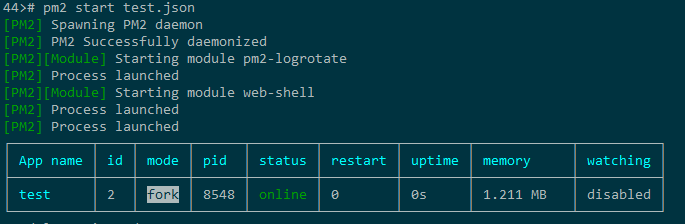
- # pm2 list #查看pm2进程,如下图:

七、备注
其他可参数见官网:http://pm2.keymetrics.io
八、附件
| Field | Type | Example | Description |
| name | string | "myAPI" | name your app will have in PM2 |
| script | string | "bin/app.js" | path of your app |
| args | list | ["--enable-logs", "-n", "15"] | arguments given to your app when it is launched |
| node_args | list | ["--harmony", "--max-stack-size=1024"] | arguments given to node when it is launched |
| cwd | string | "/var/www/app/prod" | the directory from which your app will be launched |
| exec_mode | string | "cluster" | "fork" mode is used by default, "cluster" mode can be configured with instances field |
| instances | number | 4 |
number of instances for your clustered app, 0 means as much instances as you have CPU cores. a negative value means CPU cores - value (e.g -1 on a 4 cores machine will spawn 3 instances) |
| exec_interpreter | string | "node" |
defaults to "node". can be "python", "ruby", "bash" or whatever interpreter you wish to use. "none" will execute your app as a binary executable |
| log_date_format | string | "YYYY-MM-DD HH:mm Z" | format in which timestamps will be displayed in the logs |
| error_file | string | "/var/log/node-app/node-app.stderr.log" |
path to the specified error log file. PM2 generates one by default if not specified and you can find it by typing pm2 desc <app id> |
| out_file | string | "/var/log/node-app/node-app.stdout.log" |
path to the specified output log file. PM2 generates one by default if not specified and you can find it by typing pm2 desc <app id> |
| pid_file | string | "pids/node-geo-api.pid" |
path to the specified pid file. PM2 generates one by default if not specified and you can find it by typing pm2 desc <app id> |
| merge_logs | boolean | false | defaults to false. if true, it will merge logs from all instances of the same app into the same file |
| cron_restart | string | "1 0 * * *" | a cron pattern to restart your app. only works in "cluster" mode for now. soon to be avaible in "fork" mode as well |
| watch | boolean | true |
enables the watch feature, defaults to "false". if true, it will restart your app everytime a file change is detected on the folder or subfolder of your app. |
| ignore_watch | list | ["[\/\\]\./", "node_modules"] | list of regex to ignore some file or folder names by the watch feature |
| min_uptime | number | 1000 |
min uptime of the app to be considered started (i.e. if the app crashes in this time frame, the app will only be restarted the number set in max_restarts (default 15), after that it's errored) |
| max_restarts | number | 10 |
number of consecutive unstable restarts (less than 1sec interval or custom time via min_uptime) before your app is considered errored and stop being |
| max_memory_restart | string | "150M" |
your app will be restarted by PM2 if it exceeds the amount of memory specified. human-friendly format : it can be "10M", "100K", "2G" and so on... |
| env | object | {"NODE_ENV": "production", "ID": "42"} | env variables which will appear in your app |
| autorestart | boolean | false | true by default. if false, PM2 will not restart your app if it crashes or ends peacefully |
| vizion | boolean | false | true by default. if false, PM2 will start without vizion features (versioning control metadatas) |
| post_update | list | ["npm install", "echo launching the app"] | a list of commands which will be executed after you perform a Pull/Upgrade operation from Keymetrics dashboard |
| force | boolean | true | defaults to false. if true, you can start the same script several times which is usually not allowed by PM2 |
| next_gen_js | boolean | true |
defaults to false. if true, PM2 will launch your app using embedded BabelJS features which means you can run ES6/ES7 javascript code |
| restart_delay | number | 4000 | time to wait before restarting a crashed app (in milliseconds). defaults to 0. |
pm2 相关命令的更多相关文章
- linux 搜索相关命令(2)
文件搜索相关命令 1:locate命令 需要 yum install mlocate locate 文件名 在后台数据库中按文件名搜索,搜索速度更快 /var/lib/mlocate #locate命 ...
- 《The Linux Command Line》 读书笔记04 Linux用户以及权限相关命令
Linux用户以及权限相关命令 查看身份 id:Display user identity. 这个命令的输出会显示uid,gid和用户所属的组. uid即user ID,这是账户创建时被赋予的. gi ...
- linux 目录结构及其相关命令
目录也是一个文件,它的唯一功能是用来保存文件及其相关信息.所有的文件,包括普通文件.设备文件和目录文件,都会被保存到目录中. 主目录 登录后,你所在的位置就是你的主目录(或登录目录),如果是root用 ...
- Shell编程基础教程5--文本过滤、正则表达式、相关命令
5.文本过滤.正则表达式.相关命令 5.1.正则表达式(什么是正则表达式?正则表达式怎么进行匹配?常用命令) 简介: 一种用来描述文本模式的特殊语法 ...
- Linux文件管理相关命令
Linux文件管理相关命令 作者:Vamei 出处:http://www.cnblogs.com/vamei 欢迎转载,也请保留这段声明.谢谢! 在了解了Linux文件管理背景知识之后, 我们可以 ...
- mysql主从复制replication的一些相关命令
主服务器上的相关命令:show master status; mysql> show master status\G . row *************************** Posi ...
- sqlplus 配置方法及相关命令
sqlplus 配置方法及相关命令 1.配置文件 1.1 全局模式什么叫全局模式呢:当我们配置完sqlplus工具加载配置文件后,无论在哪个目录下登陆数据库,您设置[sqlplus提示符样子,在任何目 ...
- linux网络配置相关命令、虚拟网络接口eth0:0
网络接口(interface)是网络硬件设备在操作系统中的表示方法,比如网卡在Linux操作系统中用ethX,是由0开始的正整数,比如eth0.eth1...... ethX.而普通猫和ADSL的接口 ...
- Linux中mod相关的命令 内核模块化 mod相关命令都是用来动态加载内核模块/驱动程序模块
Linux中mod相关的命令 内核模块化 mod相关命令都是用来动态加载内核模块/驱动程序模块 http://baike.baidu.com/link?url=lxiKxFvYm-UfJIxMjz ...
随机推荐
- sshd_config OpenSSH SSH 进程配置文件配置说明
名称 sshd_config – OpenSSH SSH 服务器守护进程配置文件 大纲 /etc/ssh/sshd_config 描述sshd 默认从 /etc/ssh/sshd_config 文件( ...
- C语言调用正则表达式
标准的C和C++都不支持正则表达式,但有一些函数库可以辅助C/C++程序员完成这一功能,其中最著名的当数Philip Hazel的Perl-Compatible Regular Expression库 ...
- #include<stdarg.h> 可变参数使用
今天上计算方法这课时觉得无聊至极,于是拿出C++编程之道来看了看..无意之中看到了#include<stdarg.h> va_list,va_start,va_end等东西,不知是怎么用的 ...
- mac pro上安装docker
1.进入一下地址进行下载docker https://download.docker.com/mac/stable/Docker.dmg 进入后进行下载后进行安装 2.将其拖动到Appliaction ...
- Jmeter中的变量(三)
变量(Variables) Jmeter中的变量(参数化)目的是为了提供改变请求变化的机制.比如登录场景,一般不能使用同一个账号做并发操作. 变量的特点 1) JMeter变量对于测试线程而言是局部变 ...
- C++的一大误区——深入解释直接初始化与复制初始化的区别
转自:http://blog.csdn.net/ljianhui/article/details/9245661 不久前,在博客上发表了一篇文章——提高程序运行效率的10个简单方法,对于其中最后一 ...
- 为什么可以这么快! awk 与python的应用
这几天刚处理一个排序问题 源文件: 可以看到有11G大小,需要根据最后一列的热度来做一下排序.如果让你来做这样的排序,在linux环境下,你会如何处理呢? xch27@lanzhou:/asrdata ...
- c++ 容器学习 理论
[转载]http://blog.csdn.net/acosoft/article/details/4395468 在面向对象的语言中,大多引入了容器的概念.那么 什么 是 容器?实质上就是一组相同类型 ...
- 【LOJ】 #2013. 「SCOI2016」幸运数字
题解 最大异或和,明显是个线性基 然而还有那么多路径--那就树分治,反正点数看起来很少,就是为了让人乘上一个60的常数嘛 把一个树的点分树记录下来,然后看看询问的两个点彼此相同的最后一个父亲是谁,把这 ...
- .NET 社区汇总
英文社区: 名称:MSDN 地址:http://msdn.microsoft.com/zh-cn/default.aspx 描述:这个网站是大家学.Net的初始网站,也是.net方面官方和权威的资料, ...