
布局包含Image和Title的UIButton
UIButton中的titleEdgeInsets和imageEdgeInsets可以管理button中image和title的布局。 如果对其理解不够深入,用纯数字进行布局管理,经过不断的调试,还是能试出来的,但是如果改变了图片大小或文字长度,又要再来一遍。 作为程序猿,我们不应该放弃任何一个偷懒的机会。
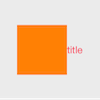
- 默认情况下,是图片在左,文字在右,垂直居中显示,如下图:
button.titleEdgeInsets = UIEdgeInsetsZero;

button.imageEdgeInsets = UIEdgeInsetsZero;
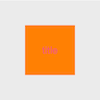
- 设置如下布局后,图片和文字都居中显示。
button.titleEdgeInsets = UIEdgeInsetsMake(0, -button.imageView.frame.size.width, 0, 0);

// button.imageEdgeInsets = UIEdgeInsetsMake(0, 0, 0, -button.titleLabel.frame.size.width);

// 由于iOS8中titleLabel的size为0,用上面这样设置有问题,修改一下即可

button.imageEdgeInsets = UIEdgeInsetsMake(0, 0, 0, -button.titleLabel.intrinsicContentSize.width);
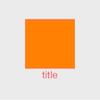
- 如果想图片在上,文字在下,水平居中显示,则按下面设置即可:
button.titleEdgeInsets = UIEdgeInsetsMake(0, -button.imageView.frame.size.width, -button.imageView.frame.size.height, 0);

// button.imageEdgeInsets = UIEdgeInsetsMake(-button.titleLabel.frame.size.height, 0, 0, -button.titleLabel.frame.size.width);

// 由于iOS8中titleLabel的size为0,用上面这样设置有问题,修改一下即可

button.imageEdgeInsets = UIEdgeInsetsMake(-button.titleLabel.intrinsicContentSize.height, 0, 0, -button.titleLabel.intrinsicContentSize.width);
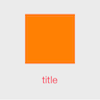
如果觉得图片和文字离的太近了,稍微分开一点:
CGFloat offset = 40.0f;

button.titleEdgeInsets = UIEdgeInsetsMake(0, -button.imageView.frame.size.width, -button.imageView.frame.size.height-offset/2, 0);

// button.imageEdgeInsets = UIEdgeInsetsMake(-button.titleLabel.frame.size.height-offset/2, 0, 0, -button.titleLabel.frame.size.width);

// 由于iOS8中titleLabel的size为0,用上面这样设置有问题,修改一下即可

button.imageEdgeInsets = UIEdgeInsetsMake(-button.titleLabel.intrinsicContentSize.height-offset/2, 0, 0, -button.titleLabel.intrinsicContentSize.width);
- 文字左对齐,图片右对齐
button.titleEdgeInsets = UIEdgeInsetsMake(0, -button.imageView.frame.size.width - button.frame.size.width + button.titleLabel.intrinsicContentSize.width, 0, 0);

    button.imageEdgeInsets = UIEdgeInsetsMake(0, 0, 0, -button.titleLabel.frame.size.width - button.frame.size.width + button.imageView.frame.size.width);
布局包含Image和Title的UIButton的更多相关文章
- 如何布局包含Image和Title的UIButton
UIButton中的titleEdgeInsets和imageEdgeInsets可以管理button中image和title的布局.如果对其理解不够深入,用纯数字进行布局管理,经过不断的调试,还是能 ...
- duilib各种布局的作用,相对布局与绝对布局的的意义与用法
大多数刚使用duilib的朋友时候非常依赖duilib自带的设计器,用他可以拖拉控件,可视化的做出自己想要的界面.可是用一段时间就会发现原带的设计器有很多bug,时不时会崩溃,支持的控件数量有限,属性 ...
- 【转】在Android布局中使用include和merge标签
内容转自:http://fengweipeng1208.blog.163.com/blog/static/21277318020138229754135/ 在我们开发android布局时,经常会有很多 ...
- 深入浅出ExtJS 第六章 布局
6.1 布局的用途 6.1 布局的用途 //决定把什么东西放到什么位置; var vieport = new Ext.Viewport({ layout:'border', //使用Border ...
- 二,WPF的布局
所有WPF布局窗口都派生自System.WIndows.Controls.Panel抽象类的面板. 不能在布局容器中放置字符串内容,而是需要一个继承自UIElement的类对字符串进行包装,如Text ...
- 总结与学习DIV+CSS网页布局技巧
以前用表格布局时设置网页居中非常方便,把表格对齐方式设置为居中就行了,就这么简单,现在呢,用DIV+CSS样式表控制,好像不是那么容易了,其实也很简单,只不过方式不同而已. <style> ...
- bootstrap栅格布局
<!DOCTYPE html> <html lang="en"> <head> <!-- //简介:boststrap内置了一套响应式,移 ...
- 学习 ExtJS 4 面板与布局
原文 http://www.cnblogs.com/codealone/archive/2013/06/04/3091325.html 面板Panel Ext.panel.Panel拓展自Ext.co ...
- Ext布局篇
EXT标准布局类 收藏 面板相当于一张干净的白纸,如果直接在上面添加内容,将很难控制面板中内容的显示位置,面板元素越多就越显得凌乱,所以需要在面板上划分不同的区域,将面板内容展示到希望的位置上.E ...
随机推荐
- ubuntu16.04(beaglebone) 下vim 和gcc 的信息
root@arm:~# dpkg -L gcc /. /usr /usr/bin /usr/bin/c99-gcc /usr/bin/c89-gcc /usr/share /usr/share/doc ...
- REDHAT一总复习1 输出重定向及head tail的用法
1.使用bash命令,在server机上完成以下任务.(考点是:head tail的使用) .显示/usr/bin/clean-binary-files文件的前12行,并将其输出到/home/stu ...
- D3.js学习(一)
从今天开始我将和大家一起学习D3.js(Data-Driven Documents),由于国内关于D3的学习资料少之又少,所以我觉得很有必要把自己学习过程记录下来,供同学们参考,如果文章有有哪些表达有 ...
- JS树形菜单
超全的JS树形菜单源代码共享(有实例图) 树形菜单是很常用的效果,常用在管理软件当中,但是一套树形菜单已经不能满足需求,所以如果能有一套比较全面的树形菜单JS特效代码,将会非常方便,下面懒人萱将超全的 ...
- break与continue的区别
break 在while.for.do...while.while循环中使用break语句退出当前循环,直接执行后面的代码. continue 的作用是仅仅跳过本次循环,而整个循环体继 ...
- php周计划1
2016.09.07-2016.09.11 2016.09.07 速成教程 javascript基础 遇到问题:盒子模型中“回”定位问题未解决 css定位:css有三种基本的定位机制 1.普通流:元 ...
- js基础总结
DOM 节点 document节点 nodeType:9 文本节点 nodeType:3 元素节点 nodeType:1 注释节点 nodeType:8 属性节点 nodeType:2 at ...
- Android Studio插件:GsonFromat
这个Android Studio插件可以根据JSONObject格式的字符串,自动生成实体类参数. 具体见:https://github.com/zzz40500/GsonFormat
- python中单引号, 双引号,三引号的差异
1. 单引号和双引号用法都是一样的,但是如果字符串里有相同的字符时要使用\进行转义 举例:1) print 'hello'2) print "hello"1和2,结果都是hello ...
- C#接口的作用(经典)
C#接口是一个让很多初学C#者容易迷糊的东西,用起来好像很简单,定义接口,里面包含方法,但没有方法具体实现的代码,然后在继承该接口的类里面要实现接口的所有方法的代码,但没有真正认识到接口的作用的时候就 ...