
【爬虫】-xpath语法熟悉及实战
本文为自学记录,部分内容转载于
python3网络爬虫实战
知乎专栏:写点python
如有侵权,请联系删除。
语法
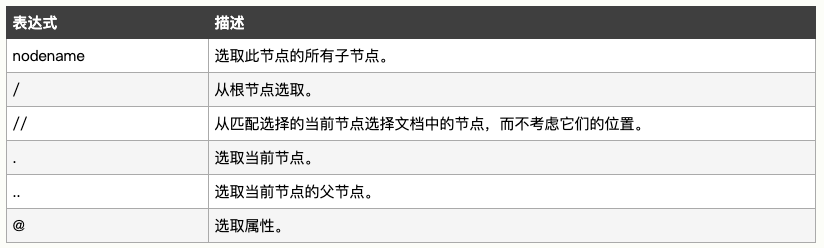
1、选取节点
XPath 使用路径表达式在 XML 文档中选取节点。节点是通过沿着路径或者 step 来选取的。
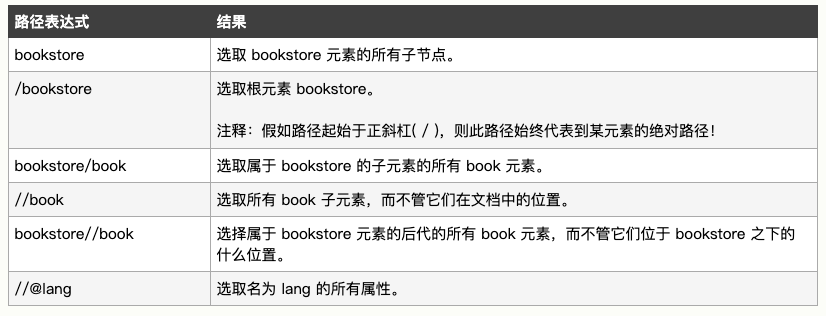
实例解释
2、谓语
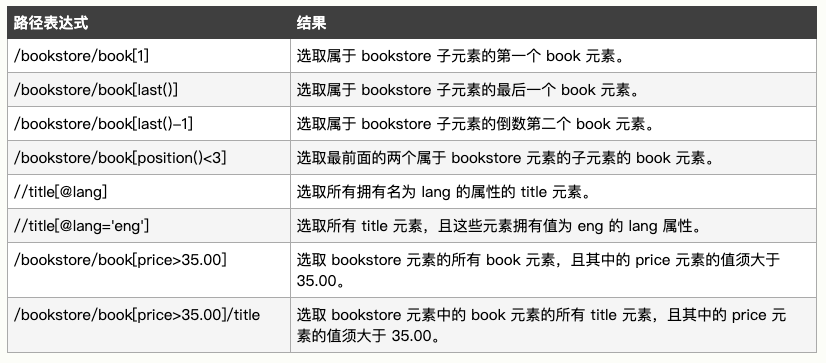
谓语用来查找某个特定的节点或者包含某个指定的值的节点。
谓语被嵌在方括号中。
text ='''

<bookstore>

<book>

  <title lang="eng">Harry Potter</title>

  <price>29.99</price>

</book>

<book>

  <title lang="eng">Learning XML</title>

  <price>39.95</price>

</book>

</bookstore>

'''

from lxml import etree

# 初始化,构造xpath解析对象

html = etree.HTML(text)

# 修正HTML代码,结果为bytes类型,还需要转化为str类型

# html  = etree.tostring(html,encoding='utf-8')

result = html.xpath('//@lang')

print(result)

结果:
['eng', 'eng']
3、选取未知节点

4、选取若干路径

实例
from lxml import etree

myPage = '''<html>

        <title>TITLE</title>

        <body>

        <h1>我的博客</h1>

        <div>我的文章</div>

        <div id="photos">

         <img src="pic1.jpeg"/><span id="pic1">PIC1 is beautiful!</span>

         <img src="pic2.jpeg"/><span id="pic2">PIC2 is beautiful!</span>

         <p><a href="http://www.example.com/more_pic.html">更多美图</a></p>

         <a href="http://www.baidu.com">去往百度</a>

         <a href="http://www.163.com">去往网易</a>

         <a href="http://www.sohu.com">去往搜狐</a>

        </div>

        <p class="myclassname">Hello,\nworld!<br/>-- by Adam</p>

        <div class="foot">放在尾部的其他一些说明</div>

        </body>

        </html>'''

html = etree.HTML(myPage)

# 定位

div1 = html.xpath('//div')

div2 = html.xpath('//div[@id]')

div3 = html.xpath('//div[@class="foot"]')

div4 = html.xpath('//div[@*]')

div5 = html.xpath('//div[1]')

div6 = html.xpath('//div[last()-1]')

div7 = html.xpath('//div[position()<3]')

div8 = html.xpath('//div|//h1')

div9 = html.xpath('//div[not(@*)]')

# 取文本text()区别html.xpath('string()')

text1 = html.xpath('//div/text()')

text2 = html.xpath('//div[@id]/text()')

text3 = html.xpath('//div[@class="foot"]/text()')

text4 = html.xpath('//div[@*]/text()')

text5 = html.xpath('//div[1]/text()')

text6 = html.xpath('//div[last()-1]/text()')

text7 = html.xpath('//div[position()<3]/text()')

text8 = html.xpath('//div/text()|//h1/text()')

text9 = html.xpath('//div[not(@*)]/text()')

# 取属性

value1 = html.xpath('//a/@href')

value2 = html.xpath('//img/@src')

value3 = html.xpath('div[2]/span/@id')

# print(value1)

# print(value2)

# print(value3)

# 定位(进阶)

a_href = html.xpath('//div[position()<3]/a/@href')

print(a_href)

a_href = html.xpath('//div[position()<3]//a/@href')

print(a_href)
实例2
在上一篇爬取猫眼TOP100里面,我们是用正则表达式去进行解析的,这里用xpath进行解析测试
from lxml import etree

html = '''

<dd>

                        <i class="board-index board-index-1">1</i>

    <a href="/films/1203" title="霸王别姬" class="image-link" data-act="boarditem-click" data-val="{movieId:1203}">

      <img src="//s0.meituan.net/bs/?f=myfe/mywww:/image/loading_2.e3d934bf.png" alt="" class="poster-default" />

      <img data-src="https://p1.meituan.net/movie/20803f59291c47e1e116c11963ce019e68711.jpg@160w_220h_1e_1c" alt="霸王别姬" class="board-img" />

    </a>

    <div class="board-item-main">

      <div class="board-item-content">

              <div class="movie-item-info">

        <p class="name"><a href="/films/1203" title="霸王别姬" data-act="boarditem-click" data-val="{movieId:1203}">霸王别姬</a></p>

        <p class="star">

                主演:张国荣,张丰毅,巩俐

        </p>

<p class="releasetime">上映时间:1993-01-01</p>    </div>

    <div class="movie-item-number score-num">

<p class="score"><i class="integer">9.</i><i class="fraction">5</i></p>

    </div>

      </div>

    </div>

                </dd>

'''

# 初始化

html = etree.HTML(html)

# html = etree.tostring(html, encoding='utf-8')

# print(html.decode('utf-8'))

# print(type(html))

# print(html)
# 排名

index = html.xpath('//dd/i[@class="board-index board-index-1"]/text()')

print(index)
# 图片

image = html.xpath('//dd/a/img/@data-src')

print(image)
# 标题

title = html.xpath('//dd/div/div/div/p/a/text()')

print(title)
# 演员

star = html.xpath('//dd/div/div/div/p[@class="star"]/text()')

print(star)
# 上映时间

time = html.xpath('//dd/div/div/div/p[@class="releasetime"]/text()')

print(time)
# 评分

sorce = html.xpath('//dd/div/div/div/p/i[@class="integer"]/text()')

print(sorce)

sorce2 = html.xpath('//dd/div/div/div/p/i[@class="fraction"]/text()')

print(sorce2)
结果:

【爬虫】-xpath语法熟悉及实战的更多相关文章
- Python爬虫之xpath语法及案例使用
Python爬虫之xpath语法及案例使用 ---- 钢铁侠的知识库 2022.08.15 我们在写Python爬虫时,经常需要对网页提取信息,如果用传统正则表达去写会增加很多工作量,此时需要一种对数 ...
- 爬虫解析之css,xpath语法
一.xpath语法 xpath实例文档 <?xml version="1.0" encoding="ISO-8859-1"?> <bookst ...
- python爬虫:XPath语法和使用示例
python爬虫:XPath语法和使用示例 XPath(XML Path Language)是一门在XML文档中查找信息的语言,可以用来在XML文档中对元素和属性进行遍历. 选取节点 XPath使用路 ...
- Python爬虫利器三之Xpath语法与lxml库的用法
前面我们介绍了 BeautifulSoup 的用法,这个已经是非常强大的库了,不过还有一些比较流行的解析库,例如 lxml,使用的是 Xpath 语法,同样是效率比较高的解析方法.如果大家对 Beau ...
- 常见的爬虫分析库(2)-xpath语法
xpath简介 1.xpath使用路径表达式在xml和html中进行导航 2.xpath包含标准函数库 3.xpath是一个w3c的标准 xpath节点关系 1.父节点 2.子节点 3.同胞节点 4. ...
- Xpath语法-爬虫(一)
前言 这一章节主要讲解Xpath的基础语法,学习如何通过Xpath获取网页中我们想要的内容;为我们的后面学习Java网络爬虫基础准备工作. 备注:此章节为基础核心章节,未来会在网络爬虫的数据解析环节经 ...
- 芝麻HTTP:Python爬虫利器之Xpath语法与lxml库的用法
安装 pip install lxml 利用 pip 安装即可 XPath语法 XPath 是一门在 XML 文档中查找信息的语言.XPath 可用来在 XML 文档中对元素和属性进行遍历.XPat ...
- 12.Python爬虫利器三之Xpath语法与lxml库的用法
LXML解析库使用的是Xpath语法: XPath 是一门语言 XPath可以在XML文档中查找信息 XPath支持HTML XPath通过元素和属性进行导航 XPath可以用来提取信息 XPath比 ...
- [Python 练习爬虫] XPATH基础语法
XPATH语法: // 定位根标签 / 往下层寻找 /text() 提取文本内容 /@xxx 提取属性内容 Sample: import requests from lxml import etree ...
随机推荐
- CoderForces 687C The Values You Can Make (01背包,DP)
题意:给定 n 个硬币和一个值 k,问你在用一些硬币组成面值为 k的这些硬币还能组成多少种其他面值. 析:如果这样说,由这些硬币能组成多少种不同的面值,那么是不是就很熟悉了,这不就是01背包么,这个题 ...
- logback-spring.xml配置文件详解
logback-spring.xml配置文件 自己改下value="G:/logs/pmp"这个值,如果你相关依赖弄好的话,直接复制粘贴即用 输出的日志文件的名称最好也改下,下文中 ...
- Java多线程设计模式(三)
目录(?)[-] Read-Wirte Lock Pattern Thread-Per-Message Pattern Worker Thread Pattern Read-Wirte Lock ...
- MySQL如何查看连接数和状态
查看连接数 命令:show processlist 如果要是root账号,能够看见当前所有用户的连接.如果是普通账号,只能看到自己占用的连接数. show processlist只能是列出前100 ...
- 关于提交表单时添加自定义值的方式:data中值可绑定function
表单提交时新增自定义值: $.ajaxForm(){ data:{aaa:"12"} } 但是这个是在初始化的时候就绑定进去的,所以值是固定的初始化时候的值,若想添加动态值,可以这 ...
- WinAPI 字符及字符串函数(10): lstrcpy - 复制字符串
unit Unit1; interface uses Windows, Messages, SysUtils, Variants, Classes, Graphics, Controls, For ...
- Linq实战 之 DataSet操作详解
Linq实战 之 DataSet操作详解 一:linq to Ado.Net 1. linq为什么要扩展ado.net,原因在于给既有代码增加福利.FCL中在ado.net上扩展了一些方法. 简单一 ...
- maven-multiModule
主pom的定义 packaging:pom modules的指定 dependencyManagement的指定 properties的指定 build或profile的设置 子module的创建 在 ...
- dubbo 安装部署
dubbo 安装部署 1 安装zookeeper 2 安装dubbo 1 下载源码 https://github.com/alibaba/dubbo 2 编译 mvn clean packa ...
- bzoj1833数字计数
题目链接 找$[1$ ~ $a-1]$和$[1$ ~ $b]$中各数码出现的次数之后相减就是答案 上代码: /********************************************* ...