
在vue项目中使用codemirror插件实现代码编辑器功能(代码高亮显示及自动提示
在vue项目中使用codemirror插件实现代码编辑器功能(代码高亮显示及自动提示)
1、使用npm安装依赖
npm install --save codemirror;
2、在页面中放入如下代码
<template>

  <textarea ref="mycode" class="codesql" v-model="code" style="height:200px;width:600px;"></textarea>

</template>

<script>

  import "codemirror/theme/ambiance.css";

  import "codemirror/lib/codemirror.css";

  import "codemirror/addon/hint/show-hint.css";

  let CodeMirror = require("codemirror/lib/codemirror");

  require("codemirror/addon/edit/matchbrackets");

  require("codemirror/addon/selection/active-line");

  require("codemirror/mode/sql/sql");

  require("codemirror/addon/hint/show-hint");

  require("codemirror/addon/hint/sql-hint");

    export default {

        name: "codeMirror",

      data () {

        return {

          code: '//按Ctrl键进行代码提示'

        }

      },

      mounted () {

        debugger

        let mime = 'text/x-mariadb'

        //let theme = 'ambiance'//设置主题,不设置的会使用默认主题

        let editor = CodeMirror.fromTextArea(this.$refs.mycode, {

          mode: mime,//选择对应代码编辑器的语言,我这边选的是数据库,根据个人情况自行设置即可

          indentWithTabs: true,

          smartIndent: true,

          lineNumbers: true,

          matchBrackets: true,

          //theme: theme,

          // autofocus: true,

          extraKeys: {'Ctrl': 'autocomplete'},//自定义快捷键

          hintOptions: {//自定义提示选项

            tables: {

              users: ['name', 'score', 'birthDate'],

              countries: ['name', 'population', 'size']

            }

          }

        })

        //代码自动提示功能,记住使用cursorActivity事件不要使用change事件,这是一个坑,那样页面直接会卡死

        editor.on('cursorActivity', function () {

          editor.showHint()

        })

      }

    }

</script>

<style>

  .codesql {

    font-size: 11pt;

    font-family: Consolas, Menlo, Monaco, Lucida Console, Liberation Mono, DejaVu Sans Mono, Bitstream Vera Sans Mono, Courier New, monospace, serif;

  }

</style>
3、话不多说,直接上图
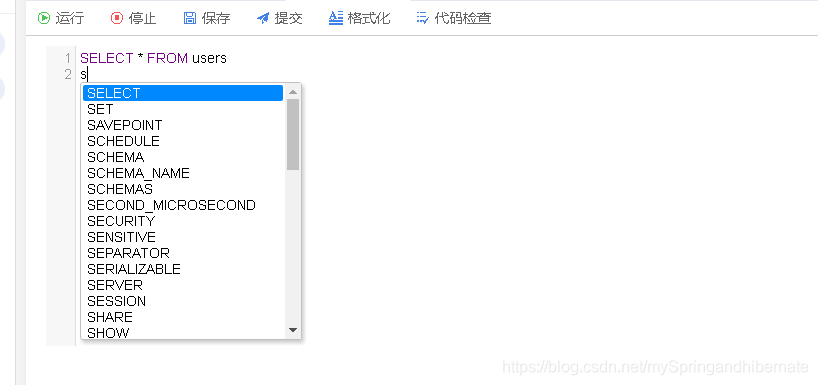
4、这样就把代码编辑器实现啦,是不是so easy啊,你们自己去尝试下吧
https://blog.csdn.net/mySpringandhibernate/article/details/84105095
另一篇文章: 使用Vue-codemirror使用总结
https://blog.csdn.net/weixin_43080277/article/details/83860629
在vue项目中使用codemirror插件实现代码编辑器功能(代码高亮显示及自动提示的更多相关文章
- 实战:vue项目中导入swiper插件
版本选择 swiper是个常用的插件,现在已经迭代到了第四代:swiper4.常用的版本是swiper3和swiper4,我选择的是swiper3. 安装 安装swiper3的最新版本3.4.2: n ...
- vue项目中的相关插件
所有安装都是cd到该项目目录中安装 -S代表将插件添加到项目中的package.json文件 1.iview 是一套基于 Vue.js 的开源 UI 组件库,主要服务于 PC 界面的中后台产品 cnp ...
- 热力图 vue 项目中使用热力图插件 “heatmap.js”(保姆式教程)
我现在写的这项目是用CDN引入 heatmap.js, 可根据自己项目情况使用哪种方式引入插件. 官网地址 "https://www.patrick-wied.at/static/heatm ...
- Vue项目中使用jquery插件
1.引入jquery,并且在vue.config.js里配置 config.plugin('provide') .use(webpack.ProvidePlugin, [{ $: 'jquery', ...
- vue项目中使用swiper插件遇到的坑
<style scoped> .swiper-pagination-bullets >>> .swiper-pagination-bullet-active { ...
- 转:如何在Vue项目中使用vw实现移动端适配
https://www.w3cplus.com/mobile/vw-layout-in-vue.html 有关于移动端的适配布局一直以来都是众说纷纭,对应的解决方案也是有很多种.在<使用Flex ...
- 在Vue项目中使用vw实现移动端适配
有关于移动端的适配布局一直以来都是众说纷纭,对应的解决方案也是有很多种.在<使用Flexible实现手淘H5页面的终端适配>提出了Flexible的布局方案,随着viewport单位越来越 ...
- 如何在Vue项目中使用vw实现移动端适配(转)
有关于移动端的适配布局一直以来都是众说纷纭,对应的解决方案也是有很多种.在<使用Flexible实现手淘H5页面的终端适配>提出了Flexible的布局方案,随着viewport单位越来越 ...
- Vue项目中使用vw实现移动端适配
我们在vue移动端项目中的适配一般都采用rem,但是rem也不是能兼容所有的终端. 随着viewport单位越来越受到众多浏览器的支持,下面将简单介绍怎么实现vw的兼容问题,用vw代替rem 当我们采 ...
随机推荐
- [置顶]JB开发之制作系统级Application
1.编译工程,生成xx.app 2.制作引导进程xx替换xx.app里面的xx进程 引导进程代码: int main(int argc, char *argv[]) { @autoreleasepoo ...
- SQL 语句快速参考
来自 W3CSchool 的 SQL 快速参考 SQL 语句 语法 AND / OR SELECT column_name(s)FROM table_nameWHERE conditionAND|OR ...
- ios UITableView高度自适应(转)
- (CGFloat)tableView:(UITableView *)tableView heightForRowAtIndexPath:(NSIndexPath *)indexPath { // ...
- netty接收大文件的方法
参考:http://blog.csdn.net/linuu/article/details/51371595 https://www.jianshu.com/p/a0a51fd79f62 netty默 ...
- js 中导出excel 较长数字串会变成科学计数法(转载)
在做项目中,碰到如题的问题.比如要将居民的信息导出到excel中,居民的身份证号码因为长度过长(大于10位),excel会自动的将过长的数字串转换成 科学计数法.现在网上找到解决方案之一: (在数字串 ...
- [算法][LeetCode]Single Number——异或运算的巧妙运用
题目要求 Given an array of integers, every element appears twice except for one. Find that single one. N ...
- java方法的理解、调用栈与异常处理
一.流程分支 If/else :基于boolean值的双分支 Switch:基于数字(整数.char.byte.枚举).字符串 类型的多分支 Int month =5; Switch 二.方法meth ...
- Cookies, Security, and Privacy Client Identification
w HTTP The Definitive Guide Cookies themselves are not believed to be a tremendous security risk, be ...
- packages managers
nodejs npm/bower/component ...rubygemsperl cpanpython pipOS X homebrewsublime text的package-control 那 ...
- BS一机双屏的解决方式
一.WebSocket通讯 WebSocket protocol 是HTML5一种新的协议.它实现了浏览器与server全双工通信. 为保证socket不间断.使用下面类库进行socket通讯. ht ...