
《DSP using MATLAB》示例Example 6.28

代码:
% The following 3 lines produce filter coefficients shown in Table 6.1

wp = [0.35, 0.65]; ws = [0.25, 0.75]; Rp = 1; As = 50;

[N, wn] = ellipord(wp, ws, Rp, As);

[b, a] = ellip(N, Rp, As, wn);

w = [0:500]*pi/500; H = freqz(b, a, w);

magH = abs(H); magHdb = 20*log10(magH);

% 16-bit word-length quantization

N1 = 15; [bahat, L1, B1] = QCoeff([b; a], N1);

TITLE1 = sprintf('%i-bits (1+%i+%i) ', N1+1, L1, B1);

bhat1 = bahat(1, :); ahat1 = bahat(2, :);

Hhat1 = freqz(bhat1, ahat1, w); magHhat1 = abs(Hhat1);

magHhat1db = 20*log10(magHhat1); zhat1 = roots(bhat1);

% 8-bit word-length quantization

N2 = 7; [bahat, L2, B2] = QCoeff([b; a], N2);

TITLE2 = sprintf('%i-bits (1+%i+%i) ', N2+1, L2, B2);

bhat2 = bahat(1, :); ahat2 = bahat(2, :);

Hhat2 = freqz(bhat2, ahat2, w); magHhat2 = abs(Hhat2);

magHhat2db = 20*log10(magHhat2); zhat2 = roots(bhat2);

% Comparison of Magnitude Plots

Hf_1 = figure('paperunits', 'inches', 'paperposition', [0, 0, 6, 5], 'NumberTitle', 'off', 'Name', 'Exameple 6.28');

%figure('NumberTitle', 'off', 'Name', 'Exameple 6.26a')

set(gcf,'Color','white');

% Comparison of Log-Magnitude Response: 16 bits

subplot(2, 2, 1); plot(w/pi, magHdb, 'g', 'linewidth', 1.5); axis([0, 1, -80, 5]);

hold on; plot(w/pi, magHhat1db, 'r', 'linewidth', 1); hold off;

xlabel('Digital Frequency in \pi units', 'fontsize', 10);

ylabel('Decibels', 'fontsize', 10); grid on;

title(['Log-mag Plot: ', TITLE1], 'fontsize', 10, 'fontweight', 'bold');

% Comparison of Pole-Zero Plots: 16 bits

subplot(2, 2, 3); [HZ, HP, Hl] = zplane([b], [a]); axis([-2, 2, -2, 2]); hold on;

set(HZ, 'color', 'g', 'linewidth', 1, 'markersize', 4);

set(HP, 'color', 'g', 'linewidth', 1, 'markersize', 4);

plot(real(zhat1), imag(zhat1), 'r+', 'linewidth', 1); grid on;

title(['PZ Plot: ' TITLE1], 'fontsize', 10, 'fontweight', 'bold'); hold off;

% Comparison of Log-Magnitude Response: 8 bits

subplot(2, 2, 2); plot(w/pi, magHdb, 'g', 'linewidth', 1.5); axis([0, 1, -80, 5]);

hold on; plot(w/pi, magHhat2db, 'r', 'linewidth', 1); hold off;

xlabel('Digital Frequency in \pi units', 'fontsize', 10);

ylabel('Decibels', 'fontsize', 10); grid on;

title(['Log-mag Plot: ', TITLE2], 'fontsize', 10, 'fontweight', 'bold');

% Comparison of Pole-Zero Plots: 8 bits

subplot(2, 2, 4); [HZ, HP, Hl] = zplane([b], [a]); axis([-2, 2, -2, 2]); hold on;

set(HZ, 'color', 'g', 'linewidth', 1, 'markersize', 4);

set(HP, 'color', 'g', 'linewidth', 1, 'markersize', 4);

plot(real(zhat2), imag(zhat2), 'r+', 'linewidth', 1); grid on;

title(['PZ Plot: ' TITLE2], 'fontsize', 10, 'fontweight', 'bold'); hold off;
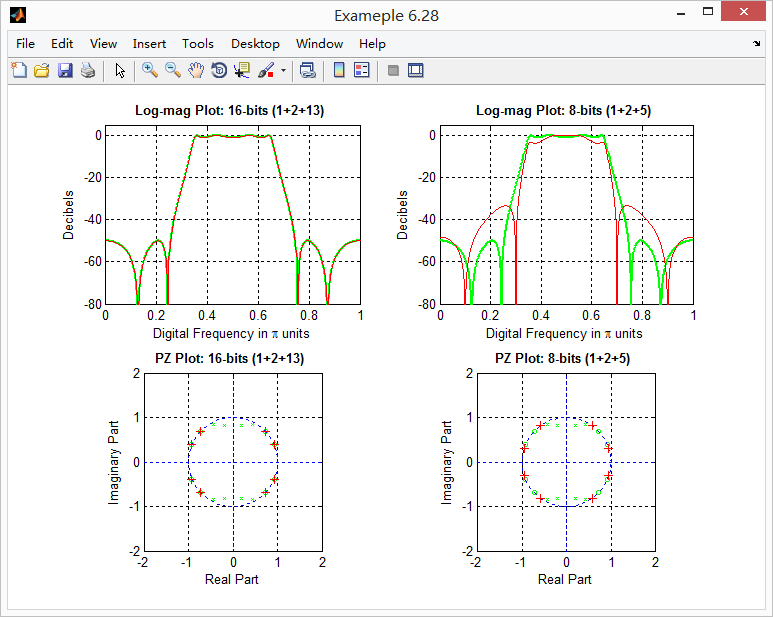
运行结果:
《DSP using MATLAB》示例Example 6.28的更多相关文章
- 《DSP using MATLAB》Problem 5.28
昨晚手机在看X信的时候突然黑屏,开机重启都没反应,今天维修师傅说使用时间太长了,还是买个新的吧,心疼银子啊! 这里只放前两个小题的图. 代码: 1. %% ++++++++++++++++++++++ ...
- 《DSP using MATLAB》Problem 8.28
代码: %% ------------------------------------------------------------------------ %% Output Info about ...
- 《DSP using MATLAB》Problem 7.28
又是一年五一节,朋友圈都是晒名山大川的,晒脑袋的,我这没钱的待在家里上网转转吧 频率采样法设计带通滤波器,过渡带中有一个样点 代码: %% ++++++++++++++++++++++++++++++ ...
- DSP using MATLAB 示例Example3.21
代码: % Discrete-time Signal x1(n) % Ts = 0.0002; n = -25:1:25; nTs = n*Ts; Fs = 1/Ts; x = exp(-1000*a ...
- DSP using MATLAB 示例 Example3.19
代码: % Analog Signal Dt = 0.00005; t = -0.005:Dt:0.005; xa = exp(-1000*abs(t)); % Discrete-time Signa ...
- DSP using MATLAB示例Example3.18
代码: % Analog Signal Dt = 0.00005; t = -0.005:Dt:0.005; xa = exp(-1000*abs(t)); % Continuous-time Fou ...
- DSP using MATLAB 示例Example3.23
代码: % Discrete-time Signal x1(n) : Ts = 0.0002 Ts = 0.0002; n = -25:1:25; nTs = n*Ts; x1 = exp(-1000 ...
- DSP using MATLAB 示例Example3.22
代码: % Discrete-time Signal x2(n) Ts = 0.001; n = -5:1:5; nTs = n*Ts; Fs = 1/Ts; x = exp(-1000*abs(nT ...
- DSP using MATLAB 示例Example3.17
- DSP using MATLAB示例Example3.16
代码: b = [0.0181, 0.0543, 0.0543, 0.0181]; % filter coefficient array b a = [1.0000, -1.7600, 1.1829, ...
随机推荐
- 浅谈NodeJs的模块机制
J历史 我们都知道,js在刚被创建的时候,只是为了在网页上写一些小脚本而已,比如网页特效,表单验证等等,创立者也许没觉悟到以后的js会发展到如此规模.这是web1.0时代. 在web 2.0时代,各种 ...
- 动态延迟加载网页元素jQuery插件scrollLoading
如果一个网页很长,那么该页面的加载时间也会相应的较长.而这里给大家介绍的这个jQuery插件scrollLoading的作用则是,对页面元素进行动态加载,通俗的说就是滚到哪就加载到哪,屏幕以下看不见的 ...
- mongodb安装、运行
1.下载安装: 切换到:/usr/local/ mkdir -p mongodb groupadd -g 800 mongodb useradd -u 801 -g mongodb mongodb c ...
- 学习opencv(持续更新)
redhat安装,报错解决方法 1 升级GCC,http://mirrors.kernel.org/gnu/gcc/ 2 更换稳定版本 #!/bin/bash yum -y install gcc g ...
- 原生javascript-Tab选项卡-面向对象
分析个人用原生JS获取类名元素的代码: getByClassName:function(className,parent){ var elem = [], node = parent != undef ...
- DRUID连接池的使用
DRUID介绍 DRUID是阿里巴巴开源平台上一个数据库连接池实现,它结合了C3P0.DBCP.PROXOOL等DB池的优点,同时加入了日志监控,可以很好的监控 DB池连接和SQL的执行情况,可 ...
- webstrom 配置eslint 自动修复错误
1.展示效果 如何给vue项目添加eslint呢,如何自动修复呢? 先展示一下效果: 2.配置步骤 1.安装插件ESLint plugin webstrom 其实有个非常好用的插件,ESLint pl ...
- Mycat跨分片Join
1 前言 Mycat目前版本支持跨分片的join,主要实现的方式有四种. 全局表 ER分片 HBT(参考MyCAT人工智能解决跨分片SQL.docx) ShareJoin ShareJoin在开发版中 ...
- Fast Walsh-Hadamard Transform
这玩意最近经常出现额…… FFT解决的问题是\[C_{k}=\sum_{i+j=k}A_i \cdot B_j\] 其中\(A\).\(B\).\(C\)是三个列向量. 而FWHT是将\(\sum\) ...
- hdu 1079 Calendar Game sg函数 难度:0
Calendar Game Time Limit: 5000/1000 MS (Java/Others) Memory Limit: 65536/32768 K (Java/Others)Tot ...