
阿里云vsftp安装和简单的配置
[root@jie ~]# cat /etc/redhat-release

CentOS release 6.8 (Final)

[root@jie ~]#

[root@jie ~]# /etc/init.d/iptables status

iptables: Firewall is not running.

[root@jie ~]# getenforce

Disabled

[root@jie ~]#
[root@jie ~]# rpm -qa|grep vsftpd

[root@jie ~]#
[root@jie ~]# yum install -y vsftpd
[root@jie ~]# cd /etc/vsftpd/

[root@jie vsftpd]# ll

total 20

-rw------- 1 root root  125 Mar 22 20:14 ftpusers

-rw------- 1 root root  361 Mar 22 20:14 user_list

-rw------- 1 root root 4599 Mar 22 20:14 vsftpd.conf

-rwxr--r-- 1 root root  338 Mar 22 20:14 vsftpd_conf_migrate.sh

[root@jie vsftpd]# cp vsftpd.conf{,.bak}

[root@jie vsftpd]# ll

total 28

-rw------- 1 root root  125 Mar 22 20:14 ftpusers

-rw------- 1 root root  361 Mar 22 20:14 user_list

-rw------- 1 root root 4599 Mar 22 20:14 vsftpd.conf

-rw------- 1 root root 4599 Sep  5 17:15 vsftpd.conf.bak

-rwxr--r-- 1 root root  338 Mar 22 20:14 vsftpd_conf_migrate.sh

[root@jie vsftpd]#

[root@jie vsftpd]# cat vsftpd.conf

# Example config file /etc/vsftpd/vsftpd.conf

#

# The default compiled in settings are fairly paranoid. This sample file

# loosens things up a bit, to make the ftp daemon more usable.

# Please see vsftpd.conf.5 for all compiled in defaults.

#

# READ THIS: This example file is NOT an exhaustive list of vsftpd options.

# Please read the vsftpd.conf.5 manual page to get a full idea of vsftpd's

# capabilities.

#

# Allow anonymous FTP? (Beware - allowed by default if you comment this out).

anonymous_enable=NO

#

# Uncomment this to allow local users to log in.

local_enable=YES

#

# Uncomment this to enable any form of FTP write command.

write_enable=YES

#

# Default umask for local users is 077. You may wish to change this to 022,

# if your users expect that (022 is used by most other ftpd's)

local_umask=022

#

# Uncomment this to allow the anonymous FTP user to upload files. This only

# has an effect if the above global write enable is activated. Also, you will

# obviously need to create a directory writable by the FTP user.

anon_upload_enable=YES

#

# Uncomment this if you want the anonymous FTP user to be able to create

# new directories.

anon_mkdir_write_enable=YES

#

# Activate directory messages - messages given to remote users when they

# go into a certain directory.

dirmessage_enable=YES

#

# The target log file can be vsftpd_log_file or xferlog_file.

# This depends on setting xferlog_std_format parameter

xferlog_enable=YES

#

# Make sure PORT transfer connections originate from port 20 (ftp-data).

connect_from_port_20=YES

#

# If you want, you can arrange for uploaded anonymous files to be owned by

# a different user. Note! Using "root" for uploaded files is not

# recommended!

#chown_uploads=YES

#chown_username=whoever

#

# The name of log file when xferlog_enable=YES and xferlog_std_format=YES

# WARNING - changing this filename affects /etc/logrotate.d/vsftpd.log

#xferlog_file=/var/log/xferlog

#

# Switches between logging into vsftpd_log_file and xferlog_file files.

# NO writes to vsftpd_log_file, YES to xferlog_file

xferlog_std_format=YES

#

# You may change the default value for timing out an idle session.

#idle_session_timeout=600

#

# You may change the default value for timing out a data connection.

#data_connection_timeout=120

#

# It is recommended that you define on your system a unique user which the

# ftp server can use as a totally isolated and unprivileged user.

#nopriv_user=ftpsecure

#

# Enable this and the server will recognise asynchronous ABOR requests. Not

# recommended for security (the code is non-trivial). Not enabling it,

# however, may confuse older FTP clients.

#async_abor_enable=YES

#

# By default the server will pretend to allow ASCII mode but in fact ignore

# the request. Turn on the below options to have the server actually do ASCII

# mangling on files when in ASCII mode.

# Beware that on some FTP servers, ASCII support allows a denial of service

# attack (DoS) via the command "SIZE /big/file" in ASCII mode. vsftpd

# predicted this attack and has always been safe, reporting the size of the

# raw file.

# ASCII mangling is a horrible feature of the protocol.

ascii_upload_enable=YES

ascii_download_enable=YES

#

# You may fully customise the login banner string:

ftpd_banner=Welcome to blah FTP service.

#

# You may specify a file of disallowed anonymous e-mail addresses. Apparently

# useful for combatting certain DoS attacks.

#deny_email_enable=YES

# (default follows)

#banned_email_file=/etc/vsftpd/banned_emails

#

# You may specify an explicit list of local users to chroot() to their home

# directory. If chroot_local_user is YES, then this list becomes a list of

# users to NOT chroot().

chroot_local_user=YES

chroot_list_enable=YES

# (default follows)

chroot_list_file=/etc/vsftpd/chroot_list

#

# You may activate the "-R" option to the builtin ls. This is disabled by

# default to avoid remote users being able to cause excessive I/O on large

# sites. However, some broken FTP clients such as "ncftp" and "mirror" assume

# the presence of the "-R" option, so there is a strong case for enabling it.

#ls_recurse_enable=YES

#

# When "listen" directive is enabled, vsftpd runs in standalone mode and

# listens on IPv4 sockets. This directive cannot be used in conjunction

# with the listen_ipv6 directive.

listen=YES

#

# This directive enables listening on IPv6 sockets. To listen on IPv4 and IPv6

# sockets, you must run two copies of vsftpd with two configuration files.

# Make sure, that one of the listen options is commented !!

#listen_ipv6=YES

pam_service_name=vsftpd

userlist_enable=NO

tcp_wrappers=YES

userlist_file=/etc/vsftpd/user_list
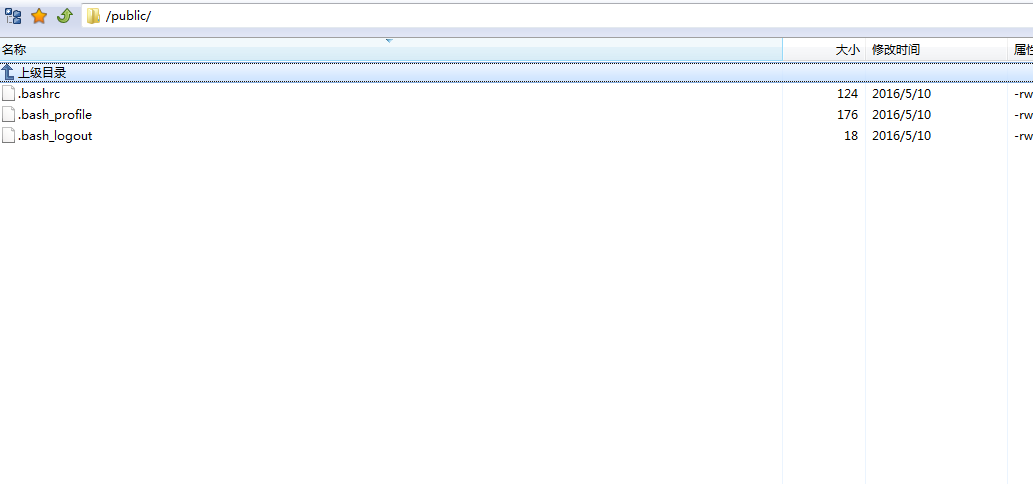
[root@jie vsftpd]# groupadd public

[root@jie vsftpd]# useradd -g public -d /public -s /sbin/nologin public

[root@jie vsftpd]# id public

uid=500(public) gid=500(public) groups=500(public)

[root@jie vsftpd]#

[root@jie vsftpd]# echo "123456"|passwd --stdin public

Changing password for user public.

passwd: all authentication tokens updated successfully.

[root@jie vsftpd]#
[root@jie vsftpd]# chown -R public.public /public

[root@jie vsftpd]# cat chroot_list

public

[root@jie vsftpd]#
[root@jie vsftpd]# chkconfig vsftpd on

[root@jie vsftpd]# /etc/init.d/vsftpd start

Starting vsftpd for vsftpd:                                [  OK  ]

[root@jie vsftpd]#
阿里云vsftp安装和简单的配置的更多相关文章
- 阿里云centos安装svn和submin
概述 没有找到可以让团队方便使用的云盘,暂时搭建一个svn凑合用一下 svn有三种安装方式 安装方式 服务程序 服务协议 用户和密码 授权 系统配置 svn独立安装 svnserve svn pass ...
- 阿里云ECS服务器Linux环境下配置php服务器(二)--phpMyAdmin篇
上一篇讲了PHP服务器的基本配置,我们安装了apache,php,还有MySQL,最后还跑通了一个非常简单的php页面,有兴趣的朋友可以看我的这篇博客: 阿里云ECS服务器Linux环境下配置php服 ...
- [docker]通过阿里云源安装docker && flannel不通问题解决(try this guy out)
docker清理容器 # 容器停止后就自动删除: docker run --rm centos /bin/echo "One"; # 杀死所有正在运行的容器: docker kil ...
- 阿里云ECS安装flannel启动问题
在阿里云ECS安装flannel,安装过程可以在网上找文章,这样的文章很多.我这里讲一下启动flannel遇到的两个问题的解决方法. 1,network.go:102] failed to retri ...
- 在阿里云上安装python3.4和pycharm
一. 安装python3.4 二. 安装pycharm 三. 安装可视化界面和远程桌面连接 四. 启动和配置pycharm 五. 安装更多字体 六. 给pycharm设置桌面快捷方式 一. 安装pyt ...
- 阿里云linux安装jmeter并进行压测
一.阿里云linux安装JDK 1.下载安装JDK jdk官网,选择linux版本,下载并保存. (一)yum安装 安装epel的yumyuan yum install epel-release -y ...
- 阿里云部署安装redis无法访问
ps:我在linux上安装redis后发现一直端口不通连接不上,折腾一晚上.后来在阿里云官方回复(机器人)中看到下面的回复: 2019/02/28 22:50 自己一试,过完是端口监听是本 ...
- 阿里云Ubuntu安装Composer和中国镜像
引用: Composer是PHP用来管理依赖(dependency)关系的工具.你可以在自己的项目中声明所依赖的外部工具库(libraries),Composer 会帮你安装这些依赖的库文件. PHP ...
- 阿里云centos安装oracle
目录 阿里云centos安装oracle 阿里云默认没有swap分区,oracle安装需要 安装Oracle所需的依赖包 创建用户和组 关闭SELINUX(阿里云缺省关闭) 开始安装 使用" ...
随机推荐
- Pathway富集分析气泡图
data.tsv > pathway = read.table("data.tsv",header = T, sep="\t") > library ...
- 关于Fiddler常见问题之一
Fiddler设置代理后,手机无法上网常见检查项 1.检查IP 2.确认端口在工作 > “ netstat -ano” 3.设置手机代理>管理网络设置>高级>代理服务器, ...
- C# 提取方法重构
引用:https://msdn.microsoft.com/zh-CN/library/0s21cwxk.aspx “提取方法”是一项重构操作,提供了一种从现有成员中的代码段创建新方法的便捷方式. 使 ...
- Dubbo与Zookeeper、SpringMVC整合和使用(负载均衡
转载:http://blog.csdn.net/congcong68/article/details/41113239 互联网的发展,网站应用的规模不断扩大,常规的垂直应用架构已无法应对,分布式服务架 ...
- ffmpeg源码分析五:ffmpeg调用x264编码器的过程分析 (转5)
原帖地址:http://blog.csdn.net/austinblog/article/details/25127533 该文将以X264编码器为例,解释说明FFMPEG是怎么调用第三方编码器来进行 ...
- UNITY Destroy()和DestroyImadiate()都不会立即释放对象内存
如题,destroyimadiate是立即将物体从场景hierachy中移除,并标记为 "null",注意 是带引号的null.这是UNITY内部的一个处理技巧.关于这个技巧有很争 ...
- Gearmand 任务分发系统
简介: Gearmand 是一个用来把工作委派给其它机器.分布式的调用更适合做某项工作的机器.并发的做某项工作在多个调用间做负载均衡.或用来调用其它语言的函数的系统. 简单来讲,就是客户端程序把请求提 ...
- git如何处理别人的pull request及解决冲突 (转)
原贴地址 出过两次了,每次都查很多资料,太蛋疼,记录在此. 当你的项目比较牛逼的时候,有人给你贡献代码,但他修改的地方恰恰你前阵子也修改了,这样在github中就不能够自动merge了. 因此你需要手 ...
- JDBC读取配置文件
Properties prop = new Properties(); prop.load(this.class.getClassLoader().getResourceAsStream(" ...
- 10-最小生成树-Prim算法
#include <iostream> #include <cstring> #include <cstdio> using namespace std; #def ...