
Android-相对布局(RelativeLayout)
<?xml version="1.0" encoding="utf-8"?>
<RelativeLayout xmlns:android="http://schemas.android.com/apk/res/android"
    android:layout_width="match_parent"
    android:layout_height="match_parent">

   相对布局这里面到所有控件,都是有相对性的
                       1.相对与父控件
                       2.相对与和自己平级的控件

</RelativeLayout>

虽然相对布局需要对没有控件设置ID,才能使用,看起来LinearLayout方便写,实际上RelativeLayout更加对灵活,因为线性布局设置垂直或者水平就整版都是垂直与水平的,相对布局控制更加灵活写

相对布局,如果不指定ID,默认都是在左上角
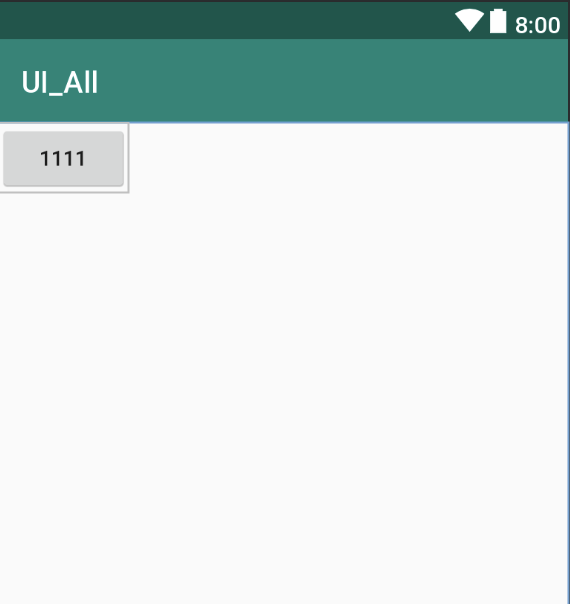
相对bt_444控件中间线对齐:
android:layout_alignBaseline="@id/bt_333"

相对bt_444控件顶部对齐:
android:layout_alignTop="@id/bt_333"
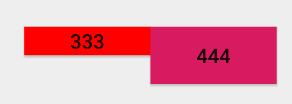
相对bt_444控件的底部对齐:
android:layout_alignBottom="@id/bt_333"

<!--

    相对于父控件系列:

            相对于父控件垂直居中

            android:layout_centerVertical="true"

            相对于父控件水平居中

            android:layout_centerHorizontal="true"

            相对于父控件正中间

            android:layout_centerInParent="true"

            相对于父控件的右边

            android:layout_alignParentRight="true"

            相对于父控件的左边

            android:layout_alignParentLeft="true"

            相对于父控件的顶部

            android:layout_alignParentTop="true"

            相对于父控件的底部

            android:layout_alignParentBottom="true"

            相对于父控件的结束(通常情况下是在父控件最右边)

            android:layout_alignParentEnd="true"

            相对于父控件的开始 最左边 相对布局的默认

            android:layout_alignParentStart="true"

        相对于平级控件系列:

            相对于bt_111控件的底部

            android:layout_below="@+id/bt_111"

            相对于bt_111控件的顶部

            android:layout_above="@id/bt_111"

            相对于bt_111控件的右边

            android:layout_toRightOf="@id/bt_111"

            相对于bt_111控件的左边

            android:layout_toRightOf="@id/bt_111"

            相对与控件的中间对齐

            android:layout_alignBaseline="@id/bt_333"

            相对与控件的顶部对齐

            android:layout_alignTop="@id/bt_333"

            相对与控件的底部对齐

            android:layout_alignBottom="@id/bt_333"

            相对与控件的中间对齐

            android:layout_alignBaseline="@id/bt_333"

            相对与控件的左对齐

            android:layout_alignLife="@id/bt_333"

            相对与控件的右对齐

            android:layout_alignRight="@id/bt_333"

            // 外边距 上下左右 一般情况下用于 View

            android:layout_marginTop="20dp"

            android:layout_marginLeft="20dp"

            android:layout_marginBottom="20dp"

            android:layout_marginRight="20dp"

            android:layout_margin="20dp"

            外边距往水平方向80dp

            android:layout_marginHorizontal="80dp"

            外边距往垂直方向80dp

            android:layout_marginVertical="80dp"

            // 内边距 上下左右 一般情况下用于 ViewGroup 用来管控View

            android:padding="40dp"

            android:paddingLeft="40dp"

            android:paddingRight="40dp"

            android:paddingTop="40dp"

            android:paddingBottom="40dp"

            内边距往水平方向60dp

            android:paddingHorizontal="60dp"

            内边距往垂直方向60dp

            android:paddingVertical="60dp"

-->
相对布局测试的代码:
<?xml version="1.0" encoding="utf-8"?>

<RelativeLayout xmlns:android="http://schemas.android.com/apk/res/android"

    android:layout_width="match_parent"

    android:layout_height="match_parent"

    android:orientation="vertical">

    <Button

        android:id="@+id/bt_111"

        android:layout_width="wrap_content"

        android:layout_height="wrap_content"

        android:text="1111"

        android:layout_centerVertical="true"

        android:layout_centerHorizontal="true"

        android:layout_centerInParent="true"

        />

    <Button

        android:id="@+id/bt_222"

        android:layout_width="wrap_content"

        android:layout_height="wrap_content"

        android:text="2222"

        android:layout_toLeftOf="@id/bt_111"

        android:layout_centerInParent="true"

        />

    <Button

        android:id="@+id/bt_333"

        android:layout_width="wrap_content"

        android:layout_height="20dp"

        android:text="333"

        android:layout_marginLeft="130dp"

        android:layout_marginTop="130dp"

        android:background="#f00"

        />

    <Button

        android:id="@+id/bt_444"

        android:layout_width="wrap_content"

        android:layout_height="40dp"

        android:text="444"

        android:layout_toRightOf="@id/bt_333"

        android:layout_alignBaseline="@id/bt_333"

        android:background="@color/colorAccent"

         />

    <Button

        android:layout_width="wrap_content"

        android:layout_height="wrap_content"

        android:text="555"

        android:layout_alignParentStart="true"

        />

</RelativeLayout>
Android-相对布局(RelativeLayout)的更多相关文章
- Android相对布局(RelativeLayout)
Android相对布局(RelativeLayout) 备注:这里的视图和元素是等同的概念. RelativeLayout是一个允许子视图相对于其他兄弟视图或是父视图显示的视图组(通过ID指定).每个 ...
- Android之布局RelativeLayout
线性布局的weight属性在等比例分配时比较方便,但是对复杂的界面,嵌套多层LinearLayout布局会导致渲染变慢,占用更多系统资源:而使用RelativeLayout的话,可能仅仅需要一层就可以 ...
- android的布局-----RelativeLayout(相对布局)
学习导图 注:父容器定位的属性值只能是Boolean ,兄弟组件定位的属性值只能是ID 典型案例(梅花) <?xml version="1.0" encoding=" ...
- Android UI -- 布局介绍(布局包括FrameLayout, LinearLayout, RelativeLayout, GridLayout)
首先介绍常用布局类 FrameLayout 最简单的布局管理器. 这个布局管理类有几个特性: 添加组件默认在左上角的. 如果添加多个组件会叠加到一起,并且都在左上角.(可以通过一gravity属性改变 ...
- Android 自学之相对布局 RelativeLayout
相对布局(RelativeLayout),相对布局容器内子组件的位置总是相对兄弟组件.父容器来决定的. RelativeLayout的XML属性及相关方法说明 XML属性 相关方法 说明 androi ...
- [Irving]Android 常用布局之RelativeLayout
RelativeLayout相对布局 相对布局 RelativeLayout 允许子元素指定它们相对于其父元素或兄弟元素的位置,这是实际布局中最常用的布局方式之一. 它灵活性大很多,当然属性也多,操作 ...
- 一步一步学android之布局管理器——RelativeLayout
今天开始学习RelativeLayout(相对布局),相对布局在平时布局的时候用的较多,因为Android适配方面的原因.相对布局可以控制组件摆放的位置(放在任一组件的上下左右等位置),下面来看看类的 ...
- Android 五大布局(LinearLayout、FrameLayout、AbsoulteLayout、RelativeLayout、TableLayout )
前言 欢迎大家我分享和推荐好用的代码段~~ 声明 欢迎转载,但请保留文章原始出处: CSDN:http://www.csdn.net ...
- android LinearLayout和RelativeLayout实现精确布局
先明确几个概念的区别: padding margin:都是边距的含义,关键问题得明白是什么相对什么的边距padding:是控件的内容相对控件的边缘的边距. margin :是控件边缘相对父空间的边距 ...
- .Net程序猿玩转Android开发---(7)相对布局RelativeLayout
相对布局RelativeLayout是Android布局中一个比較经常使用的控件,使用该控件能够布局出适合各种屏幕分辨率的布局,RelativeLayout採用相对位置进行 ...
随机推荐
- vue图片、背景图片路径问题
vue图片.背景图片路径问题 vue中引入图片经常会出现路径问题,在此记录一下: 1.组件中 <img> 引用图片 <img src="../assets/img/logo ...
- leetcode260
public class Solution { public int[] SingleNumber(int[] nums) { var dic = new Dictionary<int, int ...
- MySQL 基本语法(1.表字段操作,2表记录管理 3.运算符管理4.SQL查询 5.约束6.索引
.表字段的操作 .语法:alter table 表名 执行动作; .添加字段(add) .添加到末尾 alter table 表名 add 字段名 数据类型; .添加到第一列 alter table ...
- Shiro配置cookie以及共享Session和Session失效问题
首先我们看Shiro的会话管理器的配置 <!-- shiro会话管理 --> <!-- 即用户登录后就是一次会话,在没有退出之前,它的所有信息都在会话中:会话可以是普通 JavaSE ...
- 什么时候必须使用UI相机? 多个相机的作用原理?
首先,要从主画布说起,maincanvas,这个有什么限制?主画布是一张默认用来绘制UI的地方,这些UI必须是系统提供的UI组件,在画面下挂一个3D物体或非UI的2D物品是不会被绘制到画布上的,但是仍 ...
- 在Core环境下用WebRequest连接上远程的web Api 实现数据的简单CRUD(附Git地址)
本文所有的东西都是在dot Net Core 1.1环境+VS2017保证测试通过. 本文接着上次文章接着写的,不了解上篇文章的可能看着有点吃力.我尽量让大家都能看懂.这是上篇文章的连接http:// ...
- iOS学习之自定义弹出UIPickerView或UIDatePicker(动画效果)
前面iOS学习之UIPickerView控件的简单使用 用到的UIPickerView弹出来是通过 textField.inputView = selectPicker; textField.in ...
- js小功能
1 删除左右两端的空格 //删除左右两端的空格 function trim(str) { return str.replace(/(^\s*)|(\s*$)/g, ""); } 2 ...
- 111. Minimum Depth of Binary Tree (Tree; DFS)
Given a binary tree, find its minimum depth. The minimum depth is the number of nodes along the shor ...
- code1540 银河英雄传说
pa[i]代表i的father pre[i]代表i之前有多少个 sum[i]代表i所在的整列有多少个 cc为命令类型,x y为命令参数, fx fy分别为x y的father 当cc==‘M’时,合并 ...