
linux上通过lighttpd上跑一个C语言的CGI小页面以及所遇到的坑
Common Gateway Interface如雷贯耳,遗憾的是一直以来都没玩过CGI,今天尝试一把。Tomcat可以是玩CGI的,但得改下配置。为了方便,直接使用一款更轻量级的web服务器lighttpd来跑,。
先把lighttpd安装一下:直接使用linux的包管理器,先安装一个epel软件仓库
yum install epel-release
从这个仓库里拿到lighttpd并安装
yum install lighttpd
安装好web服务器后就可以来写CGI代码了,可以用各种语言来写,这里选择C。C编译后本身就是可执行文件,所以我们得把CGI的配置改一改:
[root@iZbp11ahvmlfioymoo7u3bZ ~]# vi /etc/lighttpd/conf.d/cgi.conf

#######################################################################

##

##  CGI modules

## ---------------

##

## See https://redmine.lighttpd.net/projects/lighttpd/wiki/docs_modcgi

##

server.modules += ( "mod_cgi" )

##

## Plain old CGI handling

##

## For PHP don't forget to set cgi.fix_pathinfo = 1 in the php.ini.

##

cgi.assign                 = ( ".pl"  => "/usr/bin/perl",

                               ".cgi" => "/usr/bin/perl",

                               ".rb"  => "/usr/bin/ruby",

                               ".erb" => "/usr/bin/eruby",

                               ".py"  => "/usr/bin/python" )

##

## to get the old cgi-bin behavior of apache

##

## Note: make sure that mod_alias is loaded if you uncomment the

##       next line. (see modules.conf)

##

#alias.url += ( "/cgi-bin" => server_root + "/cgi-bin" )

#$HTTP["url"] =~ "^/cgi-bin" {

#   cgi.assign = ( "" => "" )

#}

##

#######################################################################
这里将.cgi改为
".cgi" => "",
以上表示指定解析程序为空,这样对于带扩展名为.cgi的请求,不需要特定解析程序(比如用/bin/sh/perl)就能执行CGI。接着到/var/www/lighttpd目录,用C写一个简单例子
// A "hello world" page

#include <stdio.h>

#include <stdlib.h>

#include <string.h>

#define INCR_LEN 10

char *getValue(char *, char **);// get the param value

char **getParameters(char *, char **);// get the array of params and values

int main(void)

{

        char **pQuery;

        char *pParam;

        char *name;

        char *city;

        pParam = getenv("QUERY_STRING");

        char *pStr = malloc(strlen(pParam)+);

        memcpy(pStr, pParam, strlen(pParam)+);

        pQuery = getParameters(pStr, pQuery);

        name = getValue("name", pQuery);

        city = getValue("city", pQuery);

        printf("Content-Type:text/html\n\n");// print html

        puts("<html>");

        puts("<head><title>An HTML Page From a CGI</title></head>");

        puts("<body><br>");

        puts("<p><h2>Hello world!</h2></p>");

        printf("<p>Your name is :%s</p>\n", name);

        printf("<p>Your city is :%s</p>\n", city);

        puts("</body>");

        puts("</html>");

        return ;

}

char **getParameters(char *pTemp, char **pQuery)

{

        char **pArrayTemp = NULL;

        pQuery = calloc(INCR_LEN, sizeof(char *));

        char *pParamIndex = NULL;

        int i = ;

        int count_max = INCR_LEN;

        while((pParamIndex = strchr(pTemp,'&')) != NULL)

        {

                if(i == count_max) // array reach max(10) need more memory

                {

                        count_max += INCR_LEN;

                        pArrayTemp = realloc(pQuery, count_max*sizeof(char*));

                        if(!pArrayTemp)

                        {

                                exit();

                        }

                        pQuery = pArrayTemp;

                }

                *(pQuery+i) = malloc(pParamIndex - pTemp + );

                strncpy(*(pQuery+i), pTemp, pParamIndex - pTemp);

                strncpy(pTemp, pParamIndex+, strlen(pTemp) - (pParamIndex-pTemp) + );

                i++;

        }

        *(pQuery+i) = malloc(strlen(pTemp) + );

        strncpy(*(pQuery+i), pTemp, strlen(pTemp)+);

        return pQuery;

}

char *getValue(char *pParameter, char **pParamValues)

{

        char *pValue = NULL;

        for(; *pParamValues!=NULL; pParamValues++)

        {

                if(strstr(*pParamValues, pParameter))

                {

                        pValue = strchr(*pParamValues, '=');

                        if(pValue)

                                return pValue+;

                }

        }

        return NULL;

}
把上面的C编译一下:
gcc hello.c -o hello.cgi
最后把端口号由80改为其他端口号如8089,避免启动时与原有端口冲突。
vi /etc/lighttpd/lighttpd.conf
找到server.port后,将80改为8089。接着启动lighttpd服务器:
systemctl start lighttpd
再看下是否已经启起来了:
systemctl status lighttpd

● lighttpd.service - Lightning Fast Webserver With Light System Requirements

   Loaded: loaded (/usr/lib/systemd/system/lighttpd.service; disabled; vendor preset: disabled)

   Active: active (running) since Thu -- :: CST; 2s ago

 Main PID:  (lighttpd)

   CGroup: /system.slice/lighttpd.service

           └─ /usr/sbin/lighttpd -D -f /etc/lighttpd/lighttpd.conf

Apr  :: iZbp11ahvmlfioywlf7u3bZ systemd[]: Started Lightning Fast Webserver With Light System Requirements.

Apr  :: iZbp11ahvmlfioywlf7u3bZ lighttpd[]: -- ::: (network.c.) warning: please use server.use-ipv6 only for hostnames, not wi...Y changes

Apr  :: iZbp11ahvmlfioywlf7u3bZ lighttpd[]: -- ::: (server.c.) can't have more connections than fds/2:  1024 1024
我们看到已经启动成功了,但提示要用ipv6的地址来访问,但我想用ipv4,所以把它改掉,再次/etc/lighttpd/lighttpd.conf -> 找到server.use-ipv6 = "enable" -> 将enable改为disable -> systemctl restart lighttpd
然后我们通过ip:8089/index.html访问lighttpd自带的欢迎页:

再去访问我们编译好的hello.cgi,发现页面可以访问,却啥都没有,浏览器把页面直接下载了而不是渲染出来。咋回事呢?原来这时候的cgi文件浏览器是无法解析的,必须要去modules.conf里打开cgi:vi /etc/lighttpd/modules.conf -> 找到 #include "conf.d/cgi.conf" -> 将前面的#号删掉 -> 重启lighttpd systemctl restart lighttpd
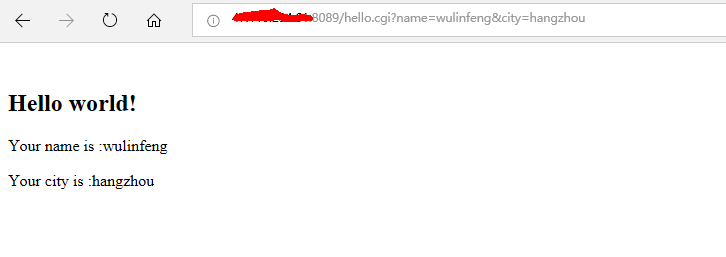
再次访问我们的hello.cgi,这次ok了
linux上通过lighttpd上跑一个C语言的CGI小页面以及所遇到的坑的更多相关文章
- 在K8S上跑一个helloworld
建立docker镜像 为了方便起见,这里直接使用一个js网页作为应用,以此创建镜像 hello world网页 创建server.js,输入以下代码创建helloworld网页: var http = ...
- 安装了linux系统的设备上不了网怎么办
玩了一阵子的树莓派,曾经计划将其作成一台小小无线路由,但是时间和精力关系始终未成功做成. 同时也有在进行一些arm开发板的学习,突然一天发现arm板直接插上网线不能是不能上网的,又想起之前玩树莓派的时 ...
- 把Linux安装到移动硬盘上
把Linux安装到移动硬盘上 转载于:http://mrkh.me/install-linux-on-a-portable-hard-drive.html 这一篇文章讲一下,怎么把linux安装到移动 ...
- Linux 在一个命令行上执行多个命令
Linux 在一个命令行上执行多个命令 1. [ ; ] 如果被分号(;)所分隔的命令会连续的执行下去,就算是错误的命令也会继续执行后面的命令. 2. [ && ] 如果命令被 &am ...
- 在 Linux 的 KVM虚拟机 上安装 Mac OS 系统的研究总结
在 Linux 的 KVM虚拟机 上安装 Mac OS 系统的研究总结 一.资料来源: 网上一共找到两个方法,一个是视频上的教程,一个是网页资料. 二.视频资料方法内容:1.install qe ...
- 将Windows上的文件上传到Linux上
下载一个SSH Secure Shell Client即可. SSHSecureShellClient-3.2.9下载地址: 免费下载地址在 http://linux.linuxidc.com/ 用户 ...
- 在openwrt上编译最简单的一个ipk包文件
1 什么是opkg Opkg 是一个轻量快速的套件管理系统,目前已成为 Opensource 界嵌入式系统标准.常用于路由.交换机等嵌入式设备中,用来管理软件包的安装升级与下载. opkg updat ...
- linux的tomcat服务器上部署项目的方法
在tomcat服务器上部署项目的前提,是我们已经准备好了tomcat服务器.在CentOs环境下部署JavaWeb环境,部署tomcat服务器在前面的文章中已经总结过了,可以参考以前文章. 一 to ...
- java使用Jsch实现远程操作linux服务器进行文件上传、下载,删除和显示目录信息
1.java使用Jsch实现远程操作linux服务器进行文件上传.下载,删除和显示目录信息. 参考链接:https://www.cnblogs.com/longyg/archive/2012/06/2 ...
随机推荐
- SQL TUNING——从近半小时到几十毫秒的一次优化
昨天,一个用户的现场人员打电话紧急求助,说他们的一个系统卡了,半天不出结果,严重的影响了他们的使用,我简单的问了几句:什么时候的事儿?答:就今天下午的事儿.问:数据库软硬件最近动过没?答:没动过.问: ...
- 信号的发送kill,raise,alarm,setitimer,abort,sigqueue
1.kill函数 int kill(pid_t pid, int sig); 发送信号给指定的进程. (1) If pid is positive, then signal sig is sent t ...
- sql语句:查询、排序、不区分大小写查询,及联合使用
1.不排序时的查找语句: offset message 为表名,talker 为列名. 此语句的意思是:从message 表中查找 talker 等于wxid_0930479303212的数据,从第 ...
- .net群讨论笔记
本篇为.net群中学到的零碎知识点笔记,将持续更新 感谢群内大神,群号(128485855) 1.关于URL编码问题encodeURIComponent 2.c#直接打开本机的excel(包括其他类型 ...
- ssh的配置,ssh打开密钥登陆,关闭密码登陆。
刚装玩fedora,那么我们就以fedora为例来说一下怎么配置: 1.先确认是否已安装ssh服务: [root@localhost ~]# rpm -qa | grep openssh-server ...
- ReentrantReadWriteLock——读读共享(一)
多个线程可以同时读,读读是异步的.非互斥的 1.Service.java(封装的方法,供线程A和B访问) package ReentrantReadWriteLock; import java.uti ...
- slice,Array.prototype.slice,Array.protyotype.slice.call
slice 特点:基于当前数组中的一或多个项创建一个新数组.[原数组不会被修改] 返回结果:返回一个从开始到结束(不包括结束)选择的数组的一部分浅拷贝到一个新数组对象. 语法: arr.slice() ...
- git添加本地项目到git
1.切换到项目所在文件夹下:git int 2.git add -A 3.git commit -m '11' 4.git remote add origin https://github.com/g ...
- mipi LCD 的CLK时钟频率与显示分辨率及帧率的关系
mipi LCD 的CLK时钟频率与显示分辨率及帧率的关系 我们先来看一个公式:Mipiclock = [ (width+hsync+hfp+hbp) x (height+vsync+vfp+vb ...
- 在vmware中实现Ubuntu与win7(主机)之间同步实现共享文件
作为linux的热衷者和初学者,我们在学习的过程中难免会碰到不少的问题,下面简单的介绍和总结一下,我是如何通过以下两种方法解决在vmware中实现Ubuntu与win7(主机)之间同步实现共享文件的. ...