
Flex 学习
Flex案例一:
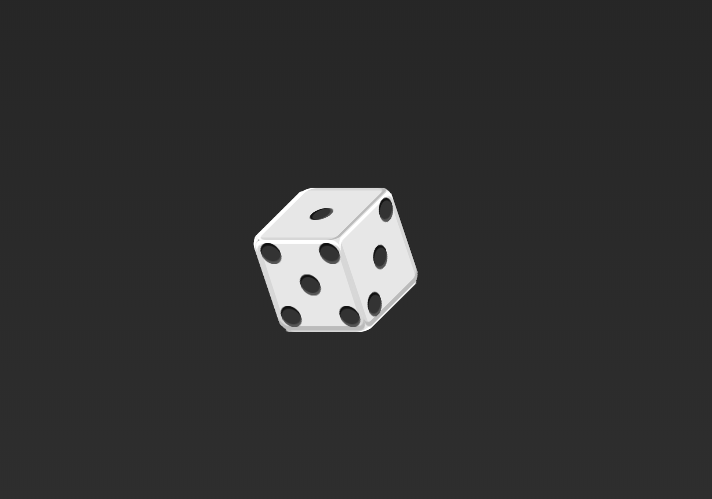
 <html>

 <head>

 <meta http-equiv="Content-Type" content="text/html; charset=utf-8" />

     <title>无标题</title>

     <style type="text/css">

         body,h1,h2,h3,h4,h5,h6,dl,dt,dd,ul,ol,li,th,td,p,blockquote,pre,form,fieldset,legend,input,button,textarea,hr{

             margin:0;

             padding:0;

         }

         body{

             display: flex;

             background: -webkit-linear-gradient(top,#222,#333);

             background: linear-gradient(top,#222,#333);

             justify-content:center;

             align-items:center;

             align-content:center;

             flex-wrap:wrap;

             position:relative;

         }

         [class$="box"]{

             background-color: #e7e7e7;

             width: 104px;

             height: 104px;

             /*padding:4px;

             margin:16px;*/

             object-fit:contain;

             border-radius: 10%;

             box-shadow: inset 0 5px white,inset 0 -5px #bbb,inset 5px 0 #d7d7d7,inset -5px 0 #d7d7d7;

             display: flex;

             position: absolute;

             top:0;

             left: 0;

             /*top: 40%;

             left: 40%;*/

         }

         [class="item"]{

             display: block;

             width:24px;

             height: 24px;

             border-radius: 50%;

             margin:4px;

             background-color: #333;

             box-shadow: inset 0 3px #111,inset 0 -3px #555;

         }

         .first-box{

             justify-content:center;

             align-items:center;

             align-content:center;

         }

         .second-box{

             justify-content:space-between;

         }

         .second-box .item:nth-of-type(2){

             -webkit-align-self:flex-end;

         }

         .third-box{

         }

         .third-box .item:nth-of-type(2){

             align-self:center;

         }

         .third-box .item:nth-of-type(3){

             align-self:flex-end;

         }

         .sixth-box,

         .four-box{

             justify-content:space-between;

             justify-wrap:wrap;

         }

         .sixth-box .column,

         .four-box .column{

             display: flex;

             flex-direction:column;

             justify-content:space-between;

         }

         .fifth-box{

             justify-content:space-between;

         }

         .fifth-box .column{

             display: flex;

             flex-direction:column;

             justify-content:space-between;

         }

         .fifth-box .column:nth-of-type(2){

             justify-content:center;

             align-items:center;

         }

         .tbox{

             width: 104px;

             height: 104px;

             background-color: transparent;

             border:none;

             box-shadow: none;

             transform-style:preserve-3d;

             display: flex;

             justify-content:center;

             align-items:center;

             align-content:center;

             flex-wrap:wrap;

             position:relative;

             -webkit-animation:iphone 4s linear infinite;

             transform:rotateZ(30deg);

         }

         .tbox:hover{

             -webkit-animation-play-state:paused;

         }

         .sixth-box{

             /*transform:rotate(30deg);*/

             transform-origin:right bottom;

             transform:rotateZ(30deg);

         }

         .fifth-box{

             margin-left: 25px;

             margin-top: 7px;

             transform-origin:right 50%;

             transform:translateZ(-105px) rotateY(90deg) rotateX(-29deg);

         }

         .four-box{

             margin-left: 40px;

             margin-top: -45px;

             /*margin-top: -36px;*/

             transform-origin:left 50%;

             transform:translateZ(-105px) rotateY(-90deg) rotateX(30deg);

         }

         .third-box{

             margin-left: 40px;

             margin-top:-45px;

             /*margin-left: 240px;*/

             transform-origin:left 50%;

             transform:translateZ(-105px) rotateZ(30deg);

         }

         .second-box{

             margin-left: 7px;

             margin-top:80px;

             /*margin-top: 128px;*/

             transform-origin: 50% top;

             transform:translateZ(-105px) rotateX(90deg) rotateY(30deg);

         }

         .first-box{

             margin-left:58px;

             margin-top:-116px;

             /*margin-top: -96px;*/

             transform-origin: 50% bottom;

             transform:translateZ(-105px) rotateX(-90deg)  rotateY(-30deg);

         }

         @-webkit-keyframes iphone{

             from{

                 transform:rotateY(0deg);

             }

             to{

                 transform:rotateY(360deg);

             }

         }

     </style>

 </head>

 <body>

 <div class="tbox">

     <div class="first-box">

         <span class="item"></span>

     </div>

     <div class="second-box">

         <span class="item"></span>

         <span class="item"></span>

     </div>

     <div class="third-box">

         <span class="item"></span>

         <span class="item"></span>

         <span class="item"></span>

     </div>

     <div class="four-box">

         <div class="column">

             <span class="item"></span>

             <span class="item"></span>

         </div>

         <div class="column">

             <span class="item"></span>

             <span class="item"></span>

         </div>

     </div>

     <div class="fifth-box">

         <div class="column">

             <span class="item"></span>

             <span class="item"></span>

         </div>

         <div class="column">

             <span class="item"></span>

         </div>

         <div class="column">

             <span class="item"></span>

             <span class="item"></span>

         </div>

     </div>

     <div class="sixth-box">

         <div class="column">

             <span class="item"></span>

             <span class="item"></span>

             <span class="item"></span>

         </div>

         <div class="column">

             <span class="item"></span>

             <span class="item"></span>

             <span class="item"></span>

         </div>

     </div>

 </div>

 </body>

 </html>
Flex 学习的更多相关文章
- 【转】【Flex】FLEX 学习网站分享
[转:http://hi.baidu.com/tanghecaiyu/item/d662fbd7f5fbe02c38f6f764 ] FLEX 学习网站分享 http://blog.minidx.co ...
- flex学习小结
接触到flex一个多月了,今天做一个学习小结.如果有知识错误或者意见不同的地方.欢迎交流指教. 画外音:先说一下,我是怎么接触到flex布局的.对于正在学习的童鞋们,我建议大家没事可以逛逛网站,看看人 ...
- CSS3伸缩布局Flex学习笔记
如果需要使用伸缩布局首先得把display:flex;对于兼容还得加前缀display:-webkit-display:flex;等其他浏览器前缀,但我本机Chrome测试已经不需要加前缀了,其实这些 ...
- flex学习
今天看视频学习的时候,发现css有一个 flex 的属性,非常的好用,为了让自己能够熟记,特意来分享一下flex的用法. 首先,采用Flex布局的元素,称为Flex容器(flex co ...
- 【Flex学习】Flex4学习网站
http://blog.minidx.com/category/flex 来自为知笔记(Wiz)
- Flex学习总结
Flex SDK Flex框架类库.Flex编译环境.调式器.MXML.ActionScript编程语言以及其它工具组成,Flash Builder是其开发环境, Flash Player的工作模 ...
- Flex学习第一天(两个数相加)
<?xml version="1.0" encoding="utf-8"?><s:Application xmlns:fx="htt ...
- Flex学习教程网站地址
http://www.985school.com/flex/complex_controls.html
- flex学习网站地址
http://hacker47.iteye.com/blog/213887 http://www.cuplayer.com/player/PlayerCode/Flex/ http://bbs.9ri ...
- flex学习, 尝试布局一个计算器
<!DOCTYPE html> <html> <head> <title>flex</title> </head> <st ...
随机推荐
- DevExpress v17.2新版亮点—WPF篇(二)
用户界面套包DevExpress v17.2终于正式发布,本站将以连载的形式为大家介绍各版本新增内容.本文将介绍了DevExpress WPF v17.2 新的Hamburger Menu.Sched ...
- 【设计模式】 模式PK:工厂模式VS建造者模式
1.概述 工厂方法模式注重的是整体对象的创建方法,而建造者模式注重的是部件构建的过程,旨在通过一步一步地精确构造创建出一个复杂的对象.我们举个简单例子来说明两者的差异,如要制造一个超人,如果使用工厂方 ...
- Redis----windows下的常用命令
1:首先下载redis.从下面地址下:https://github.com/MSOpenTech/redis/releases2:创建redis.conf文件:这是一个配置文件,指定了redis的监听 ...
- C语言基础:结构体 分类: iOS学习 c语言基础 2015-06-10 21:47 28人阅读 评论(0) 收藏
结构体:是一种用户自定义的数据类型 结构体定义 struct 结构体名 { 成员类型1 成员变量名1; 成员类型2 成员变量名2; -. }; typedef 原类型 ...
- 百度AIG知识图谱部算法实习生面经(已拿offer)
一面: 1.自我介绍 2.平时用什么编程语言比较多 python,另外学过C语言和JAVA 3.c语言里指针占多少内存 答成8位了,应该根据机器而言是16位或32位 4.python里的map函数,讲 ...
- 使用Django+MySQL+Apache+Linux创建简单的博客
本教程基于慕课网<Django入门与实践>编写,基于CentOS 7 基础知识 什么是django? Django是一个基于Python的高级Web开发框架, 特点:高效,快速,高度集成( ...
- word-如何将文字设置为插入超链接
前言 使用word有时候想要将文字部分设置为插入超链接,本文对此进行介绍. 操作步骤 1. 输入需要插入链接的文字部分: 2. 选中文字部分单击右键,点击超链接进行插入: 具体操作如下图所示: 参考 ...
- opencv-python教程学习系列11-几何变换
前言 opencv-python教程学习系列记录学习python-opencv过程的点滴,本文主要介绍几何变换,坚持学习,共同进步. 系列教程参照OpenCV-Python中文教程: 系统环境 系统: ...
- 批量读取文件matlab
前言 工程实现的过程中经常需要依次读取文件夹中的图像(或者其他文件),本文就对此进行实现. 代码 % /************************************************ ...
- Linux基础和网络管理上机试题 - imsoft.cnblogs
一.(使用at命令实现任务的的自动化,要求用一条条的指令完成) 找出系统中任何以txt为后缀名的文档,并且进行打印.打印结束后给用户foxy发出邮件通知取件.指定时间为十二月二十五日凌晨两点 ...