
一个简单的代码生成器(T4文本模板运用)
说要写这篇文章有一段时间了,但因为最近各方面的压力导致心情十二分的不好,下班后往往都洗洗睡了。今天痛定思痛,终于把这件拖了很久的事做了。好,不废话了,现在看看"一个简单的代码生成器" .
先看看界面吧!
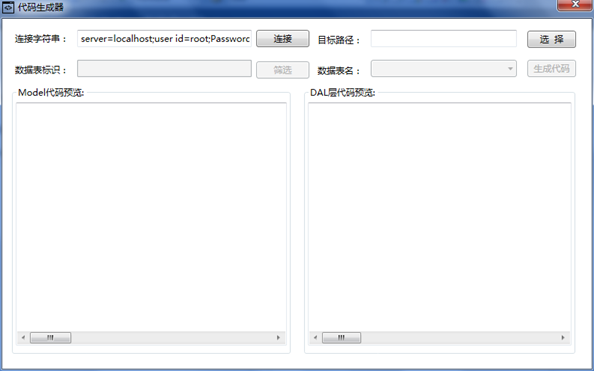
简约到如此,说是代码生成器,估计是要被吐槽的。好吧,借用园子里博友的说法,这只是一粒粟子,如果你愿意,你能看到代码生成器的“种子”。
这样运行的!
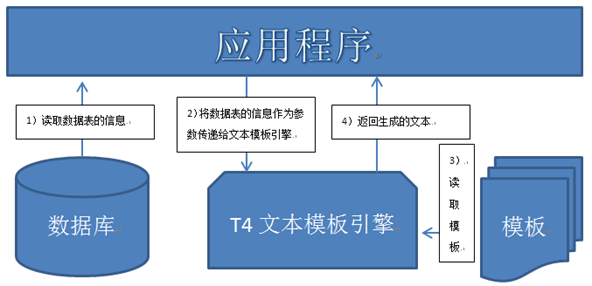
画了个简图已描述这个简单的代码生成器的工作过程。下面的介绍将以此图展开:
1)读取数据表的信息:从数据库中读取数据表的信息并转换成要为T4文本模板引擎提供的数据(EntityClassInfo);
2)将要为T4文本模板引擎提供的数据(EntityClassInfo)作为参数传递给T4文本模板引擎(其实是T4文本模板引擎的宿主,详见T4文本模板转换过程);
3)T4文本模板引擎读取模板;
4)T4文本模板引擎将生成的文本返回给应用程序。
代码:
一、在应用程序和代码中传递的参数的类型
1)EntityClassInfo.cs
using System;
using System.Collections.Generic;
using System.Linq;
using System.Text;
using System.Data;
namespace EntityInfo
{
[Serializable]
public class EntityClassInfo
{
public EntityClassInfo(DataTable dt)
{
this.ClassName = dt.TableName;
List<EntityClassPropertyInfo> ropertyListTemp = new List<EntityClassPropertyInfo>();
foreach (DataColumn dcol in dt.Columns)
{
ropertyListTemp.Add(new EntityClassPropertyInfo(dcol));
}
this.RopertyList = ropertyListTemp;
List<EntityClassPropertyInfo> primaryKeyListTemp = new List<EntityClassPropertyInfo>();
List<EntityClassPropertyInfo> notPrimaryKeyListTemp = new List<EntityClassPropertyInfo>(ropertyListTemp);
foreach (DataColumn dcol in dt.PrimaryKey)
{
primaryKeyListTemp.Add(new EntityClassPropertyInfo(dcol));
notPrimaryKeyListTemp.Remove(new EntityClassPropertyInfo(dcol));
}
this.PrimaryKeyList = primaryKeyListTemp;
this.NotPrimaryKeyList = notPrimaryKeyListTemp;
}
public string ClassName
{
get;
private set;
}
public List<EntityClassPropertyInfo> RopertyList
{
get;
private set;
}
public List<EntityClassPropertyInfo> PrimaryKeyList
{
get;
private set;
}
public List<EntityClassPropertyInfo> NotPrimaryKeyList
{
get;
private set;
}
}
}
2)EntityClassPropertyInfo.cs
using System;
using System.Collections.Generic;
using System.Linq;
using System.Text;
using System.Data;
namespace EntityInfo
{
[Serializable]
public class EntityClassPropertyInfo
{
public EntityClassPropertyInfo(DataColumn dcol)
{
this.PropertyName = dcol.ColumnName;
this.PropertyType = dcol.DataType.Name;
this.IsValueType = false;
if (dcol.DataType.IsValueType)
{
if (dcol.AllowDBNull)
{
this.PropertyType = this.PropertyType + "?";
}
else
{
this.IsValueType = true;
}
}
}
public string PropertyName
{
get;
private set;
}
public string PropertyType
{
get;
private set;
}
public bool IsValueType
{
get;
private set;
}
public override bool Equals(object obj)
{
EntityClassPropertyInfo temp = obj as EntityClassPropertyInfo;
if (this.PropertyName == temp.PropertyName && this.PropertyType == temp.PropertyType)
{
return true;
}
return false;
}
}
}
二、模板
1)生成实体类的模板:Entity.tt
<#@ template debug="false" hostspecific="false" language="C#" #>
<#@ output extension=".txt" #>
<#@ import namespace="EntityInfo" #>
<#@ parameter type="EntityInfo.EntityClassInfo" name="entity" #>
using System;
using System.Data;
using System.Configuration;
using System.Web;
using System.Web.Security;
using System.Web.UI;
using System.Web.UI.WebControls;
using System.Web.UI.WebControls.WebParts;
using System.Web.UI.HtmlControls;
/// <summary>
/// <#= entity.ClassName#> 的摘要说明
/// </summary>
public class <#= entity.ClassName#>
{
public <#= entity.ClassName#>()
{
//
// TODO: 在此处添加构造函数逻辑
//
}
<# foreach(EntityClassPropertyInfo property in entity.RopertyList)
{ #>
private <#= property.PropertyType#> m_<#= property.PropertyName#>;
<#;
}
#>
<# foreach(EntityClassPropertyInfo property in entity.RopertyList)
{ #>
public <#= property.PropertyType#> <#= property.PropertyName#>
{
set { m_<#= property.PropertyName#> = value; }
get { return m_<#= property.PropertyName#>; }
}
<#;
}
#>
}
2)生成DAL层的模板:DataAccess.tt
<#@ template debug="false" hostspecific="false" language="C#" #>
<#@ output extension=".txt" #>
<#@ import namespace="EntityInfo" #>
<#@ import namespace="System.Collections.Generic" #>
<#@ parameter type="EntityInfo.EntityClassInfo" name="entity" #>
using System;
using System.Data;
using System.Configuration;
using System.Web;
using System.Web.Security;
using System.Web.UI;
using System.Web.UI.WebControls;
using System.Web.UI.WebControls.WebParts;
using System.Web.UI.HtmlControls;
using MySql.Data.MySqlClient;
using System.Collections.Generic;
/// <summary>
/// <#= entity.ClassName#> 的摘要说明
/// </summary>
public class <#= entity.ClassName#>DAL
{
public <#= entity.ClassName#>DAL()
{
}
#region 私有方法
#region 根据实体类获取MySqlParameter数组 +MySqlParameter[] FromModel(<#= entity.ClassName#> model)
private static MySqlParameter[] FromModel(<#= entity.ClassName#> model)
{
List<MySqlParameter> parameterList = new List<MySqlParameter>();
<# foreach(EntityClassPropertyInfo property in entity.RopertyList)
{
#> parameterList.Add(new MySqlParameter("@<#=property.PropertyName#>", SQLHelper.ToDBValue(model.<#=property.PropertyName#>)));
<#;
}
#>
return parameterList.ToArray();
}
#endregion
#region 将dr中的数据转换为实体类对象 + <#= entity.ClassName#> ToModel(DataRow dr)
private static <#= entity.ClassName#> ToModel(DataRow dr)
{
<#= entity.ClassName#> model = new <#= entity.ClassName#>();
<# foreach(EntityClassPropertyInfo property in entity.RopertyList)
{
if(property.IsValueType)
{
#> model.<#=property.PropertyName#> = Convert.To<#= property.PropertyType#>(SQLHelper.FromDBValue(dr["<#= property.PropertyName #>"]));
<#;
}
else
{
#> model.<#=property.PropertyName#> = SQLHelper.FromDBValue(dr["<#=property.PropertyName#>"]) as <#=property.PropertyType#>;
<#;
}
}
#>
return model;
}
#endregion
#endregion
#region 增 + int Insert(<#= entity.ClassName#> model)
public static int Insert(<#= entity.ClassName#> model)
{
int result = -1;
string sql = @"INSERT INTO <#= entity.ClassName#>(<#= string.Join(",",GetSqlInsertInto()) #>)
VALUES(<#= string.Join(",",GetSqlInsertValue()) #>);";
result = SQLHelper.ExecuteNonQuery(sql,FromModel(model));
return result;
}
#endregion
#region 删 + int DeleteById(<#= string.Join(",",GetSqlDelVariable()) #>)
public static int DeleteById(<#= string.Join(",",GetSqlDelVariable()) #>)
{
int result = -1;
string sql = @"DELETE FROM <#= entity.ClassName#> WHERE <#= string.Join(" AND ",GetSqlWhereId()) #>;";
result = SQLHelper.ExecuteNonQuery(sql,<#= string.Join(",",GetSqlDelParameter()) #>);
return result;
}
#endregion
#region 改 + int Update(<#= entity.ClassName#> model)
public static int Update(<#= entity.ClassName#> model)
{
int result = -1;
string sql = @"UPDATE <#= entity.ClassName#>
SET <#= string.Join(",",GetSqlUpdateSet()) #>
WHERE <#= string.Join(" AND ",GetSqlWhereId()) #>";
result = SQLHelper.ExecuteNonQuery(sql, FromModel(model));
return result;
}
#endregion
#region 查 + int GetCountAll()
public static int GetCountAll()
{
int result = 0;
string sql = @"SELECT Count(*) FROM <#= entity.ClassName#>;";
result = Convert.ToInt32(SQLHelper.ExecuteScalar(sql));
return result;
}
#endregion
#region 查 + List<<#= entity.ClassName#>> GetBySql(string sql,params MySqlParameter[] parameters)
public static List<<#= entity.ClassName#>> GetBySql(string sql,params MySqlParameter[] parameters)
{
List<<#= entity.ClassName#>> modelList = new List<<#= entity.ClassName#>>();
DataTable dt = SQLHelper.ExecuteDataTable(sql,parameters);
foreach (DataRow dr in dt.Rows)
{
modelList.Add(ToModel(dr));
}
return modelList;
}
#endregion
}
<#+
private string[] GetSqlInsertInto()
{
List<string> propertyNameList= new List<string>();
foreach(EntityClassPropertyInfo property in entity.RopertyList)
{
propertyNameList.Add(property.PropertyName);
}
return propertyNameList.ToArray();
}
private string[] GetSqlInsertValue()
{
List<string> propertyNameList= new List<string>();
foreach(EntityClassPropertyInfo property in entity.RopertyList)
{
propertyNameList.Add("@" + property.PropertyName);
}
return propertyNameList.ToArray();
}
private string[] GetSqlDelVariable()
{
List<string> propertyList= new List<string>();
foreach(EntityClassPropertyInfo property in entity.PrimaryKeyList)
{
propertyList.Add(property.PropertyType + " m_" + property.PropertyName);
}
return propertyList.ToArray();
}
private string[] GetSqlDelParameter()
{
List<string> propertyList= new List<string>();
foreach(EntityClassPropertyInfo property in entity.PrimaryKeyList)
{
propertyList.Add("new MySqlParameter(@\"" + property.PropertyName + "\" ,m_" + property.PropertyName + ")");
}
return propertyList.ToArray();
}
private string[] GetSqlUpdateSet()
{
List<string> propertyList= new List<string>();
foreach(EntityClassPropertyInfo property in entity.NotPrimaryKeyList)
{
propertyList.Add(property.PropertyName +"=@" + property.PropertyName);
}
return propertyList.ToArray();
}
private string[] GetSqlWhereId()
{
List<string> propertyList= new List<string>();
foreach(EntityClassPropertyInfo property in entity.PrimaryKeyList)
{
propertyList.Add(property.PropertyName +"=@" + property.PropertyName);
}
return propertyList.ToArray();
}
#>
三、代码生成四步走:
1)从数据表信息 =》EntityClassInfo:
DataTable dt = SQLHelper.ExecuteDataTable(SQLHelper.GetConnectionString(), string.Format("SELECT * FROM {0} LIMIT 0,0", cbbTableName.SelectedValue.ToString()));
EntityClassInfo entityInfo = new EntityClassInfo(dt);
备注:
#region ExecuteTable方法
public static DataTable ExecuteDataTable(string connectionString,string sql, params MySqlParameter[] parameters)
{
using (MySqlConnection conn = new MySqlConnection(connectionString))
{
using(MySqlCommand cmd = conn.CreateCommand())
{
cmd.CommandText = sql;
cmd.Parameters.AddRange(parameters);
using (MySqlDataAdapter da = new MySqlDataAdapter(cmd))
{
using (DataTable dt = new DataTable())
{
da.Fill(dt);
da.FillSchema(dt, SchemaType.Source); //从数据源中检索架构
return dt;
}
}
}
}
}
#endregion
2)给T4文本模板传参:
CustomTextTemplatingEngineHost host = new CustomTextTemplatingEngineHost();
host.Session = new TextTemplatingSession();
host.Session.Add("entity", classInfo);
3)读取文本模板:
string input = File.ReadAllText(templatePath);
string output = new Engine().ProcessTemplate(input, host);
4)返回生成的文本:
string output = new Engine().ProcessTemplate(input, host);
源码下载(VS2010项目):一个简单的代码生成器(T4文本模板运用)
一个简单的代码生成器(T4文本模板运用)的更多相关文章
- 编写 T4 文本模板
文本模板由以下部件组成: 1)指令 - 控制模板处理方式的元素. 2)文本块 - 直接复制到输出的内容. 3)控制块 - 向文本插入可变值并控制文本的条件或重复部件的程序代码. 指令: 指令是控制模板 ...
- T4 文本模板编写准则
如果要在 Visual Studio 中生成程序代码或其他应用程序资源,遵守以下一般准则可能非常有帮助. 它们并不是一成不变的规则. 设计时 T4 模板准则 设计时 T4 模板是在设计时在 Visua ...
- 使用 T4 文本模板生成设计时代码
使用设计时 T4 文本模板,您可以在 Visual Studio 项目中生成程序代码和其他文件. 通常,您编写一些模板,以便它们根据来自模型的数据来改变所生成的代码. 模型是包含有关应用程序要求的 ...
- T4文本模板转换过程
T4文本模板转换过程将文本模板文件作为输入,生成一个新的文本文件作为输出. 例如,可以使用文本模板生成 Visual Basic 或 C# 代码,还可以生成 HTML 报告. 有三个组件参与这一过程: ...
- 动手写一个简单的Web框架(模板渲染)
动手写一个简单的Web框架(模板渲染) 在百度上搜索jinja2,显示的大部分内容都是jinja2的渲染语法,这个不是Web框架需要做的事,最终,居然在Werkzeug的官方文档里找到模板渲染的代码. ...
- T4文本模板
<#...#> 可以包含语句 <#=...#> 用于表达式,提供“输出”操作 <#+ ...> 使用类功能控制块向文本模板添加方法.属性.字段,必须作为文件中最后 ...
- 一个简单的Android富文本TextView实现
p.p1 { margin: 0.0px 0.0px 0.0px 0.0px; font: 24.0px Helvetica; color: #555555 } p.p2 { margin: 0.0p ...
- 一个简单的Dump转文本工具—Dump2Text
每次电脑重装都得烦心,要把庞大的IDE重新配置一次,正准备安装Visual Stdio 2010,上网找镜像的时候发现,Visual Stdio 2013推出了Community版,不仅没有lite掉 ...
- MVC开发T4代码生成之一----文本模板基础
T4文本模板 T4全写为Text Template Transformation Toolkit,是一种编程辅助工具,用来使程序代码自(懒)动(猿)生(福)成(利)的工具.MVC开发中大量使用了T4模 ...
随机推荐
- vmware目录2
http://www.globalknowledge.com/training/course.asp?pageid=9&courseid=17880&country=United+St ...
- 转:初探nginx架构(二)
From:http://tengine.taobao.org/book/chapter_02.html 上篇文章讲了很多关于nginx的进程模型,接下来,我们来看看nginx的是如何处理事件的. 有人 ...
- Hibernate学习笔记四:事务管理
转载请注明原文地址:http://www.cnblogs.com/ygj0930/p/6768298.html 一:需要事务的Session操作 Session操作中,查询类操作是不需要事务就能生效 ...
- 〖Linux〗实时更新 hosts 文件的脚本
适用场景: 下载了一个smarthosts的hosts文件,但hosts文件过旧导致一些ip地址已失效无法访问网络. 脚本使用: ./hostsupdate # 直接从 /etc/hosts 中获得需 ...
- SpringBoot集成redisson分布式锁
官方文档:https://github.com/redisson/redisson/wiki/%E7%9B%AE%E5%BD%95 20180226更新:增加tryLock方法,建议后面去掉Distr ...
- 一网打尽2013最常用的NoSQL数据库
摘要:与关系数据库相比,每个NoSQL都有自己不同的适用场景,这里带大家盘点文档数据库.图数据库.键值数据存储.列存储数据库与内存数据网络等领域的常用的NoSQL. 在几年内,NoSQL数据库一直 ...
- codevs 2010 求后序遍历
时间限制: 1 s空间限制: 64000 KB题目描述 Description输入一棵二叉树的先序和中序遍历序列,输出其后序遍历序列.输入描述 Input Description共两行,第一行一个字符 ...
- notepad++插件实现json、xml格式化
notepad++比较出色的免费的数据编辑.格式化工具... 现在json.xml文件很流行.格式化也是必须的,方便查看关键信息! 01.下载notepad++及相关插件 npp_7.5.5-x86: ...
- sshd服务分析
00.阐述 sshd 服务 基本上,所有的 ssh 相关设定都放在 /etc/ssh/sshd_config 里面!不过,每个 Linux distribution 的预设设定都不太相同, 所以我们有 ...
- jquery版本号升级不兼容的问题:$("input").attr("value")功能发生改变
之前项目中使用的是jquery-1.6.3.js,在这个版本号中,假设我们想获取输入框的值,能够使用$("input").attr("value")或者是$(& ...