
Wireshark分析RabbitMQ
消费者Code:
using System;

using System.Collections.Generic;

using System.Linq;

using System.Text;

using System.Threading.Tasks;

using RabbitMQ.Client;

using RabbitMQ.Client.Events;

using System.IO;

using System.Threading;

namespace Consumer

{

    class Program

    {

        static void Main(string[] args)

        {

            new Thread(Consumer.Read).Start();

            Console.ReadLine();

        }

        public class Consumer

        {

            public static void Read()

            {

                var qName = "writeLogQueue";

                var exchangeName = "fanoutExchange1";

                var exchangeType = "fanout";//topic、fanout

                var routingKey = "writeLogKey";

                var factory = new ConnectionFactory() { HostName = "10.40.3.65", UserName = "qhong", Password = "hongdada", VirtualHost = "rongzi_dev" };

                using (var connection = factory.CreateConnection())

                using (var channel = connection.CreateModel())

                {

                    channel.ExchangeDeclare(exchangeName, exchangeType);

                    channel.QueueDeclare(qName, false, false, false, null);

                    channel.QueueBind(qName, exchangeName, routingKey);

                    var consumer = new EventingBasicConsumer(channel);

                    consumer.Received += (model, ea) =>

                    {

                        var body = ea.Body;

                        var message = Encoding.UTF8.GetString(body);

                        ExcuateWriteFile(message);

                        Console.WriteLine(" Receiver Received {0}", message);

                    };

                    channel.BasicConsume(queue: qName,

                                         noAck: true,

                                         consumer: consumer);

                    Console.WriteLine(" Press [enter] to exit.");

                    Console.ReadLine();

                }

            }

            public static void ExcuateWriteFile(string i)

            {

                //using (FileStream fs = new FileStream(@"d:\\test.txt", FileMode.Append))

                //{

                //    using (StreamWriter sw = new StreamWriter(fs, Encoding.Unicode))

                //    {

                //        sw.WriteLine(i);

                //    }

                //}

                Console.WriteLine(i);

            }

        }

    }

}
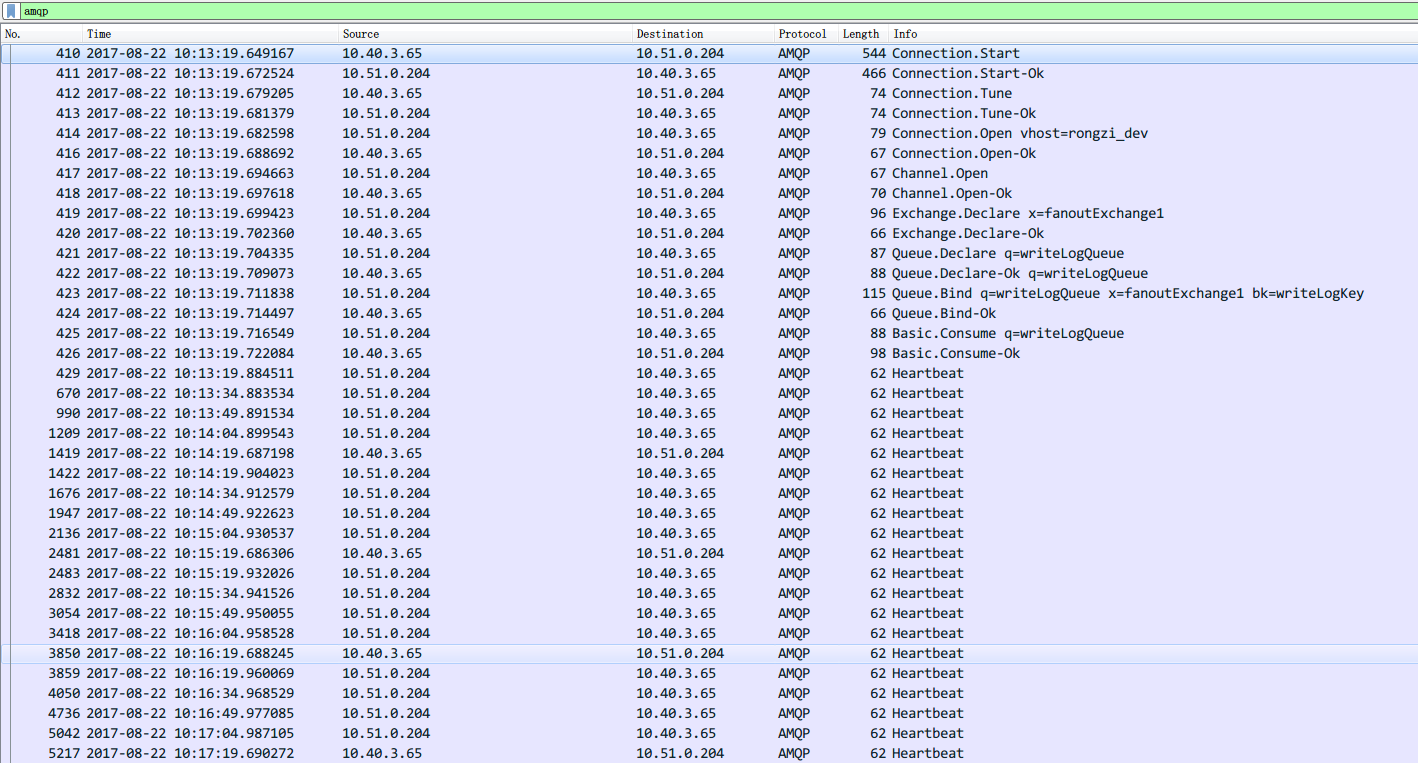
查看Wireshark抓包:
"No.","Time","Source","Destination","Protocol","Length","Info"

"","2017-08-22 10:13:19.649167","10.40.3.65","10.51.0.204","AMQP","","Connection.Start "

"","2017-08-22 10:13:19.672524","10.51.0.204","10.40.3.65","AMQP","","Connection.Start-Ok "

"","2017-08-22 10:13:19.679205","10.40.3.65","10.51.0.204","AMQP","","Connection.Tune "

"","2017-08-22 10:13:19.681379","10.51.0.204","10.40.3.65","AMQP","","Connection.Tune-Ok "

"","2017-08-22 10:13:19.682598","10.51.0.204","10.40.3.65","AMQP","","Connection.Open vhost=rongzi_dev "

"","2017-08-22 10:13:19.688692","10.40.3.65","10.51.0.204","AMQP","","Connection.Open-Ok "

"","2017-08-22 10:13:19.694663","10.51.0.204","10.40.3.65","AMQP","","Channel.Open "

"","2017-08-22 10:13:19.697618","10.40.3.65","10.51.0.204","AMQP","","Channel.Open-Ok "

"","2017-08-22 10:13:19.699423","10.51.0.204","10.40.3.65","AMQP","","Exchange.Declare x=fanoutExchange1 "

"","2017-08-22 10:13:19.702360","10.40.3.65","10.51.0.204","AMQP","","Exchange.Declare-Ok "

"","2017-08-22 10:13:19.704335","10.51.0.204","10.40.3.65","AMQP","","Queue.Declare q=writeLogQueue "

"","2017-08-22 10:13:19.709073","10.40.3.65","10.51.0.204","AMQP","","Queue.Declare-Ok q=writeLogQueue "

"","2017-08-22 10:13:19.711838","10.51.0.204","10.40.3.65","AMQP","","Queue.Bind q=writeLogQueue x=fanoutExchange1 bk=writeLogKey "

"","2017-08-22 10:13:19.714497","10.40.3.65","10.51.0.204","AMQP","","Queue.Bind-Ok "

"","2017-08-22 10:13:19.716549","10.51.0.204","10.40.3.65","AMQP","","Basic.Consume q=writeLogQueue "

"","2017-08-22 10:13:19.722084","10.40.3.65","10.51.0.204","AMQP","","Basic.Consume-Ok "

"","2017-08-22 10:13:19.884511","10.51.0.204","10.40.3.65","AMQP","","Heartbeat "

"","2017-08-22 10:13:34.883534","10.51.0.204","10.40.3.65","AMQP","","Heartbeat "

"","2017-08-22 10:13:49.891534","10.51.0.204","10.40.3.65","AMQP","","Heartbeat "

"","2017-08-22 10:14:04.899543","10.51.0.204","10.40.3.65","AMQP","","Heartbeat "

"","2017-08-22 10:14:19.687198","10.40.3.65","10.51.0.204","AMQP","","Heartbeat "

"","2017-08-22 10:14:19.904023","10.51.0.204","10.40.3.65","AMQP","","Heartbeat "

"","2017-08-22 10:14:34.912579","10.51.0.204","10.40.3.65","AMQP","","Heartbeat "

"","2017-08-22 10:14:49.922623","10.51.0.204","10.40.3.65","AMQP","","Heartbeat "

"","2017-08-22 10:15:04.930537","10.51.0.204","10.40.3.65","AMQP","","Heartbeat "

"","2017-08-22 10:15:19.686306","10.40.3.65","10.51.0.204","AMQP","","Heartbeat "

"","2017-08-22 10:15:19.932026","10.51.0.204","10.40.3.65","AMQP","","Heartbeat "

"","2017-08-22 10:15:34.941526","10.51.0.204","10.40.3.65","AMQP","","Heartbeat "

"","2017-08-22 10:15:49.950055","10.51.0.204","10.40.3.65","AMQP","","Heartbeat "

"","2017-08-22 10:16:04.958528","10.51.0.204","10.40.3.65","AMQP","","Heartbeat "

"","2017-08-22 10:16:19.688245","10.40.3.65","10.51.0.204","AMQP","","Heartbeat "

"","2017-08-22 10:16:19.960069","10.51.0.204","10.40.3.65","AMQP","","Heartbeat "

"","2017-08-22 10:16:34.968529","10.51.0.204","10.40.3.65","AMQP","","Heartbeat "

"","2017-08-22 10:16:49.977085","10.51.0.204","10.40.3.65","AMQP","","Heartbeat "
生产者Code:
using System;

using System.Collections.Generic;

using System.Linq;

using System.Text;

using System.Threading;

using System.Threading.Tasks;

using RabbitMQ.Client;

using RabbitMQ.Client.Events;

using System.IO;

using Newtonsoft.Json;

using System.ComponentModel;

using System.Text.RegularExpressions;

namespace ConsoleDemo

{

    class Program

    {

        static void Main(string[] args)

        {

            new Thread(Provider.Write).Start();

            Console.ReadLine();

        }

    }

    public class Provider

    {

        public static void Write()

        {

            var qName = "writeLogQueue";

            var exchangeName = "fanoutExchange1";

            var exchangeType = "fanout";//topic、fanout

            var routingKey = "writeLogKey";

            var factory = new ConnectionFactory() { HostName = "10.40.3.65", UserName = "qhong", Password = "hongdada", VirtualHost = "rongzi_dev" };

            //var factory = new ConnectionFactory() { HostName = "10.51.0.204", UserName = "qhong", Password = "hongdada",VirtualHost="rongzi_qa" };

            using (var connection = factory.CreateConnection())

            using (var channel = connection.CreateModel())

            {

                ////设置交换器的类型

                //channel.ExchangeDeclare(exchangeName, exchangeType);

                ////声明一个队列,设置队列是否持久化,排他性,与自动删除

                //channel.QueueDeclare(qName, true, false, false, null);

                ////绑定消息队列,交换器,routingkey

                //channel.QueueBind(qName, exchangeName, routingKey);

                channel.ExchangeDeclare(exchangeName, exchangeType);

                channel.QueueDeclare(queue:qName, durable: false, exclusive: false, autoDelete: false, arguments: null);

                channel.QueueBind(qName, exchangeName, routingKey);

                for (int i = ; i < ; i++)

                {

                    string message = i.ToString();

                    var body = Encoding.UTF8.GetBytes(message);

                    channel.BasicPublish(exchange:exchangeName, routingKey:routingKey, basicProperties: null, body: body);

                    Console.WriteLine("Program Sent {0}", message);

                }

            }

        }

    }

}
抓包,太长就不截图了
"","2017-08-22 10:33:20.584321","10.51.0.204","10.40.3.65","AMQP","","Heartbeat "

"","2017-08-22 10:33:35.585035","10.51.0.204","10.40.3.65","AMQP","","Heartbeat "

"","2017-08-22 10:33:45.475110","10.40.3.65","10.51.0.204","AMQP","","Connection.Start "

"","2017-08-22 10:33:45.492512","10.51.0.204","10.40.3.65","AMQP","","Connection.Start-Ok "

"","2017-08-22 10:33:45.495352","10.40.3.65","10.51.0.204","AMQP","","Connection.Tune "

"","2017-08-22 10:33:45.497523","10.51.0.204","10.40.3.65","AMQP","","Connection.Tune-Ok "

"","2017-08-22 10:33:45.498767","10.51.0.204","10.40.3.65","AMQP","","Connection.Open vhost=rongzi_dev "

"","2017-08-22 10:33:45.504320","10.40.3.65","10.51.0.204","AMQP","","Connection.Open-Ok "

"","2017-08-22 10:33:45.507044","10.51.0.204","10.40.3.65","AMQP","","Channel.Open "

"","2017-08-22 10:33:45.510357","10.40.3.65","10.51.0.204","AMQP","","Channel.Open-Ok "

"","2017-08-22 10:33:45.511938","10.51.0.204","10.40.3.65","AMQP","","Exchange.Declare x=fanoutExchange1 "

"","2017-08-22 10:33:45.515660","10.40.3.65","10.51.0.204","AMQP","","Exchange.Declare-Ok "

"","2017-08-22 10:33:45.517792","10.51.0.204","10.40.3.65","AMQP","","Queue.Declare q=writeLogQueue "

"","2017-08-22 10:33:45.521655","10.40.3.65","10.51.0.204","AMQP","","Queue.Declare-Ok q=writeLogQueue "

"","2017-08-22 10:33:45.523771","10.51.0.204","10.40.3.65","AMQP","","Queue.Bind q=writeLogQueue x=fanoutExchange1 bk=writeLogKey "

"","2017-08-22 10:33:45.527364","10.40.3.65","10.51.0.204","AMQP","","Queue.Bind-Ok "

"","2017-08-22 10:33:45.533525","10.51.0.204","10.40.3.65","AMQP","","Basic.Publish x=fanoutExchange1 rk=writeLogKey Content-Header Content-Body "

"","2017-08-22 10:33:45.534040","10.51.0.204","10.40.3.65","AMQP","","Basic.Publish x=fanoutExchange1 rk=writeLogKey Content-Header Content-Body "

"","2017-08-22 10:33:45.534170","10.51.0.204","10.40.3.65","AMQP","","Basic.Publish x=fanoutExchange1 rk=writeLogKey Content-Header Content-Body "

"","2017-08-22 10:33:45.534290","10.51.0.204","10.40.3.65","AMQP","","Basic.Publish x=fanoutExchange1 rk=writeLogKey Content-Header Content-Body "

"","2017-08-22 10:33:45.534612","10.51.0.204","10.40.3.65","AMQP","","Basic.Publish x=fanoutExchange1 rk=writeLogKey Content-Header Content-Body "

"","2017-08-22 10:33:45.535047","10.51.0.204","10.40.3.65","AMQP","","Basic.Publish x=fanoutExchange1 rk=writeLogKey Content-Header Content-Body "

"","2017-08-22 10:33:45.535142","10.51.0.204","10.40.3.65","AMQP","","Basic.Publish x=fanoutExchange1 rk=writeLogKey Content-Header Content-Body "

"","2017-08-22 10:33:45.535206","10.51.0.204","10.40.3.65","AMQP","","Basic.Publish x=fanoutExchange1 rk=writeLogKey Content-Header Content-Body "

"","2017-08-22 10:33:45.535266","10.51.0.204","10.40.3.65","AMQP","","Basic.Publish x=fanoutExchange1 rk=writeLogKey Content-Header Content-Body "

"","2017-08-22 10:33:45.535318","10.51.0.204","10.40.3.65","AMQP","","Basic.Publish x=fanoutExchange1 rk=writeLogKey Content-Header Content-Body "

"","2017-08-22 10:33:45.535373","10.51.0.204","10.40.3.65","AMQP","","Basic.Publish x=fanoutExchange1 rk=writeLogKey Content-Header Content-Body "

"","2017-08-22 10:33:45.535440","10.51.0.204","10.40.3.65","AMQP","","Basic.Publish x=fanoutExchange1 rk=writeLogKey Content-Header Content-Body "

"","2017-08-22 10:33:45.535492","10.51.0.204","10.40.3.65","AMQP","","Basic.Publish x=fanoutExchange1 rk=writeLogKey Content-Header Content-Body "

"","2017-08-22 10:33:45.535545","10.51.0.204","10.40.3.65","AMQP","","Basic.Publish x=fanoutExchange1 rk=writeLogKey Content-Header Content-Body "

"","2017-08-22 10:33:45.535601","10.51.0.204","10.40.3.65","AMQP","","Basic.Publish x=fanoutExchange1 rk=writeLogKey Content-Header Content-Body "

"","2017-08-22 10:33:45.535652","10.51.0.204","10.40.3.65","AMQP","","Basic.Publish x=fanoutExchange1 rk=writeLogKey Content-Header Content-Body "

"","2017-08-22 10:33:45.535723","10.51.0.204","10.40.3.65","AMQP","","Basic.Publish x=fanoutExchange1 rk=writeLogKey Content-Header Content-Body "

"","2017-08-22 10:33:45.535780","10.51.0.204","10.40.3.65","AMQP","","Basic.Publish x=fanoutExchange1 rk=writeLogKey Content-Header Content-Body "

"","2017-08-22 10:33:45.535840","10.51.0.204","10.40.3.65","AMQP","","Basic.Publish x=fanoutExchange1 rk=writeLogKey Content-Header Content-Body "

"","2017-08-22 10:33:45.535891","10.51.0.204","10.40.3.65","AMQP","","Basic.Publish x=fanoutExchange1 rk=writeLogKey Content-Header Content-Body "

"","2017-08-22 10:33:45.537191","10.51.0.204","10.40.3.65","AMQP","","Channel.Close reply=Goodbye "

"","2017-08-22 10:33:45.538158","10.40.3.65","10.51.0.204","AMQP","","Basic.Deliver x=fanoutExchange1 rk=writeLogKey Content-Header Content-Body Basic.Deliver x=fanoutExchange1 rk=writeLogKey Content-Header Content-Body Basic.Deliver x=fanoutExchange1 rk=writeLogKey Content-Header Content-Body Basic.Deliver x=fanoutExchange1 rk=writeLogKey Content-Header Content-Body "

"","2017-08-22 10:33:45.539595","10.40.3.65","10.51.0.204","AMQP","","Basic.Deliver x=fanoutExchange1 rk=writeLogKey Content-Header Content-Body Basic.Deliver x=fanoutExchange1 rk=writeLogKey Content-Header Content-Body Basic.Deliver x=fanoutExchange1 rk=writeLogKey Content-Header Content-Body "

"","2017-08-22 10:33:45.539597","10.40.3.65","10.51.0.204","AMQP","","Basic.Deliver x=fanoutExchange1 rk=writeLogKey Content-Header Content-Body Basic.Deliver x=fanoutExchange1 rk=writeLogKey Content-Header Content-Body Basic.Deliver x=fanoutExchange1 rk=writeLogKey Content-Header Content-Body "

"","2017-08-22 10:33:45.539597","10.40.3.65","10.51.0.204","AMQP","","Basic.Deliver x=fanoutExchange1 rk=writeLogKey Content-Header Content-Body Basic.Deliver x=fanoutExchange1 rk=writeLogKey Content-Header Content-Body Basic.Deliver x=fanoutExchange1 rk=writeLogKey Content-Header Content-Body "

"","2017-08-22 10:33:45.539598","10.40.3.65","10.51.0.204","AMQP","","Basic.Deliver x=fanoutExchange1 rk=writeLogKey Content-Header Content-Body Basic.Deliver x=fanoutExchange1 rk=writeLogKey Content-Header Content-Body "

"","2017-08-22 10:33:45.539598","10.40.3.65","10.51.0.204","AMQP","","Basic.Deliver x=fanoutExchange1 rk=writeLogKey Content-Header Content-Body Basic.Deliver x=fanoutExchange1 rk=writeLogKey Content-Header Content-Body Basic.Deliver x=fanoutExchange1 rk=writeLogKey Content-Header Content-Body Basic.Deliver x=fanoutExchange1 rk=writeLogKey Content-Header Content-Body "

"","2017-08-22 10:33:45.539599","10.40.3.65","10.51.0.204","AMQP","","Basic.Deliver x=fanoutExchange1 rk=writeLogKey Content-Header Content-Body "

"","2017-08-22 10:33:45.543441","10.40.3.65","10.51.0.204","AMQP","","Channel.Close-Ok "

"","2017-08-22 10:33:45.547820","10.51.0.204","10.40.3.65","AMQP","","Connection.Close reply=Connection close forced "

"","2017-08-22 10:33:45.551016","10.40.3.65","10.51.0.204","AMQP","","Connection.Close-Ok "

"","2017-08-22 10:33:50.587474","10.51.0.204","10.40.3.65","AMQP","","Heartbeat "

"","2017-08-22 10:34:05.596326","10.51.0.204","10.40.3.65","AMQP","","Heartbeat "
通过info可以很清晰的看出rabbitmq的进程!
可以看出,发布者发布了20条信息,请求了20次
但是消费者在消费的时候,并不是二十次,而是七次,可以看出Basic.Deliver在一次AMQP中最多被调用了4次,可见一次消费可以消费多条message。
Wireshark分析RabbitMQ的更多相关文章
- Wireshark分析非标准端口号流量
Wireshark分析非标准端口号流量 2.2.2 分析非标准端口号流量Wireshark分析非标准端口号流量 应用程序运行使用非标准端口号总是网络分析专家最关注的.关注该应用程序是否有意涉及使用非 ...
- wireshark分析dhcp过程
---恢复内容开始--- DHCP DHCP(Dynamic Host Configuration Protocol)是一个用于主机动态获取IP地址的配置解 析,使用UDP报文传送,端口号为67何68 ...
- Linux使用tcpdump命令抓包并使用wireshark分析
Linux使用tcpdump命令抓包并使用wireshark分析 介绍 有时分析客户端和服务器网络交互的问题时,为了查找问题,需要分别在客户端和服务器上抓包,我们的客户端一般是windows上的,抓包 ...
- Android 抓包并通过 Wireshark 分析
分析 Android 中 app 的网络数据交互,需要在 Android 上抓包,常用工具为 tcpdump ,用 tcpdump 生成 Wireshark 识别的 pcap 文件,把 pcap 文件 ...
- Android利用tcpdump抓包,用wireshark分析包。
1.前言 主要介绍在android手机上如何利用tcpdump抓包,用wireshark分析包. android tcpdump官网: http://www.androidtcpdump.com/ t ...
- wireshark分析https数据包解密前后的特点
wireshark分析https数据包解密前后的特点 (一)https解密前 1.协议种类:2种(1)TCP(第四层,传输层)(2)SSL/TLS(第五层,应用层,加解密)2.应用层数据所在数据包特点 ...
- MAC帧的格式&&wireshark分析MAC帧
MAC帧的格式 MAC帧较为简单,由五个字段组成 目的地址:6字节 源地址:6字节 类型字段:2字节,用来标志上一层使用的是什么协议,以便把收到的MAC地址帧的数据交给上一层的这个协议. 数据字段:其 ...
- [转]使用wireshark分析TCP/IP协议中TCP包头的格式
本文简单介绍了TCP面向连接理论知识,详细讲述了TCP报文各个字段含义,并从Wireshark俘获分组中选取TCP连接建立相关报文段进行分析. 一.概述 TCP是面向连接的可靠传输协议,两个进程互发数 ...
- python - bilibili(三)wireshark分析
当我们开始打开浏览器,并进入B站直播网页前,我们打开wireshark软件(软件的下载与安装请百度一下)开始截取当前数据. 然后输入直播间网址,enter进入就可以停止截取数据了,然后我们分析所截取的 ...
随机推荐
- Connections in Galaxy War----zoj3261
题目链接: http://acm.zju.edu.cn/onlinejudge/showProblem.do?problemCode=3261 题意:有n个星球编号为0—n-1;能量分别为p[i]:有 ...
- grunt学习三-bower(一)
bower是什么?官网给出的 a package manager fow the web.简单说引入文件版本管理,例如jquery,传统做法到jquery的官网下载下,在引入,这样比较繁琐,也不利用 ...
- Nginx配置优化
Nginx优化: 并发优化 KeepAlive长连接 压缩优化 配置缓存 两个监控工具: nginx_status:并发统计 Ngxtop:请求统计 Nginx配置并发.长连接.压缩.状态监控: 关闭 ...
- MyEclipse中jquery.js文件报missing semicolon的错误解决
myeclipse的验证问题不影响jquery的应用,如果看着别扭,解决办法如下:选中你想去掉的js文件:右键选择 MyEclipse-->Exclude From Validation :然后 ...
- SQLCE数据工具(Flyhoward Ltd SDF Viewer)
SDF Viewer sdf数据库创建编辑查看 官方下载地址 http://www.flyhoward.com/Download_SDF_Viewer.aspx 用户名:www.cr173.com注 ...
- [js]ext.js探索
Ext JS 经常会遇到布局等头疼的问题,一直在用bootstrap,但是我不喜欢这玩意出的效果想找个合适的js架构入手 http://examples.sencha.com/extjs/6.6.0/ ...
- jconsole监控远程 spring boot程序
监控java 程序 增加启动参数 java \ -Djava.rmi.server.hostname=192.168.1.97 \ -Dcom.sun.management.jmxremote \- ...
- [LeetCode] 64. Minimum Path Sum_Medium tag: Dynamic Programming
Given a m x n grid filled with non-negative numbers, find a path from top left to bottom right which ...
- numpy的ravel()和flatten()函数
相同点: 两者所要实现的功能是一致的(将多维数组降位一维).这点从两个单词的意也可以看出来,ravel(散开,解开),flatten(变平). In [14]: x=np.array([[1,2],[ ...
- cocos代码研究(7)即时动作子类学习笔记
理论部分 即时动作是会立即被执行的动作.他们没有持续时间动作(ActionInterval)的持续时间属性.继承自 FiniteTimeAction.被 CallFunc, FlipX, FlipY, ...