
CHtmlEditCtrl(1) : Use CHtmlEditCtrl to Create a Simple HTML Editor
I needed a lightweight HTML editor to generate "rich text" emails, so I decided to explore the features and capabilities of the MFC CHtmlEditCtrl control. I had looked into using the DHTML Edit Control (an Active X control) in the past, but this new (MFC 7) class supports that functionality, so I decided to work from that direction.
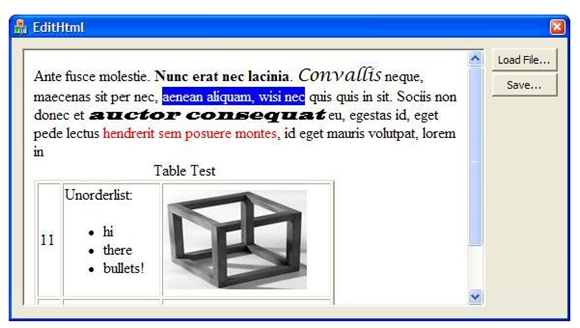
I found a few quirks with the control. There is (at least) one significant bug in the implementation and some "rough edges" that need to be smoothed out. But with a little bit of finesse, it is possible to create a usable HTML editor with very few lines of code.
If you want a full-fledged Document/View system, then the sample code provided by Microsoft and elsewhere (see References) is your best bet. I wanted a simple control that I could plop down into a dialog box so my user can start typing text and make it bold, italics, etc. This turns out to be easy once you get over a few hurdles, and it is also possible to read-in HTML source text from a file or URL.
The Good
The underlying DHTML editing support is powerful and comprehensive. For instance, the control automatically implements nearly all of the important keyboard command functions:
Ctrl+B Bold
Ctrl+I Italics
Ctrl+U Underline
Ctrl+K Create a Hyperlink
Ctrl+spc Remove formatting
Ctrl+bksp Undo (last text edit or format change)
Ctrl+X Cut
Ctrl+C Copy
Ctrl+V Insert from clipboard
Ctrl+F Find (the "new style" that highlights all occurrences!)
Ctrl+A Select All
Ctrl+L Open new local HTML file
Ctrl+N New browser window on current URL
Ctrl+P Print...
It is capable of nearly any desired HTML edit action, including "Convert lines to a bullet list," "Set the font: size, color, face, background, etc.", "Insert a horizontal line", "Insert a button," and so forth.
You have complete access to the browser DOM -- you can get an IHTMLDocument2* and use it to iterate through the elements. So you can programmatically do basically anything you want to do -- either in the HTML DOM or (as we shall see in the continuation of this article) by modifying the HTML text directly.
The Bad
As capable as it is, the DHTML editor seems partially unfinished. For instance, it has no support for creating a <TABLE> element. If a table already exists in the HTML, you can select it and delete it, or manually drag its handles to change the size, but that's about it.
The built-in context menu shows a "Properties" command, but nothing happens when you select it. It appears that Microsoft leaves implementation of this (complex) functionality up to the programmer -- but I think they should have disabled menu items that do nothing.
When you load an existing HTML page in design mode, you may be in for something of a shock... In edit mode, the scripts are not executed, so lots of hidden stuff is shown, and the page layout looks wonky. It is possible to switch to "Browser View" but there are some cases where that fails for no apparent reason.
There are a few other "quirks" that we'll encounter as we explore this subject.
The Ugly
The thing that might prevent many programmers from using this as a simple control is that 1) The Toolbox does not provide a CHtmlEditCtrl tool, and 2) the MCF Class Wizard support does not provide a wizard for deriving from CHtmlEditCtrl -- you must do it manually. (Note: You can derive from CHtmlEditView, though there are some peculiarities about putting a View into a dialog control).
Let's Get Started!
In this article, I'll provide a simple class object that will make it easy to put an HTML editor into a dialog box. And I'll demonstrate how to use it. In future articles, we'll look at some more advanced techniques.
First, we'll derive from CHtmlEditCtrl to (initially) provide just a few functions:
A means to instantiate the control on a dialog box.
Overrides to get rid of "Byte Order Marks" in the source text.
An option to disable (or replace) the built-in context menu.
The latter function is needed to avoid letting the user do things like navigate to a different page, or other things that don't make sense for some situations.
Here's the header file (HtmlEditCtrlEx.h):
|
#pragma once #include <afxhtml.h> // CHtmlEditCtrlEx control class CHtmlEditCtrlEx : public CHtmlEditCtrl { DECLARE_DYNCREATE(CHtmlEditCtrlEx) protected: public: CHtmlEditCtrlEx() { m_fEnableContextMenu=true; }; virtual ~CHtmlEditCtrlEx() {}; BOOL CreateFromStatic( UINT nID, CWnd* pParent ); void EnableContextMenu( BOOL fEnab ) { m_fEnableContextMenu= fEnab; }; HRESULT GetDocumentHTML( CString& sHtml ); // override discards BOM HRESULT SetDocumentHTML( CString& sHtml ); // override discards BOM protected: BOOL m_fEnableContextMenu; DECLARE_MESSAGE_MAP() public: virtual BOOL PreTranslateMessage(MSG* pMsg); // context menu suppression }; |
And here's the source code (HtmlEditCtrlEx.cpp):
|
#include "stdafx.h" #include "HtmlEditCtrlEx.h" // CHtmlEditCtrlEx IMPLEMENT_DYNCREATE(CHtmlEditCtrlEx, CHtmlEditCtrl) BEGIN_MESSAGE_MAP(CHtmlEditCtrlEx, CHtmlEditCtrl) END_MESSAGE_MAP() BOOL CHtmlEditCtrlEx::CreateFromStatic( UINT nID, CWnd* pParent ) { CStatic wndStatic; if ( !wndStatic.SubclassDlgItem(nID, pParent)) { return( FALSE ); } CRect rc; wndStatic.GetWindowRect( &rc ); pParent->ScreenToClient( &rc ); return Create( 0, (WS_CHILD | WS_VISIBLE), rc, pParent, nID, 0 ); }; BOOL CHtmlEditCtrlEx::PreTranslateMessage(MSG* pMsg) { if ( !m_fEnableContextMenu ) { switch (pMsg->message) { case WM_CONTEXTMENU: case WM_RBUTTONUP: case WM_RBUTTONDOWN: case WM_RBUTTONDBLCLK: if (pMsg->message==WM_RBUTTONUP) { // let parent handle context menu GetParent()->SendMessage(WM_CONTEXTMENU, pMsg->wParam, pMsg->lParam); } return TRUE; // eat it } } return CHtmlEditCtrl::PreTranslateMessage(pMsg); } // overide to discard BOM HRESULT CHtmlEditCtrlEx::GetDocumentHTML( CString& sHtml ) { HRESULT hr= CHtmlEditCtrl::GetDocumentHTML( sHtml ); if ( sHtml[0] != '<' ) { sHtml= sHtml.Mid(3); } return hr; } HRESULT CHtmlEditCtrlEx::SetDocumentHTML( CString& sHtml ) { HRESULT hr; int nOffset=0; if ( sHtml[0]==0xef && sHtml[1]==0xbb && sHtml[2]==0xbf ) { // BOM may be there nOffset= 3; } hr= CHtmlEditCtrl::SetDocumentHTML( sHtml.Mid(nOffset) ); return hr; } |
The PreTranslateMessage override allows you to prevent the build-in context menu, while at the same time, process any WM_CONTEXT menu handler that you provide in your parent dialog box.
The key function is CreateFromStatic. This function looks for a STATIC control in the parent window and uses it to determine the size and placement for the HTML editor window. It calls the CHtmlEditCtrl::Create() function, which ends up setting the browser control into design mode and navigating to about:blank -- to provide an empty slate.
Note the code in the SetDocumentHTML override where it checks the first few bytes for a special sequence,
0xef 0xbb 0xbf
The CHtmlEditCtrl's SaveAs function uses a CStream-based technique that stores these at the beginning of the file. It's called the "Byte Order Mark" (BOM). In this case, I don't need the bytes and they look goofy, so I get rid of them. In the continuation of this article, I'm going to add an Edit Source option and I want to show a clean text file.
To use this control:
1) Use the Visual Studio AppWizard to create an MFC dialog-based program.
2) In the Dialog Editor, use the toolbox to add a Static Text box at the location where you want the editor. Set its ID to, for instance, IDST_HtmlBox
3) Add this to your OnInitDialog function:
|
m_ctlEditHtml.CreateFromStatic( IDST_HtmlBox, this ); // m_ctlEditHtml.EnableContextMenu( false ); // -- uncomment later |
and add...
|
#include "HtmlEditCtrlEx.h" |
...at the top of the dialog's header file.
You now have an HTML editor that will handle all of the expected keyboard commands. As you may have noticed in the earlier screenshot, I've added two buttons for Load and Save. Here's the code for those functions:
|
void CEditHtmlDlg::OnBnClickedLoadfile() { wchar_t szFilter[] = L"HTML files (*.htm)|*.htm;*.html|" L"All Files (*.*)|*.*||"; CFileDialog dlg(TRUE,0,0,6,szFilter ); if ( dlg.DoModal()!=IDOK ) { return; } //-------------------------- read the HTML file into memory CString sFile= dlg.GetPathName(); CFile cf( sFile,CFile::modeRead ); int nLen= (int)cf.GetLength(); BYTE *p= new BYTE[nLen+2]; int n= cf.Read( p,nLen ); // read it all p[nLen]=0; // Add null terminator for CString m_sHtml= p; // save the HTML string as dialog member variable delete p; m_ctlEditHtml.SetDocumentHTML( m_sHtml ); // stuff it into the document m_ctHtmlSrcText.SetWindowTextW( m_sHtml );// and the source view } void CEditHtmlDlg::OnBnClickedSavefile() { m_ctlEditHtml.SaveAs(); // this one is easier :-) } |
Summary:
In this article, we created an object derived from CHtmlEditCtrl and placed it onto a dialog box. For now, we can read an HTML file from disk, make changes (using keyboard commands only) and save it back out. It's just a start, but because of the control's built-in functionality, it's a good distance toward a useful little utility for creating and modifying HTML files.
In future articles, we'll add an HTML source editor and explore how to access some editing functionality that is not directly available from the keyboard.
References:
Paul DiLascia's MSDN articles about using CHtmlView provided inspiration and guidance on setting up the control and overriding the context menu:
MSJ aug2003 http://msdn.microsoft.com/en-us/magazine/cc164109.aspx
MSJ sep2001 http://msdn.microsoft.com/en-us/magazine/cc301445.aspx
MSJ jan2000 (apparently, no longer available!)
CHtmlEditCtrl Class
http://msdn.microsoft.com/en-us/library/h14ht0dh.aspx
CHtmlEditCtrlBase Class
http://msdn.microsoft.com/en-us/library/54542c1c.aspx
MSHTML Editing Overviews and Tutorials
http://msdn.microsoft.com/en-us/library/aa770039(VS.85).aspx
Document/View architecture examples:
HTMLEdit Sample: Wraps the Internet Explorer MSHTML Editing Control
http://msdn.microsoft.com/en-us/library/ea8hhwb6.aspx
Using the new HTML Editing classes in MFC7
http://www.codeproject.com/KB/MFC/mfchtmledit.aspx
=-=-=-=-=-=-=-=-=-=-=-=-=-=-=-=-=-=-=-=-=-=-=-=-=-=-=-=-=-=-=-=-=-=-=-=-=-=-=-=-=-=
If you liked this article and want to see more from this author, please click the Yes button near the:
Was this article helpful?
label that is just below and to the right of this text. Thanks!
=-=-=-=-=-=-=-=-=-=-=-=-=-=-=-=-=-=-=-=-=-=-=-=-=-=-=-=-=-=-=-=-=-=-=-=-=-=-=-=-=-=
From: https://www.experts-exchange.com/articles/1396/Use-CHtmlEditCtrl-to-Create-a-Simple-HTML-Editor.html
CHtmlEditCtrl(1) : Use CHtmlEditCtrl to Create a Simple HTML Editor的更多相关文章
- Create a simple REST web service with Python--转载
今日尝试用python建立一个restful服务. 原文地址:http://www.dreamsyssoft.com/python-scripting-tutorial/create-simple-r ...
- CSU1019: Simple Line Editor
1019: Simple Line Editor Submit Page Summary Time Limit: 1 Sec Memory Limit: 128 Mb Subm ...
- [Angular 2] Create a simple search Pipe
This lesson shows you how to create a component and pass its properties as it updates into a Pipe to ...
- create a simple COM object
aaarticlea/png;base64,iVBORw0KGgoAAAANSUhEUgAAArsAAAGYCAIAAADN0b3QAAAgAElEQVR4nO29749c1b2nW/4Lzh8wUr
- Artix-7 50T FPGA试用笔记之Create a simple MicroBlaze System
前言:之前笔者的试用博文提到安富利这块板子非常适合MicroBlaze开发,同时网上关于MicroBlaze的资料非常少(或含糊不清),没有一篇能完整介绍VIVADO SDK的设计流程,所以笔者带来这 ...
- [Tools] Create a Simple CLI Tool in Node.js with CAC
Command-line tools can help you with all sorts of tasks. This lesson covers the very basics of setti ...
- [Angular] Create a simple *ngFor
In this post, we are going to create our own structure directive *ngFor. What it should looks like i ...
- [Angular] Using directive to create a simple Credit card validator
We will use 'HostListener' and 'HostBinding' to accomplish the task. The HTML: <label> Credit ...
- Create a simple js-ctypes example
js-ctypes 为Firefox extension访问由C/C++编写的native code提供了一种通用的方法. 从Firefox 4 开始支持js-ctypes,不同版本的之间有极好的兼容 ...
随机推荐
- android在代码中四种设置控件背景颜色的方法(包含RGB)
转载请注明出处: http://blog.csdn.net/fth826595345/article/details/9208771 TextView tText=(TextView) findVi ...
- 华为正在力挺的NB-IoT是什么鬼! - 全文
NB-IoT,Niubility Internet of Thing,即牛掰的物联网技术. 关于物联网,小编想从2款很有趣的应用说起. 这不是在播限制级.这是Nake Labs推出的3D健身镜,这款智 ...
- cmd 递归删除目录或文件
递归删目录 for /r <TARGET DIR> %i in (<DIR NAME or Pattern>) do rd /s /q %i 递归删文件 for /r < ...
- 微软为何选择在 Github 上开源 .NET 核心?
本文来自微软开源.NET 的一篇公告 ,文中阐述了微软为何选择在 Github 开源.NET,以及微软对开源和开源社区方面的认识的变迁. 对于.NET来说,今天(2014/11/12)是个大日子! 我 ...
- 在AngularJS中使用ES6
本篇记录一些AngularJS结合使用ES6的各种写法. ES6中module的导出导入 class MainController { constructor(searchService){ this ...
- Spring boot配置多个Redis数据源操作实例
原文:https://www.jianshu.com/p/c79b65b253fa Spring boot配置多个Redis数据源操作实例 在SpringBoot是项目中整合了两个Redis的操作实例 ...
- c++中 extern
用例子给你示范 // 1.cpp int x = 10; // 2.cpp 注意没有包含1.cpp #include <iostream> using namespace std; ext ...
- tomcat站点配置
那么只需要在tomcat 上下文中声明 <Parameter name=“log4j.org.springframework.orm” value=“debug”/> 1.server.x ...
- 得到手机当前显示的activity的名字
/** * @return 手机当前的activity */ String getRunningActivityName(){ ActivityManager activityManager=(Act ...
- CountDownLatch使用场景及分析
JDk1.5提供了一个非常有用的包,Concurrent包,这个包主要用来操作一些并发操作,提供一些并发类,可以方便在项目当中傻瓜式应用. JDK1.5以前,使用并发操作,都是通过Thread,Run ...