
iOScollectionView广告无限滚动(Swift实现)
今天公司里的实习生跑过来问我一般App上广告的无限滚动是怎么实现的,刚好很久没写博客了,就决定写下了,尽量帮助那些处于刚学iOS的程序猿.
做一个小demo,大概实现效果如下图所示:

基本实现思路:
1. 在你需要放置无限滚动展示数据的地方把他的数据,在原本的基础上把你要展示的数据扩大三倍.(当然扩大两倍也是可以的,三倍的话,比较好演示)
   // MARK: - 设置数据源

    func collectionView(_ collectionView: UICollectionView, numberOfItemsInSection section: Int) -> Int {

//        print(self.arrayM.count)

        return self.arrayM.count *

    }
2.当在定时器的作用下,或者在拖动情况存下滚动到第八个时候,设置此时的collectionView.contentOffset.x等于滚动到第三个cell的contentOffset.x
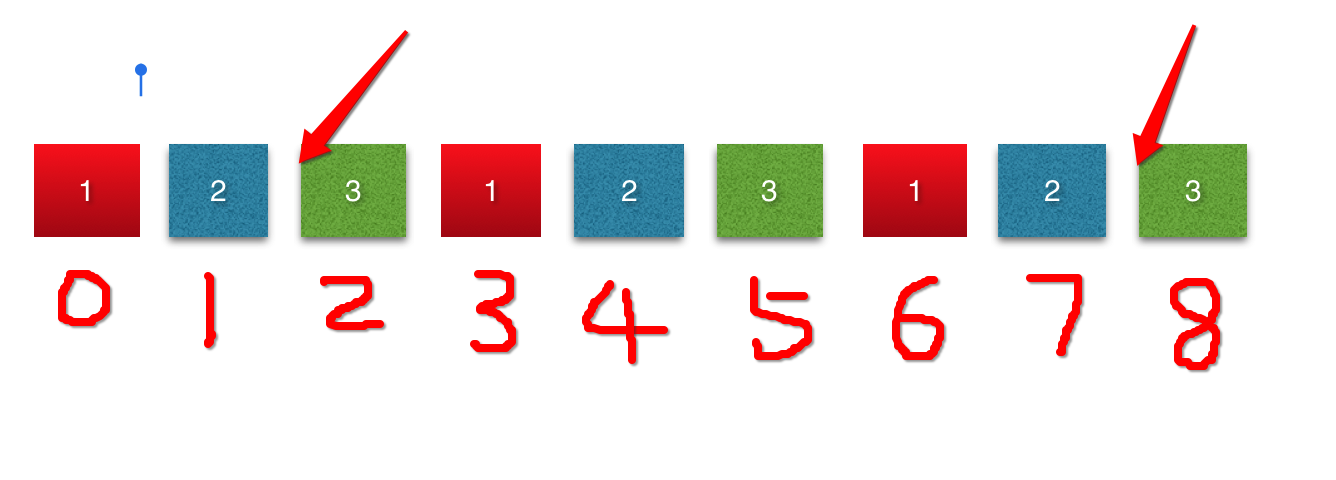
if collectionView.contentOffset.x == CGFloat( * self.arrayM.count - ) * self.collectionView.bounds.width {

            self.collectionView.contentOffset.x = CGFloat(self.arrayM.count - ) * self.collectionView.bounds.width

        }
3.当拖动到第0个cell时,设置此时的collectionView.contentOffset.x等于第六个cell的contentOffset.x
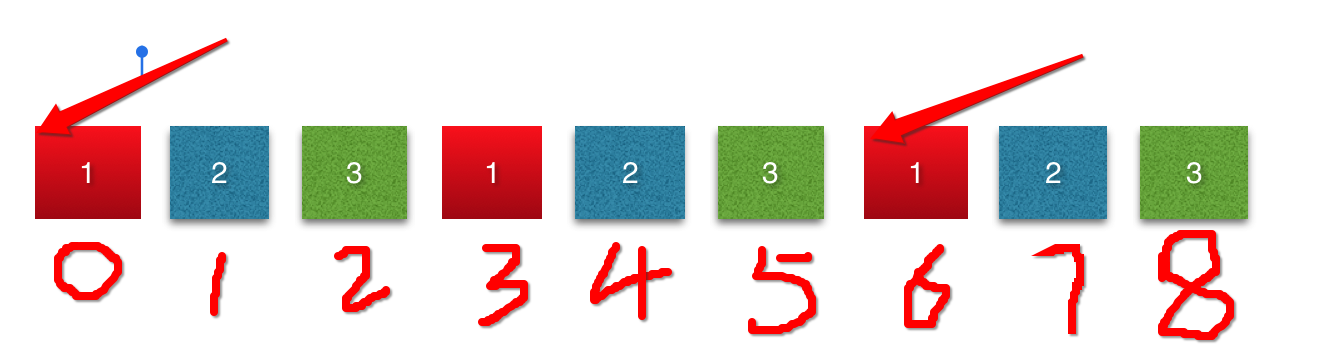
if collectionView.contentOffset.x ==  {

            self.collectionView.contentOffset.x = CGFloat( * self.arrayM.count - ) * self.collectionView.bounds.width

        }
代码如下:
我在代码中用到5张照片,所以应该一共有15个cell
import UIKit

class ViewController: UIViewController ,UICollectionViewDataSource, UICollectionViewDelegate {

    @IBOutlet weak var collectionView: UICollectionView!

    var timer : Timer?

    var arrayM : [BOModel] = [] {

        didSet {

            self.collectionView.reloadData()

        }

    }

    static let CellID = "cell"

    override func viewDidLoad() {

        super.viewDidLoad()

        self.collectionView.dataSource = self

        self.collectionView.delegate = self

        // 加载数据

        loadData()

        self.collectionView.register(UINib.init(nibName: "BOCollectionViewCell", bundle: nil), forCellWithReuseIdentifier: ViewController.CellID)

        //设置collextionView

        setupCollectionView()

        // 开启定时器

        starTimer()

    }

    /// 从polist中加载数据

    func loadData() {

        let stemp: NSArray = NSArray(contentsOfFile: Bundle.main.path(forResource: "shops.plist", ofType: nil)!)!

        for dict in stemp {

            let model = BOModel.init(dict: dict as! [String : Any])

            self.arrayM.append(model)

        }

    }

    /// 设置cellection的布局方式

    ///

    /// - Returns: 一个布局类型

    func setupCollectionFlowlayout() -> (UICollectionViewFlowLayout) {

        let flowLayout = UICollectionViewFlowLayout()

        flowLayout.itemSize = self.collectionView.bounds.size

        flowLayout.minimumLineSpacing =

        flowLayout.minimumInteritemSpacing =

        flowLayout.scrollDirection = .horizontal

        flowLayout.sectionInset = UIEdgeInsetsMake(, , , )

        return flowLayout

    }

    /// 设置collectionVIew

    func setupCollectionView() -> () {

        self.collectionView.collectionViewLayout = self.setupCollectionFlowlayout()

        self.collectionView.showsVerticalScrollIndicator = false

        self.collectionView.showsHorizontalScrollIndicator = false

        self.collectionView.isPagingEnabled = true

    }

    // MARK: - 设置数据源

    func collectionView(_ collectionView: UICollectionView, numberOfItemsInSection section: Int) -> Int {

//        print(self.arrayM.count)

        return self.arrayM.count *

    }

    func collectionView(_ collectionView: UICollectionView, cellForItemAt indexPath: IndexPath) -> UICollectionViewCell {

        let cell = self.collectionView.dequeueReusableCell(withReuseIdentifier: ViewController.CellID, for: indexPath) as! BOCollectionViewCell

        cell.model = self.arrayM[indexPath.row % self.arrayM.count]

        return cell

    }

    // MARK: - 实现代理方法

    func scrollViewDidEndDecelerating(_ scrollView: UIScrollView) {

        //contentOffset.x == 0 时,重新设置contentOffset.x的值

        if collectionView.contentOffset.x ==  {

            self.collectionView.contentOffset.x = CGFloat( * self.arrayM.count - ) * self.collectionView.bounds.width

        }

        //当到达最后一个cell时,重新设置contentOffset.x的值

        if collectionView.contentOffset.x == CGFloat( * self.arrayM.count - ) * self.collectionView.bounds.width {

            self.collectionView.contentOffset.x = CGFloat(self.arrayM.count - ) * self.collectionView.bounds.width

        }

    }

    /// 开启定时器

    func starTimer () {

        let timer = Timer.init(timeInterval: , target: self, selector: #selector(ViewController.nextPage), userInfo: nil, repeats: true)

        // 这一句代码涉及到runloop 和 主线程的知识,则在界面上不能执行其他的UI操作

        RunLoop.main.add(timer, forMode: RunLoopMode.commonModes)

        self.timer = timer

    }

    /// 在1秒后,自动跳转到下一页

    func nextPage() {

        // 如果到达最后一个,则变成第四个

        if collectionView.contentOffset.x == CGFloat( * self.arrayM.count - ) * self.collectionView.bounds.width {

            self.collectionView.contentOffset.x = CGFloat(self.arrayM.count - ) * self.collectionView.bounds.width

        }else {

            // 每过一秒,contentOffset.x增加一个cell的宽度

            self.collectionView.contentOffset.x += self.collectionView.bounds.size.width

        }

}

    /// 当collectionView开始拖动的时候,取消定时器

    func scrollViewWillBeginDragging(_ scrollView: UIScrollView) {

        self.timer?.invalidate()

        self.timer = nil

    }

    /// 当用户停止拖动的时候,开启定时器

    func scrollViewWillEndDragging(_ scrollView: UIScrollView, withVelocity velocity: CGPoint, targetContentOffset: UnsafeMutablePointer<CGPoint>) {

        starTimer()

    }

}
plist文件如下图所示: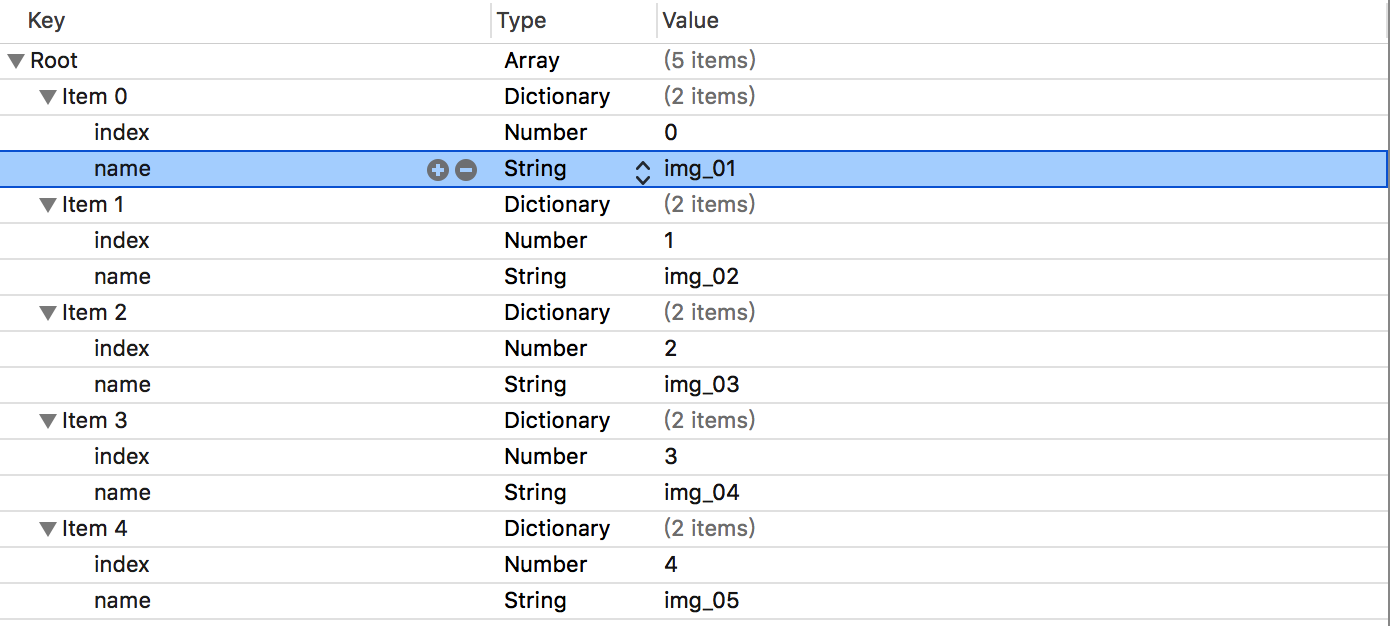
用到的字典转模型因为比较简单的转换,就自己写了个:
import UIKit

class BOCollectionViewCell: UICollectionViewCell {

    @IBOutlet weak var imageView: UIImageView!

    var model : BOModel? {

        didSet {

            guard let image = UIImage.init(named: (model?.name)!) else {

                return

            }

            self.imageView.image = image

        }

    }

    override func awakeFromNib() {

        super.awakeFromNib()

    }

}
自定义collectionViewCell类中的内容:
import UIKit

class BOCollectionViewCell: UICollectionViewCell {

    @IBOutlet weak var imageView: UIImageView!

    var model : BOModel? {

        didSet {

            guard let image = UIImage.init(named: (model?.name)!) else {

                return

            }

            self.imageView.image = image

        }

    }

    override func awakeFromNib() {

        super.awakeFromNib()

    }

}
附: 其实这种方法比较实现无限滚动,利用了一点小技巧,用电脑测试的时候可能有一点缺陷.
iOScollectionView广告无限滚动(Swift实现)的更多相关文章
- iOS开发:一个无限滚动自动播放图片的Demo(Swift语言编码)
很久以前就想写这么一个无限滚动的Demo了,最近学习了下Swift,手中没有可以用来练手的Demo,所以才将它实现了. Github地址(由于使用了UIView+AutoLayout第三方进行布局,所 ...
- iOS swift版本无限滚动轮播图
之前写过oc版本的无限滚动轮播图,现在来一个swift版本全部使用snapKit布局,数字还是pageConrrol样式可选 enum typeStyle: Int { case pageContro ...
- UIScrollView实现图片轮播器的无限滚动
简介 在现在的一些App中常常见到图片轮播器,一般用于展示广告.新闻等数据,在iOS内并没有现成的控件直接实现这种功能,但是通过UIScrollView的允许分页设置,可以实现滚动轮播的功能. 轮播原 ...
- Infinite Scroll - jQuery & WP 无限滚动插件
无限滚动(Infinite Scroll)也称为自动分页.滚动分页和无限分页.常用在图片.文章或其它列表形式的网页中,用来在滚动网页的时候自动加载下一页的内容.Infinite Scroll 这款 ...
- [Unity3D插件]2dtoolkit系列二 动画精灵的创建以及背景图的无限滚动
经过昨天2dtoolkit系列教程一的推出,感觉对新手还有有一定的启发作用,引导学习使用unity 2dToolKit插件的使用过程,今天继续系列二——动画精灵的创建,以及背景图的无限循环滚动,在群里 ...
- 基于HTML5+CSS3的图片旋转、无限滚动、文字跳动特效
本文分享几种基于HTML5+CSS3实现的一些动画特效:图片旋转.无限滚动.文字跳动;实现起来均比较容易,动手来试试! 一.图片旋转 效果图如下: 这个效果实现起来其实并不困难.代码清单如下: < ...
- LoopBar – Tap酒吧与无限滚动
相约 LoopBar – 标签栏与无限滚动为Android由Cleveroad 在Cleveroad我们最近认识到通过使用任何一个应用程序类别的导航,导航面板是很无聊和琐碎.这就是为什么我们的设计师的 ...
- Android 高级UI设计笔记09:Android如何实现无限滚动列表
ListView和GridView已经成为原生的Android应用实现中两个最流行的设计模式.目前,这些模式被大量的开发者使用,主要是因为他们是简单而直接的实现,同时他们提供了一个良好,整洁的用户体验 ...
- 无限滚动 --demo
<!DOCTYPE HTML><html><head><meta http-equiv="Content-Type" content=&q ...
随机推荐
- 千呼万唤始出来,微软Power BI简体中文版官网终于上线了,中文文档也全了。。
前几个月时间,研究微软Power BI技术,由于没有任何文档和资料,只能在英文官网瞎折腾,同时也发布了英文文档的相关文章:系列文章,刚好上周把文章发布完,结果简体中文版上线了.哈哈,心里有苦啊,早知道 ...
- jquery.Callbacks的实现
前言 本人是一个热爱前端的菜鸟,一直喜欢学习js原生,对于jq这种js库,比较喜欢理解他的实现,虽然自己能力有限,水平很低,但是勉勉强强也算是能够懂一点吧,对于jq源码解读系列,博客园里有很多,推荐大 ...
- 学习笔记之MVC级联及Ajax操作
由于刚转型到MVC,MVC的架构模式很多不是很清楚,比如今天就想做个级联的操作,因为之前的ASP.NET的方式是通过:控件-->添加事件-->后台编写级联事件进行触发,但是这个MVC就不同 ...
- Android Studio —— 重装 HAXM
Android Studio -- 重装 HAXM 版权声明:本文为博主原创文章,未经博主允许不得转载. 微博:厉圣杰 文中如有纰漏,欢迎大家留言指出. Android SDK 自带模拟器一直以慢.卡 ...
- MAC Osx PHP安装指导
php.ini的位置 Mac OS X中没有默认的php.ini文件,但是有对应的模版文件php.ini.default,位于/private/etc/php.ini.default 或者说 /etc ...
- Java 堆内存与栈内存异同(Java Heap Memory vs Stack Memory Difference)
--reference Java Heap Memory vs Stack Memory Difference 在数据结构中,堆和栈可以说是两种最基础的数据结构,而Java中的栈内存空间和堆内存空间有 ...
- 漫谈C#编程语言在游戏领域的应用
0x00 前言 随着微软越来越开放,C#也变得越来越吸引人们的眼球.而在游戏行业中,C#也开始慢慢地获得了关注.这不, 网易绝代双娇手游团队已经全面使用.Net Core支持前后端统一C#开发,跨平台 ...
- Java FtpClient 实现文件上传服务
一.Ubuntu 安装 Vsftpd 服务 1.安装 sudo apt-get install vsftpd 2.添加用户(uftp) sudo useradd -d /home/uftp -s /b ...
- 熊乐:H3 BPM为加速企业流程管理提供源动力
近日,在北京·金隅喜来登酒店,H3 BPM以"让天下没有难用的流程"为主题,正式发布H3 BPM10.0版本.全新的业务流程管理系统在易用性方面大大提升,并且全面支持Java与.N ...
- Atitit.cto 与技术总监的区别
Atitit.cto 与技术总监的区别 1. 核心区别1 2. Cto主要职责1 3. 如何提升到cto1 4. CTO五种基本的必备素质:2 5. 2 1. 核心区别 技术总监(Chief Tech ...