
eclipse运行WordCount
1)
可以完全参考http://www.cnblogs.com/archimedes/p/4539751.html在eclipse下创建MapReduce工程,创建了MR工程,并完成WordCount.java的编写之后,运行WordCount.java,结果可能如图所示 ,原因是未设置MR读取文件的路径以及输出结果的路径,修改方法如下图所示
需要注意的就是,这里的in和out就是hdfs中的路径,in就是输入数据所在的路径,ou就是最后结果的输出路径。使用完全分布式运行MR程序,设置如下:
 ,其实Master:9000/user/input中只是存储了数据集的元数据(9000是hdfs-site.xml中配置的),并没有存储真正的数据集。另外,第二次运行WordCounts时会提示output文件已存在,需要删除output才能正常运行。
以上在eclipse中点击run直接运行的方式只是在本地机器上运行mapreduce(单机模式),可以在http://master:50030/jobtracker.jsp中看到Running Jobs是none,在Eclipse的控制台就是这种形式:
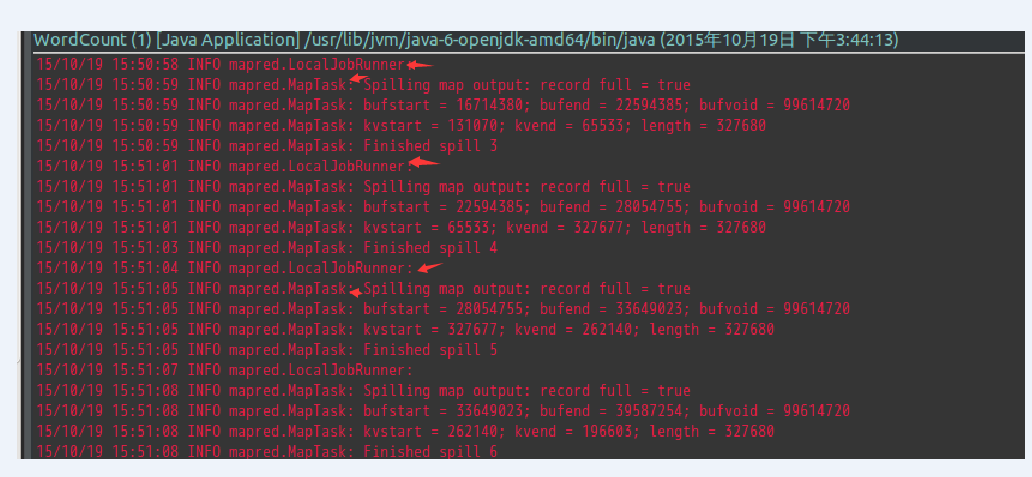
可以看到LocalJobRunner,就是使用本地主机运行MR,一直都是mapred.MapTask,即一直进行map操作,这就是因为没有把MR程序部署到集群上去。程序运行时间是54分钟。
2)
下图就是将MR部署到集群上之后,运行MR时候的情况:
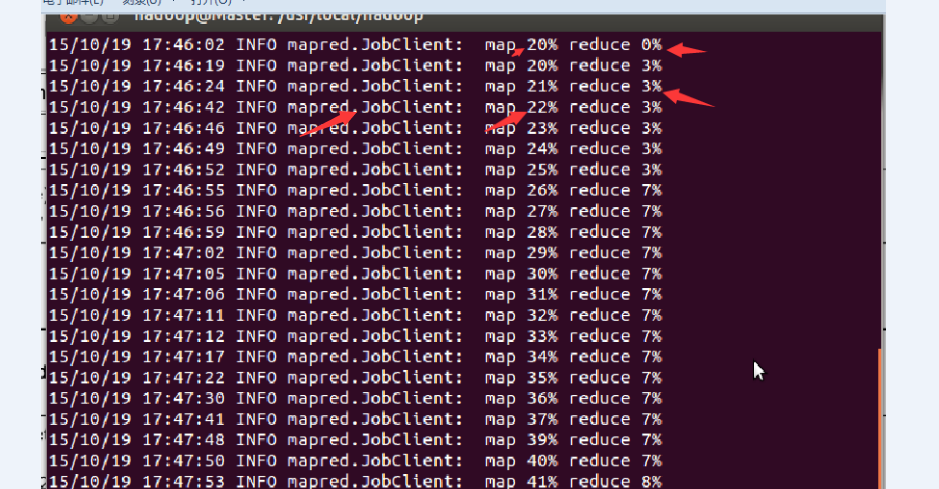
可以看到,当map达到一定的比例时,map和reduce操作是并行运行的。

map运行完毕,reduce继续运行。

在http://master:50030/jobtracker.jsp中看到Running Jobs。
程序运行时间是17分9秒。集群中1个master,3个slave。
3)
如何是MR程序在集群上运行呢?
需要将eclipse中的MR程序打包,利用eclipse打包过程如下:
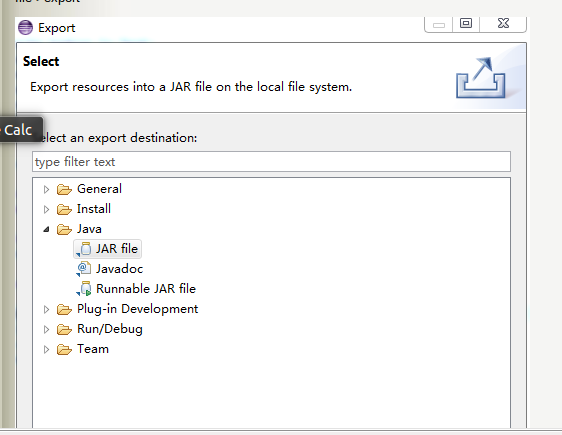
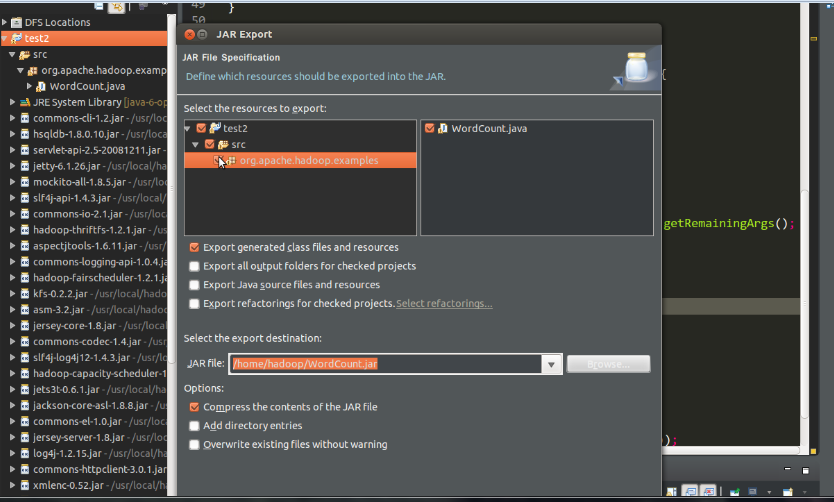
生成jar包之后,使用
bin/hadoop jar /home/hadoop/WordCount.jar org.apache.hadoop.examples.WordCount /user/input /user/output
其中: 1)/home/hadoop/WordCount.jar 指示jar包的位置
2)org.apache.hadoop.examples.WordCount表示package org.apache.hadoop.examples(源程序中第一行生命了包)中的主类WordCount。

3)/user/input /user/output分别是hdfs中数据集的输入目录和运算结果的输出目录。
4)WordCount原码如下:
/**

 *  Licensed under the Apache License, Version 2.0 (the "License");

 *  you may not use this file except in compliance with the License.

 *  You may obtain a copy of the License at

 *

 *      http://www.apache.org/licenses/LICENSE-2.0

 *

 *  Unless required by applicable law or agreed to in writing, software

 *  distributed under the License is distributed on an "AS IS" BASIS,

 *  WITHOUT WARRANTIES OR CONDITIONS OF ANY KIND, either express or implied.

 *  See the License for the specific language governing permissions and

 *  limitations under the License.

 */

package org.apache.hadoop.examples;

import java.io.IOException;

import java.util.StringTokenizer;

import org.apache.hadoop.conf.Configuration;

import org.apache.hadoop.fs.Path;

import org.apache.hadoop.io.IntWritable;

import org.apache.hadoop.io.Text;

import org.apache.hadoop.fs.FileSystem;

import org.apache.hadoop.mapred.JobConf;

import org.apache.hadoop.mapreduce.Job;

import org.apache.hadoop.mapreduce.Mapper;

import org.apache.hadoop.mapreduce.Reducer;

import org.apache.hadoop.mapreduce.lib.input.FileInputFormat;

import org.apache.hadoop.mapreduce.lib.output.FileOutputFormat;

import org.apache.hadoop.util.GenericOptionsParser;

public class WordCount {

  public static class TokenizerMapper

       extends Mapper<Object, Text, Text, IntWritable>{

    private final static IntWritable one = new IntWritable(1);

    private Text word = new Text();

    public void map(Object key, Text value, Context context

                    ) throws IOException, InterruptedException {

      StringTokenizer itr = new StringTokenizer(value.toString());

      while (itr.hasMoreTokens()) {

        word.set(itr.nextToken());

        context.write(word, one);

      }

    }

  }

  public static class IntSumReducer

       extends Reducer<Text,IntWritable,Text,IntWritable> {

    private IntWritable result = new IntWritable();

    public void reduce(Text key, Iterable<IntWritable> values,

                       Context context

                       ) throws IOException, InterruptedException {

      int sum = 0;

      for (IntWritable val : values) {

        sum += val.get();

      }

      result.set(sum);

      context.write(key, result);

    }

  }

  public static void main(String[] args) throws Exception {

    Configuration conf = new Configuration();

    //JobConf conf=new JobConf();

    //

    //conf.setJar("org.apache.hadoop.examples.WordCount.jar");

   // conf.set("fs.default.name", "hdfs://Master:9000/");

    //conf.set("hadoop.job.user","hadoop");

    //指定jobtracker的ip和端口号,master在/etc/hosts中可以配置

   // conf.set("mapred.job.tracker","Master:9001");

    /*

    FileSystem hdfs =FileSystem.get(conf);

    Path findf=new Path("/user/output");

    boolean isExists=hdfs.exists(findf);

    System.out.println("/user/output exit?"+isExists);

    if(isExists)

    {

        hdfs.delete(findf, true);

        System.out.println("delete /user/output");

    }

    */

    String[] otherArgs = new GenericOptionsParser(conf, args).getRemainingArgs();

    if (otherArgs.length != 2) {

      System.err.println("Usage: wordcount <in> <out>");

      System.exit(2);

    }

    Job job = new Job(conf, "word count");

    job.setJarByClass(WordCount.class);

    job.setMapperClass(TokenizerMapper.class);

    job.setCombinerClass(IntSumReducer.class);

    job.setReducerClass(IntSumReducer.class);

    job.setOutputKeyClass(Text.class);

    job.setOutputValueClass(IntWritable.class);

    FileInputFormat.addInputPath(job, new Path(otherArgs[0]));

    FileOutputFormat.setOutputPath(job, new Path(otherArgs[1]));

    System.exit(job.waitForCompletion(true) ? 0 : 1);

  }

}
这种代码可以直接在elipse中以单机模式运行,但是再次运行之前需要手动删除output目录,所以就想在程序中加入代码,检测output是否已经存在,是的话就删除,代码如下:
 /**

  *  Licensed under the Apache License, Version 2.0 (the "License");

  *  you may not use this file except in compliance with the License.

  *  You may obtain a copy of the License at

  *

  *      http://www.apache.org/licenses/LICENSE-2.0

  *

  *  Unless required by applicable law or agreed to in writing, software

  *  distributed under the License is distributed on an "AS IS" BASIS,

  *  WITHOUT WARRANTIES OR CONDITIONS OF ANY KIND, either express or implied.

  *  See the License for the specific language governing permissions and

  *  limitations under the License.

  */

 package org.apache.hadoop.examples;

 import java.io.IOException;

 import java.util.StringTokenizer;

 import org.apache.hadoop.conf.Configuration;

 import org.apache.hadoop.fs.Path;

 import org.apache.hadoop.io.IntWritable;

 import org.apache.hadoop.io.Text;

 import org.apache.hadoop.fs.FileSystem;

 import org.apache.hadoop.mapred.JobConf;

 import org.apache.hadoop.mapreduce.Job;

 import org.apache.hadoop.mapreduce.Mapper;

 import org.apache.hadoop.mapreduce.Reducer;

 import org.apache.hadoop.mapreduce.lib.input.FileInputFormat;

 import org.apache.hadoop.mapreduce.lib.output.FileOutputFormat;

 import org.apache.hadoop.util.GenericOptionsParser;

 public class WordCount {

   public static class TokenizerMapper

        extends Mapper<Object, Text, Text, IntWritable>{

     private final static IntWritable one = new IntWritable(1);

     private Text word = new Text();

     public void map(Object key, Text value, Context context

                     ) throws IOException, InterruptedException {

       StringTokenizer itr = new StringTokenizer(value.toString());

       while (itr.hasMoreTokens()) {

         word.set(itr.nextToken());

         context.write(word, one);

       }

     }

   }

   public static class IntSumReducer

        extends Reducer<Text,IntWritable,Text,IntWritable> {

     private IntWritable result = new IntWritable();

     public void reduce(Text key, Iterable<IntWritable> values,

                        Context context

                        ) throws IOException, InterruptedException {

       int sum = 0;

       for (IntWritable val : values) {

         sum += val.get();

       }

       result.set(sum);

       context.write(key, result);

     }

   }

   public static void main(String[] args) throws Exception {

     Configuration conf = new Configuration();

     //JobConf conf=new JobConf();

     //

     //conf.setJar("org.apache.hadoop.examples.WordCount.jar");

    // conf.set("fs.default.name", "hdfs://Master:9000/");

     //conf.set("hadoop.job.user","hadoop");

     //指定jobtracker的ip和端口号,master在/etc/hosts中可以配置

    // conf.set("mapred.job.tracker","Master:9001");

     FileSystem hdfs =FileSystem.get(conf);

     Path findf=new Path("/eclipse-test5/output");

     boolean isExists=hdfs.exists(findf);

     System.out.println("/eclipse-test5/output exit?"+isExists);

     if(isExists)

     {

         hdfs.delete(findf, true);

         System.out.println("delete /eclipse-test5/output");

     }

     String[] otherArgs = new GenericOptionsParser(conf, args).getRemainingArgs();

     if (otherArgs.length != 2) {

       System.err.println("Usage: wordcount <in> <out>");

       System.exit(2);

     }

     Job job = new Job(conf, "word count");

     job.setJarByClass(WordCount.class);

     job.setMapperClass(TokenizerMapper.class);

     job.setCombinerClass(IntSumReducer.class);

     job.setReducerClass(IntSumReducer.class);

     job.setOutputKeyClass(Text.class);

     job.setOutputValueClass(IntWritable.class);

     FileInputFormat.addInputPath(job, new Path(otherArgs[0]));

     FileOutputFormat.setOutputPath(job, new Path(otherArgs[1]));

     System.exit(job.waitForCompletion(true) ? 0 : 1);

   }

 }
78-88行代码实现检测output目录是否存在,存在的话就删除的功能。但是78-88行使用的hdfs的API却检测到output不存在,但是运行程序的时候却提示output已经存在,如图所示:
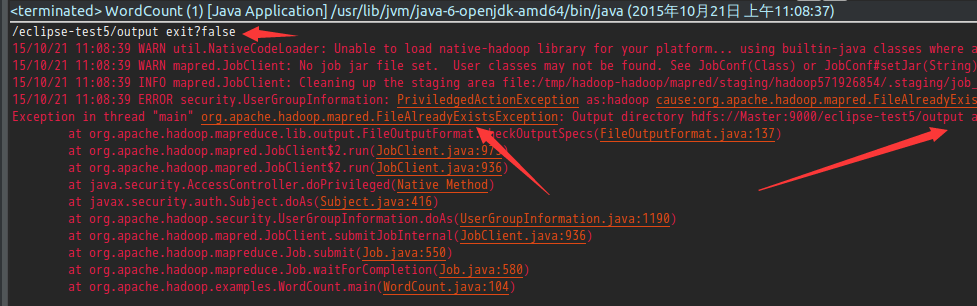
但是,如果将上述程序打成jar包再运行就不会出错。
5)
如果是单单使用HDFS提供的API对文件进行操作,又想直接在eclipse中直接运行,不想打jar包使用hadoop命令运行的话,可以在代码中加入以下三行代码:
conf.set("fs.default.name", "hdfs://Master:9000/");

conf.set("hadoop.job.user","hadoop");

//指定jobtracker的ip和端口号,master在/etc/hosts中可以配置

conf.set("mapred.job.tracker","Master:9001");
这样可以实现不打jar包直接对hdfs进行操作的目的。
但是,将这三行代码加入WordCount中的话却会报错。
6)最后,需要搞清楚这三行代码到底做了什么?
conf.set("fs.default.name", "hdfs://Master:9000/");

conf.set("hadoop.job.user","hadoop");

//指定jobtracker的ip和端口号,master在/etc/hosts中可以配置

conf.set("mapred.job.tracker","Master:9001");
eclipse运行WordCount的更多相关文章
- Eclipse运行wordcount步骤
Eclipse运行wordcount步骤 第一步:建立工程,导入代码. 第二步:建立文件写入数据(以空格分开),并上传到hdfs上. 1.创建文件并写入数据: 2.上传hdfs 在hadoop权限下就 ...
- Hadoop3 在eclipse中访问hadoop并运行WordCount实例
前言: 毕业两年了,之前的工作一直没有接触过大数据的东西,对hadoop等比较陌生,所以最近开始学习了.对于我这样第一次学的人,过程还是充满了很多疑惑和不解的,不过我采取的策略是还是先让环 ...
- eclipse连hadoop2.x运行wordcount 转载
转载地址:http://my.oschina.net/cjun/blog/475576 一.新建java工程,并且导入hadoop相关jar包 此处可以直接创建mapreduce项目就可以,不用下面折 ...
- 解决在windows的eclipse上面运行WordCount程序出现的一系列问题详解
一.简介 要在Windows下的 Eclipse上调试Hadoop2代码,所以我们在windows下的Eclipse配置hadoop-eclipse-plugin- 2.6.0.jar插件,并在运行H ...
- (三)配置Hadoop1.2.1+eclipse(Juno版)开发环境,并运行WordCount程序
配置Hadoop1.2.1+eclipse(Juno版)开发环境,并运行WordCount程序 一. 需求部分 在ubuntu上用Eclipse IDE进行hadoop相关的开发,需要在Eclip ...
- win10+eclipse+hadoop2.7.2+maven+local模式直接通过Run as Java Application运行wordcount
一.准备工作 (1)Hadoop2.7.2 在linux部署完毕,成功启动dfs和yarn,通过jps查看,进程都存在 (2)安装maven 二.最终效果 在windows系统中,直接通过Run as ...
- 021_在Eclipse Indigo中安装插件hadoop-eclipse-plugin-1.2.1.jar,直接运行wordcount程序
1.工具介绍 Eclipse Idigo.JDK1.7-32bit.hadoop1.2.1.hadoop-eclipse-plugin-1.2.1.jar(自己网上下载) 2.插件安装步骤 1)将ha ...
- Window7中Eclipse运行MapReduce程序报错的问题
按照文档:http://www.micmiu.com/bigdata/hadoop/hadoop2x-eclipse-mapreduce-demo/安装配置好Eclipse后,运行WordCount程 ...
- eclipse运行没问题,tomcat以脚本启动后插入数据库的中文会乱码
记一次部署工程的时候遇到的问题 部署war包到win7的时候发现,布上去后插入数据库的中文会乱码,然后发现用eclipse运行源码没问题,一开始以为是war打出来的时候编码错误,然后将eclipse的 ...
随机推荐
- python 校招信息爬虫程序
发现一个爬虫程序,正在学习中: https://github.com/lizherui/spider_python
- Win8.1想要卸载openSUSE出现问题(2014.8.15已解决)
用DiskGenius激活C盘后果然好用了!随便用EasyBCD恢复一下就好了 下面再说说安装openSUSE这半周多的问题: 1.如果是NVIDIA和Intel双显卡就不要安装NVIDIA的显卡驱动 ...
- [.NET] 打造防“狼”神器 :任务栏篇
@微微一笑:本文标题纯属自娱自乐. 隐藏任务栏效果图: 对比 说起来惭愧,上面这个隐藏任务栏功能,只是完成了我一半的预想.本想是可以选择性的隐藏任务栏上的某个TaskBarButton,但是Win7+ ...
- 推荐一个sqlce,sqllite等数据库管理工具
推荐一个sqlce,sqllite等数据库管理工具 下载地址: http://fishcodelib.com/files/DatabaseNet4.zip 支持sqlserver,sqlce, sql ...
- DoubanFm之设计模式(一)
前两版DoubanFm写的太戳,第一版可以忽略,当是熟悉WP手机的一些API.. 第二版用了比较多的依赖注入,熟悉了Messenger,过后越写越大,感觉不对,赶快打住..现在开始好好思考各模块了. ...
- 菜鸟学习Spring——60s使用annotation实现简单AOP
一.概述. AOP大家都知道切面编程,在Spring中annotation可以实现简单的AOP列子.下面还未大家介绍几个概念: Aspect 对横切性关注点的模块化. Advice 对横切性关注点的具 ...
- EMVTag系列12《卡片内部风险管理数据》
Ø 9F53 连续脱机交易限制数(国际-货币) L: 1 -C(有条件):如果执行国际-货币频度检查 PBOC专有数据元. 不使用指定应用货币的连续脱机交易次数最大数,超过后交易请求联机 模板 ...
- [Letcode] 1. Two Sum
Given an array of integers, return indices of the two numbers such that they add up to a specific ta ...
- Android程序完全退出的三种方法
很多网友可能发现自己的Android程序有很多Activity,比如说主窗口A,调用了子窗口B,在B中如何关闭整个Android应用程序呢? 这里Android123给大家三种比较简单的方法实现. 首 ...
- WCF 已超过传入消息(65536)的最大消息大小配额。若要增加配额,请使用相应绑定元素上的 MaxReceivedMessageSize 属性
我出现这个问题主要是服务器返回数据量过大引起了,需要客户端服务端都要进行配置:我会说其实有神器的么....(工具=>wcf服务配置编辑器),用工具编辑下,就会完全搞定这个问题,再也不用纠结了 服 ...