
iOS开发:icon和启动图尺寸
歪果仁的总结:
|
Asset |
iPhone 6s Plus and iPhone 6 Plus (@3x) |
iPhone 6s, iPhone 6, and iPhone 5 (@2x) |
iPhone 4s (@2x) |
iPad and iPad mini (@2x) |
iPad 2 and iPad mini (@1x) |
iPad Pro (@2x) |
|
App icon (required for all apps) |
180 x 180 |
120 x 120 |
120 x 120 |
152 x 152 |
76 x 76 |
167 x 167 |
|
App icon for the App Store (required for all apps) |
1024 x 1024 |
1024 x 1024 |
1024 x 1024 |
1024 x 1024 |
1024 x 1024 |
1024 x 1024 |
|
Launch file or image (required for all apps) |
Use a launch file (see Launch Files) |
For iPhone 6s and iPhone 6, use a launch file (see Launch Files) For iPhone 5, 640 x 1136 |
640 x 960 |
1536 x 2048 (portrait) 2048 x 1536 (landscape) |
768 x 1024 (portrait) 1024 x 768 (landscape) |
2048 x 2732 (portrait) 2732 x 2048 (landscape) |
|
Spotlight search results icon (recommended) |
180 x 180 |
For iPhone 6s and iPhone 6, use 120 x 120 For iPhone 5, use 80 x 80 |
80 x 80 |
120 x 120 |
60 x 60 |
120 x 120 |
|
Settings icon (recommended) |
87 x 87 |
58 x 58 |
58 x 58 |
58 x 58 |
29 x 29 |
58 x 58 |
|
Toolbar and navigation bar icon (optional) |
About 66 x 66 |
About 44 x 44 |
About 44 x 44 |
About 44 x 44 |
About 22 x 22 |
About 44 x 44 |
|
Tab bar icon (optional) |
About 75 x 75 (maximum: 144 x 96) |
About 50 x 50 (maximum: 96 x 64) |
About 50 x 50 (maximum: 96 x 64) |
About 50 x 50 (maximum: 96 x 64) |
About 25 x 25 (maximum: 48 x 32) |
About 50 x 50 (maximum: 96 x 64) |
|
Web clip icon (recommended for web apps and websites) |
180 x 180 |
120 x 120 |
120 x 120 |
152 x 152 |
76 x 76 |
167 x 167 |
切图尺寸一般尺寸:
iPhone 6 Plus (@3x)
iPhone 6 and iPhone 5 (@2x)
iPhone 4s (@2x)
iPad and iPad mini (@2x)
iPad 2 and iPad mini (@1x)
英语不好的童鞋看下面:http://www.cnblogs.com/dyllove98/p/3233845.html
made in china 总结:
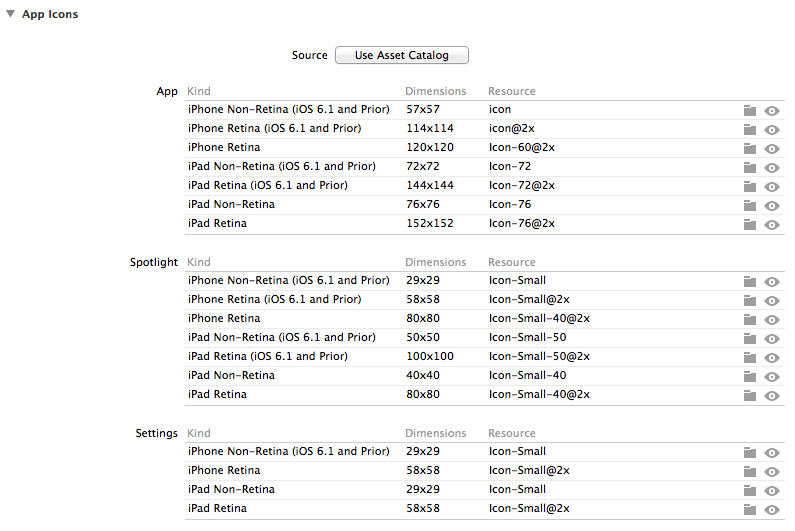
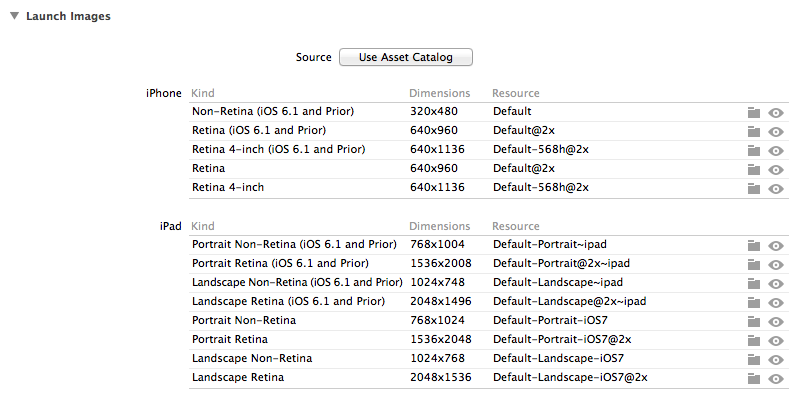
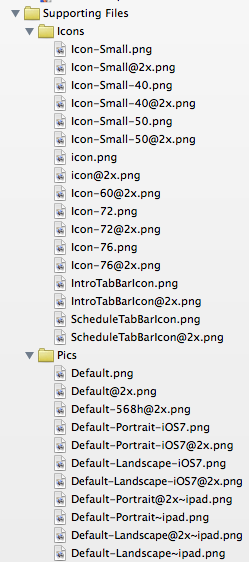
其他控件的大小:
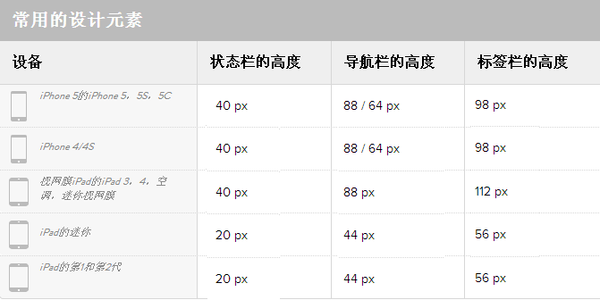
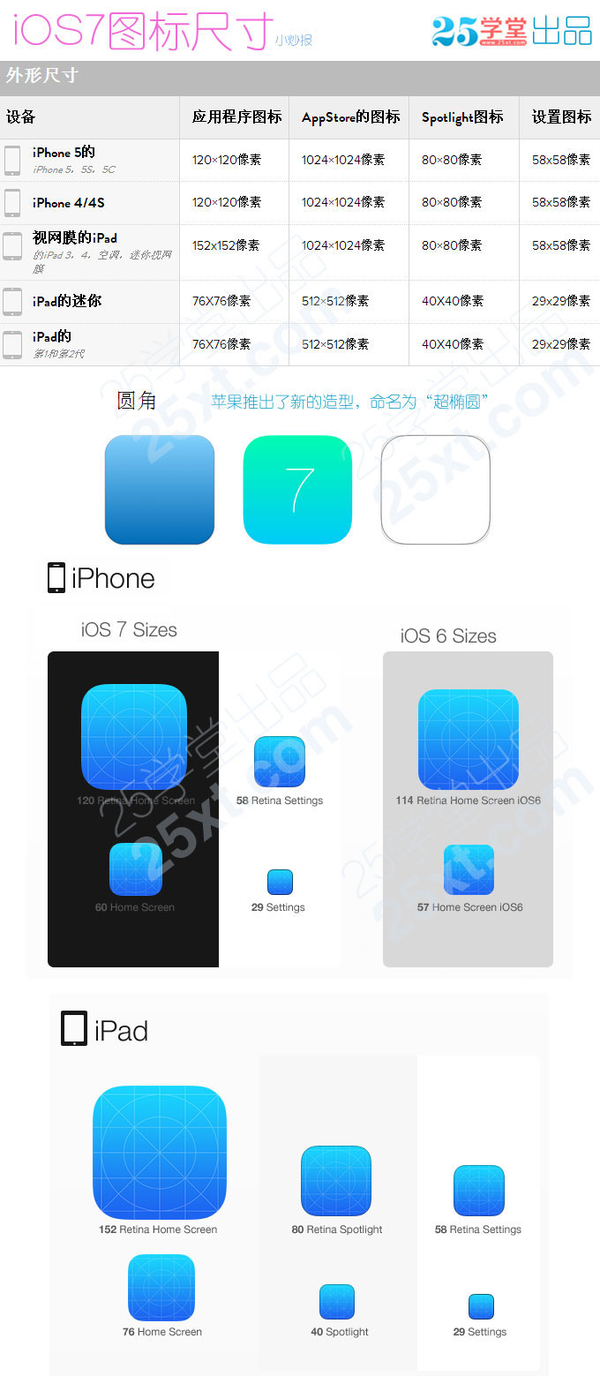
大概就是这样:
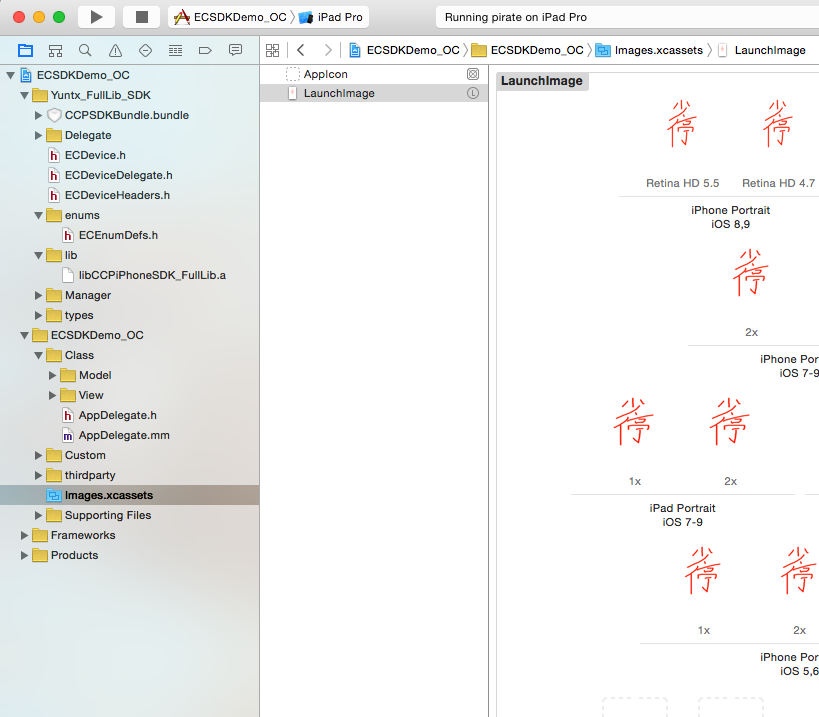
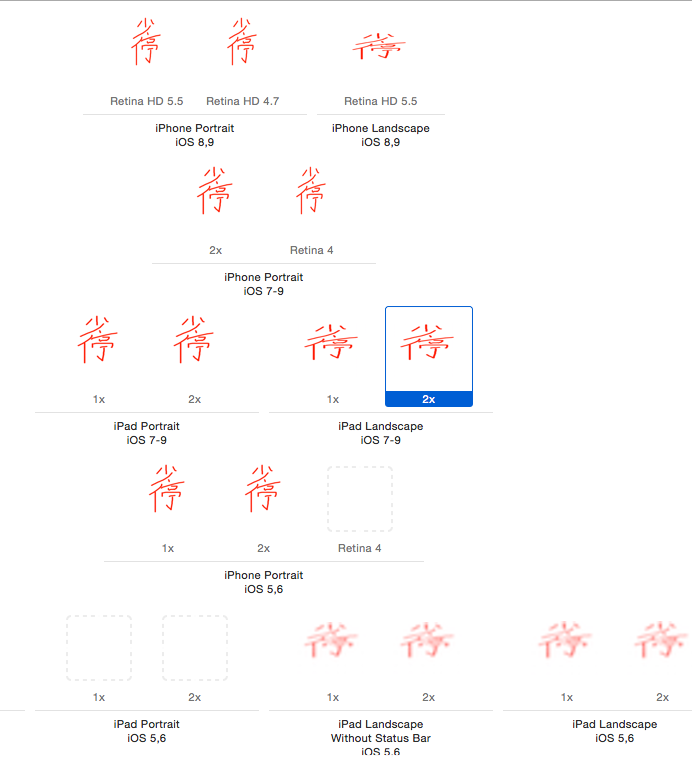
iPhone Portrait iOS 8,9 Retina HD 5.5 (1242×2208) @3x
Retina HD 4.7 (750×1334) @2x
iPhone Landscape iOS 8,9 Retina HD 5.5 (2208×1242)
iPhone Portrait iOS 7-9 -2x (640×960) @2x
-Retina 4 (640×1136) @2x
iPhone Portrait iOS 5,6 1x (320×480) @1x
-2x (640×960) @2x
Retina4 (640×1136) @2x
ipad protrait ios 7-9 1x (768x1024)
2x (1536x2048)
ipad landscape ios 7-9 1x (1024x768)
2x (2048x1536)
网友测试:
- 用于iPhone6p的1242x2208,或者1080x1920,也就是Retina HD 5.5
- 用于iPhone6的750x1334,也就是Retina HD 4.7
- 用于4寸屏(iPhone5/5s)的640x1136,就是Retina 4 2X
- 用于3.5寸(iPhone4/4s)的640x960,就是2x
- 3.5英寸:640 x 960
4.0英寸:640 x 1136
4.7英寸:750 x 1334
5.5英寸:1242 x 2208
iPad:768 x 1024
- 3.5英寸:640 x 960
iOS开发:icon和启动图尺寸的更多相关文章
- iOS开发:icon和启动图尺寸(转)
转至:http://www.cnblogs.com/shaoting/p/4941634.html 歪果仁的总结: Asset iPhone 6s Plus and iPhone 6 Plus (@3 ...
- iOS - iPhone屏幕适配/启动图适配/APP图标适配(iPhone最全尺寸包含iPhoneX/XR/XS/XS Max等)
趁iPhone新品还没有发布,先整理一下屏幕适配.启动图适配.APP图标适配的笔记,方便以后查阅: 注:部分图片来源于网络 违删; (一)iPhone屏幕适配: (1)屏幕分辨率: ①设计尺寸规范(表 ...
- ios 和安卓常用图标、启动图 尺寸
---------------------------------------------ios---------------------------------------------------- ...
- 17.iOS App设置icon,启动图,App名称的方法
icon:选择Assets-->AppIcon-->将各种尺寸的icon拖拽到相应的框中. APP名称:选择info-->Bundle name,修改APP名字. 启动图: 首先点击 ...
- [摘抄]iOS App icon、启动页、图标规范
以下内容都是我在做App时通过自己的经验和精品的分析得来的,希望会帮助到你.但是有时个别情况也要个别分析,要活学活用. 一. App Icon 在设计iOS App Icon时,设计师不需要切圆角, ...
- 分分钟解决iOS开发中App启动广告的功能
前不久有朋友需要一个启动广告的功能,我说网上有挺多的,他说,看的不是很理想.想让我写一个,于是乎,抽空写了一个,代码通俗易懂,简单的封装了一下,各种事件用block回调的,有俩种样式的广告,一种是全屏 ...
- iOS程序两中启动图方式和一些坑LaunchImage 和 Assets.xcassets(Images.xcassets)
一.通过LaunchScreen.storyboard 作启动图 1>在LaunchScreen.storyboard中拖拽一个imageView放上启动图片 注意:记得勾选右边的 User a ...
- iOS开发之-- 设置启动图片
一.添加启动图片 点击Assets.xcassets进入图片管理,右击,弹出"New Launch Image"或点下面的+号创建Launch Image: 如图,右侧的勾选可以让 ...
- iOS开发 - App程序启动原理
Info.plist和pch文件的作用 建立一个project后,会在Supporting files目录下看到一个"project名-Info.plist"的文件,该文件对pro ...
随机推荐
- Linux基础:软件安装(rpm,yum,源代码)
Software Installation on Linux Linux安装分为rpm包(可通过yum或者是rpm命令安装)和源码包(源代码或者是编译过的二进制码)两种. Linux是开源系统,很多应 ...
- WPF:行列显示
新建显示病人信息控件PatientElement Add-->NewItem-->WPF-->UserControl(WPF),名称:PatientElement.xmal < ...
- python中的binascii
import binascii as B s = 'abcde' h = B.b2a_hex(s) # 字符串转16进制 '6162636465' h = B.hexlify(s) # 作用同上 s ...
- SQL批量删除与批量插入
批量删除: DELETE FROM MyTable WHERE ID IN (1,2); 批量插入: INSERT INTO MyTable(ID,NAME) VALUES(1,'123');INSE ...
- IKAnalyzer进行中文分词和去停用词
最近学习主题模型pLSA.LDA,就想拿来试试中文.首先就是找文本进行切词.去停用词等预处理,这里我找了开源工具IKAnalyzer2012,下载地址:(:(注意:这里尽量下载最新版本,我这里用的IK ...
- 问题解决The connection to adb is down, and a severe error has occured.
遇到问题描述: 运行android程序控制台输出 [2013-06-25 11:10:32 - MyWellnessTracker] The connection to adb is down, an ...
- tomcat 下虚拟机部署导致应用filter失效的问题
遇到一个困扰我两天的问题 服务器的tomcat上面挂了3个项目 1个项目在D:\tomcat\\webapps\ROOT下 运行正常 1个项目在D:\heyefan下 运行正常 1个项目在D:\MA ...
- Python中的*args和**kwargs
原文地址:http://www.linuxidc.com/Linux/2011-10/45083.htm 先来看个例子: ,2,3,4) foo(a=1,b=2,c=3) foo(1,2,3,4, a ...
- 二模 (4)day2
第一题: 题目大意:给出1~n的一个排列,统计该排列有多少个长度为奇数的连续子序列的中位数是b.中位数是指把所有元素从小到大排列后,位于中间的数. N<=100000 1.考虑到一个符合要求的连 ...
- 飞天诚信usb-key登录windows+远程桌面
最近在尝试用智能卡做身份验证,以飞天诚信的ePass3000为例. 1.网络环境搭建: 用3台虚机+1台实体机搭一个单独的测试网段:172.16.188.x,如下: 机器名 IP 操作系统 作用 do ...