
Linux上安装Bugzilla4.4小记
因项目需要,我受命在一台Linux服务器上搭建一个Bugzilla,进过一天的调试,这项任务总算完成了。现在可以肯定的说,安装过程不复杂,基本就是解压,填参数,执行命令。Bugzilla要跑起来,本机的MySQL和Sandmail不是必须的,你可以用其它机器上的MySQL代替本机MySQL,可以用SMTP方式代替本机sendmail。本机的Apache(httpd)是必须的,当然安装和使用Apache也容易,总之不要被大部头的网文吓到,犯错不要紧,多试几次也就弄出来了。
今天先把安装过程记录在这里。
1.准备工作--安装CPAN
先直接从http://search.cpan.org/CPAN/authors/id/A/AN/ANDK/CPAN-2.00.tar.gz下载,若此网址失效可以从网址http://search.cpan.org/~andk/CPAN/lib/CPAN.pm去寻找CPAN-2.00.tar.gz下载,可以从 http://pan.baidu.com/s/1wwEo3 下载。
将CPAN-2.00.tar.gz下载下来后执行下面命令:
# tar -zxvf CPAN-2.00.tar.gz
# cd CPAN-2.00
# perl Makefile.PL
# make
# make install
2.安装Bugzilla
下载bugzilla-4.4.tart.gz (http://pan.baidu.com/s/1l7sL9)后,解压
#tar xvzf bugzilla-4.4.tart.gz,之后得到目录bugzilla-4.4
然后执行命令#cp bugzilla-4.4 /var/www/html/bugzilla(/var/www/html/是httpd对外服务目录)
之后,进入目录/var/www/html/bugzilla
#cd /var/www/html/bugzilla
执行命令#./checksetup.pl --check-modules
此命令用于检查所需要的peal模块是否都已安装,程序会提示那些需要安装,哪些是可选的,你按命令把必需的装上就行。如果偷懒的话可以执行#perl install-module.pl --all让系统自己忙去。
之后执行#./checksetup.pl ,这一步是用来生成localconfig文件,得到这个文件需要你手工修改好,主要是改这些信息。
$webservergroup='apache' #apache使用的group
$db_driver = 'mysql'; #使用的数据库
$db_host = '192.168.0.104'; #数据库服务器ip
$db_name = 'bugs'; #数据库名称
$db_user = 'root'; #连接数据库的用户名
$db_pass = '123456';#连接数据库的用户密码
$db_port = 3306;#连接数据库的端口
修改完数据库信息后,再一次执行#./checksetup.pl,执行完Bugzilla需要的表就会创建出来了。数据库生成完成后,将会提示输入管理员邮件地址、用户名和密码。这个最好记下来,以后还会用它们登录系统(管理员邮件地址/密码)进行配置。
到这里,Bugzilla的事情就做完了,接下来是Httpd的事情。
3.配置httpd
首先,需要在httpd安装目录下创建一个文件bugzilla,使用如下命令
# vi /etc/httpd/conf.d/bugzilla
在其中输入一行
Alias /bugzilla/ "/var/www/html/bugzilla/"
然后:wq保存退出,这样做的意义是让我们可以通过http://serverip/bugzilla来访问BugZilla。
有些网文居然把Alias /bugzilla/ "/var/www/html/bugzilla/"这句话说是写到httpd.conf文件里面,别被误导了。
然后,还要在/etc/httpd/conf/httpd.conf里面加入如下内容:
<Directory /var/www/html/bugzilla>
AddHandler cgi-script .cgi
Options +ExecCGI
DirectoryIndex index.cgi index.html
AllowOverride Limit FileInfo Indexes Options
</Directory>
然后使用#service httpd restart重启Httpd就好了。
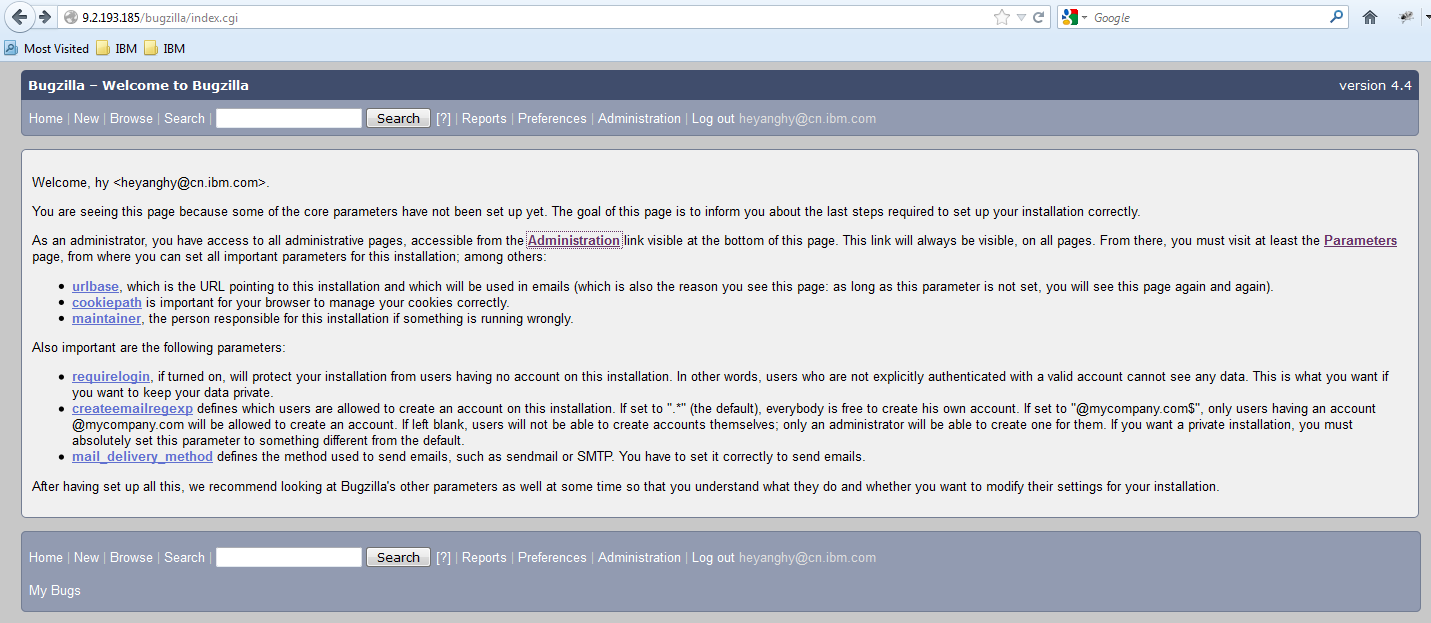
之后就可以通过http://serverip/bugzilla来看到如下页面:

然后,使用前面记下来的管理员邮件地址和密码登录,进去后点Parameters再点左边的Email菜单。
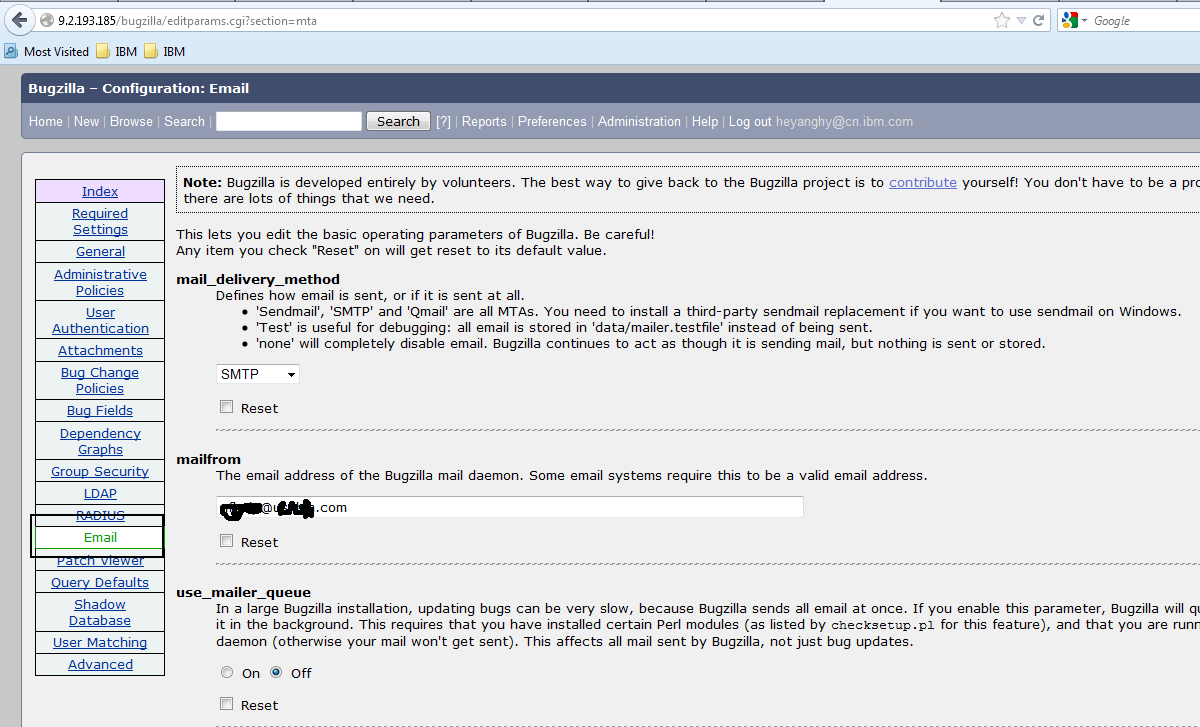
设置以下几项,我设置的自己的网易邮箱,供参照
Mail_delivery_method=SMTP
Mailfrom=myuser@163.com
Smtpserver=smtp.163.com
Smtp_username=myuser@163.com
Smtp_password=mypassword
如果不走界面,直接修改/var/www/html/bugzilla/data/params文件也是可行的,上面那些值都在里面。
不幸的是,注册用户事给用户发邮件没有成功,错误如下:
An unexpected error occurred. This could be a temporary problem, or some code is behaving incorrectly. If this problem persists, please email this page to nXXXp@XXX.com with details of what you were doing at the time this message appeared.
URL: http://9.2.193.185/bugzilla/createaccount.cgi?login=XXX%40163.com&token=1380208497-_aNlyyuqOCh97LmD_p-b_9o9PgnfLVXR3D0eXWUeAoQ
There was an error sending mail from 'nXXXp@XXX.com' to 'XXX@163.com': Couldn't authenticate '****:...'
Traceback:
at Bugzilla/Mailer.pm line 174
Bugzilla::Mailer::MessageToMTA(...) called at Bugzilla/Token.pm line 76
Bugzilla::Token::issue_new_user_account_token(...) called at Bugzilla/User.pm line 2039
Bugzilla::User::check_and_send_account_creation_confirmation(...) called at /var/www/html/bugzilla/createaccount.cgi line 37
具体原因不明,现正调查中。
2013年9月27日14:26:59
将Mail_delivery_method改成TEST之后,/var/www/html/bugzilla/data/mailer.testfile里面是有内容的,
...
From - Fri, 27 Sep 2013 02:32:32 -0400
From: XXXX@XXX.XXX.com^M
To: 123@136.com^M
Subject: Bugzilla: confirm account creation^M
X-Bugzilla-Type: admin^M
X-Bugzilla-URL: ^M
Auto-Submitted: auto-generated^M
MIME-Version: 1.0^M
Date: Fri, 27 Sep 2013 02:32:32 -0400^M
Content-Type: text/plain; charset="UTF-8"^M
^M
Bugzilla has received a request to create a user account^M
using your email address (123@136.com).^M
^M
To continue creating an account using this email address, visit the ^M
following link by September 30, 2013 at 02:32 EDT:^M
^M
token.cgi?t=vPctKScNdR&a=request_new_account^M
^M
If you did not receive this email before September 30, 2013 at 02:32 EDT or^M
you wish to create an account using a different email address you can begin^M
again by going to:^M
^M
createaccount.cgi^M
^M
PRIVACY NOTICE: Bugzilla is an open bug tracking system. Activity on most^M
bugs, including email addresses, will be visible to the public. We recommend^M
using a secondary account or free web email service (such as Gmail, Yahoo,^M
Hotmail, or similar) to avoid receiving spam at your primary email address.^M
^M
If you do not wish to create an account, or if this request was made in^M
error you can do nothing or visit the following link:^M
^M
token.cgi?t=vPctKScNdR&a=cancel_new_account^M
^M
If the above links do not work, or you have any other issues regarding^M
your account, please contact administration at nfhelp@us.ibm.com.
...
说明Bugzilla与SMTP服务器之间出了问题,而Bugzilla内部工作正常。
继续调查中.
2013年9月28日0:45:25补记
刚才将use_mailer_queue改成Off,然后再开一个新Account,系统提示邮件发出去了,检查下邮箱,确实来了,如下
Bugzilla has received a request to create a user account
using your email address (XXXXXX@XXXX.com).
To continue creating an account using this email address, visit the
following link by September 30, 2013 at 12:28 EDT:
token.cgi?t=X6rGyNmOdv&a=request_new_account
If you did not receive this email before September 30, 2013 at 12:28 EDT or
you wish to create an account using a different email address you can begin
again by going to:
createaccount.cgi
PRIVACY NOTICE: Bugzilla is an open bug tracking system. Activity on most
bugs, including email addresses, will be visible to the public. We recommend
using a secondary account or free web email service (such as Gmail, Yahoo,
Hotmail, or similar) to avoid receiving spam at your primary email address.
If you do not wish to create an account, or if this request was made in
error you can do nothing or visit the following link:
token.cgi?t=X6rGyNmOdv&a=cancel_new_account
If the above links do not work, or you have any other issues regarding
your account, please contact administration at nfhelp@us.ibm.com.
然后我用一个网易和gmail邮箱试试,也都收到邮件了,说明邮件系统好用了。
但是除了use_mailer_queue改成Off一项,其它都没有变化,邮件发送就好用了,我上午也试过同样的方式,为啥不好用呢?难道上午Bugzilla与SMTP服务器之间出了问题,晚上就OK了。
明天再在我的新机器上试试装装看,要真是连接问题这两天功夫花的就有点冤了。
2013年9月30日19:43:38补记
现在Bugzilla邮件系统一切正常,估计真是连接问题。
Linux上安装Bugzilla4.4小记的更多相关文章
- linux上安装配置samba服务器
linux上安装配置samba服务器 在linux上安装配置samba服务器 在这给大家介绍一个不错的家伙,samba服务.如果您正在犯愁,如何在Windows和Linux之间实现资源共享,就请看看这 ...
- 在Windows和Linux上安装paramiko模块以及easy_install的安装方法
一.paramiko模块有什么用? paramiko是用python语言写的一个模块,遵循SSH2协议,支持以加密和认证的方式,进行远程服务器的连接.由于使用的是python这样的能够跨平台运行的语言 ...
- 在Linux上安装Oracle RAC 12 c(12.1) 虚拟机,一步一步向导
Oracle RAC 12 c(12.1)在Linux上安装虚拟机,一步一步向导 今天我们将看到如何安装 12 c版本1 RAC(真正的应用程序集群)数据库2 Linux 64位的虚拟机 使用VMWa ...
- WINDOWS和Linux上安装php7 alpha 并安装 yaf
WINDOWS和Linux上安装php7 alpha 并安装 yaf PHP技术 widuu 2个月前 (06-15) 126浏览 0评论 windows 1.windows上安装 php7 ...
- 在Windows和Linux上安装paramiko模块
一.paramiko模块有什么用? paramiko是用python语言写的一个模块,遵循SSH2协议,支持以加密和认证的方式,进行远程服务器的连接.由于使用的是python这样的能够跨平台运行的语言 ...
- Linux上安装使用boost入门指导
Data Mining Linux上安装使用boost入门指导 获得boost boost分布 只需要头文件的库 使用boost建立一个简单的程序 准备使用boost二进制文件库 把你的程序链接到bo ...
- 如何在Linux上安装Storm
Storm是开源的分布式实时计算系统,能够让数据流处理变得简单.可靠,也因此在大数据领域有广泛的实际 应用.下面介绍一下如何在Linux系统上安装Storm.根据Storm官网介绍,安装Storm软件 ...
- linux上安装Drupal
linux上安装Drupal 前言:国内用drupal的并不太多,网上资料也很少.要注意的是drupal尽量别使用apt来安装,特别是ubuntu平台的drupal做出了一定的更改,会妨碍后期的学习和 ...
- 在Linux上安装Hadoop
先决条件: Hadoop是用JAVA写的,所以首先要安装Java.在Ubuntu上安装JDK见:http://blog.csdn.net/microfhu/article/details/766739 ...
随机推荐
- tyvj 1031 热浪 最短路
热浪 Time Limit: 1 Sec Memory Limit: 256 MB 题目连接 http://tyvj.cn/p/1031 Description 德克萨斯纯朴的民眾们这个夏天正在遭受 ...
- UVALive 4868 Palindrometer 暴力
F - Palindrometer Time Limit:3000MS Memory Limit:0KB 64bit IO Format:%lld & %llu Submit ...
- Codeforces Round #283 (Div. 2) B. Secret Combination 暴力水题
B. Secret Combination time limit per test 2 seconds memory limit per test 256 megabytes input standa ...
- Alpha冲刺(4/10)——追光的人
1.队友信息 队员学号 队员博客 221600219 小墨 https://www.cnblogs.com/hengyumo/ 221600240 真·大能猫 https://www.cnblogs. ...
- centos7安装kafka_2.11-1.0.0 新手入门
系统环境 1.操作系统:64位CentOS Linux release 7.2.1511 (Core) 2.jdk版本:1.8.0_121 3.zookeeper版本:zookeeper-3.4.9. ...
- java并发基础(一)
最近在看<java并发编程实战>,希望自己有毅力把它读完. 线程本身有很多优势,比如可以发挥多处理器的强大能力.建模更加简单.简化异步事件的处理.使用户界面的相应更加灵敏,但是更多的需要程 ...
- [Dynamic Language] pyspark Python3.7环境设置 及py4j.protocol.Py4JJavaError: An error occurred while calling z:org.apache.spark.api.python.PythonRDD.collectAndServe解决!
pyspark Python3.7环境设置 及py4j.protocol.Py4JJavaError: An error occurred while calling z:org.apache.spa ...
- 解决Oracle11g空表无法导出的问题
Oracle11g 新增參数deferred_segment_creation ,建库的时候默认值为true,意思是延时载入,当表中不存在数据的时候,不为这个表创建空间,当你导出的时候会发现非常多表 ...
- “System.InvalidOperationException”类型的未经处理的异常在 ESRI.ArcGIS.AxControls.dll 中发生
问题描述: 新手们进行ArcGIS ArcObject开发时经常会遇到各种十分古怪的问题,比如下面的这个问题: “System.InvalidOperationException”类型的未经处理的异常 ...
- EF三种加载方法
EF性能之关联加载 鱼和熊掌不能兼得 ——中国谚语 一.介绍 Entity Framework作为一个优秀的ORM框架,它使得操作数据库就像操作内存中的数据一样,但是这种抽象是有性能代价的,故鱼和 ...