
IOS的滑动菜单(Sliding Menu)的具体写法(附代码)
滑动菜单是一个很流行的IOS控件
先上效果图:
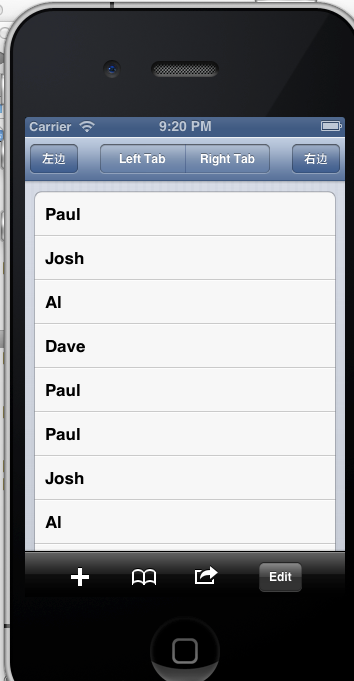
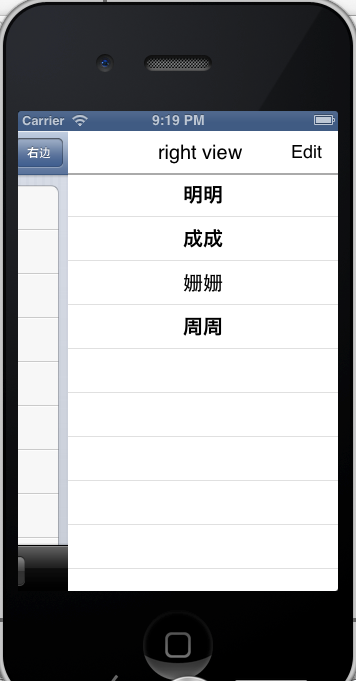
这里使用github的JTReveal框架来开发,链接是https://github.com/agassiyzh/JTRevealSidebarDemo/commit/ac03d9d7be4f1392020627e5fe8c22b972de4704
我们的ViewController要实现protocol JTRevealSidebarV2Delegate的两个optional方法
@optional

- (UIView *)viewForLeftSidebar;

- (UIView *)viewForRightSidebar;
- (UIView *)viewForLeftSidebar {
CGRect mainFrame = [[UIScreen mainScreen] applicationFrame];
UITableView *view = self.leftSidebarView;
if ( ! view) {
view = self.leftSidebarView = [[UITableView alloc] initWithFrame:CGRectMake(0, mainFrame.origin.y, 270, mainFrame.size.height) style:UITableViewStylePlain];
view.dataSource = self;
view.delegate = self;
view.autoresizingMask = UIViewAutoresizingFlexibleLeftMargin | UIViewAutoresizingFlexibleHeight;
view.backgroundColor = [UIColor whiteColor];
UIView* rightHeaderView = [[UIView alloc] initWithFrame:CGRectMake(0, 0, 250, 42)];
rightHeaderView.backgroundColor = [UIColor whiteColor];
rightHeaderView.opaque = NO;
UILabel* lable = [[UILabel alloc] initWithFrame:CGRectMake(90, 2, 100, 38)];
[lable setText:@"left view"];
UIFont* font = [UIFont systemFontOfSize:20];
lable.font = font;
[rightHeaderView addSubview:lable];
UIView* lines = [[UIView alloc] initWithFrame:CGRectMake(0, 42, 300, 2)];
lines.backgroundColor = [UIColor lightGrayColor];
[rightHeaderView addSubview:lines];
UIButton* button = [[UIButton alloc] initWithFrame:CGRectMake(213, 2, 53, 38)];
[button setTitle:@"Edit" forState:UIControlStateNormal];
[button setTitleColor:[UIColor blackColor] forState:UIControlStateNormal];
[button addTarget:self action:@selector(leftButtonClicked:) forControlEvents:UIControlEventTouchUpInside];
[rightHeaderView addSubview:button];
view.tableHeaderView = rightHeaderView;
}
return view;
}
在ViewController先初始化title
-(void) addTilteBar{

    UIBarButtonItem *back = [[UIBarButtonItem alloc] initWithTitle:@"左边" style:UIBarButtonItemStylePlain target:self action:@selector(showLeftSidebar:)];

    self.navigationItem.leftBarButtonItem = back;

    [back release];

    NSArray* array = [[NSArray alloc] initWithObjects:@"Left Tab",@"Right Tab",nil];

    UISegmentedControl* segment = [[UISegmentedControl alloc] initWithItems:array];

    CGRect rect = CGRectMake(80.0f, 8.0f, 170.0f, 30.0f);

    segment.frame = rect;

    segment.segmentedControlStyle = UISegmentedControlStyleBar;

    segment.selectedSegmentIndex = -1;

    [segment addTarget:self action:@selector(segmentAction:) forControlEvents:UIControlEventValueChanged];

    self.navigationItem.titleView = segment;

    [segment release];

    UIBarButtonItem *mapButton = [[UIBarButtonItem alloc]

                                  initWithTitle:@"右边"

                                  style:UIBarButtonItemStyleBordered

                                  target:self

								  action:@selector(revealRightSidebar:)];

//       [button2 addTarget:self action:@selector(revealRightSidebar:) forControlEvents:UIControlEventTouchUpInside];

    self.navigationItem.rightBarButtonItem = mapButton;

    self.navigationItem.revealSidebarDelegate = self;

    [mapButton release];
点击左边的事件是
- (void)showLeftSidebar:(id)sender {

    JTRevealedState state = JTRevealedStateLeft;

    if (self.navigationController.revealedState == JTRevealedStateLeft) {

        state = JTRevealedStateNo;

    }

    [self.navigationController setRevealedState:state];

}
界面中这些tableview的Delegate和dataSource共用一个
- (NSInteger)tableView:(UITableView *)tableView numberOfRowsInSection:(NSInteger)section

{

    if (tableView == self.rightSidebarView) {

        return [RightArray count];

    }else if(tableView == self.leftSidebarView) {

        return [leftArray count];

    }else{

         return [names count];

    }

}

- (UITableViewCell *)tableView:(UITableView *)tableView cellForRowAtIndexPath:(NSIndexPath *)indexPath

{

    if (tableView == self.rightSidebarView) {

        static NSString *CellIdentifier = @"rightcell";

        UITableViewCell *cell = [tableView dequeueReusableCellWithIdentifier:CellIdentifier];

        if (cell == nil) {

            cell = [[[UITableViewCell alloc] initWithStyle:UITableViewCellStyleDefault reuseIdentifier:CellIdentifier] autorelease];

        }

        // Configure the cell...

        NSUInteger row = [indexPath row];

       // NSUInteger section = [indexPath section];

       // cell.textLabel.textAlignment = UITextAlignmentCenter;

        cell.textLabel.textAlignment = NSTextAlignmentCenter;

        cell.textLabel.text = [RightArray objectAtIndex:row];

        return cell;

    } else if(tableView == self.leftSidebarView) {

        static NSString *CellIdentifier = @"left_cell";

        UITableViewCell *cell = [tableView dequeueReusableCellWithIdentifier:CellIdentifier];

        if (cell == nil) {

            cell = [[[UITableViewCell alloc] initWithStyle:UITableViewCellStyleDefault reuseIdentifier:CellIdentifier] autorelease];

        }

        // Configure the cell...

        NSUInteger row = [indexPath row];

        // NSUInteger section = [indexPath section];

        // cell.textLabel.textAlignment = UITextAlignmentCenter;

        cell.textLabel.textAlignment = NSTextAlignmentCenter;

        cell.textLabel.text = [leftArray objectAtIndex:row];

        return cell;

    }else {

        static NSString *TableSampleIdentifier = @"TableSampleIdentifier";

//        UITableViewCell *cell = [[[UITableViewCell alloc] initWithFrame:CGRectZero reuseIdentifier:nil] autorelease];

        UITableViewCell *cell = [[UITableViewCell alloc] initWithStyle:UITableViewCellStyleDefault reuseIdentifier:TableSampleIdentifier];

        cell.textLabel.text = [names objectAtIndex:indexPath.row];

        return cell;

    }

}
IOS的滑动菜单(Sliding Menu)的具体写法(附代码)的更多相关文章
- iOS顶部滑动菜单:FDSlideBar 与NinaPagerView
FDSlideBar 是一个顶部滑动菜单,如常见的网易.腾讯新闻等样式.该控件支持自定颜色.字体等多种样式风格.菜单间切换流畅,具有较好的体验性.下部的内容展示经过挣 扎,最后选择了 UITableV ...
- Android 学习笔记之AndBase框架学习(七) SlidingMenu滑动菜单的实现
PS:努力的往前飞..再累也无所谓.. 学习内容: 1.使用SlidingMenu实现滑动菜单.. SlidingMenu滑动菜单..滑动菜单在绝大多数app中也是存在的..非常的实用..Gith ...
- IOS学习之路十(仿人人滑动菜单Slide-out Sidebar Menu)
最近滑动菜单比较流行,像facebook和人人等都在使用滑动菜单,今天做了一个小demo大体效果如下: 这次用了一个开源的项目ECSlidingViewController这个也是一个挺著名的托管在G ...
- ionic教程之Win10环境下ionic+angular实现滑动菜单及列表
写博客,不容易,你们的评论和转载,就是我的动力,但请注明出处,隔壁老王的开发园:http://www.cnblogs.com/titibili/p/5124940.html 2016年1月11日 21 ...
- Android UI(三)SlidingMenu实现滑动菜单(详细 官方)
Jeff Lee blog: http://www.cnblogs.com/Alandre/ (泥沙砖瓦浆木匠),retain the url when reproduced ! Thanks ...
- bootstrap-简单实用的垂直手风琴滑动菜单列表特效
前端: <html lang="zh"> <head> <meta charset="UTF-8"> <meta ht ...
- html5手机端的点击弹出侧边滑动菜单代码
效果预览:http://hovertree.com/texiao/html5/19/ 本效果适用于移动设备,可以使用手机等浏览效果. 源码下载:http://hovertree.com/h/bjaf/ ...
- Android 滑动菜单框架--SwipeMenuListView框架完全解析
SwipeMenuListView(滑动菜单) A swipe menu for ListView.--一个非常好的滑动菜单开源项目. Demo 一.简介 看了挺长时间的自定义View和事件分发,想找 ...
- Android 3D滑动菜单完全解析,实现推拉门式的立体特效
转载请注明出处:http://blog.csdn.net/guolin_blog/article/details/10471245 在上一篇文章中,我们学习了Camera的基本用法,并借助它们编写了一 ...
随机推荐
- 图片切换(timer控件与ImagesList结合使用)
private void Form3_Load(object sender, EventArgs e) { //打开窗体的时候显示第一张图片 this.pictureBox1.Image = this ...
- 【读】为什么BIO效率低下
原因: 假如有10000个连接,4核CPU ,那么bio 就需要一万个线程,而nio大概就需要5个线程(一个接收请求,四个处理请求).如果这10000个连接同时请求,那么bio就有10000个线程抢四 ...
- 使用mybatis-generator生成自动代码
2019-02-22 配置文件: pom.xml 添加 dependency plugin 基于mybatis-plus <dependency> <groupId>o ...
- day-01mysql数据库下载安装卸载及基本操作
MySQL5.5.40破解版地址(永久有效):链接:https://pan.baidu.com/s/1n-sODjoCdeSGP8bDGxl23Q 密码:qjjy 第2节 数据库的介绍 MySQL:开 ...
- 使用css实现炫酷的横屏滚动效果
炫酷的横屏滚动效果css实现 DEMO: https://codepen.io/kobako/pen/BxVLLm 我们对滚动条都不陌生.平时浏览的网页,进度条通常是垂直方向的,内容从上往下排列.但是 ...
- mysql_real_escape_string与mysqli_real_escape_string
参考 mysql_real_escape_string mysqli_real_escape_string mysql_real_escape_string是用来转义字符的,主要是转义POST或GE ...
- 判断css文件是否加载完成
function cssReady(fn, link) { var d = document, t = d.createStyleSheet, r = t ? 'rules' : 'cssRules' ...
- 菜鸟的HTML学习之路
开发网站流程 确定风格.功能(论坛.留言板.支付.用户登录等). 美工制作网页效果图(首页.列表页.内容页). 制作人员切图排版,排成网页形式. 后台程序开始写程序. 前台与后台结合. HTML注释 ...
- hadoop HA集群搭建步骤
NameNode DataNode Zookeeper ZKFC JournalNode ResourceManager NodeManager node1 √ √ √ √ node2 ...
- 优雅的实现多类型列表的Adapter
1引言 在开发中经常会遇到,一个列表(RecyclerView)中有多种布局类型的情况.前段时间,看到了这篇文章 [译]关于 Android Adapter,你的实现方式可能一直都有问题(http:/ ...