
UIKit 框架之UIAlertController
IOS8之后增加了UIAlertController类,它可以表示UIAlertView和UIActionSheet.它继承自UIViewController。
- (BOOL)application:(UIApplication *)application didFinishLaunchingWithOptions:(NSDictionary *)launchOptions {
    self.window.backgroundColor=[UIColor whiteColor];
    [self.window makeKeyAndVisible];

    ViewController *vc=[[ViewController alloc]init];
    UINavigationController *nvc=[[UINavigationController alloc]initWithRootViewController:vc];
    self.window.rootViewController=nvc;
    return YES;
}
//
//  ViewController.m
//  AlertVC
//
//  Created by City--Online on 15/5/25.
//  Copyright (c) 2015年 XQB. All rights reserved.
//

#import "ViewController.h"

@interface ViewController ()

@end

@implementation ViewController

- (void)viewDidLoad {
    [super viewDidLoad];
    UIButton *btn=[UIButton buttonWithType:UIButtonTypeCustom];
    btn.frame=CGRectMake(100, 100, 50, 50);
    [btn setTitle:@"按钮" forState:UIControlStateNormal];
    [btn setTitleColor:[UIColor blackColor] forState:UIControlStateNormal];
    btn.layer.borderWidth=2.0;
    [btn addTarget:self action:@selector(btnClick:) forControlEvents:UIControlEventTouchUpInside];
    [self.view addSubview:btn];

}
-(void)btnClick:(id)sender
{
//    UIAlertController *alert=[UIAlertController alertControllerWithTitle:@"Title" message:@"message" preferredStyle:UIAlertControllerStyleAlert];
//
//    [alert addTextFieldWithConfigurationHandler:^(UITextField *textField) {
//        textField.text=@"name";
//        textField.clearsOnBeginEditing=YES;
//    }];
//    [alert addTextFieldWithConfigurationHandler:^(UITextField *textField) {
//        textField.text=@"password";
//        textField.clearsOnBeginEditing=YES;
//    }];

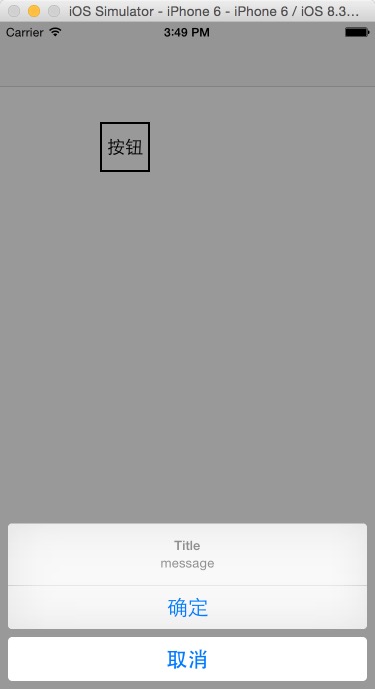
    UIAlertController *alert=[UIAlertController alertControllerWithTitle:@"Title" message:@"message" preferredStyle:UIAlertControllerStyleActionSheet];

    UIAlertAction *actionOk=[UIAlertAction actionWithTitle:@"确定" style:UIAlertActionStyleDefault handler:^(UIAlertAction *action) {
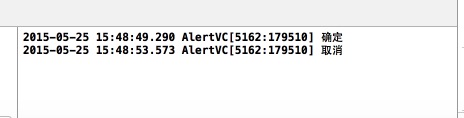
        NSLog(@"确定");
    }];
    UIAlertAction *actionCancel=[UIAlertAction actionWithTitle:@"取消" style:UIAlertActionStyleCancel handler:^(UIAlertAction *action) {
        NSLog(@"取消");
    }];
    [alert addAction:actionOk];
    [alert addAction:actionCancel];
    [self presentViewController:alert animated:YES completion:nil];
}
- (void)didReceiveMemoryWarning {
    [super didReceiveMemoryWarning];
    // Dispose of any resources that can be recreated.
}

@end

UIKit 框架之UIAlertController的更多相关文章
- Swift - 重写UIKit框架类的init初始化方法(以UITabBarController为例)
原来写了篇文章讲UITabBarController的用法,当时是从UIViewController跳转到UITabBarController页面,代码如下: 1 self.presentViewCo ...
- UIKit框架
在今后的应用程序构建中,会陆续使用各式各样的控件,因此UIKit框架的引入是必不可少的! 一.简介 UIKitk框架提供一系列的Class(类)来建立和管理iPhone OS应用程序的用户界面接口.应 ...
- iOS学习32之UIKit框架-可视化编程-XIB
1. Interface Builder 可视化编程 1> 概述 GUI : 图形用户界面(Graphical User Interface, 简称GUI, 又称图形化界面) 是指采用图形方式显 ...
- 基础框架Fundation和UIkit框架的定义和使用
Foundation 框架为所有应用程序提供基本的系统服务 您的应用程序以及 UIKit 和其他框架,都建立在 Foundation 框架的基础结构之上.Foundation 框架提供许多基本的对象类 ...
- iOS开发概述UIkit动力学,讲述UIKit的Dynamic特性,UIkit动力学是UIkit框架中模拟真实世界的一些特性。
转发:http://my.oschina.net/u/1378445/blog/335014 iOS UIKit动力学 Dynamics UIAttachmentBehavior 实现iMessage ...
- iOS开发UIKit框架-可视化编程-XIB
1. Interface Builder 可视化编程 1> 概述 GUI : 图形用户界面(Graphical User Interface, 简称GUI, 又称图形化界面) 是指采用图形方式显 ...
- 79、iOS 的Cocoa框架、Foundation框架以及UIKit框架
Cocoa框架是iOS应用程序的基础 1. Cocoa是什么? Cocoa是 OS X和ios 操作系统的程序的运行环境. 是什么因素使一个程序成为Cocoa程序呢?不是编程语言,因为在Cocoa开发 ...
- UIKit 框架之UIView二
下面这些都是UIView一些基本的东西,具体的可以参考UIKit 框架之UIView一博客 一.自定义一个View // // MyView.m // UIView // // Created by ...
- UIKit 框架之Bar、Controller
UIKit框架中有各种Bar,UITabBar.UINavigationBar.UIToolbar.Bar对应的就有一些Item,tabBarItem.navigationItem.toolbarIt ...
随机推荐
- go 编译问题
golang的编译使用命令 go build , go install;除非仅写一个main函数,否则还是准备好目录结构:GOPATH=工程根目录:其下应创建src,pkg,bin目录,bin目录中用 ...
- 使用redis实现【统计文章阅读量】及【最热文章】功能
1.视图函数 # 不需要登录装饰器,匿名用户也可访问def article_detail(request, id, slug): # print(slug,id) article = get_obje ...
- javascript中string与int之间的转换
string转int javascript中提供了两种方法转换为数值(int): var str='15'; var str8='015'; var strChar='12abc'; //first ...
- Nigix配置
- LOJ#3086. 「GXOI / GZOI2019」逼死强迫症(矩阵快速幂)
题面 传送门 题解 先考虑全都放\(1\times 2\)的方块的方案,设防\(i\)列的方案数为\(g_i\),容易推出\(g_i=g_{i-1}+g_{i-2}\),边界条件为\(g_0=g_1= ...
- pymongo学习第1篇——增删改查
参考文档: 1.https://docs.mongodb.org/getting-started/python/ 2.http://api.mongodb.org/python/current/api ...
- 使用browserSync自动刷新
本篇主要是以 http://www.imooc.com/article/14759 为参考来写的: 已经整理到github上:https://github.com/Macaulish/gulp-Bro ...
- Flask从入门到精通之自定义错误界面
如果你在浏览器的地址栏中输入了不可用的路由,那么会显示一个状态码为404 的错误页面.现在这个错误页面太简陋.平庸,而且样式和使用了Bootstrap 的页面不一致. 像常规路由一样,Flask 允许 ...
- 自己实现简单的RSA秘钥生成与加解密(Java )
最近在学习PKI,顺便接触了一些加密算法.对RSA着重研究了一下,自己也写了一个简单的实现RSA算法的Demo,包括公.私钥生成,加解密的实现.虽然比较简单,但是也大概囊括了RSA加解密的核心思想与流 ...
- java中线程池的几种实现方式
1.线程池简介: 多线程技术主要解决处理器单元内多个线程执行的问题,它可以显著减少处理器单元的闲置时间,增加处理器单元的吞吐能力. 假设一个服务器完成一项任务所需时间为:T1 创建 ...