
ActiveMQ安全机制设置
一、设置后台管理密码
a、ActiveMQ使用的是jetty服务器,找到D:\div\apache-activemq-5.11.1\conf\jetty.xml文件:
<bean id="adminSecurityConstraint" class="org.eclipse.jetty.util.security.Constraint">

    <property name="name" value="BASIC" />

    <property name="roles" value="admin" />

    <!-- set authenticate=false to disable login -->

    <property name="authenticate" value="true" />

</bean>
注意:低版本的authenticate的属性默认为"false",需要改为"true",高版本的已经默认为true
b、修改控制台的登录用户名密码conf/jetty-realm.properties文件中
## ---------------------------------------------------------------------------

## Licensed to the Apache Software Foundation (ASF) under one or more

## contributor license agreements.  See the NOTICE file distributed with

## this work for additional information regarding copyright ownership.

## The ASF licenses this file to You under the Apache License, Version 2.0

## (the "License"); you may not use this file except in compliance with

## the License.  You may obtain a copy of the License at

##

## http://www.apache.org/licenses/LICENSE-2.0

##

## Unless required by applicable law or agreed to in writing, software

## distributed under the License is distributed on an "AS IS" BASIS,

## WITHOUT WARRANTIES OR CONDITIONS OF ANY KIND, either express or implied.

## See the License for the specific language governing permissions and

## limitations under the License.

## ---------------------------------------------------------------------------

# Defines users that can access the web (console, demo, etc.)

# username: password [,rolename ...]

#admin: admin, admin

#user: user, user

ljq: ljq, admin
二、消息生产者和消费者密码认证
a、D:\div\apache-activemq-5.11.1\conf\activemq.xml添加生产者和消费者密码认证信息: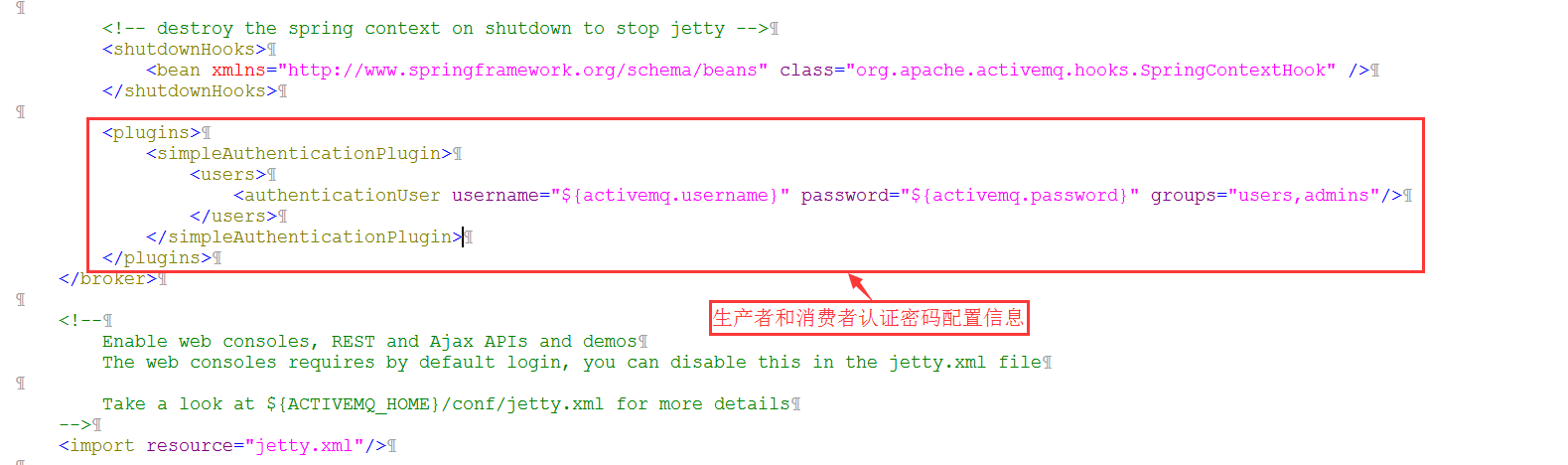
b、设置用户名密码,文件在D:\div\apache-activemq-5.11.1\conf\credentials.properties
## ---------------------------------------------------------------------------

## Licensed to the Apache Software Foundation (ASF) under one or more

## contributor license agreements.  See the NOTICE file distributed with

## this work for additional information regarding copyright ownership.

## The ASF licenses this file to You under the Apache License, Version 2.0

## (the "License"); you may not use this file except in compliance with

## the License.  You may obtain a copy of the License at

##

## http://www.apache.org/licenses/LICENSE-2.0

##

## Unless required by applicable law or agreed to in writing, software

## distributed under the License is distributed on an "AS IS" BASIS,

## WITHOUT WARRANTIES OR CONDITIONS OF ANY KIND, either express or implied.

## See the License for the specific language governing permissions and

## limitations under the License.

## ---------------------------------------------------------------------------

# Defines credentials that will be used by components (like web console) to access the broker

activemq.username=ljq

activemq.password=ljq

guest.password=password
三、在Java生产者和消费者端设置用户名密码才能连接
ConnectionFactory connectionFactory = new ActiveMQConnectionFactory("ljq", "ljq", "failover:(tcp://localhost:61616)?Randomize=false");
ActiveMQ安全机制设置的更多相关文章
- 深入浅出 JMS(三) - ActiveMQ 安全机制
深入浅出 JMS(三) - ActiveMQ 安全机制 一.认证 认证(Authentication):验证某个实体或者用户是否有权限访问受保护资源. MQ 提供两种插件用于权限认证: (一).Sim ...
- 消息中间件-activemq消息机制和持久化介绍(三)
前面一节简单学习了activemq的使用,我们知道activemq的使用方式非常简单有如下几个步骤: 创建连接工厂 创建连接 创建会话 创建目的地 创建生产者或消费者 生产或消费消息 关闭生产或消费者 ...
- ActiveMQ持久化机制和JMS可靠消息
1.ActiveMQ持久化机制 1.1 JDBC将数据持久化到数据库 1.2 AMQ生成日志文件 1.3 KahaDB:本次磁盘生成数据文件(默认) 1.4 LevelDB:谷歌K/V数据库 1.5 ...
- 消息中间件-activemq安全机制
activemq作为消息中间件这样一个独立的个体存在,连通用户和服务器.如果没有一套完备的安全机制去设置用户权限设置消息分发机制可想后果是非常严重.ActiveMQ如果不加入安全机制的话,任何人只要知 ...
- tomcat,zookeeper,activeMQ,Kafka设置jvm参数
1,tomcat设置jvm参数 设置方法: 在tomcat bin 目录增加配置:setenv.sh #add tomcat pid CATALINA_PID="$CATALINA_ ...
- ActiveMQ中Session设置的相关理解
名词解释: P:生产者 C:消费者 服务端:P 或者 ActiveMQ服务 客户端:ActiveMQ服务 或者 C 客户端成功接收一条消息的标志是这条消息被签收.成功接收一条消息一般包括如下三个阶段: ...
- ActiveMQ可靠性机制
消息的签收(Acknowledgment): 客户端成功接收一条消息的标志是这条消息被签收. 成功接收一条消息一般包括如下三个阶段: (1) 客户端接收消息 (2) 客户端处理消息 (3) 消息 ...
- ActiveMQ 用户名密码设置
用户名密码信息保存在conf/jetty-realm.properties文件中 按顺序分别是:用户名.密码.角色名 另:ActiveMQ使用的是jetty服务器, 可以通过设置conf/jetty. ...
- ActiveMQ持久化机制
用户注册成功后发短信提醒 同步http 异步mq JMS中两种通讯模式: 发布订阅 一对多 topic 去过消费者集群的话 都会消费 消息队列 点对点 queue 去过消费者集群的话 ...
随机推荐
- 配置使用sourcemap调试vue源码爬坑
环境: Google Chrome V72.0.3626.109 vue-dev V 2.6.10 爬坑的乐趣就不说了(我恨啊),以下说一下出坑要点 1. 在vue-dev的package.json ...
- Opengl中的gluProject函数认识
1. 从官方说明如下 https://www.opengl.org/sdk/docs/man2/xhtml/gluProject.xml Name gluProject — map object co ...
- The Activities of September
- 导出delphi编写的ios程序在xcode下的日志
- [leetcode] 20. Valid Sudoku
这道题目被放在的简单的类别里是有原因的,题目如下: Determine if a Sudoku is valid, according to: Sudoku Puzzles - The Rules. ...
- DBCC--CHECKDB--结果收集
--由宋沄剑提供 CREATE TABLE [dbo].[dbcc_history]( [Error] [int] NULL, [Level] [int] NULL, [State] [int] NU ...
- C#中的NameValueCollection简介
NameValueCollection继承自NameObjectCollectionBase,并且和一般的键值对不同的是,它支持集合中出现相同的Key. 引用:using System.Collect ...
- JS 中的数据类型转换
转成字符串 String 1. 使用 toString方法 这种方法可以将 number, boolean, object,array,function 转化为字符串,但是无法转换 null, und ...
- 解决创建带有NameSpace的XML文件出现空白xmlns的问题
为了能够让用户自行部署ClickOnce应用程序,需要编写一个生成ClickOnce应用程序的ClickOnce专用安装程序setup.exe,而生成这个setup.exe的方法就是编写一个XML格式 ...
- PageAdmin CMS网站建设教程:如何实现信息的定时发布
PageAdmin Cms发布文章时候有一个上线时间设置和下线时间设置,网站编辑人员可以利用这个功能来实现定时发布,在信息发布界面,如下图: 设置后就会自动加入定时任务中,注意这个功能需要再系统设置& ...