
spring 注解实例
先不说网上的那些例子了,百度到的都是一些零碎的东西。我之所以记博客,除了总结之外,很大一个原因是对网上的某些东西真的很无语。
拿注解来说,什么入门实例的东西,说是入门,却连一个基本的hello world 都没有,呵呵。
之前一直都是用xml配置,注解现在用的也多了,要好好看看。
本篇里面都是基础,代码清单都会列全。
首先是引入spring包,这里用的是maven,pom.xml加入:
    <dependency>

        <groupId>org.springframework</groupId>

        <artifactId>spring-context</artifactId>

        <version>4.0.6.RELEASE</version>

    </dependency>
然后maven install,引入包。
接着,xml的配置文件,这里包括头文件,以及注解需要的配置:
beans.xml
<?xml version="1.0" encoding="UTF-8"?>

<beans xmlns="http://www.springframework.org/schema/beans"

    xmlns:xsi="http://www.w3.org/2001/XMLSchema-instance"

    xmlns:context="http://www.springframework.org/schema/context"

    xsi:schemaLocation="http://www.springframework.org/schema/beans

        http://www.springframework.org/schema/beans/spring-beans.xsd

        http://www.springframework.org/schema/context

       http://www.springframework.org/schema/context/spring-context-3.0.xsd">

       <context:annotation-config></context:annotation-config>

       <context:component-scan base-package="com.spring.ioc"></context:component-scan>

</beans>
好了,从现在开始。
代码结构:
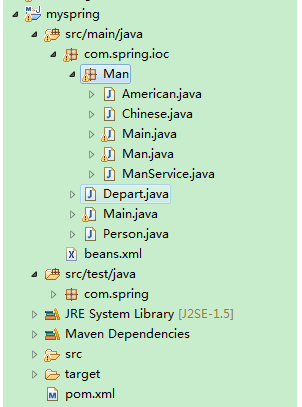
Man包下是第二个例子。
先说第一个例子,无接口的。
person.java:
package com.spring.ioc;

import org.springframework.stereotype.Component;

@Component

public class Person {

    private String name;

    private String sex;

    public Person() {

        name="wang";

        sex="man";

    }

/*    public Person(String name, String sex) {

        super();

        name="wang";

        sex="man";

    }*/

    public String getName() {

        return name;

    }

    public void setName(String name) {

        this.name = name;

    }

    public String getSex() {

        return sex;

    }

    public void setSex(String sex) {

        this.sex = sex;

    }

}
里面初始化了一些数据,作为一个bean。
depart.java:
package com.spring.ioc;

import org.springframework.beans.factory.annotation.Autowired;

import org.springframework.stereotype.Component;

@Component

public class Depart {

    @Autowired

    private Person person;

    public String getDepart(){

        String s=person.getName()+" in depart";

        return s;

    }

}
这个是为了演示,在depart里面注入person。
主类测试用的:
package com.spring.ioc;

import org.springframework.beans.factory.annotation.Autowired;

import org.springframework.beans.factory.annotation.Qualifier;

import org.springframework.context.ApplicationContext;

import org.springframework.context.support.ClassPathXmlApplicationContext;

public class Main {

    public static void main(String[] args) {

        ApplicationContext applicationContext=new ClassPathXmlApplicationContext("beans.xml");

        Depart depart=(Depart) applicationContext.getBean("depart");

        System.out.println(depart.getDepart());

    }

}
运行后,结果:
wang in depart
第二个例子,带有接口的例子:
创建接口,man:
package com.spring.ioc.Man;

public interface Man {

    public String say();

}
然后有两个实现类:
package com.spring.ioc.Man;

import org.springframework.stereotype.Component;

@Component

public class Chinese implements Man {

    public String say() {

        // TODO Auto-generated method stub

        return "你好";

    }

}
package com.spring.ioc.Man;

import org.springframework.stereotype.Component;

@Component

public class American implements Man {

    public String say() {

        // TODO Auto-generated method stub

        return "hello";

    }

}
然后创建一个类,注入这两个接口实现类。
package com.spring.ioc.Man;

import org.springframework.beans.factory.annotation.Autowired;

import org.springframework.beans.factory.annotation.Qualifier;

import org.springframework.stereotype.Component;

@Component

public class ManService {

    @Autowired

    @Qualifier(value="chinese")

    private Man man;

    public String sayChineseHello(){

        return man.say()+",欢迎";

    }

    @Autowired

    @Qualifier(value="american")

    private Man aman;

    public String sayEnglishHello(){

        return aman.say()+",welcome";

    }

}
主类:
package com.spring.ioc.Man;

import org.springframework.context.ApplicationContext;

import org.springframework.context.support.ClassPathXmlApplicationContext;

public class Main {

    public static void main(String[] args) {

        ApplicationContext context=new ClassPathXmlApplicationContext("beans.xml");

        ManService manService=(ManService) context.getBean("manService");

        String string=manService.sayChineseHello();

        System.out.println(string);

        System.out.println(manService.sayEnglishHello());

    }

}
运行结果:
你好,欢迎
hello,welcome
关于接口的,要在实现类上面添加注解说明。坑爹的,网上有篇文章说是要在接口上添加注解,不能在实现类上面,导致错误了半天。
关于注解的各个标签,可以单独百度一下,很多讲解。
spring 注解实例的更多相关文章
- Spring注解实例
public class ActivityAction extends CoreAction { private static final Logger log = Logger.getLogger( ...
- Spring Aop实例@Aspect、@Before、@AfterReturning@Around 注解方式配置
用过spring框架进行开发的人,多多少少会使用过它的AOP功能,都知道有@Before.@Around和@After等advice.最近,为了实现项目中的输出日志和权限控制这两个需求,我也使用到了A ...
- Spring的AOP配置文件和注解实例解析
1.1 Spring的AOP配置文件和注解实例解析 AOP它利用一种称为"横切"的技术,将那些与核心业务无关,却为业务模块所共同调用的逻辑或责任封装起来,便于减 ...
- spring注解说明之Spring2.5 注解介绍(3.0通用)
spring注解说明之Spring2.5 注解介绍(3.0通用) 注册注解处理器 方式一:bean <bean class="org.springframework.beans.fac ...
- 使用Spring注解来简化ssh框架的代码编写
目的:主要是通过使用Spring注解的方式来简化ssh框架的代码编写. 首先:我们浏览一下原始的applicationContext.xml文件中的部分配置. <bean id="m ...
- [转]Spring 注解总结
原文地址:http://blog.csdn.net/wangshfa/article/details/9712379 一 注解优点?注解解决了什么问题,为什么要使用注解? 二 注解的来龙去脉(历史) ...
- spring 注解简单使用
一.通用注解 1.项目结构: 2.新建Person类,注解@Component未指明id,则后期使用spring获取实例对象时使用默认id="person"方式获取或使用类方式获取 ...
- Spring 注解总结
声明:这是转载的.内容根据网上资料整理.相关链接:http://www.360doc.com/content/10/1118/16/2371584_70449913.shtmlhttp://www.i ...
- Spring Security4实例(Java config版)——ajax登录,自定义验证
本文源码请看这里 相关文章: Spring Security4实例(Java config 版) -- Remember-Me 首先添加起步依赖(如果不是springboot项目,自行切换为Sprin ...
随机推荐
- 部分PR回写的数量带有小数,分别是2023工厂的纸箱104007000389,2021工厂的纸盒404002005930;
描述:部分PR回写的数量带有小数,分别是2023工厂的纸箱104007000389,2021工厂的纸盒404002005930: 原因:所有物料规划PR时对舍入值的先后考虑逻辑影响到回写出来的temp ...
- java学习笔记----@Override的作用
初学java或多或少都会有这样的疑问,@Override有什么用,有的时候写,有的时候又不写,搞的初学者甚是郁闷. 做了一两年的开发说起这个问题不一定能够对答如流.小弟才疏学浅,花了点时间,看了一下资 ...
- alter 和 update的用法和区别
alter的增加和删除alter table xs_kc add xuefen number;alter table xs_kc drop column xuefen; 删除的时候必须使用column ...
- BeanDefinitionStoreException: IOException parsing XML document from ServletContext resource
Tomcat报错如下: BeanDefinitionStoreException: IOException parsing XML document from ServletContext resou ...
- 孤岛营救问题(BFS+状压DP)
孤岛营救问题 https://www.luogu.org/problemnew/show/P4011 用状压DP标记拿到钥匙的数量 #include<iostream> #include& ...
- K.O. -------- Eclipse中Maven的报错处理
----------------------siwuxie095 K.O. -------- Eclipse 中 Maven 的报错处理 ...
- 使用VisualStudio开发php的图文设置方法[xyytit]
早先在asp横行的年代,php和asp一样,大都都是html中夹杂代码,说实话,这时候IDE的确用处不是很大,倒是类似于dw之类的设计器甚为上手. 现在,三层.mvc之类的思想遍地开花,使得代码和 ...
- mongo嗅探器mongosniff
mongo嗅探器 在更高版本被mongoreplay取代. 安装: 在Ubuntu直接apt-get install mongodb即包含有. 使用方法 直接--help查看使用方法,一般使用: mo ...
- C++ define与const
C++中不但可以用define定义常量还可以用const定义常量,它们的区别如下: 用#define MAX 255定义的常量是没有类型的,所给出的是一个立即数,编译器只是把所定义的常量值与所定义的常 ...
- ubuntu14.04安装opengl
OpenGL 是一套由SGI公司发展出来的绘图函式库,它是一组 C 语言的函式,用于 2D 与 3D 图形应用程式的开发上. 不可或缺的就是编译器与基本的函式库,如果系统没有安装的话,依照下面的方式安 ...