
C# 图像自动切换
using System;
using System.Collections.Generic;
using System.ComponentModel;
using System.Data;
using System.Drawing;
using System.Linq;
using System.Text;
using System.Threading.Tasks;
using System.Windows.Forms;
using System.Threading;
using System.IO;
using System.Runtime.InteropServices
namespace 自动切换图像
{
public partial class Form1 : Form
{
public Form1()
{
InitializeComponent();
}
private bool Stara_Stop = true;
string path1,path2;
int i = 1;
private void timer1_Tick(object sender, EventArgs e)//自动切换
{
try
{
if (!Stara_Stop && (i < (Convert.ToInt16(textBox1.Text) + 1)))
{
//Thread.Sleep(1000);
pictureBox1.Image = null;
path2 = path1 + i.ToString() + Image_format();
pictureBox1.Image = Image.FromFile(path2);
if (i == Convert.ToInt16(textBox1.Text))
{
i = 0;
}
i++;
}
}
catch (Exception ex)
{
timer1.Enabled = false;
MessageBox.Show(ex.Message,"error!",MessageBoxButtons.OK);
}
}
private void button1_Click(object sender, EventArgs e)//开始停止
{
if(m_Data_null())
{
if (Stara_Stop)
{
path1 = path();
button1.Text = "停止切换";
button1.BackColor = Color.Red;
Stara_Stop = false;
timer1.Enabled = true;
timer1.Interval = Convert.ToInt16(textBox3.Text);
textBox1.Enabled = false;
textBox2.Enabled = false;
textBox3.Enabled = false;
comboBox1.Enabled = false;
button2.Enabled = false;
}
else
{
button1.Text = "开始切换";
button1.BackColor = Color.White;
Stara_Stop = true;
timer1.Enabled = false;
textBox1.Enabled = true;
textBox2.Enabled = true;
textBox3.Enabled = true;
comboBox1.Enabled = true;
button2.Enabled = true;
}
}
}
private bool m_Data_null()
{
bool m_Data = false;
if (textBox1.Text != string.Empty && textBox2.Text != string.Empty && textBox3.Text != string.Empty
&& comboBox1.Text != string.Empty)
{
m_Data = true;
}
else
{
m_Data = false;
MessageBox.Show("请设置切换的图像及条件!", "提示!", MessageBoxButtons.OK);
}
return m_Data;
}
private string path()//图像路径
{
string m_path;
if (textBox1.Text == string.Empty)
{
m_path = @"D:\_VS2015_\图像自动切换\Image\robot\";
}
else
{
m_path = textBox2.Text+ @"\";
}
return m_path;
}
private string Image_format()//图像格式
{
string format;
format = comboBox1.Text;
return format;
}
private void folderBrowserDialog1_HelpRequest(object sender, EventArgs e)
{
}
private void Form1_Load(object sender, EventArgs e)
{
comboBox1.Text = ".PNG";
}
private void button2_Click(object sender, EventArgs e)
{
i = 1;
pictureBox1.Image = null;
}
private void textBox2_MouseDoubleClick(object sender, MouseEventArgs e)
{
//选择打开文件
//OpenFileDialog of = new OpenFileDialog();
//if (of.ShowDialog() == DialogResult.OK)
//{
// textBox2.Text = of.FileName;
//}
//选择文件夹路径
FolderBrowserDialog folderBrowserDialog = new FolderBrowserDialog();
if (folderBrowserDialog.ShowDialog() == DialogResult.OK)
{
textBox2.Text = folderBrowserDialog.SelectedPath;
//获取文件数量
var flies = Directory.GetFiles(textBox2.Text);
textBox1.Text = (flies.Length).ToString();
}
}
private void button3_Click(object sender, EventArgs e)
{
this.Close();
}
}
}
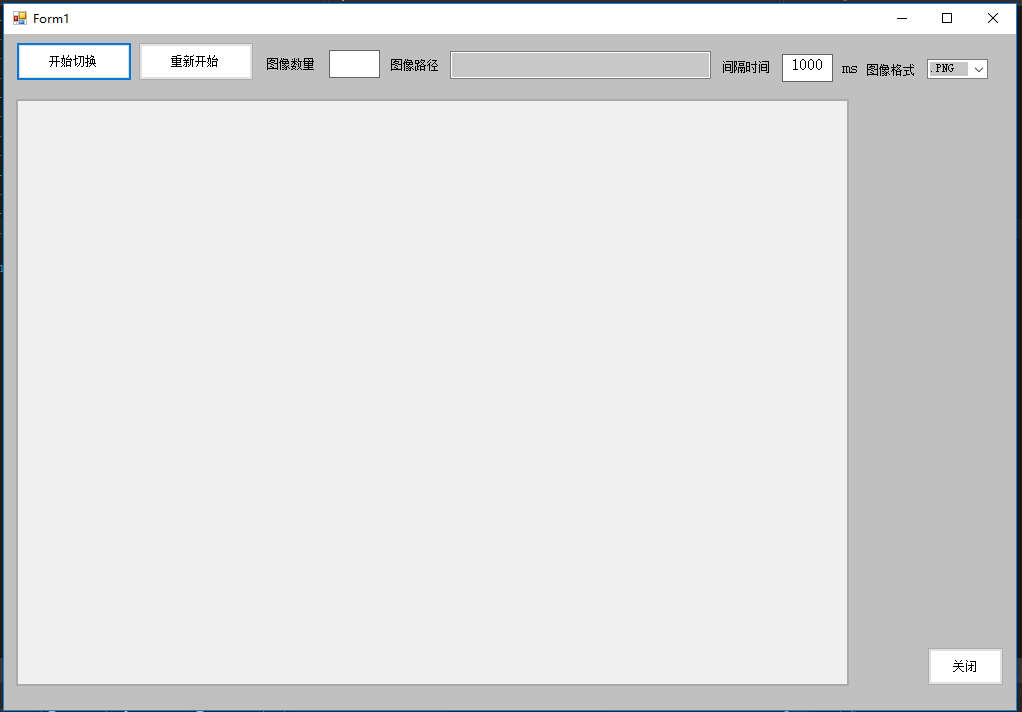
//以下是UI界面
C# 图像自动切换的更多相关文章
- 【温故而知新-Javascript】图片效果(图像震动效果、闪烁效果、自动切换图像)
1.当鼠标指针经过图像时图像震动效果 <!DOCTYPE html PUBLIC "-//W3C//DTD XHTML 1.0 Transitional//EN" " ...
- 自定义Image自动切换图像控件
做这么一个控件,图片自动切换,形成动画效果. 随便的码码,码完发现东西太少了,不过还算完善. public class MyPictureBox : PictureBox { Timer timer ...
- 原生js+css3实现图片自动切换,图片轮播
运用CSS3transition及opacity属性 制作图片轮播动画 自己这两天根据用js来控制触发CSS3中transition属性,从而写出来的以CSS3动画为基础,js控制过程的图片轮播 运用 ...
- 获取bing.com的图片并在gnome3中设置自动切换
发现 bing.com 上的图片很好看,因此打算每天把 bing.com 的图片下载下来,用作桌面. 需要做的是两个部分,爬取图片到目录和设置目录图片为桌面背景并可以自动切换. 第一部分,下载图片,使 ...
- 在 Visual Studio 等编辑器/IDE中自动切换输入法,不需要手动的有没有?
使用Visual Studio写代码,经常遇到的一个问题就是切换中文输入法麻烦,输入完注释//,要切换到中文,输入完引号,要输入中文,然后还需要切换回来,有没有? 有时候中文输入法忽然失效有没有?明明 ...
- jquery背景自动切换特效
查看效果网址:http://keleyi.com/a/bjad/4kwkql05.htm 本特效的jquery版本只支持1.9.0以下. 代码如下: <!DOCTYPE html PUBLIC ...
- jquery叠加页片自动切换特效
查看效果:http://keleyi.com/keleyi/phtml/jqtexiao/34.htm 下面是HTML代码: <!DOCTYPE html> <html xmlns= ...
- Android中仿淘宝首页顶部滚动自定义HorizontalScrollView定时水平自动切换图片
Android中仿淘宝首页顶部滚动自定义HorizontalScrollView定时水平自动切换图片 自定义ADPager 自定义水平滚动的ScrollView效仿ViewPager 当遇到要在Vie ...
- ios基础篇(二十三)—— 定时器NSTimer与图片的自动切换
一.NSTimer NSTimer是一个能在从现在开始到后面的某一个时刻或者周期性的执行我们指定的方法的对象.可以按照一定的时间间隔,将制定的信息发送给目标对象.并更新某个对象的行为.你可以选择在未来 ...
随机推荐
- SSH框架整合思想
--------------------siwuxie095 SSH 框架整合思想 1.SSH 框架,即 Struts2 ...
- PAT L1-020 帅到没朋友(模拟数组)
当芸芸众生忙着在朋友圈中发照片的时候,总有一些人因为太帅而没有朋友.本题就要求你找出那些帅到没有朋友的人. 输入格式: 输入第一行给出一个正整数N(≤100),是已知朋友圈的个数:随后N行,每行首先给 ...
- 【校招面试 之 C/C++】第25题 C++ 智能指针(一)之 auto_ptr
1.智能指针背后的设计思想 我们先来看一个简单的例子: void remodel(std::string & str) { std::string * ps = new std::string ...
- Swift4 - 动态计算UITableView中tableHeaderView的高度 - 获取子控件高度和宽度
核心 : /// 获取 子控件高度 func sizeHeaderToFit(view:UIView) { view.setNeedsLayout() view.layoutIfNeeded() le ...
- 什么是Shell、Shell脚本
Shell本身是一个用C语言编写的程序,它是用户使用Linux的桥梁.Shell既是一种命令语言,又是一种程序设计语言.作为命令语言,它交互式地解释和执行用户输入的命令:作为程序设计语言,它定义了各种 ...
- Navicat Premium11连接Oracle出现ORA-28547:connection to server failed
环境描述:本地Oracle正常安装,中途没有出现任何异常.确保Oracle的主要服务都启动了.1.OracleServiceORCL2.OracleOraDb11g_home1TNSListener ...
- sql ltrim/rtrim 字段中为中文时出现?的问题
字段存储为中文,类型为nvarchar,使用ltrim时结果集中出现的问号,我的解决办法是:将问号replace掉
- 判断浏览器是ie9座特殊处理
function ie(){ var agent = navigator.userAgent.toLowerCase();//判断浏览器版本 return (!!window.ActiveXObjec ...
- KBMMW 4.83.00 发布
新版本又来了,端午节都不让大家过好:) 这次终于支持ios 64了,不用我再手工改了. Components4Developers is a company established in 1999 w ...
- 2018.10.02 NOIP模拟 矩阵分组(二分答案)
传送门 考场上并不会写二分的check函数,下来看了看题解发现真是妙极. 不难想到每次直接从四个角各按阶梯状拓展出合法区域A,再检验B是否合法就行了.(然而考场上写的弃疗了) 于是题解用了一些小技巧优 ...