
iOS 封装跑马灯和轮播效果
功能概述和预览

功能描述:WSL_RollView 是基于UICollectionView实现的支持水平和垂直两个方向上的的分页和渐进循环轮播效果,可以设置时间间隔、渐进速率、是否循环、分页宽度和间隔,还支持高度自定义分页视图的控件。
一、实现方法
1.1、 首先用UICollectionView和计时器实现一个基本的水平滚动效果,如下图,这个太简单就不在此详述。

1.2、对比上面的效果图,我们还需要解决分页的宽度和循环滚动的问题。
- 自定义分页宽度:默认的分页宽度是UICollectionView的宽度,所以当分页宽度的不等于UICollectionView的宽度或分页间隔不等于0时会出现错误,这时就需要我们通过自定义UICollectionViewFlowLayout来实现效果。
/** 返回值决定了collectionView停止滚动时的偏移量 手指松开后执行

 * proposedContentOffset:原本情况下,collectionView停止滚动时最终的偏移量

 * velocity 滚动速率,通过这个参数可以了解滚动的方向

 */

- (CGPoint)targetContentOffsetForProposedContentOffset:(CGPoint)proposedContentOffset withScrollingVelocity:(CGPoint)velocity{

    if (_scrollStyle == WSLRollViewScrollStylePage) {

        CGSize size = self.collectionView.frame.size;

        // 计算可见区域的面积

        CGRect rect = CGRectMake(proposedContentOffset.x, proposedContentOffset.y, size.width, size.height);

        NSArray *array = [super layoutAttributesForElementsInRect:rect];

        // 标记 cell 的中点与 UICollectionView 中点最小的间距

        CGFloat minDetal = MAXFLOAT;

        if (self.scrollDirection == UICollectionViewScrollDirectionHorizontal){

            // 计算 CollectionView 中点值

            CGFloat centerX = proposedContentOffset.x + self.collectionView.frame.size.width * 0.5;

            for (UICollectionViewLayoutAttributes *attrs in array){

                if (ABS(minDetal) > ABS(centerX - attrs.center.x)){

                    minDetal = attrs.center.x - centerX;

                }

            }

            return CGPointMake(proposedContentOffset.x + minDetal, proposedContentOffset.y);

        }else{

            // 计算 CollectionView 中点值

            CGFloat centerY = proposedContentOffset.y + self.collectionView.frame.size.height * 0.5;

            for (UICollectionViewLayoutAttributes *attrs in array){

                if (ABS(minDetal) > ABS(centerY - attrs.center.y)){

                    minDetal = attrs.center.y - centerY;

                }

            }

            return CGPointMake(proposedContentOffset.x, proposedContentOffset.y + minDetal);

        }

    }

    return proposedContentOffset;

}
- 循环滚动:思想当然还是3 >4 >0 >1 >2 >3 >4 >0 >1,关键就在于怎么确定弥补两端轮播首尾相连需要增加的cell,前边尾首相连需要UICollectionView可见范围内的数据源后边的元素cell,后边首尾相连需要UICollectionView可见范围内的数据源前边的元素cell
//获取首尾相连循环滚动时需要用到的元素,并重组数据源

- (void)resetDataSourceForLoop{

    if(_loopEnabled == NO){

        return;

    }

    if(_scrollDirection == UICollectionViewScrollDirectionHorizontal && _collectionView.contentSize.width >= self.frame.size.width){

        //用于右侧连接元素数量

        _addRightCount = [_collectionView  indexPathForItemAtPoint:CGPointMake(self.frame.size.width - 1, 0)].row + 1 ;

        if (_scrollStyle == WSLRollViewScrollStylePage){

            //如果是分页,还需要用于左侧连接元素数量

            _addLeftCount = _sourceArray.count - [_collectionView  indexPathForItemAtPoint:CGPointMake(_collectionView.contentSize.width - self.frame.size.width + 1, 0)].row;

        }

    }else if(_scrollDirection == UICollectionViewScrollDirectionVertical && _collectionView.contentSize.height >= self.frame.size.height){

        //用于右侧连接元素数量

        _addRightCount = [_collectionView  indexPathForItemAtPoint:CGPointMake(0, self.frame.size.height - 1)].row + 1 ;

        if (_scrollStyle == WSLRollViewScrollStylePage){

            //用于左侧连接元素数量

            _addLeftCount = _sourceArray.count - [_collectionView  indexPathForItemAtPoint:CGPointMake(0, _collectionView.contentSize.height - self.frame.size.height + 1)].row;

        }

    }

    NSArray * rightSubArray = [_sourceArray subarrayWithRange:NSMakeRange(0, _addRightCount)];

    //增加右侧连接元素

    [_dataSource addObjectsFromArray:rightSubArray];

    if (_scrollStyle == WSLRollViewScrollStylePage){

        NSArray * leftSubArray = [_sourceArray subarrayWithRange:NSMakeRange(_sourceArray.count - _addLeftCount, _addLeftCount)];

        //增加左侧连接元素

        [_dataSource insertObjects:leftSubArray atIndexes: [NSIndexSet indexSetWithIndexesInRange:NSMakeRange(0,_addLeftCount)]];

    }

}
二、WSL_RollView用法
请看WSLRollView.h文件中的注释,属性和用法很明朗,详情和效果可以看代码。
//

//  WSLRollView.h

//  WSL_RollView

//

//  Created by 王双龙 on 2018/9/8.

//  Copyright © 2018年 https://www.jianshu.com/u/e15d1f644bea. All rights reserved.

//

#import <UIKit/UIKit.h>

/**

 默认cell样式 WSLItemID

 */

@interface WSLRollViewCell : UICollectionViewCell

@end

@class WSLRollView;

//代理协议

@protocol WSLRollViewDelegate <NSObject>

@optional

/**

 返回itemSize 默认值是CGSizeMake(self.frame.size.width, self.frame.size.height);

 */

- (CGSize)rollView:(WSLRollView *)rollView sizeForItemAtIndex:(NSInteger)index;

/**

 item的间隔 默认值0

 */

- (CGFloat)spaceOfItemInRollView:(WSLRollView *)rollView;

/**

 内边距 上 左 下 右 默认值UIEdgeInsetsMake(0, 0, 0, 0)

 */

- (UIEdgeInsets)paddingOfRollView:(WSLRollView *)rollView;

/**

 点击事件

 */

- (void)rollView:(WSLRollView *)rollView didSelectItemAtIndex:(NSInteger)index;

/**

 自定义item样式

 */

- (WSLRollViewCell *)rollView:(WSLRollView *)rollView cellForItemAtIndex:(NSInteger )index;

@end

/**

 滚动样式

 */

typedef NS_ENUM(NSInteger, WSLRollViewScrollStyle) {

    WSLRollViewScrollStylePage = 0, /** 分页 必须等宽或高*/

    WSLRollViewScrollStyleStep   /** 渐进 可以不等宽或高*/

};

@interface WSLRollView : UIView

/**

 原始数据源

 */

@property (nonatomic, strong) NSMutableArray * sourceArray;

/**

 是否循环轮播 默认YES

 */

@property (nonatomic, assign) BOOL loopEnabled;

/**

 轮播方向 默认是 UICollectionViewScrollDirectionHorizontal 水平

 */

@property (nonatomic, assign) UICollectionViewScrollDirection scrollDirection;

/**

 轮播样式 默认是 WSLRollViewScrollStylePage 分页

 */

@property (nonatomic, assign) WSLRollViewScrollStyle scrollStyle;

/**

 渐进轮播速率 单位是Point/s,以坐标系单位为准 默认60/s 如果为0 表示禁止计时器

 */

@property (nonatomic, assign) CGFloat speed;

/**

 分页轮播间隔时长 单位是s  默认3s 如果为0 表示禁止计时器

 */

@property (nonatomic, assign) CGFloat interval;

/**

 item的间隔 默认值0

 */

@property (nonatomic, assign) CGFloat spaceOfItem;

/**

 内边距 上 左 下 右 默认值UIEdgeInsetsMake(0, 0, 0, 0)

 */

@property (nonatomic, assign) UIEdgeInsets padding;

/** delegate*/

@property (nonatomic, weak) id<WSLRollViewDelegate> delegate;

/**

  初始化方法 direction 滚动方向

 */

- (instancetype)initWithFrame:(CGRect)frame scrollDirection:(UICollectionViewScrollDirection)direction;

/**

 注册item样式 用法和UICollectionView相似

 */

- (void)registerClass:(nullable Class)cellClass forCellWithReuseIdentifier:(NSString *)identifier;

/**

 注册item样式 用法和UICollectionView相似

 */

- (void)registerNib:(nullable UINib *)nib forCellWithReuseIdentifier:(NSString *)identifier;

/**

 用于初始化和获取WSLRollViewCell,自定义cell样式 用法和UICollectionView相似

 */

- (WSLRollViewCell *)dequeueReusableCellWithReuseIdentifier:(NSString *)identifier forIndex:(NSInteger)index;

/**

 刷新数据源

 */

- (void)reloadData;

/**

 暂停自动轮播

 */

- (void)pause;

/**

 继续自动轮播

 */

- (void)play;

/**

 释放计时器 必须执行,防止内存暴涨

 */

- (void)close;

@end
三、项目结构
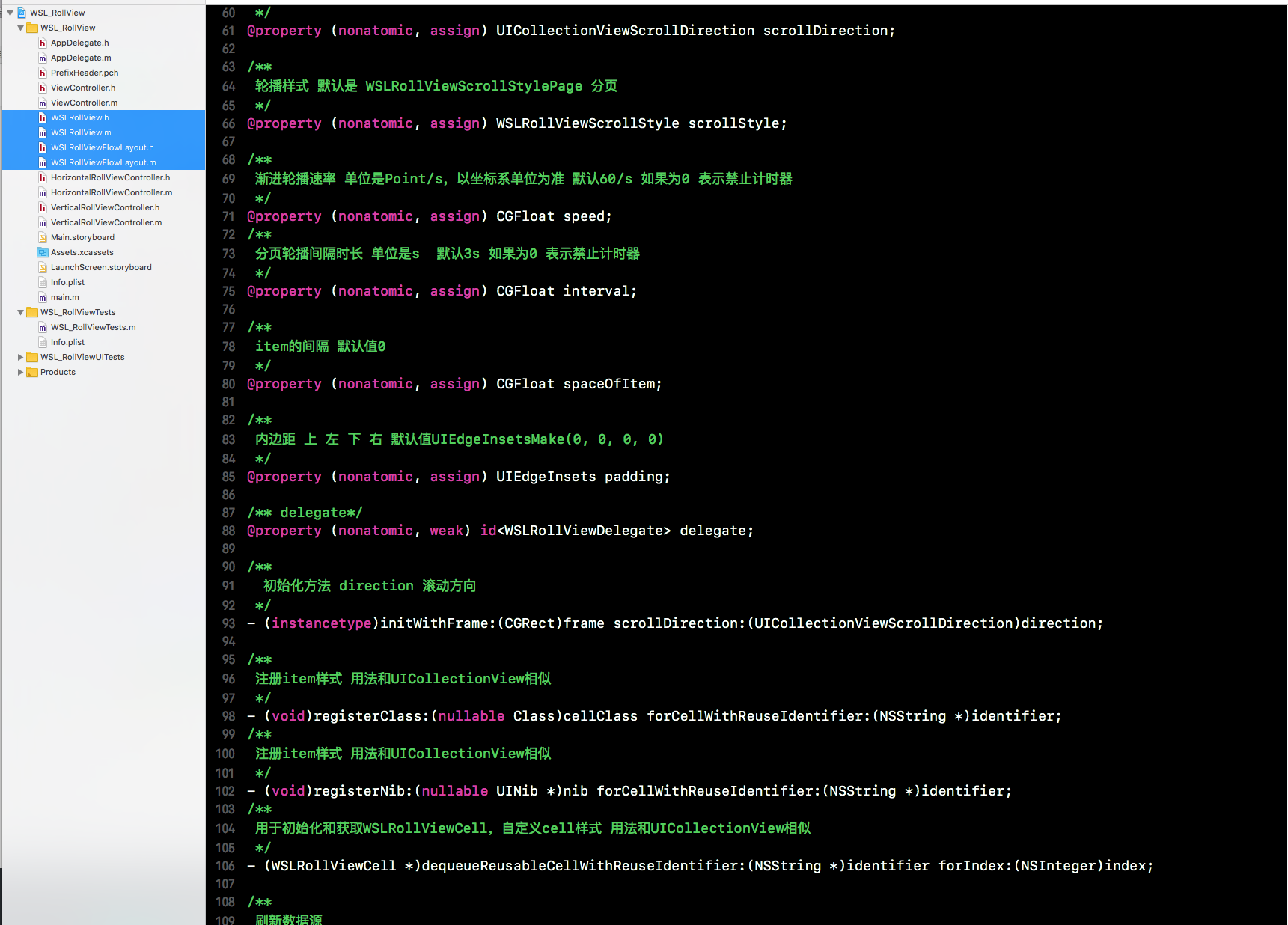
以上就是我实现这个效果的过程;如果小伙伴们有其他的实现方法,欢迎再此留言交流
iOS 封装跑马灯和轮播效果的更多相关文章
- ios图片轮播效果
代码地址如下:http://www.demodashi.com/demo/11959.html ImageCarousel 简单封装的图片轮播器 内存过大由于我加载的图片分辨率较高(4k) 文件目录 ...
- 用JQ去实现一个轮播效果
前提:用JQ去实现轮播效果一步步的做一个梳理. 首先肯定是轮播的HTML和CSS样式了: <body> <div class="pic"> <div ...
- iOS开发UI篇—无限轮播(新闻数据展示)
iOS开发UI篇—无限轮播(新闻数据展示) 一.实现效果 二.实现步骤 1.前期准备 (1)导入数据转模型的第三方框架MJExtension (2)向项目中添加保存有“新闻”数据的pli ...
- iOS开发UI篇—无限轮播(功能完善)
iOS开发UI篇—无限轮播(功能完善) 一.自动滚动 添加并设置一个定时器,每个2.0秒,就跳转到下一条. 获取当前正在展示的位置. [self addNSTimer]; } -(void)addNS ...
- IOS第六天(3:scrollView 图片轮播器)
IOS第六天(3:scrollView 图片轮播器) #import "HMViewController.h" #define kImageCount 5 @interface H ...
- jQuery个性化图片轮播效果
jQuery个性化图片轮播效果 购物产品展示:图片轮播器<效果如下所示> 思路说明: 每隔一段时间,实现图片的自动切换及选项卡选中效果,鼠标划入图片动画停止,划出或离开动画开始 两个区域: ...
- Android使用ViewPager实现左右循环滑动及轮播效果
边界的时候会看到一个不能翻页的动画,可能影响用户体验.此外,某些区域性的ViewPager(例如展示广告或者公告之类的ViewPager),可能需要自动轮播的效果,即用户在不用滑动的情况下就能够看到其 ...
- JQuery实现图片轮播效果源码
======================整体结构======================== <div class="banner"> <ul class ...
- 基于css3的轮播效果
花了一上午来调整页面在ie10上的显示问题,sass编译生成的css文件在ie内核下一直不能正确加载,果然兼容性的问题还需要好好研究.转入正题,用css3实现轮播效果主要是基于css3的framewo ...
随机推荐
- amfphp2.1.1的使用经过
这两天看了一个FLASH的教程,是arrowyong写的名为 <<ActionScript3.0从零基础学习类>>,这个教程好用,没有ActionScript编程经验的人,可以 ...
- Extjs GridPanel 监听事件 行选中背景
Extjs设置GridPanel选中行背景色和选中单元格背景色 var view = grid.getView(); view.getRow(index).style.backgroundColor ...
- iOS Sprite Kit最新特性Physics Field虚拟物理场Swift測试
在WWDC2014上,Sprite Kit又有了非常多新的提升! 当中一个非常有意思的东西就是Physics Field!也就是物理场! 这意味着我们在Sprite kit上编写虚拟物理场的游戏将变得 ...
- 如何高效把一字节的位对换, bit0和bit7,bit1和bit6,以此类推.
#include<stdio.h> #include<stdlib.h> //异或法 unsigned char byteReverse(unsigned char val) ...
- 【BZOJ】【1923】【Sdoi2010】外星千足虫
高斯消元解Xor方程组 ZYF Orz 这题……不作死就不会死T^T,用bitset确实比较快,而且可以从string直接转成bitset(构造函数). 但问题是我把转过来以后的顺序搞反了……原本以为 ...
- Centos下运行cp命令式提示略过目录
今天在复制一个目录到还有一个目录的时候cp ./res /usr 的时候出现了问题,提示我的是: cp略过了目录 后来我找了一下 在网上search了一下CP命令的使用方法: CP命令 该命令的功能是 ...
- 第六章 JVM垃圾收集器(2)
上一章记录了几种常见的垃圾收集器,见<第五章 JVM垃圾收集器(1)> 1.G1 说明: 从上图来看,G1与CMS相比,仅在最后的"筛选回收"部分不同(CMS是并发清除 ...
- uva 10160 Servicing Stations(DFS+剪枝)
Servicing stations A company offers personal computers for sale in N towns (3 <= N <= 35). The ...
- 同一页面的两个Iframe获取数据
首先页面: <td style="width: 50%" valign="top"> <iframe name="xxx" ...
- GoLang中flag标签使用
正如其他语言一样,在 linux 系统上通过传入不同的参数来使得代码执行不同逻辑实现不同功能,这样的优点就是执行想要的既定逻辑而不需要修改代码重新编译与打包.在 Golang 语言中也为我们提供了相应 ...