
【Android】3.5 示例5--多地图展示
分类:C#、Android、VS2015、百度地图应用; 创建日期:2016-02-04
3.5 示例5--多地图展示
一、简介
地图控件自v2.3.5版本起,支持多实例,即开发者可以在一个页面中建立多个地图对象,并且针对这些对象分别操作且不会产生相互干扰。
文件名:Demo04MultiMapView.cs
简介:介绍多MapView的使用
详述:在一个界面内,同时建立四个TextureMapView控件;
二、示例
1、运行截图
在x86模拟器中的运行效果如下:
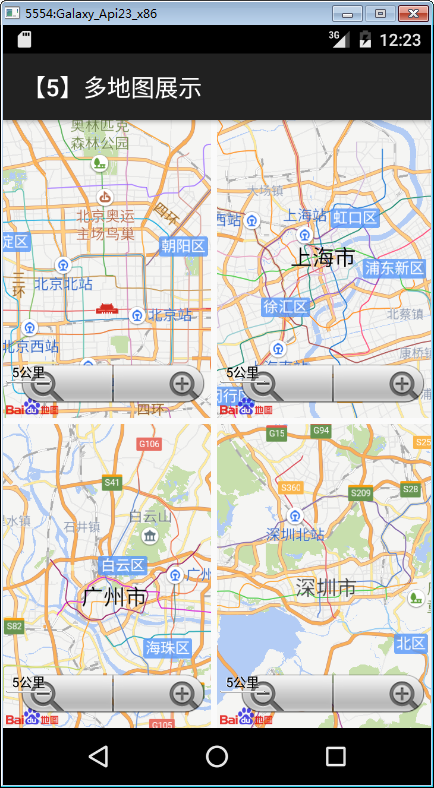
在上一节例子的基础上,只需要再增加下面的步骤即可。
2、添加demo05_multimap.axml文件
在layout文件夹下添加该文件,将其改为下面的代码:
<?xml version="1.0" encoding="utf-8"?>

<LinearLayout xmlns:android="http://schemas.android.com/apk/res/android"

    xmlns:map="http://schemas.android.com/apk/res-auto"

    android:layout_width="match_parent"

    android:layout_height="match_parent"

    android:orientation="vertical" >

    <LinearLayout

        android:layout_width="match_parent"

        android:layout_height="match_parent"

        android:layout_marginBottom="5dp"

        android:layout_weight=""

        android:orientation="horizontal" >

        <fragment

            android:id="@+id/map1"

            android:layout_width="match_parent"

            android:layout_height="match_parent"

            android:layout_marginRight="5dp"

            android:layout_weight=""

            class="com.baidu.mapapi.map.TextureMapFragment" />

        <fragment

            android:id="@+id/map2"

            android:layout_width="match_parent"

            android:layout_height="match_parent"

            android:layout_weight=""

            class="com.baidu.mapapi.map.TextureMapFragment" />

    </LinearLayout>

    <LinearLayout

        android:layout_width="match_parent"

        android:layout_height="match_parent"

        android:layout_weight=""

        android:orientation="horizontal" >

        <fragment

            android:id="@+id/map3"

            android:layout_width="match_parent"

            android:layout_height="match_parent"

            android:layout_marginRight="5dp"

            android:layout_weight=""

            class="com.baidu.mapapi.map.TextureMapFragment" />

        <fragment

            android:id="@+id/map4"

            android:layout_width="match_parent"

            android:layout_height="match_parent"

            android:layout_weight=""

            class="com.baidu.mapapi.map.TextureMapFragment" />

    </LinearLayout>

</LinearLayout>
3、添加Demo05MultiMapView.cs文件
在SdkDemos文件夹下添加该文件,然后将其内容改为下面的代码:
using Android.App;

using Android.Content.PM;

using Android.OS;

using Com.Baidu.Mapapi.Map;

using Com.Baidu.Mapapi.Model;

namespace BdMapV371Demos.SrcSdkDemos

{

    /// <summary>

    /// 在一个Activity中展示多个地图

    /// </summary>

    [Activity(Label = "@string/demo_name_multimap",

        ConfigurationChanges = ConfigChanges.Orientation | ConfigChanges.KeyboardHidden,

        ScreenOrientation = ScreenOrientation.Sensor)]

    public class Demo05MutiMapView : Activity

    {

        private readonly LatLng Geo_BeiJing = new LatLng(39.945, 116.404);

        private readonly LatLng Geo_ShangHai = new LatLng(31.227, 121.481);

        private readonly LatLng Geo_GuangZhou = new LatLng(23.155, 113.264);

        private readonly LatLng Geo_ShenZhen = new LatLng(22.560, 114.064);

        protected override void OnCreate(Bundle savedInstanceState)

        {

            base.OnCreate(savedInstanceState);

            SetContentView(Resource.Layout.demo05_multimap);

            InitMap();

        }

        /// <summary>

        /// 初始化Map

        /// </summary>

        private void InitMap()

        {

            MapStatusUpdate u1 = MapStatusUpdateFactory.NewLatLng(Geo_BeiJing);

            TextureMapFragment map1 = FragmentManager.FindFragmentById<TextureMapFragment>(Resource.Id.map1);

            map1.BaiduMap.SetMapStatus(u1);

            MapStatusUpdate u2 = MapStatusUpdateFactory.NewLatLng(Geo_ShangHai);

            TextureMapFragment map2 = FragmentManager.FindFragmentById<TextureMapFragment>(Resource.Id.map2);

            map2.BaiduMap.SetMapStatus(u2);

            MapStatusUpdate u3 = MapStatusUpdateFactory.NewLatLng(Geo_GuangZhou);

            TextureMapFragment map3 = FragmentManager.FindFragmentById<TextureMapFragment>(Resource.Id.map3);

            map3.BaiduMap.SetMapStatus(u3);

            MapStatusUpdate u4 = MapStatusUpdateFactory.NewLatLng(Geo_ShenZhen);

            TextureMapFragment map4 = FragmentManager.FindFragmentById<TextureMapFragment>(Resource.Id.map4);

            map4.BaiduMap.SetMapStatus(u4);

        }

    }

}
4、修改MainActivity.cs文件
在MainActivity.cs文件的demos字段定义中添加下面的代码。
          //示例5--多地图展示

            new DemoInfo<Activity>(Resource.String.demo_title_multimap,

                Resource.String.demo_desc_multimap,

                new Demo05MutiMapView()),
运行观察结果。
【Android】3.5 示例5--多地图展示的更多相关文章
- Android 开发之集成百度地图的定位与地图展示
app 应用中,大多数应用都具有定位功能,百度定位就成了开发人员的集成定位功能的首选,近期也在做定位功能,可是发现百度真是个大坑啊, sdk 命名更新了,相关代码却不更新,害得我花费了非常长时间来研究 ...
- LBS数据分析:使用地图展示统计数据——麻点图与麻数图
作为一个LBS的APP,都获得了用户经纬度,也都使用了友盟统计.google ana等等统计分析系统,不过没有地图展示功能,不能进行直观的展示. 友盟统计.google ana等系统是总体数据统计,无 ...
- 【iOS】7.4 定位服务->3.1 地图框架MapKit 功能1:地图展示
> 本文并非最终版本,如果想要关注更新或更正的内容请关注文集,联系方式详见文末,如有疏忽和遗漏,欢迎指正. --- > 本文相关目录: ================== 所属文集:[[ ...
- Android 组件化/模块化之路——在展示层搭建MVP结构
Android 组件化/模块化之路——在展示层搭建MVP结构 什么是MVP Model–View–Presenter (MVP) 源于 Model–View–Controller (MVC) 的结构设 ...
- 基于MySQL + Node.js + Leaflet的离线地图展示,支持百度、谷歌、高德、腾讯地图
1. 基本说明 本项目实现了离线展示百度.谷歌.高德.腾讯地图.主要功能如下: 实现了地图瓦片图下载.存储.目前支持存储至MySQL Node.js服务调用MySQL中的瓦片图 Leaflet展示地图 ...
- openlayers4 入门开发系列之地图展示篇(附源码下载)
前言 openlayers4 官网的 api 文档介绍地址 openlayers4 api,里面详细的介绍 openlayers4 各个类的介绍,还有就是在线例子:openlayers4 官网在线例子 ...
- Echarts地图展示及属性分析
Echarts,一个效果非常棒的可视化库,可以生产各种图表,动态展示,附上官方网址:http://www.echartsjs.com/index.html 之前带本科实习时有同学用过,狗哥的博客也用这 ...
- SkylineGlobe Android 开发 面积计算示例代码
SkylineGlobe Android 开发 面积计算示例代码: 如果之前熟悉SkylineGlobe桌面端的二次开发,看这些代码应该不难理解. package com.skyline.terrae ...
- Android vcard使用示例,生成vcf文件
Android vcard使用示例,生成vcf文件 我们备份手机联系人时,导出到SD卡时,会在SD卡中生成一个vcf文件,用于保存联系人姓名,手机号码. vCard 规范容许公开交换个人数据交换 ( ...
随机推荐
- Cass环境下光标无显示
先安装CAD2004,十字光标正常显示:再安装CASS7.0,光标就不显示了.现在不清楚是CAD的问题,还是CASS的问题,多半是后者.重新配置了CASS环境也不行. 于是,打开CAD选项,显示,窗口 ...
- Python标记去重
预逻辑脚本代码: uniqueList = [] def isDuplicate(inValue): if inValue in uniqueList: return 1 else: uniqueLi ...
- activemq无法启动且后台管理界面进不去的解决办法
从官网下载了一个最新的activemq,目前最新版本是5.14.5 我下载的是windows版本,通过执行%activemq home%/bin/win64/InstallService.bat,可以 ...
- error loading /system/media/audio/ui/Effect_Tick.ogg
问题原因: 同一个AVD,调试了很多个项目,产生了N多个log文件,这些文件可能产生了影响. 解决办法: 新建一个AVD即可.
- HTML一(简介)
什么是 HTML? HTML 是用来描述网页的一种语言. HTML 指的是超文本标记语言 (Hyper Text Markup Language) HTML 不是一种编程语言,而是一种标记语言 (ma ...
- Wireshark基本介绍和TCP三次握手
转自:http://www.cnblogs.com/TankXiao/archive/2012/10/10/2711777.html 之前写过一篇博客:用 Fiddler 来调试HTTP,HTTPS. ...
- Navicat如何直接修改表中数据?
Navicat如何直接修改表中数据?
- JVM中类的卸载机制
类的生命周期 当Sample类被载入.连接和初始化后,它的生命周期就開始了. 当代表Sample类的Class对象不再被引用,即不可触及时,Class对象就会结束生命周期.Sample类在方法区内的数 ...
- Linux安装SQLite轻量级数据库
SQLite,是一款轻型的数据库,是遵守ACID的关系型数据库管理系统,它包含在一个相对小的C库中.它是D.RichardHipp建立的公有领域项目.它的设计目标是嵌入式的,而且目前已经在很多嵌入式产 ...
- 职业-把工作当作职业 or 事业?
有这么一种说法,工作态度可以分为两种:一种是把工作当作职业,另一种是把工作当成事业.态度折射品质,态度影响成败. 把工作当作一份职业的人,以职业交换薪水,完全是为工作而工作,工作是为了糊口养家,上班是 ...