
YARN的重启动问题:RM Restart/RM HA/Timeline Server/NM Restart
ResourceManger Restart
ResourceManager负责资源管理和应用的调度,是YARN的核心组件,有可能存在单点失败的问题。ResourceManager Restart是使RM在重启动时能够使Yarn集群正常工作的feature,并且使RM的出现的失败不被用户知道。
ResourceManager Restart feature is divided into two phases:
- ResourceManager Restart Phase 1 (Non-work-preserving RM restart,since hadoop2.4.0): Enhance RM to persist application/attempt state and other credentials information in a pluggable state-store. RM will reload this information from state-store upon restart and re-kick the previously running applications. Users are not required to re-submit the applications.
- ResourceManager Restart Phase 2 (Work-preserving RM restart, since hadoop2.6.0): Focus on re-constructing the running state of ResourceManager by combining the container statuses from NodeManagers and container requests from ApplicationMasters upon restart. The key difference from phase 1 is that previously running applications will not be killed after RM restarts, and so applications won’t lose its work because of RM outage.
ResourceManager High Availability
Hadoop2.4.0之前,ResourceManager存在单点失败的问题。Yarn的HA(高可用)使用Actice/Standby结构。在任意一个时刻,只有一个Active RM,一个到多个Standby RM。其实就是将ResourceManager进行了备份,使得系统中存在Active RM和Standby RM。
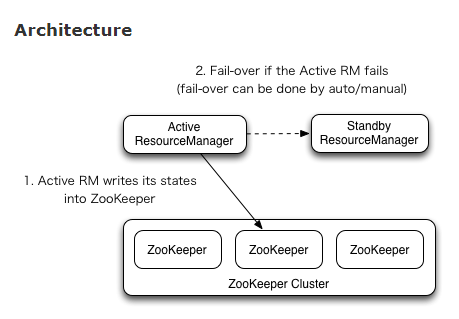
Manual transitions and failover
输入yarn rmadmin
Automatic failover
当RM 失效或者不再响应时,基于Zookeeper的ActiveStandbyElector(已经内嵌到了RM中,不用启动单独的ZKFC daemon)选举出新的Active RM。
Client, ApplicationMaster and NodeManager on RM failover
如果有多个RM,那么所有节点上的yarn-site.xml文件都需要列出所有的RM。Clients、AMs、NMs以Round-Robin的方式连接RMs,直到遇到一个Active RM为止。如果Active RM失效,那么重新以Round-Robin的方式找到新的Active RM。
The YARN Timeline Server
YARN通过Timeline Server解决apps当前信息和历史信息的存储和检索。TimelineServer的两个职责:
Persisting Application Specific Information
信息的搜集和检索与特定的app或者框架有关。例如MapReduce框架的信息可以包括number of map tasks, reduce tasks, counters…etc。用户可以将app专门的信息通过Application Master包含的TimelineClient
或者App的container进行发布。
Persisting Generic Information about Completed Applications
Generic information为app level的信息,例如queue-name,user info等。通用数据被Yarn的RM发布到timeline store中,用于web-UI的已经完成的apps的信息展示。
NodeManager Restart
NodeManager Restart机制能够使NodeManager所在节点的active Containers不丢失。NM在处理container 管理请求时,将必要的state存储到local state-store。当NMs restart时,首先为不同的子系统加载state,然后让子系统使用加载的state进行恢复。
enabling NM Restart:
(1) 将/conf/yarn-site.xml中的yarn.nodemanager.recovery.enabled设置为true。默认为false
(2) Configure a path to the local file-system directory where the NodeManager can save its run state.
(3) Configure a valid RPC address for the NodeManager.
(4) Auxiliary services.
Link:
http://hadoop.apache.org/docs/r2.7.2/hadoop-yarn/hadoop-yarn-site/ResourceManagerRestart.html
http://hadoop.apache.org/docs/r2.7.2/hadoop-yarn/hadoop-yarn-site/ResourceManagerHA.html
http://hadoop.apache.org/docs/r2.7.2/hadoop-yarn/hadoop-yarn-site/TimelineServer.html
http://hadoop.apache.org/docs/r2.7.2/hadoop-yarn/hadoop-yarn-site/NodeManagerRestart.html
YARN的重启动问题:RM Restart/RM HA/Timeline Server/NM Restart的更多相关文章
- 3.19 YARN HA架构及(RM/NM) Restart讲解
一.ResourceManager HA ResourceManager(RM)负责跟踪集群中的资源,以及调度应用程序(例如,MapReduce作业). 在Hadoop 2.4之前,ResourceM ...
- Samza在YARN上的启动过程 =》 之一
运行脚本,提交job 往YARN提交Samza job要使用run-job.sh这个脚本. samza-example/target/bin/run-job.sh --config-factory= ...
- 安装和启动tftp-server服务器及可能出现Redirecting to /bin/systemctl restart xinetd.service问题的解决方式
安装和启动tftp-server服务器及可能出现Redirecting to /bin/systemctl restart xinetd.service问题的解决方式 1)首先,检查服务器已安装的tf ...
- 对比git rm和rm的使用区别
在这里说一下git rm和rm的区别,虽然觉得这个问题有点肤浅,但对于刚接触git不久的朋友来说还是有必要的. 用 git rm 来删除文件,同时还会将这个删除操作记录下来:用 rm 来删除文件,仅仅 ...
- 并发与多版本:update重启动问题
以下演示重启动问题,请注意 before触发器和after触发器的行为区别,因为before触发器会触发两次而导致重启动问题,因此使用after触发器更加高效,应该尽量避免在所有触发器中使用自治事务 ...
- "git rm" 和 "rm" 的区别
"git rm" 和 "rm" 的区别 FEB 3RD, 2013 | COMMENTS 这是一个比较肤浅的问题,但对于 git 初学者来说,还是有必要提一下的 ...
- installshield制作的安装包卸载时提示重启动的原因以及解决办法
原文:installshield制作的安装包卸载时提示重启动的原因以及解决办法 有时候卸载installshield制作的安装包程序,卸载完会提示是否重启电脑以完成所有卸载,产生这个提示的常见原因有如 ...
- [转]"git rm" 和 "rm" 的区别
用 git rm 来删除文件,同时还会将这个删除操作记录下来 直观的来讲,git rm 删除过的文件,执行 git commit -m "abc" 提交时, 会自动将删除该文件的操 ...
- .gitignore无效解决方案以及git rm和rm的区别
一. gitignore 先来了解一下gitignore的常用语法 斜杠“/”表示目录, 是否已斜杠开头有很大区别,如 /build 与 build/ 的区别:其中 build/ 表示不管在哪个位置的 ...
随机推荐
- 关于Myeclipse的MyEclipse:Java was started but returned exit code=-1 错误
我们在安装MyEclipse后有时会遇到这样一个问题,可以进入主界面软件也属于激活状态,但是过一会会报错, 并弹出MyEclipse:Java was started but returned exi ...
- 简单的Restful工具类
import java.io.BufferedReader;import java.io.ByteArrayOutputStream;import java.io.Closeable;import j ...
- 如何配置pycaffe
首先,使用cmake配置.生成caffe的vs2015工程时,设定生成python接口,即BUILD项->BUILD_python.BUILD_python_layer,注意使用CMake生成V ...
- 【SIKIA计划】_07_Unity3D游戏开发-坦克大战笔记
[新增分类][AudioClips]音频剪辑[AudioMixers]音频混合器[Editor][Fonts]字体[Materials]材质[Models]模型[Standard Assets] [渲 ...
- 一个IT男的表白
致BCD6 CEC0 C3F4 转一轮肩胛骨 倒一杯铁观音 白驹过隙,倏忽两秋 远方有希望和梦想 有火车.微信美颜视频聊天和碧根果 有你的支持 如果身旁没有你 生活无趣失去动力 就像python失去类 ...
- Controller - 压力机的设置 - 界面图表分析
一. Controller- 压力机界面的一下设置讲解 2种测试场景的设计和压测策略 二. Controller- 压力机界面的图表分析
- 软件RAID
软件RAID也必须在多磁盘系统中才能实现.实现RAID1最少要拥有两块硬盘,而实现RAID5则最少要拥有三块硬盘.通常情况下,操作系统所在磁盘采用RAID1,而数据所在磁盘采用RAID5. 卷的类 ...
- C++STL 中的容器整体/逐元素操作方法 少写80%for循环
本文中示例代码默认已引用 std 命名空间 累加 (std::accumulate) accumulate(begin, end, init, op) 返回给定区间内元素的累加值与给定初值的和,初值不 ...
- Codeforces1151E,F | 553Div2 | 瞎讲报告
传送链接 E. Number of Components 当时思博了..一直在想对于\([1,r]\)的联通块和\([1,l-1]\)的联通块推到\([l,r]\)的联通块...我真的是傻了..这题明 ...
- ffplay.exe操作方式
大牛博客: 博文名称:[总结]FFMPEG视音频编解码零基础学习方法 博文链接:http://blog.csdn.net/leixiaohua1020/article/details/15811977 ...