
Entity Framework(EF的Code First方法)
EntityFramework,是Microsoft的一款ORM(Object-Relation-Mapping)框架。同其它ORM(如,NHibernate,Hibernate)一样,
一是为了使开发人员以操作对象的方式去操作关系型数据表。
二是为了屏蔽底层不同厂商的数据库,开发人员面向ORM框架编写数据的CRUD(Create,Retrieve,Update,Delete)操作,再由ORM框架将这些操作翻译成不同数据库厂商的语言。
从EF 4.X开始支持三种构建方法:1. Database First方法。2.Model First方法。3.Code First 方法。
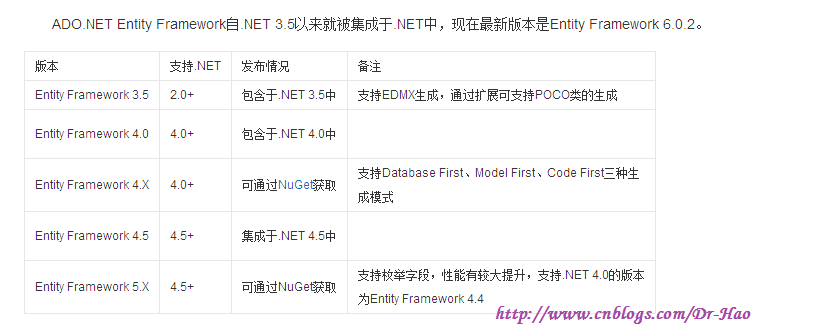
本次测试以Visual Studio2013 / MS Sql Server2012 / Entity Framework 6.X 测试EF
Code First Demo【此时数据库和表格都已经存在,为了在原有项目中引入EF,需要使用这种方式】
【关键:上下文,实体类的约束及关系】
//MS SQL Server连接字符串

//connectionString="Data Source=(local);Initial Catalog=EFTest;User Id=sa;Password=123456;" providerName="System.Data.SqlClient"
<connectionStrings>

  <add name="EFTest" connectionString="Data Source=(local);Initial Catalog=EFTest;User Id=sa;Password=123456;" providerName="System.Data.SqlClient"></add>

</connectionStrings>
原有项目中,已经有了模型类,所以不再重新生成模型类
操作步骤:
1>引入程序集EntityFramework.dll,System.Data.Entity.dll
2>在配置文件中 写连接字符串
3>创建模型类(如果项目中有模型类,则只需要维护关系)
通过导航属性来表示类的关系,注意:导航属性设置成virtual,
特性维护:Table,Key,ForeignKey
4>创建上下文类,继承自DbContext
调用父类构造方法,传递连接字符串"name=***"
5>根据类型创建数据库表
Context1 context = new Context1();
使用context.Database.CreateIfNotExists();完成数据库中表的创建;
调用context.SaveChanges()方法完成保存。
1:打开SQLServer2012,使用下面SQL文本创建MyFirstModelFirstEF数据库
create database EFTest

on primary

(

    name='EFTest.mdf',

    --修改为自己电脑上SQL DB路径

    filename='D:\yangZ_MSSQL\EFTest.mdf',

    size=5mb,

    maxsize=100mb,

    filegrowth=10%

)

log on

(

    name='EFTest_log.ldf',

    --修改为自己电脑上SQL DB路径

    filename='D:\yangZ_MSSQL\EFTest_log.ldf',

    size=2mb,

    maxsize=100mb,

    filegrowth=5mb

)

go
2:新建ConsoleApplication应用程序EFCodeFirstDemo

3:引入程序集EntityFramework.dll,System.Data.Entity.dll (默认找不到引用EntityFramework.dll)
3.1:可以通过NuGet来获取 [工具-->库程序包管理器-->程序包管理器控制台],Ps:这种方式要求电脑必须联网
Install-Package EntityFramework -Version 6.0.2

Install-Package EntityFramework -Pre (表示最新)

Uninstall-Package EntityFramework -Version 6.1.0
3.2:拷贝现有EF项目中的EntityFramework.dll文件
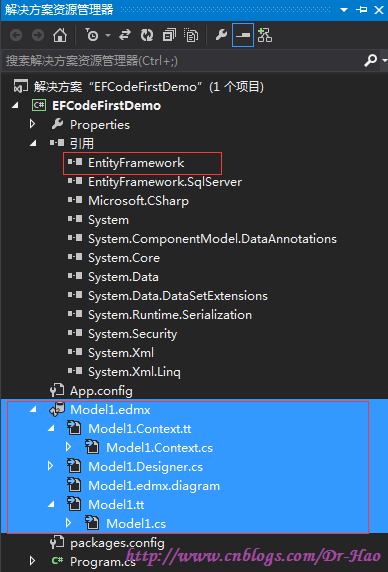
3.3:可以通过ModelFirst/DatabaseFirst(不添加任何表格)引入dll,然后删除Model.edmx文件
在EFCodeFirstDemo上 右键-->新建-->新建项-->数据-->ADO.NET实体数据模型,选择从数据库生成/空模型,然后点击完成
4:在配置文件中 写连接字符串
  <connectionStrings>

    <add name="EFTest" connectionString="Data Source=(local);Initial Catalog=EFTest;User Id=sa;Password=123456;" providerName="System.Data.SqlClient"></add>

  </connectionStrings>
5:创建模型类(如果项目中有模型类,则只需要维护关系)
通过导航属性来表示类的关系,注意:导航属性设置成virtual,
特性维护:Table,Key,ForeignKey
ContactInfo.cs
using System;

using System.Collections.Generic;

using System.ComponentModel.DataAnnotations;

using System.ComponentModel.DataAnnotations.Schema;

using System.Linq;

using System.Text;

using System.Threading.Tasks;

namespace EFCodeFirstDemo

{

    //Table是在 System.ComponentModel.DataAnnotations.Schema

    [Table("ContactInfo")]

    public class ContactInfo

    {

        //Key 是在System.ComponentModel.DataAnnotations

        [Key]

        public int InfoId { get; set; }

        public string InfoName { get; set; }

        //ForeignKey  是在System.ComponentModel.DataAnnotations.Schema

        [ForeignKey("ContactType")]

        public int ContactTypeId { get; set; }

        public virtual ContactType ContactType { get; set; }

    }

}
ContactType.cs
using System;

using System.Collections.Generic;

using System.ComponentModel.DataAnnotations;

using System.ComponentModel.DataAnnotations.Schema;

using System.Linq;

using System.Text;

using System.Threading.Tasks;

namespace EFCodeFirstDemo

{

    //Table是在 System.ComponentModel.DataAnnotations.Schema

    [Table("ContactType")]

    public class ContactType

    {

        public ContactType()

        {

            this.ContactInfo = new HashSet<ContactInfo>();

        }

        //Key 是在System.ComponentModel.DataAnnotations

        [Key]

        public int TypeId { get; set; }

        public string TypeTitle { get; set; }

        public virtual ICollection<ContactInfo> ContactInfo { get; set; }

    }

}
通过实体框架 Code First 建立新数据库 链接: http://pan.baidu.com/s/1qYBZiCc 密码: 5r4a
6:创建上下文类,继承自DbContext
调用父类构造方法,传递连接字符串"name=***"
6.1:在EFCodeFirstDemo project项目 右键-->添加-->类 Context1.cs
using System;

using System.Collections.Generic;

using System.Data.Entity;

using System.Linq;

using System.Text;

using System.Threading.Tasks;

namespace EFCodeFirstDemo

{

    public class Context1 : DbContext

    {

        public Context1()

            : base("name=EFTest")

        {

        }

        public virtual DbSet<ContactType> ContactType { get; set; }

        public virtual DbSet<ContactInfo> ContactInfo { get; set; }

    }

}

7:根据类型创建数据库表
Context1 context = new Context1();
使用context.Database.CreateIfNotExists();完成数据库中表的创建;
调用context.SaveChanges()方法完成保存。
using System;

using System.Collections.Generic;

using System.Linq;

using System.Text;

using System.Threading.Tasks;

namespace EFCodeFirstDemo

{

    class Program

    {

        static void Main(string[] args)

        {

            Context1 context = new Context1();

            //在现有链接数据库中 ,若当前实体模型对应的数据库不存在,则创建,反之则不需要创建

            context.Database.CreateIfNotExists();

            context.SaveChanges();

        }

    }

}
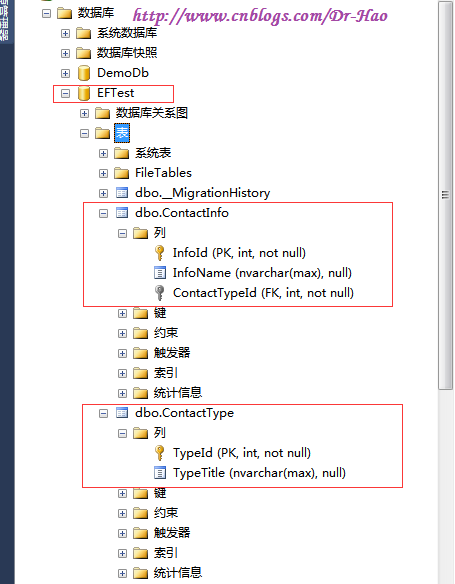
此时对应MS SQL Server数据库为:
【未完,待续】
Entity Framework(EF的Code First方法)的更多相关文章
- Entity Framework(EF的Model First方法)
EntityFramework,是Microsoft的一款ORM(Object-Relation-Mapping)框架.同其它ORM(如,NHibernate,Hibernate)一样, 一是为了使开 ...
- Entity Framework(EF的Database First方法)
EntityFramework,是Microsoft的一款ORM(Object-Relation-Mapping)框架.同其它ORM(如,NHibernate,Hibernate)一样, 一是为了使开 ...
- 【极力分享】[C#/.NET]Entity Framework(EF) Code First 多对多关系的实体增,删,改,查操作全程详细示例【转载自https://segmentfault.com/a/1190000004152660】
[C#/.NET]Entity Framework(EF) Code First 多对多关系的实体增,删,改,查操作全程详细示例 本文我们来学习一下在Entity Framework中使用Cont ...
- ASP.NET Core 开发-Entity Framework (EF) Core 1.0 Database First
ASP.NET Core 开发-Entity Framework Core 1.0 Database First,ASP.NET Core 1.0 EF Core操作数据库. Entity Frame ...
- Visual Studio Entity Framework (EF) 生成SQL 代码 性能查询
Visual Studio Entity Framework (EF) 生成SQL 代码 性能查询 SQL 中,有SQL Server Profiler可以用来查询性能以及查看外部调用的SQL ...
- [转]Using Entity Framework (EF) Code-First Migrations in nopCommerce for Fast Customizations
本文转自:https://www.pronopcommerce.com/using-entity-framework-ef-code-first-migrations-in-nopcommerce-f ...
- Entity Framework工具POCO Code First Generator的使用
在使用Entity Framework过程中,有时需要借助工具生成Code First的代码,而Entity Framework Reverse POCO Code First Generator是一 ...
- Entity Framework工具POCO Code First Generator的使用(参考链接:https://github.com/sjh37/EntityFramework-Reverse-POCO-Code-First-Generator)
在使用Entity Framework过程中,有时需要借助工具生成Code First的代码,而Entity Framework Reverse POCO Code First Generator是一 ...
- ASP.NET Core 开发 - Entity Framework (EF) Core
EF Core 1.0 Database First http://www.cnblogs.com/linezero/p/EFCoreDBFirst.html ASP.NET Core 开发 - En ...
随机推荐
- 自己用过的web软件tools软件以及玩过的游戏
三年大学世界 最经常用的web网站估计就是淘宝了 最经常使用的工具软件也就是 Microsoft office,而最经常玩的游戏就是英雄联盟了一款pvp对战游戏 淘宝自不必说 可以称为国内最大 ...
- 高性能页面加载技术--BigPipe设计原理及Java简单实现
1.技术背景 动态web网站的历史可以追溯到万维网初期,相比于静态网站,动态网站提供了强大的可交互功能.经过几十年的发展,动态网站在互动性和页面显示效果上有了很大的提升,但是对于网站动态网站的整体页面 ...
- PGM学习之三 朴素贝叶斯分类器(Naive Bayes Classifier)
介绍朴素贝叶斯分类器的文章已经很多了.本文的目的是通过基本概念和微小实例的复述,巩固对于朴素贝叶斯分类器的理解. 一 朴素贝叶斯分类器基础回顾 朴素贝叶斯分类器基于贝叶斯定义,特别适用于输入数据维数较 ...
- PGM学习之二 PGM模型的分类与简介
废话:和上一次的文章确实隔了太久,希望趁暑期打酱油的时间,将之前学习的东西深入理解一下,同时尝试用Python写相关的机器学习代码. 一 PGM模型的分类 通过上一篇文章的介绍,相信大家对PGM的定义 ...
- EF 使用 oracle
EF 使用 oracle https://www.oracle.com/technetwork/topics/dotnet/downloads/index.html C:\Program Files ...
- 【spring学习笔记一】Ioc控制反转
(最近有点捞,在大一的时候还通过写博客的方式督促自己学习唉,先培养起习惯,再找个好点的地方重新开始写博客⑧) Spring是JAVA的一个框架. 有个概念叫依赖注入(或者还有个名字叫控制反转). 概念 ...
- Next Permutation - LeetCode
目录 题目链接 注意点 解法 小结 题目链接 Next Permutation - LeetCode 注意点 如果是字典序最大的串则要返回字典序最小的串 解法 解法一:参见:http://www.cn ...
- 【IOI 2018】Doll 机械娃娃
我感觉这个题作为Day2T1,有一定的挑战性.为$Rxd$没有完成这道题可惜. 我觉得这道题,如果按照前几个部分分的思路来想,就有可能绕进错误的思路中.因为比如说每个传感器最多只在序列中出现$2$次, ...
- uoj132/BZOJ4200/洛谷P2304 [Noi2015]小园丁与老司机 【dp + 带上下界网络流】
题目链接 uoj132 题解 真是一道大码题,,,肝了一个上午 老司机的部分是一个\(dp\),观察点是按\(y\)分层的,而且按每层点的上限来看可以使用\(O(nd)\)的\(dp\),其中\(d\ ...
- Java考试题之九
QUESTION 177 Given: 1. class TestException extends Exception { } 2. class A { 3. public ...