
Android EditText弹出软键盘实现页面标题头不动,软键盘弹出在编辑框下面
为了实现EditText编辑的时候弹出软键盘标题头不动,底部编辑框,上移在这总结:
RelativeLayout在弹出软键盘的时候先寻找android:layout_alignParentBottom属性是否有控件设置为true,如果有将此控件向上移动键盘高度的位置,布局也就位于软键盘的上面,其他控件如果有相对于该控件的位置,也就相对的移动了,如果没有则什么都不做,可以看做布局是一层一层盖上去的,键盘弹出的时候,只把符合要求的当层的布局向上移动,所以如果我们按照这种方法写,肯定是可以的。
还有一个重点就是,配置文件里面该activity要设置android:windowSoftInputMode=”adjustResize”
遇到设置之后不生效的结果,那就在布局文件的根布局添加android:fitsSystemWindows=”true”属性。
<?xml version="1.0" encoding="utf-8"?>

<RelativeLayout xmlns:android="http://schemas.android.com/apk/res/android"

    xmlns:tools="http://schemas.android.com/tools"

    android:layout_width="match_parent"

    android:layout_height="match_parent"

    android:fitsSystemWindows="true"

    tools:context="com.shiwen.oil.activity.NoticeDetailActivity">

    <ProgressBar

        android:id="@+id/progressBar"

        style="?android:attr/progressBarStyleHorizontal"

        android:layout_width="match_parent"

        android:layout_height="3dip"

        android:layout_alignParentTop="true"

        android:progressDrawable="@drawable/progressbar_drawable"

        android:visibility="gone"/>

    <WebView

        android:id="@+id/webView"

        android:layout_width="match_parent"

        android:layout_height="match_parent"

        android:layout_below="@id/progressBar"

        android:layout_weight="1"/>

    <RelativeLayout

        android:id="@+id/comment_bottom_ll"

        android:layout_width="match_parent"

        android:layout_height="wrap_content"

        android:background="@color/white"

        android:layout_alignParentBottom="true"

     >

        <View

            android:layout_width="match_parent"

            android:layout_height="0.5dp"

            android:background="@color/gray" />

        <LinearLayout

            android:layout_width="match_parent"

            android:layout_height="wrap_content"

            android:layout_marginBottom="10dp"

            android:layout_marginTop="10dp"

            android:orientation="horizontal">

            <RelativeLayout

                android:id="@+id/rl"

                android:layout_width="0dp"

                android:layout_height="wrap_content"

                android:layout_marginLeft="13dp"

                android:layout_weight="3">

                <EditText

                    android:id="@+id/bottom_ed"

                    android:layout_width="match_parent"

                    android:layout_height="32dp"

                    android:background="@drawable/shape_gray_solid_bg"

                    android:hint="写评论"

                    android:minHeight="35dp"

                    android:paddingLeft="20dp"

                    android:paddingRight="5dp"

                    android:textColorHint="@color/gray"

                    android:textSize="14sp" />

            </RelativeLayout>

            <Button

                android:id="@+id/bottom_bnt"

                android:layout_width="0dp"

                android:layout_height="32dp"

                android:layout_centerVertical="true"

                android:layout_marginLeft="10dp"

                android:layout_toRightOf="@id/rl"

                android:layout_weight="1"

                android:background="@drawable/shape_base_bg2"

                android:text="确认"

                android:layout_marginRight="5dp"

                android:textColor="@color/white"

                android:textSize="13sp" />

        </LinearLayout>

    </RelativeLayout>

</RelativeLayout>
     <activity

            android:name=".activity.NoticeDetailActivity"

            android:windowSoftInputMode="adjustResize"

            ></activity>
效果图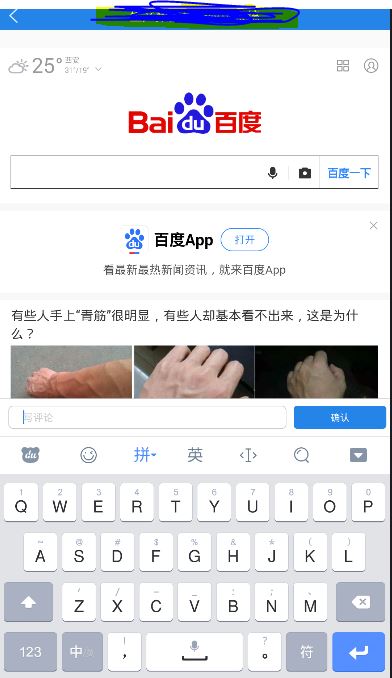
Android EditText弹出软键盘实现页面标题头不动,软键盘弹出在编辑框下面的更多相关文章
- android软件简约记账app开发day10-主页面模块--头信息的展示,和之后功能完善的目标。
android软件简约记账app开发day10-主页面模块--头信息的展示,和之后功能完善的目标. 今天来写主界面头信息的展示,也就是将第一天的写的layout中的item_main_top展示到主界 ...
- Android软键盘弹出,覆盖h5页面输入框问题
之前我们在使用vue进行 h5 表单录入的过程中,遇到了Android软键盘弹出,覆盖 h5页面 输入框 问题,在此进行回顾并分享给大家: 系统:Android 条件:当输入框在可视区底部或者偏下的位 ...
- H5页面 绝对定位元素被 软键盘弹出时顶起
H5页面 绝对定位元素被 软键盘弹出时顶起 在h5页面开发的过程中,我们可能会遇到下面这个问题,当页面中有输入框的时候,系统自带的软盘会把按钮挤出原来的位置.那么我们该怎么解决呢?下面列出一下的方法: ...
- Android EditText不弹出输入法总结,焦点问题的总结
看一个manifest中Activity的配置,如果这个页面有EditText,并且我们想要进入这个页面的时候默认弹出输入法,可以这样设置这个属相:android:windowSoftInputMod ...
- Android EditText 不弹出输入法
当第一次进入一个activity的时候 一般是第一个edittext是默认选中的,但是该死的软键盘也一起弹出来了 那是相当的不美观哈!(#‵′)凸.为此, 本大人就去寻找在刚进入这个activity ...
- Android EditText不弹出输入法焦点问题的总结
转自:http://mobile.51cto.com/aprogram-403138.htm 看一个manifest中Activity的配置,如果这个页面有EditText,并且我们想要进入这个页面的 ...
- 如何利用PopupWindow实现弹出菜单并解决焦点获取以及与软键盘冲突问题
如何利用PopupWindow实现弹出菜单并解决焦点获取以及与软键盘冲突问题 如何利用PopupWindow实现弹出菜单并解决焦点获取以及与软键盘冲突问题 在android中有时候可能要实现一个底部弹 ...
- Android EditText默认不弹出输入法,以及获取光标,修改输入法Enter键的方法
一.Android EditText默认不弹出输入法的办法:1. 在AndroidManifest.xml中将需要默认隐藏键盘的Activity中添加属性即可(常用此方法) android:windo ...
- Android EditText软键盘显示隐藏以及“监听”
一.写此文章的起因 本人在做类似于微信.易信等这样的聊天软件时,遇到了一个问题.聊天界面最下面一般类似于如图1这样(这里只是显示了最下面部分,可以参考微信等),有输入文字的EditText和表情按钮等 ...
随机推荐
- Powershell - 获取服务器启动时间
www.orangeisland.cn 使用以下命令,直接获取服务器启动时间: 通过以下脚本,批量获取服务器的启动时间: $TextPath = "C:\Users\admin\Deskto ...
- 2019 年百度之星·程序设计大赛 - 初赛一Game HDU 6669 (实现,贪心)
Game Time Limit: 2000/1000 MS (Java/Others) Memory Limit: 32768/32768 K (Java/Others) Total Submissi ...
- php禁止个别ip访问网站
PHP禁止个别IP访问自己的网站,可以看看下面的方法. function get_ip_data(){ $ip=file_get_contents("http://ip.taobao.com ...
- 记录一下RAC的使用
1 常规的对数组的操作,包括遍历.刷选.映射.替换 // 遍历 NSArray * array = @["]; [array.rac_sequence.signal subscribeNe ...
- Head First设计模式 装饰者模式
装饰器模式 典型的例子:JAVA IO. 装饰器模式(Decorator Pattern)允许向一个现有的对象添加新的功能,同时又不改变其结构.这种类型的设计模式属于结构型模式,它是作为现有的类的一个 ...
- Iview 在Table组件中添加图片
要先简单了解render函数的使用. 直接上代码: { title: "商品图片", key: "commodityPhoto", align: 'center ...
- chr ord 去重
找不同字符串 t 由字符串 s 随机重排,然后在随机位置添加一个字母. 请找出在 t 中被添加的字母. def func(s, t): num1 = 0 num2 = 0 for i in s: nu ...
- 什么是DOM(文档对象模型)?
㈠什么是DOM? 文档对象模型(Document Object Model,简称DOM),是W3C组织推荐的处理可扩展标志语言的标准编程接口. DOM 定义了访问 HTML 和 XML 文档的标准: ...
- C# 输出双引号
Response.Write("前一页面的标题是:\"" +Page.PreviousPage.Title.ToString()+"\"") ...
- [JZOJ6244]【NOI2019模拟2019.7.1】Trominoes 【计数】
Description n,m<=10000 Solution 考虑暴力轮廓线DP,按顺序放骨牌 显然轮廓线长度为N+M 轮廓线也是单调的 1表示向上,0表示向右 N个1,M个0 只能放四种骨牌 ...