
RHEL 6.5---SVN服务实现过程
| 主机名 | IP地址 |
| master | 192.168.30.130 |
| slave | 192.168.30.131 |
安装
[root@master ~]# yum install -y subversion httpd mod_dav_svn
创建工程版本库
[root@master ~]# mkdir /webdept  #版本库目录

[root@master ~]# svnadmin create /webdept/www.sishen.cn 第一个版本库

查看版本库中的内容

[root@master ~]# ll  /webdept/www.sishen.cn/

total

drwxr-xr-x  root root  May  : conf #是这个仓库的配置文件(仓库的用户访问账号、权限等),也是我们要关注的配置文件

drwxr-sr-x  root root  May  : db #所有版本控制的数据存放文件

-r--r--r--  root root     May  : format #是一个文本文件,里面只放了一个整数。表示当前文件库配置的版本号

drwxr-xr-x  root root  May  : hooks #放置hook脚本文件的目录

drwxr-xr-x  root root  May  : locks #用来放置subversion常见锁定数据的目录,用来追踪存取文件库的客户端

-rw-r--r--  root root   May  : README.txt

[root@master ~]# ll /webdept/www.sishen.cn/conf/

total

-rw-r--r--  root root  May  : authz #权限认证

-rw-r--r--  root root  May  : passwd #用户名和密码

-rw-r--r--  root root  May  : svnserve.conf #服务器配置文件
对不同的版本库,修改配置文件
[general]

..........

anon-access = read

..........

auth-access = write

..........

password-db = passwd

..........

authz-db = authz

..........

realm = www.sishen.cn

..........
配置用户和密码
[root@master ~]# vim /webdept/www.sishen.cn/conf/passwd

[users]

sishen =

xueji =

haha =

#末尾添加这三行

#对于部分版本,前面的[users]是有#号的,如果有#号,一定要取消,否则只能使用匿名用户登录,客户端登录不会出现登录窗口或密码提示,除非在配置文件将anon设置为none,否则将返回一个错误

#这里的密码都是明文,没有加密。
配置认证信息
[root@master ~]# vim /webdept/www.sishen.cn/conf/authz

[groups]
Check = sishen,xueji #此行添加,定义组

[/] #此行添加,/表示在当前所在版本库目录,这里表示在www.sishen.cn目录下

user = rw

@Check = r #表示这个组的权限

* =  #除了上面的有赋予权限成员之外,其他成员都没有权限
该文件的定义格式:
[/目录名]
@用户组名 = 权限
用户名 = 权限
* =
启动svn服务创建测试代码
[root@master ~]# svnserve -d -r /webdept/ #启动了/wendept下的所有的版本库

查看进程

[root@master ~]# ps -aux | grep svn

Warning: bad syntax, perhaps a bogus '-'? See /usr/share/doc/procps-3.2./FAQ

root        0.0  0.0    ?        Ss   :   : svnserve -d -r /webdept/

root        0.0  0.0     pts/    S+   :   : grep svn

[root@master ~]# netstat -antup | grep svn

tcp               0.0.0.0:                0.0.0.0:*                   LISTEN      /svnserve
在SVN服务端提交代码测试
[root@master ~]# mkdir localsvn

[root@master ~]# cd localsvn/

[root@master localsvn]# touch .html

[root@master localsvn]# touch .html

[root@master localsvn]# cd

root@master ~]# svn import /root/localsvn/ file:///webdept/www.sishen.cn/ -m "The First Commit"

Adding         /root/localsvn/.html

Adding         /root/localsvn/.html

Committed revision

在客户端

[root@slave editweb]# svn import /root/editweb/ svn://192.168.30.130/www.sishen.cn/ -m "The Second Commit"

Authentication realm: <svn://192.168.30.130:3690> www.sishen.cn

Password for 'root':

Authentication realm: <svn://192.168.30.130:3690> www.sishen.cn

Username: haha

Password for 'haha':

-----------------------------------------------------------------------

ATTENTION!  Your password for authentication realm:

   <svn://192.168.30.130:3690> www.sishen.cn

can only be stored to disk unencrypted!  You are advised to configure

your system so that Subversion can store passwords encrypted, if

possible.  See the documentation for details.

You can avoid future appearances of this warning by setting the value

of the 'store-plaintext-passwords' option to either 'yes' or 'no' in

'/root/.subversion/servers'.

-----------------------------------------------------------------------

Store password unencrypted (yes/no)? yes

Adding         /root/editweb/.html

Adding         /root/editweb/.html

Adding         /root/editweb/.html

Committed revision .
代码提取
[root@master ~]# svn checkout svn://192.168.30.130/www.sishen.cn download-source   #会自动新建download-source目录

Authentication realm: <svn://192.168.30.130:3690> www.sishen.cn

Authentication realm: <svn://192.168.30.130:3690> www.sishen.cn

Password for 'root':   #这里直接回车

Authentication realm: <svn://192.168.30.130:3690> www.sishen.cn

Username: sishen   #输入sishen,或者xueji,这两个用户只有读取的权限

Password for 'sishen':  #输入sishen的密码123456

-----------------------------------------------------------------------

ATTENTION!  Your password for authentication realm:

   <svn://192.168.30.130:3690> www.sishen.cn

can only be stored to disk unencrypted!  You are advised to configure

your system so that Subversion can store passwords encrypted, if

possible.  See the documentation for details.

You can avoid future appearances of this warning by setting the value

of the 'store-plaintext-passwords' option to either 'yes' or 'no' in

'/root/.subversion/servers'.

-----------------------------------------------------------------------

Store password unencrypted (yes/no)? no #不要存储密码

A    download-source/.html

A    download-source/.html

A    download-source/.html

A    download-source/.html

A    download-source/.html

Checked out revision .
添加代码
[root@master download-source]# touch a.html

[root@master download-source]# ls

.html  .html  .html  .html  .html  a.html

[root@master download-source]# svn add a.html

A         a.html

[root@master download-source]# svn commit -m "The third commit"

Authentication realm: <svn://192.168.30.130:3690> www.sishen.cn

Password for 'sishen': #输入密码发现提示认证失败,因为sishen用户没有写权限,再次执行svn提交命令到此处时,直接回车切换用户haha

Authentication realm: <svn://192.168.30.130:3690> www.sishen.cn

Username: haha

Password for 'haha':

-----------------------------------------------------------------------

ATTENTION!  Your password for authentication realm:

   <svn://192.168.30.130:3690> www.sishen.cn

can only be stored to disk unencrypted!  You are advised to configure

your system so that Subversion can store passwords encrypted, if

possible.  See the documentation for details.

You can avoid future appearances of this warning by setting the value

of the 'store-plaintext-passwords' option to either 'yes' or 'no' in

'/root/.subversion/servers'.

-----------------------------------------------------------------------

Store password unencrypted (yes/no)? no

Sending        .html

Adding         a.html

Transmitting file data ..

Committed revision .

#提交成功
配置SVN+Apache
[root@master ~]# vim  /etc/httpd/conf.d/subversion.conf

LoadModule dav_svn_module     modules/mod_dav_svn.so

LoadModule authz_svn_module   modules/mod_authz_svn.so

#如果有这两个库文件说明安装成功

#然后在文件末尾田间如下内容

<Location /webdept>

   DAV svn

   SVNParentPath /webdept

      AuthType Basic

      AuthName "www.sishen.cn website dept"

      AuthUserFile /webdept/svn/passwd

      AuthzSVNAccessFile /webdept/svn/authz

      Require valid-user

</Location>
创建用户passwd文件
[root@master ~]# mkdir /webdept/svn

[root@master ~]# htpasswd -c /webdept/svn/passwd webuser #首次创建passwd文件需要使用-c参数,之后就不要使用了,否则会覆盖文件内容

New password:

Re-type new password:

Adding password for user webuser

[root@master ~]# htpasswd /webdept/svn/passwd webuser01

New password:

Re-type new password:

Adding password for user webuser01

[root@master ~]# htpasswd /webdept/svn/passwd depuser

New password:

Re-type new password:

Adding password for user depuser

[root@master ~]# cat /webdept/svn/passwd

webuser:KdGQogiSh/owA

webuser01:xa4W7xxnGNzHw

depuser:sw3dIsOwv4IAc
创建权限authz认证文件
[root@master ~]# vim /webdept/svn/authz

[groups]

all = webuser,webuser01

[/]   # / 表示版本库根目录

webuser = rw

[www.sishen.cn:/]

@all = rw #表示webuser和webuser01都可以读写

[www.xueji.cn:/] #该目录只有webuser01和depuser可以读写

webuser01 = rw

depuser = rw
启动服务测试
[root@master ~]# service httpd restart

Stopping httpd:                                            [  OK  ]

Starting httpd:                                            [  OK  ]
物理机浏览器访问测试
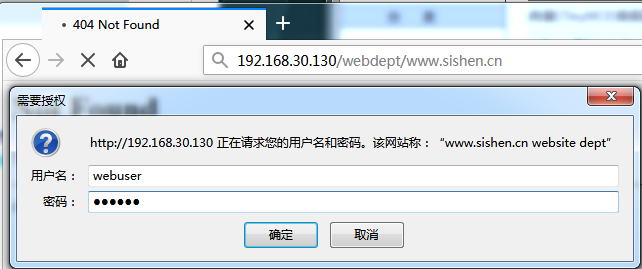
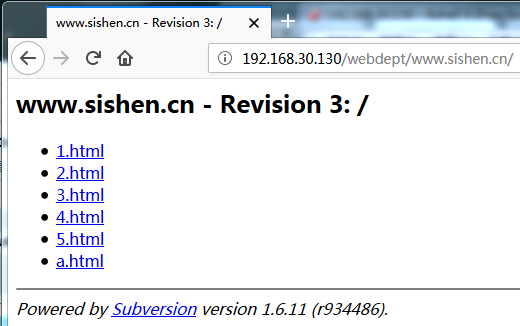
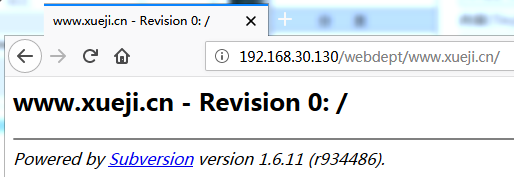
在linux客户端执行以下操作
[root@slave ~]# mkdir /website

[root@slave ~]# svn checkout svn://192.168.30.130/www.sishen.cn/ source

A    source/.html

A    source/a.html

A    source/.html

A    source/.html

A    source/.html

A    source/.html

Checked out revision .

[root@slave ~]# svn co "http://192.168.30.130/webdept/www.sishen.cn" source

Authentication realm: <http://192.168.30.130:80> www.sishen.cn website dept

Password for 'root':  #直接回车

Authentication realm: <http://192.168.30.130:80> www.sishen.cn website dept

Username: webuser   #输入webuser用户

Password for 'webuser':  #输入密码123456

-----------------------------------------------------------------------

ATTENTION!  Your password for authentication realm:

   <http://192.168.30.130:80> www.sishen.cn website dept

can only be stored to disk unencrypted!  You are advised to configure

your system so that Subversion can store passwords encrypted, if

possible.  See the documentation for details.

You can avoid future appearances of this warning by setting the value

of the 'store-plaintext-passwords' option to either 'yes' or 'no' in

'/root/.subversion/servers'.

-----------------------------------------------------------------------

Store password unencrypted (yes/no)? no

svn: 'source' is already a working copy for a different URL
至于windows下的svn客户端在此就不在演示了。
RHEL 6.5---SVN服务实现过程的更多相关文章
- CentOS(Linux) - SVN使用笔记(一) - 安装SVN过程及开启和关闭svn服务指令
1.安装: yum install httpd httpd-devel subversion mod_dav_svn mod_auth_mysql yum remove subversion 删除旧版 ...
- 最简单的SVN环境搭建过程
本文简单描述最简单的SVN环境搭建过程 搭建环境:windows (个人验证了windows2003,windows xp) 使用软件:Setup-Subversion-1.6.17 //Serve ...
- SVN 服务端 和 客户端
网址大全 | EF CodeFirst | 电视 | MyNPOI | 开源 | 我的皮肤 | ASP.NET MVC4 | 前端提升 | LINQ | WCF ...
- SVN服务端和客户端的安装与搭建
版权声明:本文为博主原创文章,转载请注明原文出处. https://blog.csdn.net/zzfenglin/article/details/50931462 SVN简介 SVN全名Subver ...
- window、linux安装jdk,excel 导入oracle,WebService,window 端口查看,svn服务安装,oracle用户解锁
内存泄露分析插件http://download.eclipse.org/mat/1.3/update-site/birt插件http://download.eclipse.org//birt/upda ...
- centos6.5 svn服务端搭建
一.前言 Subversion是一个免费的开源的版本管理系统,它是作为CVS(Concurrent Versions System)的取代品出现的.本文简单介绍了Subversion在centos上的 ...
- git跟svn 服务端对比
Git已经火了很久,简单的使用也没有问题,但有几个问题一直以来都没有搞清楚:git跟svn有哪些异同,两者相互的优劣是什么,git的分布式怎么理解,为什么有离线提交,,,自己动手,分别看一下服务端跟客 ...
- svn服务
svn服务实战应用指南 1.1 svn介绍 什么是svn? svn(sub-version)是近年来崛起的非常优秀的版本管理工具,与cvs管理工具一样,svn是一个跨平台的开源的版本控制系统, ...
- PCB SVN 服务端VisualSVN Server与TortoiseSVN
PCB 工程系统SVN源代码招病毒破坏以后,一周时间都没有源代码同步更新了,今天终于将SVN源代码数据恢复并重建SVN服务器,这里将SVN搭建安装过程整理如下 一.服务端SVN安装 1.下载地址:ht ...
随机推荐
- apache benchmark
1 ab是什么 是一个web高并发测试工具,可以发送get.put.post请求. 2 ab -n和-c共存 -c是concurrency的缩写,即同一时间发送多个请求. -n是指本次总共发送多少个请 ...
- redis11----监控工具 sentinel
当master宕机了要把slave1变为master,并把slave2指向slave1. 可以运行时更改master-slave,config set/get,修改一台slave(设为A)为new m ...
- 从源码理解 ThreadLocal
为每个线程保存各自的拷贝,可以通过在Thread类中定义一个成员变量来保存每个线程值,这样也是线程安全的. 通过定义一个成员变量 sn 来实现,这里并没有使用ThreadLocal类来实现: publ ...
- asp.net下的cookieName
https://stackoverflow.com/questions/1017144/rename-asp-net-sessionid Add to your web.config:- <sy ...
- HDFS之二:HDFS文件系统JavaAPI接口
HDFS是存取数据的分布式文件系统,HDFS文件操作常有两种方式,一种是命令行方式,即Hadoop提供了一套与Linux文件命令类似的命令行工具.HDFS操作之一:hdfs命令行操作 另一种是Java ...
- 【旧文章搬运】分析了一下360安全卫士的HOOK
原文发表于百度空间及看雪论坛,2009-10-08 看雪论坛地址:https://bbs.pediy.com/thread-99128.htm 看时间,09年的国庆节基本上就搞这玩意儿了...==== ...
- Start Developing Mac Apps -- Human Interface Design 用户界面设计
Human Interface Design It’s not enough to create an app that works. Users expect Mac apps to be powe ...
- ASP.NET Core MVC 2.x 全面教程_ASP.NET Core MVC 06. Controller 返回View
Controller父类会提供很多上下文的相关信息,还提供了很多封装的方法 返回的对象要求实现了IActionResult接口 继承父类,并引入命名空间 写this点就出现很多东西,这些就是上下文的信 ...
- ACM-ICPC 中可能会使用到的库
sort(v.first(),v.end(),cmp())unique(v.first(),v.end(),cmp()) 第三个参数可以传入一个bool型,用来判断是不是相等,返回unique后的超尾 ...
- 51nod1127【尺取】
思路: 尺取,写挫了,debug了半天. #include <bits/stdc++.h> using namespace std; typedef long long LL; const ...