
antV G6流程图在Vue中的使用
最近我司项目中需要加入流程图制作功能,于是乎百度各种找可视化绘制拓扑图的轮子,大部分都是国外的,看文档太吃力,不过好在最终让我发现了AntV G6流程图图表库,最新版为2.0,不过编辑器在2.0版本还没有进行开源,所以只能退而求其次,使用了1.2.8版本。希望2.0版本的编辑器尽早开源,在交互方面1.2.8版本还是差了一些。
该组件并
非开箱即食,需要根据自己的业务进行修改,右侧属性表单部分如果有时间考虑改为插槽形式,方便以后复用~
技术栈
- Vue
v3.0.1 - Element-ui
v2.4.5 - antV G6
v1.2.8 - Sass
效果图
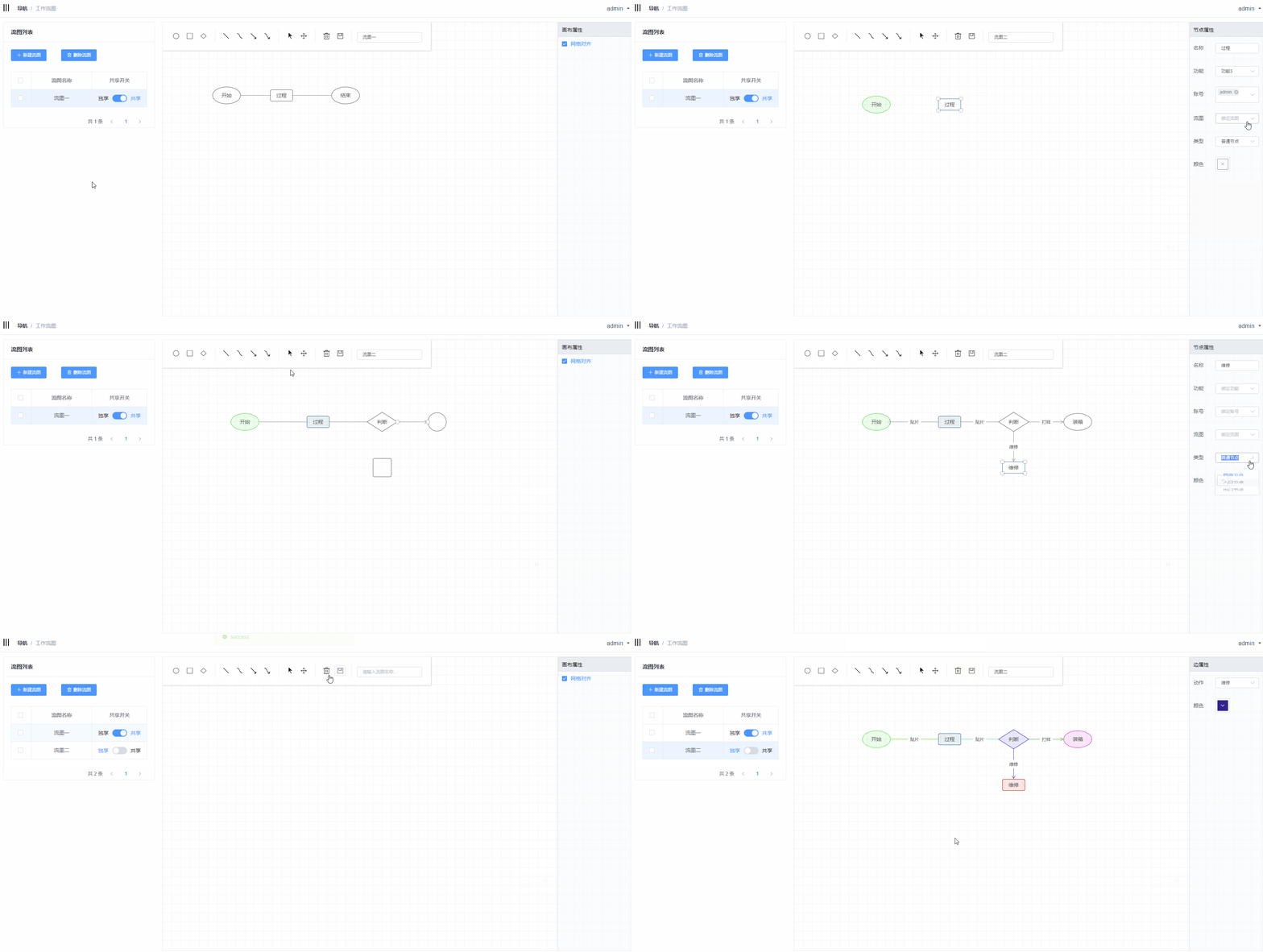
引入
在index.html中进行了全局引用
<script src="./static/plugin/g6.min.js"></script>
实例代码
仿照2.0版本的编辑器将G6作为了一个组件使用,代码:
<template>

  <div id="flowChart">

    <div class="operating">

      <div class="btn-group">

        <div class="btn" @click="addCircle" title="起始节点">

          <i class="iconfont icon-circle-oeps"></i>

        </div>

        <div class="btn" @click="addRect" title="常规节点">

          <i class="iconfont icon-square-oeps"></i>

        </div>

        <div class="btn" @click="addRhombus" title="条件节点">

          <i class="iconfont icon-square-ling"></i>

        </div>

      </div>

      <div class="btn-group">

        <div class="btn" @click="addLine" title="直线">

          <i class="iconfont icon-zhixian"></i>

        </div>

        <div class="btn" @click="addSmooth" title="曲线">

          <i class="iconfont icon-quxian"></i>

        </div>

        <div class="btn" @click="addArrowLine" title="箭头直线">

          <i class="iconfont icon-jiantouzhixian"></i>

        </div>

        <div class="btn" @click="addArrowSmooth" title="箭头曲线">

          <i class="iconfont icon-jiantouquxian"></i>

        </div>

      </div>

      <div class="btn-group">

        <div class="btn" @click="changeMode('edit')" title="选择模式">

          <i class="iconfont icon-chose"></i>

        </div>

        <div class="btn" @click="changeMode('drag')" title="拖拽模式">

          <i class="iconfont icon-move"></i>

        </div>

      </div>

      <div class="btn-group">

        <div class="btn" @click="del" style="margin-top: 5px;" title="删除">

          <i class="el-icon-delete"></i>

        </div>

        <div class="btn" @click="save" title="保存">

          <i class="iconfont icon-baocun"></i>

        </div>

      </div>

      <div class="btn-group">

        <el-input size="mini" v-model="workflowName" placeholder="请输入流图名称..."></el-input>

      </div>

    </div>

    <div class="info">

      <div class="title">

        <span>{{infoTitle}}属性</span>

      </div>

      <div class="content">

        <el-checkbox v-if="isBlank === true" v-model="checked">网格对齐</el-checkbox>

        <el-form v-else label-position="left" label-width="60px">

          <el-form-item v-if="isNode !== true" label="动作">

            <el-select v-model="action" size="mini" filterable placeholder="绑定动作" value="">

              <el-option

                v-for="item in actionList"

                :key="item.id"

                :label="item.label"

                :value="item.id">

              </el-option>

            </el-select>

          </el-form-item>   <!-- 线-->

          <el-form-item v-if="isNode === true" label="名称">

            <el-input size="mini" v-model="name"></el-input>

          </el-form-item>

          <el-form-item v-if="isNode === true" label="功能">

            <el-select v-model="func" size="mini" filterable placeholder="绑定功能" value="">

              <el-option

                v-for="item in funcList"

                :key="item.id"

                :label="item.label"

                :value="item.id">

              </el-option>

            </el-select>

          </el-form-item>

          <el-form-item v-if="isNode === true" label="账号">

            <el-select v-model="account" size="mini" filterable multiple

                       collapse-tags placeholder="绑定账号" value="">

              <el-option

                v-for="item in accountList"

                :key="item.id"

                :label="item.label"

                :value="item.id">

              </el-option>

            </el-select>

          </el-form-item>

          <el-form-item v-if="isNode === true" label="流图">

            <el-select v-model="workflow" size="mini" filterable clearable placeholder="绑定流图" value="">

              <el-option

                v-for="item in workflowList"

                :key="item.id"

                :label="item.label"

                :value="item.id">

              </el-option>

            </el-select>

          </el-form-item>

          <el-form-item v-if="isNode === true" label="类型">

            <el-select v-model="nodeType" size="mini" filterable placeholder="请选择类型" value="">

              <el-option

                v-for="item in nodeTypeList"

                :key="item.id"

                :label="item.label"

                :value="item.id">

              </el-option>

            </el-select>

          </el-form-item>

          <el-form-item label="颜色">

            <el-color-picker v-model="color"></el-color-picker>

          </el-form-item>

        </el-form>

      </div>

    </div>

  </div>

</template>

<script>

  export default {

    name: "index",

    components: {},

    mounted() {

      this.initG6();

    },

    props: {

      actionList: {

        type: Array, default: []

      },

      funcList: {

        type: Array, default: []

      },

      accountList: {

        type: Array, default: []

      },

      workflowList: {

        type: Array, default: []

      },

      nodeTypeList: {

        type: Array, default: () => {

          return [

            {id: 0, label: '普通节点'},

            {id: 1, label: '入口节点'},

            {id: 2, label: '出口节点'}

          ]

        }

      }

    },

    data() {

      return {

        action: '',

        name: '',

        func: '',

        account: '',

        workflow: '',

        nodeType: 0,

        color: '',

        net: '',

        Util: '',

        workflowName: '',

        activation: '', //当前激活的节点

        isNode: false, //当前是节点

        isBlank: true,   //当前是空白区

        checked: true,  //网格对齐

        infoTitle: '画布',//属性标题

        oldColor: '',    //获取节点本身颜色

        type: '',        //有值为编辑状态

      }

    },

    methods: {

      initG6() {

        let self = this;

        self.Util = G6.Util;

        let grid;

        if (self.checked) {

          grid = {

            forceAlign: true, // 是否支持网格对齐

            cell: 25,         // 网格大小

          };

        } else {

          grid = null;

        }

        self.net = new G6.Net({

          id: 'flowChart',      // 容器ID

          mode: 'edit',

          grid: grid,

          /*width: 500,    // 画布宽*/

          height: 800    // 画布高

        });

        /*self.net.tooltip({

          title: '信息', // @type {String} 标题

          split: ':',  // @type {String} 分割符号

          dx: 0,       // @type {Number} 水平偏移

          dy: 0        // @type {Number} 竖直偏移

        });*/

        /**

         *点击空白处

         */

        self.net.on('click', (ev) => {

          if (!self.Util.isNull(ev.item)) {

            self.isBlank = false

          } else {

            self.isBlank = true;

            self.infoTitle = '画布'

          }

        });

        /**

         *点击节点

         */

        self.net.on('itemclick', function (ev) {

          self.isNode = self.Util.isNode(ev.item);   //是否为Node

          self.activation = ev.item;

          if (self.isNode) {

            /* 激活节点后节点名称input聚焦*/

            self.$nextTick(()=>{

              self.$refs.inputFocus.$el.querySelector('input').focus();

            });

            self.infoTitle = '节点';

            self.name = ev.item.get('model').label;

            self.func = ev.item.get('model').func;

            self.account = ev.item.get('model').account || [];

            self.workflow = ev.item.get('model').workflow;

            self.nodeType = ev.item.get('model').nodeType;

          } else {

            self.infoTitle = '边';

            self.action = ev.item.get('model').action;

          }

          self.color = self.oldColor;

        });

        /**

         * 鼠标移入移出事件改变颜色

         */

        self.net.on('itemmouseenter', ev => {

          const item = ev.item;

          self.oldColor = item.get('model').color;     //获取节点颜色

          self.net.update(item, {

            color: '#108EE9',

          });

          self.net.refresh();

        });

        self.net.on('itemmouseleave', ev => {

          const item = ev.item;

          self.net.update(item, {

            color: self.oldColor

          });

          self.net.refresh();

        });

        /**

         * 提示信息

         */

       /* self.net.node().tooltip(['label', 'func', 'role', 'color']);

        self.net.edge().tooltip(['label', 'color']);*/

        /**

         * 渲染

         */

        /*self.net.source(self.nodes, self.edges);*/  //加载资源数据

        self.net.render();

      },

      addCircle() {

        this.net.beginAdd('node', {

          shape: 'circle',

          nodeType: 0

        })

      },//添加起始节点

      addRect() {

        this.net.beginAdd('node', {

          shape: 'rect',

          nodeType: 0

        })

      },//添加常规节点

      addRhombus() {

        this.net.beginAdd('node', {

          shape: 'rhombus',

          nodeType: 0

        })

      }, //添加条件节点

      addLine() {

        this.net.beginAdd('edge', {

          shape: 'line'

        });

      }, //添加直线

      addSmooth() {

        this.net.beginAdd('edge', {

          shape: 'smooth'

        })

      },  //添加曲线

      addArrowSmooth() {

        this.net.beginAdd('edge', {

          shape: 'smoothArrow'

        })

      }, //添加箭头曲线

      addArrowLine() {

        this.net.beginAdd('edge', {

          shape: 'arrow'

        });

      }, //添加箭头直线

      addPolyLine() {

        this.net.beginAdd('edge', {

          shape: 'polyLineFlow'

        });

      }, //添加折线

      changeMode(mode) {

        this.net.changeMode(mode)

      }, //拖拽与编辑模式的切换

      del() {

        this.net.del()

      },//删除

      save() {

        /* 验证流图名称*/

        if (this.workflowName !== '') {

          let data = this.net.save();

          if (data.source.nodes.length === 0) {

            this.$message({type: 'error', message: '流图内容不能为空'});

            return false

          }

          /* 验证节点名称*/

          for (let item of data.source.nodes) {

            if (item.label === '' || item.label === null || item.label === undefined) {

              this.$message({type: 'error', message: '节点名称不能为空'});

              return false

            }

          }

          data.source['name'] = this.workflowName;

          /*let json = JSON.stringify(data, null, 2);*/

          this.$emit('saveData', data.source, this.type);

        } else {

          this.$message({type: 'error', message: '流图名称不能为空'})

        }

        /*console.log(saveData, json);*/

      },//保存

      update() {

        if (this.activation.get('type') === 'node') {

          this.net.update(this.activation, {

            label: this.name,

            func: this.func,

            account: this.account,

            workflow: this.workflow,

            nodeType: this.nodeType,

            color: this.color

          });

        } else {

          /* 根据ID取出label*/

          let label = this.actionList.map(item => {

            if (item.id === this.action) {

              return item.label

            }

          }).join('');

          this.net.update(this.activation, {

            label: label,

            color: this.color,

            action: this.action

          });

        }

      },  //更新节点

      clearView() {

        this.type = '';

        this.workflowName = '';

        this.net.changeData()

      },   //清空视图

      source(nodes, edges, name, type) {

        this.type = type;

        this.workflowName = name;

        this.net.changeData(nodes, edges)

      },  //更新数据

    },

    watch: {

      /**

       * 监听输入框

       */

      action: function () {

        this.update()

      },

      name: function () {

        this.update()

      },

      func: function () {

        this.update()

      },

      account: function () {

        this.update()

      },

      workflow: function () {

        this.update()

      },

      nodeType: function () {

        this.update()

      },

      color: function () {

        this.update()

      },

      /**

       * 网格切换

       */

      checked: function () {

        let _saveData = this.net.save();

        this.net.destroy();  //销毁画布

        this.initG6();

        this.net.read(_saveData);

        this.net.render()

      }

    }

  }

</script>

<style rel="stylesheet/scss" lang="scss" scoped>

  #flowChart {

    border: 1px solid #ebeef5;

    position: relative;

    overflow: hidden;

  }

  .operating {

    position: absolute;

    z-index: 99;

    background-color: #ffffff;

    padding: 20px 10px;

    box-shadow: 1px 1px 4px 0 #0a0a0a2e;

  }

  .info {

    position: absolute;

    right: 0;

    z-index: 99;

    box-shadow: 1px 1px 4px 0 #0a0a0a2e;

    .title {

      height: 40px;

      padding-left: 10px;

      border-top: 1px solid #DCE3E8;

      border-bottom: 1px solid #DCE3E8;

      border-left: 1px solid #DCE3E8;

      background: rgb(235, 238, 242);

      line-height: 40px;

      span {

        font-size: 14px;

      }

    }

    .content {

      background: rgba(247, 249, 251, 0.45);

      width: 200px;

      height: 800px;

      border-left: 1px solid #E6E9ED;

      padding: 10px;

    }

  }

  .btn-group {

    border-right: 1px solid #efefef;

    display: inline-block;

    padding-left: 10px;

    padding-right: 14px;

    &:last-of-type {

      border-right: 0;

    }

    .btn {

      display: inline-block;

      margin: 2px;

      width: 30px;

      height: 30px;

      line-height: 30px;

      text-align: center;

      cursor: pointer;

      border: 1px solid rgba(233, 233, 233, 0);

      i {

        font-size: 20px;

      }

      &:hover {

        border: 1px solid #E9E9E9;

        color: #767A85;

        border-radius: 2px;

        background: #FAFAFE;

      }

    }

    .el-form-item {

      margin-bottom: 0 !important;

    }

  }

</style>
流图属性
| 参数 | 说明 | 类型 | 可选值 | 默认值 |
|---|---|---|---|---|
| actionList | 动作数据 | Array | —— | [] |
| funcList | 功能数据 | Array | —— | [] |
| accountList | 账号数据 | Array | —— | [] |
| workflowList | 流图数据 | Array | —— | [] |
| nodeTypeList | 节点类型数据 | Array | —— | [{id: 0, label: '普通节点'},{id: 1, label: '入口节点'},{id: 2, label: '出口节点'}] |
所有属性接收的数据格式需要与
nodeTypeList的默认值相同
流图事件
| 事件名 | 说明 | 参数 |
|---|---|---|
| saveData | 当用户手动点击保存触发事件 | source,type |
参数
type可为空,在此项目中主要用来区分新建与编辑
流图方法
| 方法名 | 说明 | 参数 |
|---|---|---|
| clearView | 清空当前视图 | —— |
| source | 渲染数据 | nodes, edges, name, type |
参数
type与事件中相同,参数name的作用是用来取流图名
参考文档
来源:https://segmentfault.com/a/1190000016445313
antV G6流程图在Vue中的使用的更多相关文章
- React使用AntV G6实现流程图
安装 npm install @antv/g6 --save 引用 import G6 from '@antv/g6' 自定义节点 /** * 方式一 */ G6.registerNode('rect ...
- vue结合antV/g6 实现网络拓扑图
最近很多业务场景都会需要用到拓扑图,翻找了很多资料,最后选择了antV/g6,主要原因有以下几点: 1.阿里出品,所以框架的成熟性有保障 2.业务场景契合(1.规则拓扑图:2.动画流向:每个节点会有流 ...
- 对Vue中的MVVM原理解析和实现
对Vue中的MVVM原理解析和实现 首先你对Vue需要有一定的了解,知道MVVM.这样才能更有助于你顺利的完成下面原理的阅读学习和编写 下面由我阿巴阿巴的详细走一遍Vue中MVVM原理的实现,这篇文章 ...
- vue中如何不通过路由直接获取url中的参数
前言:为什么要不通过路由直接获取url中的参数? vue中使用路由的方式设置url参数,但是这种方式必须要在路径中附带参数,而且这个参数是需要在vue的路由中提前设置好的. 相对来说,在某些情况下直接 ...
- vue中的重要特性
一.vue中的自定义组件 html的代码: <!DOCTYPE html> <html lang="en"> <head> <meta c ...
- Vue中comoputed中的数据绑定
Vue中的数据实现响应式绑定是在初始化的时候利用definePrototype的定义set和get过滤器,在进行组件模板编译时实现water的监听搜集依赖项,当数据发生变化时在set中通过调用dep. ...
- vue中使用stompjs实现mqtt消息推送通知
最近在研究vue+webAPI进行前后端分离,在一些如前端定时循环请求后台接口判断状态等应用场景用使用mqtt进行主动的消息推送能够很大程度的减小服务端接口的压力,提高系统的效率,而且可以利用mqtt ...
- Vue中应用CORS实现AJAX跨域,及它在 form data 和 request payload 的小坑处理
基本概念部分(一):理解CORS 说道Vue的跨域AJAX,我想先梳理一遍CORS跨域,"跨域资源共享"(Cross-origin resource sharing),它是一个W3 ...
- vue中watched属性
watched属性,vue中的观察属性,可用来监听一个值的变化 默认有两个参数,新值,旧值 data (){ return { currentCity: "深圳" } } watc ...
随机推荐
- 洛谷——P1746 离开中山路
P1746 离开中山路 题目背景 <爱与愁的故事第三弹·shopping>最终章. 题目描述 爱与愁大神买完东西后,打算坐车离开中山路.现在爱与愁大神在x1,y1处,车站在x2,y2处.现 ...
- hdu5412CRB and Queries
动态修改求区间K大. 整体二分是一个神奇的东西: http://www.cnblogs.com/zig-zag/archive/2013/04/18/3027707.html 入门: 一般的主席树都挂 ...
- 【mac】mac上安装JDK
安装步骤就是在Oracle官网下载你想要的JDK版本下载,下载的时候同意协议即可 这里就给出jdk安装的位置 还有一点要注意的是,在指定JVM的位置的时候,需要指定到home目录下
- 【Todo】Java学习笔记 100==100 & Reflection API & Optional类详解 & DIP、IoC、DI & token/cookie/session管理会话方式
为什么1000 == 1000返回为False,而100 == 100会返回为True? Link Java Reflection API:Link Java8 Optional 类深度解析: L ...
- nginx匹配规则
rewrite ^/(.*)$ /index.php/$1 last; 这句话的意思,是把slash(/)之后的所有内容在前面加上一个/index.php,这里的$1指代前面括号的正则表达式(.*)所 ...
- [Javascript] Replicate JavaScript Constructor Inheritance with Simple Objects (OLOO)
Do you get lost when working with functions and the new keyword? Prototypal inheritance can be compl ...
- linked-list-cycle-ii——链表,找出开始循环节点
Given a linked list, return the node where the cycle begins. If there is no cycle, returnnull. Follo ...
- VC中常见API函数使用方法(经验版)
***********************************************声明*************************************************** ...
- iOS文件的管理(添加,删除,拷贝,移动)
#import "ViewController.h" @implementation ViewController - (void)viewDidLoad { [super vie ...
- C#串口通讯教程 简化一切 只保留核心功能 这可能是最易于理解的一篇教程
C#串口通讯教程 简化一切 只保留核心功能 这可能是最易于理解的一篇教程 串口的定义,请自行了解. C#操作串口通讯在.Net强大类库的支持下,只需要三个步骤: 1 创建 2 打开 3 发送/接受 ...