
Android 网络图片查看器与网页源码查看器
在AndroidManifest.xml里面先添加访问网络的权限:
<uses-permission android:name="android.permission.INTERNET"/>
效果图如下 :
:
下面是主要代码:
 package com.hb.neting;

 import java.io.InputStream;

 import java.net.HttpURLConnection;

 import java.net.URL;

 import android.annotation.SuppressLint;

 import android.app.Activity;

 import android.graphics.Bitmap;

 import android.graphics.BitmapFactory;

 import android.os.Bundle;

 import android.text.TextUtils;

 import android.view.View;

 import android.widget.EditText;

 import android.widget.ImageView;

 import android.widget.Toast;

 public class MainActivity extends Activity {

     private ImageView iv_show;

     private EditText et_input;

     private String path;

     private int code;

     private HttpURLConnection conn;

     @Override

     protected void onCreate(Bundle savedInstanceState) {

         super.onCreate(savedInstanceState);

         setContentView(R.layout.activity_main);

         iv_show=(ImageView) findViewById(R.id.iv_show);

         et_input=(EditText) findViewById(R.id.et_inpput);

     }

     @SuppressLint("ShowToast") public void chakan(View view){

         path = et_input.getText().toString().trim();

         if (TextUtils.isEmpty(path)) {

             Toast.makeText(MainActivity.this, "不能输入空的", 0).show();

             return;

         }

         new Thread(){

             public void run() {

                 try {

                     URL url = new URL(path);

                     conn = (HttpURLConnection) url.openConnection();

                     conn.setRequestMethod("GET");

                     conn.setConnectTimeout(5000);

                     code = conn.getResponseCode();

                     if(code==200){

                         InputStream in = conn.getInputStream();

                         //解析图片

                         final Bitmap stream = BitmapFactory.decodeStream(in);

                         runOnUiThread(new  Runnable() {

                             public void run() {

                                 //更新UI

                                 iv_show.setImageBitmap(stream);

                             }

                         });

                         in.close();

                     }

                 } catch (Exception e) {

                     e.printStackTrace();

                 }

             };

         }.start();

     }

 }
这是xml的布局:
 <LinearLayout xmlns:android="http://schemas.android.com/apk/res/android"

     xmlns:tools="http://schemas.android.com/tools"

     android:layout_width="match_parent"

     android:layout_height="match_parent"

     android:orientation="vertical" >

     <EditText

         android:id="@+id/et_inpput"

         android:layout_width="match_parent"

         android:layout_height="wrap_content"

         android:hint="请输入获取图片的地址:" />

     <Button

         android:id="@+id/bt_read"

         android:onClick="chakan"

         android:layout_width="match_parent"

         android:layout_height="wrap_content"

         android:text="查看"

         />

     <ImageView

         android:id="@+id/iv_show"

         android:layout_width="match_parent"

         android:layout_height="match_parent"

         />

 </LinearLayout>
源码:http://pan.baidu.com/s/1bUgMgY
接着看一下网页源码查看器的小案例:
既然都涉及到网络的添加一个如上的网络权限是必不可少的了,具体操做如上所示,先看效果图:
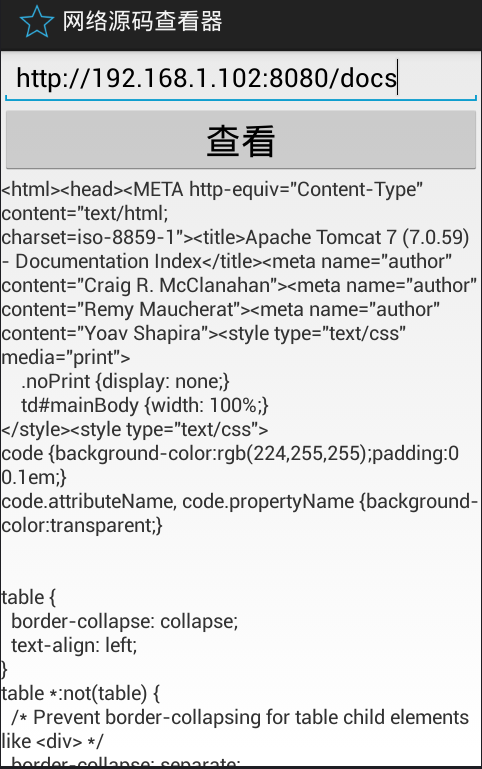
主要代码:
 package com.hb.network;

 import java.io.InputStream;

 import java.net.HttpURLConnection;

 import java.net.URL;

 import android.annotation.SuppressLint;

 import android.app.Activity;

 import android.os.Bundle;

 import android.os.Handler;

 import android.os.Message;

 import android.text.TextUtils;

 import android.view.View;

 import android.widget.EditText;

 import android.widget.TextView;

 import android.widget.Toast;

 import com.hb.utils.ReadStreamUtils;

 public class MainActivity extends Activity {

     protected static final int SUCESS = 0;

     protected static final int EORR = 1;

     private TextView tv_show;

     private EditText et_input;

     private URL url;

     private String path;

     @SuppressLint("HandlerLeak")

     private Handler handler=new Handler(){

         public void handleMessage(android.os.Message msg) {

             switch (msg.what) {

             case SUCESS:

                 String content=(String) msg.obj;

                 tv_show.setText(content);

                 break;

             case EORR:

                 Toast.makeText(MainActivity.this,"查看源码失败" , 0).show();

                 break;

             }

         };

     };

     @Override

     protected void onCreate(Bundle savedInstanceState) {

         super.onCreate(savedInstanceState);

         setContentView(R.layout.activity_main);

         tv_show=(TextView) findViewById(R.id.tv_show);

         et_input=(EditText) findViewById(R.id.et_input);

     }

     public void onclick(View view){

         path = et_input.getText().toString().trim();

         if(TextUtils.isEmpty(path)){

             return;

         }new Thread(){

             public void run() {

                 try {

                     url = new URL(path);

                     //判断从EditText获取的数据否为空

                     if(TextUtils.isEmpty(path)){

                         return;

                     }

                     HttpURLConnection conn = (HttpURLConnection) url.openConnection();

                     conn.setConnectTimeout(3000);

                     conn.setRequestMethod("GET");

                     int code = conn.getResponseCode();

                     if(code == 200){

                         InputStream is= conn.getInputStream();

                         String content = ReadStreamUtils.Read(is);

                         Message msg = new Message();

                         msg.what=SUCESS;

                         msg.obj=content;

                         handler.sendMessage(msg);

                     }

                 } catch (Exception e) {

                     e.printStackTrace();

                     Message msg = new Message();

                     msg.what=EORR;

                     handler.sendMessage(msg);

                 }

             };

         }.start();

     }

 }
 package com.hb.utils;

 import java.io.ByteArrayOutputStream;

 import java.io.IOException;

 import java.io.InputStream;

 public class ReadStreamUtils {

 /**

  * 读取流的输入

  * @param is

  * @return

  * @throws IOException

  */

     public static String Read(InputStream is) throws IOException{

         ByteArrayOutputStream bos = new ByteArrayOutputStream();

         int len;

         byte [] buffer=new byte[1024];

         while((len=is.read(buffer))!=-1){

             bos.write(buffer,0,len);

         }

         is.close();

         bos.close();

         String temp = bos.toString();

         if(temp.contains("charset=utf-8")){

             return bos.toString("utf-8");

         }else if(temp.contains("charset=iso-8859-1")){

             return bos.toString("iso-8859-1");

         }

         return null;

     }

 }
及xml布局:
 <LinearLayout xmlns:android="http://schemas.android.com/apk/res/android"

     xmlns:tools="http://schemas.android.com/tools"

     android:layout_width="match_parent"

     android:layout_height="match_parent"

     android:orientation="vertical"

     tools:context="${relativePackage}.${activityClass}" >

     <EditText

         android:id="@+id/et_input"

         android:layout_width="match_parent"

         android:layout_height="wrap_content"

         android:hint="请输入要查看源码的网址:" />

     <Button

         android:onClick="onclick"

         android:layout_width="match_parent"

         android:layout_height="wrap_content"

         android:text="查看"

         android:textSize="25sp" />

     <ScrollView

         android:layout_width="match_parent"

         android:layout_height="match_parent" >

         <TextView

             android:id="@+id/tv_show"

             android:layout_width="match_parent"

             android:layout_height="match_parent" />

     </ScrollView>

 </LinearLayout>
源码:http://pan.baidu.com/s/1bUgMgY
http://pan.baidu.com/s/1i46RQqL
Android 网络图片查看器与网页源码查看器的更多相关文章
- 黎活明8天快速掌握android视频教程--24_网络通信之网页源码查看器
1 该项目的主要功能就是从将后台的html网页在Android的界面上显示出来 后台就是建立一个java web工程在工程尚建立一个html或者jsp文件就可以了,这里主要看Android客户端的程序 ...
- Android(java)学习笔记203:网页源码查看器(Handler消息机制)
1.项目框架图: 2.首先是布局文件activity_main.xml: <LinearLayout xmlns:android="http://schemas.android.com ...
- Android(java)学习笔记146:网页源码查看器(Handler消息机制)
1.项目框架图: 2.首先是布局文件activity_main.xml: <LinearLayout xmlns:android="http://schemas.android.com ...
- android 网络_网络源码查看器
xml设计 <?xml version="1.0"?> -<LinearLayout tools:context=".MainActivity" ...
- Android: 在WebView中获取网页源码
1. 使能javascript: ? 1 webView.getSettings().setJavaScriptEnabled(true); 2. 编写本地接口 ? 1 2 3 4 5 final c ...
- 编译Android 4.4.4 r1的源码刷Nexus 5手机详细教程
本文博客地址:http://blog.csdn.net/qq1084283172/article/details/54562606 网上关于编译Android源码的教程已经很多了,但是讲怎么编译And ...
- 【原】Android热更新开源项目Tinker源码解析系列之一:Dex热更新
[原]Android热更新开源项目Tinker源码解析系列之一:Dex热更新 Tinker是微信的第一个开源项目,主要用于安卓应用bug的热修复和功能的迭代. Tinker github地址:http ...
- 如何查看google chrome 插件源码
常用浏览器google chrome 有很多优秀的插件,寂寞的时候想看看人家是怎么实现的,说是快那就动手吧 插件代码位置 本人mac笔记本,chrome 插件位置如下 $ cd /Users/vin ...
- Python爬虫学习之获取网页源码
偶然的机会,在知乎上看到一个有关爬虫的话题<利用爬虫技术能做到哪些很酷很有趣很有用的事情?>,因为强烈的好奇心和觉得会写爬虫是一件高大上的事情,所以就对爬虫产生了兴趣. 关于网络爬虫的定义 ...
随机推荐
- 使用Post方法模拟登陆爬取网页(转)
使用Post方法模拟登陆爬取网页 最近弄爬虫,遇到的一个问题就是如何使用post方法模拟登陆爬取网页.下面是极简版的代码: import java.io.BufferedReader; impor ...
- YII数据流程浅析
MVC就不解释,直接上代码分析数据流程: 数据库图: 模型部分介绍: <?php /* * 前两个方法必须写 * 继承自CActiveRecord类 这个类位于 \framework\db\ar ...
- 关于使用Xshell远程连接启动tomcat导致图片不显示,报错Could not initialize class sun.awt.X11GraphicsEnvironment解决方案
如果您是使用xshell远程启动tomcat,导致二维码.验证码,头像等各种图片不显示,并且打开图片链接报错Could not initialize class sun.awt.X11Graphics ...
- Servlet之中文乱码问题【入门版】
请求数据的中文问题 1 post请求提交中文 get请求建议不提交中文(只是也有方法解决) 1.1post request.setCharacterEncoding("utf-8" ...
- HDU1236 排名 题解
Problem Description 今天的上机考试尽管有实时的Ranklist,但上面的排名仅仅是依据完毕的题数排序,没有考虑 每题的分值,所以并非最后的排名.给定录取分数线.请你敲代码找出最后 ...
- 关于The hierarchy of the type TestBeforeAdvice is inconsistent的问题
今天准备写一个spring aop的demo,创建了TestBeforeAdvice类,该类实现了MethodBeforeAdvice接口,eclipse报了"The hierarchy o ...
- HDU5768Lucky7
Lucky7 Time Limit: 2000/1000 MS (Java/Others) Memory Limit: 65536/65536 K (Java/Others)Total Subm ...
- 基于Jquery插件Uploadify实现实时显示进度条上传图片
网址:http://www.jb51.net/article/83811.htm 这篇文章主要介绍了基于Jquery插件Uploadify实现实时显示进度条上传图片的相关资料,感兴趣的小伙伴们 ...
- 迟到的WC2019打铁祭
这是我最失败的一次考试... 具体过程就不说了,全程划水,掉线.还是自身实力不行啊. 最后文艺汇演,本人是DL24主唱&&rapper,欢迎大家交友.^_^.
- [POI2012]FES-Festival
https://www.zybuluo.com/ysner/note/1252538 题面 有一个数列\(\{a\}\).现给定多组限制,限制分成\(2\)类,第一类是\(a_x+1=a_y\),有\ ...