
SSISDB6:Operation
SSISDB 系列随笔汇总:
- SSISDB1:使用SSISDB管理Package
- SSISDB2:SSIS工程的操作实例
- SSISDB3:Package的执行实例
- SSISDB4:当前正在运行的Package及其Executable
- SSISDB5:使用TSQL脚本执行Package
- SSISDB6:参数和环境变量
操作实例(Operation)是对SSIS Project所做的任何一次操作,例如,部署SSIS工程,执行Package等,都被抽象成一个操作。在执行每一次操作时,SSISDB都会记录操作的执行情况和消息。消息的记录是由事件触发时的,在触发事件时,SSIS引擎会记录事件产生的消息和事件的上下文,通过操作实例的消息,能够监控操作实例的运行情况,对已发生的错误进行故障排除。
在实际的项目开发过程中,通常使用SQL Server Agent创建Job来调用Package,每一个Job Step都会创建一个操作实例,分配一个操作实例的ID。操作实例分为用户操作和系统操作,共计10种类型:
- 1 :Integration Services initialization
- 2 :Retention window
- 3 :MaxProjectVersion
- 101 :deploy_project
- 106 :restore_project
- 200 :create_execution and start_execution
- 202 :stop_operation
- 300 :validate_project
- 301 :validate_package
- 1000 :configure_catalog
系统操作实例主要用于系统维护和版本控制,而用户操作实例主要是Package的执行。
一,维护操作
操作实例产生的消息可能很多,SSIS引擎会把操作实例产生的消息都记录到SSISDB数据库中,随着时间的增长,数据库记录的消息数据会持续增大,导致SSISDB数据库变得臃肿,占用的硬盘空间增加,查询性能变慢。
SSIS引擎自动创建一个用于管理SSISDB的Agent,叫做“SSIS Server Maintenance Job”,该Job每天运行一次,共有两个Job Step,分别用于移除操作的消息记录和工程版本(Project Version)。这个Job的两个Step通过调用SP来清理过时的数据和工程版本:
EXEC [internal].[cleanup_server_retention_window]

EXEC [internal].[cleanup_server_project_version]
如果操作类型(Operation Type)是 Retention Windows,表示SSIS引擎执行历史消息的清理操作,将保持窗口(Retention window)之外的操作记录及其消息删除;如果操作类型是MaxProjectVersion,表示SSIS引擎执行工程版本清理操作,维持一定数量的Project version,将老的的Project Version删除。
在清理过时的数据和版本时,用户可以通过SSMS(依次点击Integration Services\SSISDB\Properties)查看SSIS的属性,用户只需要修改配置属性,就能控制Agent在何时清理过时的数据,
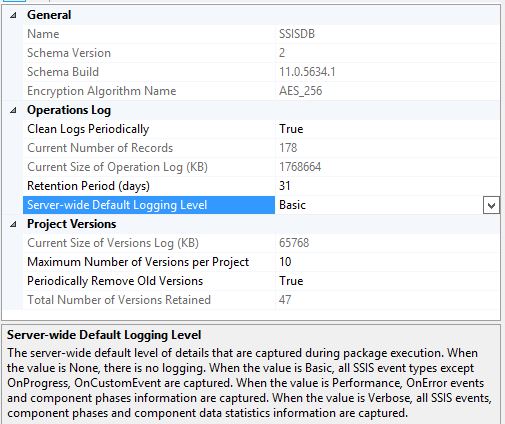
用户可以通过视图:catalog.catalog_properties 查看,集成服务引擎的属性
- VERSION_CLEANUP_ENABLED:当该属性值是TRUE时,表示启用版本清理,SSISDB只存储指定数量(MAX_PROJECT_VERSIONS)的工程版本,过时的工程版本被删除;当该属性值是FALSE时,禁用版本删除,保存所有的的版本。
- MAX_PROJECT_VERSIONS:该属性值表示SSISDB最多为一个工程(Project)保存的版本数量。如果启用版本清理功能,那么大于该版本的工程版本将会被删除。
- OPERATION_CLEANUP_ENABLED:该属性值为TRUE时,表示启用操作消息清理,SSISDB只存储在特定时间窗口内的操作的历史记录和关于操作的消息,超过时间窗口的消息和历史记录被删除;如果该属性值是FALSE,那么SSISDB存储操作的所有历史记录和关于操作的所有消息,不会清理操作的任何信息。
- RETENTION_WINDOW:该属性设置保持操作消息的时间窗口,单位是天(day),如果设置为-1,表示时间窗口无限大;注意,如果不做操作消息的清理,那么设置OPERATION_CLEANUP_ENABLED为FALSE,用户可以禁用操作消息的清理。
二,从SSISDB中查询操作实例
在查询操作实例之前,首先创建辅助数据,使用以下的脚本创建,便于窗口类型ID对应的类型文本(Name):
use SSISDB

go

create schema helper

go

create table helper.OperationType

(

operation_type int not null,

operation_type_descr varchar(256) not null,

invoker varchar(256) not null

)

go

insert into helper.OperationType

(

operation_type,

operation_type_descr,

invoker

)

values

(1,  'Integration Services initialization','')

,(2, 'Retention window','SQL Agent job')

,(3, 'MaxProjectVersion','SQL Agent job')

,(101, 'deploy_project','Stored procedure')

,(106, 'restore_project','Stored procedure')

,(200, 'create_execution and start_execution','Stored procedures')

,(202, 'stop_operation','Stored procedure')

,(300, 'validate_project','Stored procedure')

,(301, 'validate_package','Stored procedure')

,(1000, 'configure_catalog','Stored procedure')

go

create table helper.MessageType

(

message_type int not null,

message_type_descr varchar(256) not null

)

go

insert into helper.MessageType

(

message_type,

message_type_descr

)

values

(-1,'Unknown')

,(120,'Error')

,(110,'Warning')

,(70,'Information')

,(10,'Pre-validate')

,(20,'Post-validate')

,(30,'Pre-execute')

,(40,'Post-execute')

,(60,'Progress')

,(50,'StatusChange')

,(100,'QueryCancel')

,(130,'TaskFailed')

,(90,'Diagnostic')

,(200,'Custom')

,(140,'DiagnosticEx, Whenever an Execute Package task executes a child package, it logs this event. The event message consists of the parameter values passed to child packages.')

,(400,'NonDiagnostic')

,(80,'VariableValueChanged')

go

create table helper.MessageSourceType

(

message_source_type int not null,

message_source_descr varchar(256)

)

go

insert into helper.MessageSourceType

(

message_source_type,

message_source_descr

)

values

(10,'Entry APIs, such as T-SQL and CLR Stored procedures')

,(20,'External process used to run package (ISServerExec.exe)')

,(30,'Package-level objects')

,(40,'Control Flow tasks')

,(50,'Control Flow containers')

,(60,'Data Flow task')

go

create table helper.OperationStatus

(

operation_status int not null,

operation_status_descr varchar(256) not null

)

go

insert into helper.OperationStatus

(

operation_status,

operation_status_descr

)

values

(1,'created')

,(2,'running')

,(3,'canceled')

,(4,'failed')

,(5,'pending')

,(6,'ended unexpectedly')

,(7,'succeeded')

,(8,'stopping')

,(9,'completed')

go

create table helper.ObjectType

(

object_type int not null,

object_type_descr varchar(256) not null

)

go

insert into helper.ObjectType

(

object_type,

object_type_descr

)

values

(10,'folder')

,(20,'project')

,(30,'package')

,(40,'environment')

,(50,'instance of execution')

go

create table helper.ContextType

(

context_type int not null,

context_type_name varchar(256) not null,

context_type_descr varchar(256) not null,

)

go

insert into helper.ContextType

(

context_type,

context_type_name,

context_type_descr

)

values

(10,'Task','State of a task when an error occurred.')

,(20,'Pipeline','Error from a pipeline component: source, destination, or transformation component.')

,(30,'Sequence','State of a sequence.')

,(40,'For Loop','State of a For Loop')

,(50,'Foreach Loop','State of a Foreach Loop')

,(60,'Package','State of the package when an error occurred.')

,(70,'Variable','Variable value')

,(80,'Connection Manage','Properties of a connection manager.')

go

create table helper.ExecutionResult

(

execution_result int not null,

execution_result_descr varchar(256) not null

)

go

insert into helper.ExecutionResult

(

execution_result,

execution_result_descr

)

values

(0,'Success')

,(1,'Failure')

,(2,'Completion')

,(3,'Cancelled')

go
1,查询操作实例
按照操作实例开始的时间倒序查询操作实例,对于系统创建的自动清理的操作实例,其object_type 是NULL
select top 11

    o.operation_id,

    opt.operation_type_descr ,

    o.created_time,

    o.object_id,

    obt.object_type_descr,

    o.object_name,

    ops.operation_status_descr,

    o.start_time,

    o.end_time

from catalog.operations o

inner join helper.OperationType opt

    on o.operation_type=opt.operation_type

inner join helper.OperationStatus ops

    on o.status=ops.operation_status

left join helper.ObjectType obt

    on o.object_type=obt.object_type

order by o.start_time desc
返回的操作实例的信息,字段operation_status_descr是操作实例的状态,running表示正在执行,succeeded表示执行成功,failed表示执行失败等。

2,查看指定操作实例的消息
根据字段message_type,能够查询特定类型的消息,例如, 120表示错误消息(Error);消息源是指产生消息的源头,最常见的消息源是:控制流任务(Control Flow Task,类型是40),控制流容器(Control Flow Container,类型是50),数据流组件(Data Flow Task,类型是60),通过查看操作实例的消息,能够监控到Package运行过程中的状态。
select om.operation_message_id,

    om.message_time,

    mt.message_type_descr,

    om.message_source_type,

    mst.message_source_descr,

    om.message

from catalog.operation_messages om

inner join helper.MessageType mt

    on om.message_type=mt.message_type

inner join helper.MessageSourceType mst

    on om.message_source_type=mst.message_source_type

where om.operation_id=23537

  -- and mt.message_type=120  --error message

order by om.message_time desc
3,查看操作实例的Event Message
Event Message是关于Message的信息,可以认为和Message是一一对应的。
select em.event_message_id,

    em.package_name,

    em.package_path,

    em.subcomponent_name,

    em.event_name,

    mt.message_type_descr,

    mst.message_source_descr,

    --em.message_source_id,

    em.message_source_name,

    em.message,

    cast(em.message_time as DATETIME) as message_time,

    em.execution_path

from catalog.event_messages em with(nolock)

inner join helper.MessageType mt

    on em.message_type=mt.message_type

inner join helper.MessageSourceType mst

    on em.message_source_type=mst.message_source_type

where em.operation_id=23537

order by em.message_time desc
4,查看指定Event Message的Context
Event Message的上下文(Context)是指Package的组件(Task、Pipeline、Sequence、For Loop、Foreach Loop、Package、Variable、Connection Manage)等在事件发生时,它们的属性值是什么,事件消息的上下文主要用于故障排除。当错误事件发生时,可以查看变量(Variable)的值,便于快速查找到Package的出错原因。
select emc.context_id,

    emc.context_depth,

    emc.package_path,

    ct.context_type_name,

    ct.context_type_descr,

    emc.context_source_name,

    --emc.context_source_id,

    emc.property_name,

    emc.property_value

from catalog.event_message_context emc with(nolock)

inner join helper.ContextType ct

    on emc.context_type=ct.context_type

where emc.event_message_id=6713840

order by emc.context_type
5,用于故障排除的脚本
select

    opt.operation_type_descr as Operation,

    obt.object_type_descr as object_type,

    o.object_name,

    ops.operation_status_descr as OperationStatus,

    mt.message_type_descr as message_type,

    mst.message_source_descr,

    om.message,

    om.message_time

from catalog.operations o

inner join helper.OperationType opt

    on o.operation_type=opt.operation_type

inner join helper.ObjectType obt

    on o.object_type=obt.object_type

inner join helper.OperationStatus ops

    on o.status=ops.operation_status

inner join catalog.operation_messages om

    on o.operation_id=om.operation_id

inner join helper.MessageType mt

    on om.message_type=mt.message_type

inner join helper.MessageSourceType mst

    on om.message_source_type=mst.message_source_type

where o.operation_id =104627

    and om.message_type in

    (

        120,--Error

        110,--Warning

        130--TaskFailed

    )

order by om.message_time desc

select

    opt.operation_type_descr as Operation,

    obt.object_type_descr as object_type,

    o.object_name,

    ops.operation_status_descr as OperationStatus,

    em.event_message_id,

    em.package_name,

    em.event_name,

    em.message_source_name,

    em.subcomponent_name,

    mt.message_type_descr as message_type,

    mst.message_source_descr as message_source_type,

    em.package_path,

    em.event_message_id,

    em.message_time,

    em.message

from catalog.operations o

inner join helper.OperationType opt

    on o.operation_type=opt.operation_type

inner join helper.OperationStatus ops

    on o.status=ops.operation_status

inner join helper.ObjectType obt

    on o.object_type=obt.object_type

inner join catalog.event_messages em

    on o.operation_id=em.operation_id

inner join helper.MessageType mt

    on em.message_type=mt.message_type

inner join helper.MessageSourceType mst

    on em.message_source_type=mst.message_source_type

where o.operation_id =104627

    and em.message_type in

    (

        120,    --Error

        110,    --Warning

        130     --TaskFailed;

    )

    --and em.package_name=N'PackageName.dtsx'

order by em.message_time desc

select emc.context_depth,

    emc.package_path,

    ct.context_type_name as context_type,

    emc.context_source_name,

    emc.property_name,

    emc.property_value

from catalog.event_message_context emc

inner join helper.ContextType ct

    on emc.context_type=ct.context_type

where emc.event_message_id=23929777

and emc.context_type=70
附:创建SSISDB Catalog的辅助表
use SSISDB

go

create schema helper

go

create table helper.OperationType

(

operation_type int not null,

operation_type_descr varchar(256) not null,

invoker varchar(256) not null

)

go

insert into helper.OperationType

(

operation_type,

operation_type_descr,

invoker

)

values

(1,  'Integration Services initialization','')

,(2, 'Retention window','SQL Agent job')

,(3, 'MaxProjectVersion','SQL Agent job')

,(101, 'deploy_project','Stored procedure')

,(106, 'restore_project','Stored procedure')

,(200, 'create_execution and start_execution','Stored procedures')

,(202, 'stop_operation','Stored procedure')

,(300, 'validate_project','Stored procedure')

,(301, 'validate_package','Stored procedure')

,(1000, 'configure_catalog','Stored procedure')

go

create table helper.MessageType

(

message_type int not null,

message_type_descr varchar(256) not null

)

go

insert into helper.MessageType

(

message_type,

message_type_descr

)

values

(-1,'Unknown')

,(120,'Error')

,(110,'Warning')

,(70,'Information')

,(10,'Pre-validate')

,(20,'Post-validate')

,(30,'Pre-execute')

,(40,'Post-execute')

,(60,'Progress')

,(50,'StatusChange')

,(100,'QueryCancel')

,(130,'TaskFailed')

,(90,'Diagnostic')

,(200,'Custom')

,(140,'DiagnosticEx, Whenever an Execute Package task executes a child package, it logs this event. The event message consists of the parameter values passed to child packages.')

,(400,'NonDiagnostic')

,(80,'VariableValueChanged')

go

create table helper.MessageSourceType

(

message_source_type int not null,

message_source_descr varchar(256)

)

go

insert into helper.MessageSourceType

(

message_source_type,

message_source_descr

)

values

(10,'Entry APIs, such as T-SQL and CLR Stored procedures')

,(20,'External process used to run package (ISServerExec.exe)')

,(30,'Package-level objects')

,(40,'Control Flow tasks')

,(50,'Control Flow containers')

,(60,'Data Flow task')

go

create table helper.OperationStatus

(

operation_status int not null,

operation_status_descr varchar(256) not null

)

go

insert into helper.OperationStatus

(

operation_status,

operation_status_descr

)

values

(1,'created')

,(2,'running')

,(3,'canceled')

,(4,'failed')

,(5,'pending')

,(6,'ended unexpectedly')

,(7,'succeeded')

,(8,'stopping')

,(9,'completed')

go

create table helper.ObjectType

(

object_type int not null,

object_type_descr varchar(256) not null

)

go

insert into helper.ObjectType

(

object_type,

object_type_descr

)

values

(10,'folder')

,(20,'project')

,(30,'package')

,(40,'environment')

,(50,'instance of execution')

go

create table helper.ContextType

(

context_type int not null,

context_type_name varchar(256) not null,

context_type_descr varchar(256) not null,

)

go

insert into helper.ContextType

(

context_type,

context_type_name,

context_type_descr

)

values

(10,'Task','State of a task when an error occurred.')

,(20,'Pipeline','Error from a pipeline component: source, destination, or transformation component.')

,(30,'Sequence','State of a sequence.')

,(40,'For Loop','State of a For Loop')

,(50,'Foreach Loop','State of a Foreach Loop')

,(60,'Package','State of the package when an error occurred.')

,(70,'Variable','Variable value')

,(80,'Connection Manage','Properties of a connection manager.')

go

create table helper.ExecutionResult

(

execution_result int not null,

execution_result_descr varchar(256) not null

)

go

insert into helper.ExecutionResult

(

execution_result,

execution_result_descr

)

values

(0,'Success')

,(1,'Failure')

,(2,'Completion')

,(3,'Cancelled')

go
参考文档:
catalog.operations (SSISDB Database)
catalog.catalog_properties (SSISDB Database)
SSIS Catalog: Part 6 - Operations
SSISDB6:Operation的更多相关文章
- 多线程:Operation(一)
1. 进程和线程 1.1 进程 进程:正在运行的应用程序叫进程 进程之间都是独立的,运行在专用且受保护的内存空间中 两个进程之间无法通讯 通俗的理解,手机上同时开启了两个App.这两个App肯定是在不 ...
- SSISDB6:参数和环境变量
SSISDB 系列随笔汇总: SSISDB1:使用SSISDB管理Package SSISDB2:SSIS工程的操作实例 SSISDB3:Package的执行实例 SSISDB4:当前正在运行的Pac ...
- root用户删除文件提示:Operation not permitted
root用户删除文件提示:Operation not permitted http://blog.csdn.net/evanbai/article/details/6187578
- SQLExecption:Operation not allowed after ResultSet closed解决办法
原网址:http://blog.csdn.net/sku0923/article/details/1722370 一个stmt多个rs进行操作引起的ResultSet已经关闭错误 一个stmt多个rs ...
- [Android Pro] root用户删除文件提示:Operation not permitted
reference to : http://blog.csdn.net/evanbai/article/details/6187578 一些文件看上去可能一切正常,但当您尝试删除的时候,居然也会报错, ...
- 多线程:Operation(二)
1. Operation 设置依赖关系 先看看如何设置operation的依赖关系. 啥叫依赖关系?有啥用啊?打个比方咱们要做一个听音乐的付费App项目,需要经过登陆.付费.下载.播放四个步骤.其实一 ...
- root用户被提示:Operation not permitted
一.问题 今天为了删除一个多余的的软件,在删除该软件安装目录时,提示rm: cannot remove ‘.user.ini’: Operation not permitted,root权限都不能删除 ...
- 解决Linux 下 root用户删除文件提示:Operation not permitted
问题描述 用最高权限rm文件,居然报错Operation not permitted.查看权限也没有问题.可想而知有可能文件被保护了.用命令lsattr检查一下就知道. [root@linux roo ...
- HADOOP HA 报错 - 所有 namenode 都是standby --集群报错: Operation category READ is not supported in state standby
报错: 经过查看集群的jps如下: ==================== hadoop01 jps =================== FsShell ResourceManager Name ...
随机推荐
- dedecms搜索框写法
<div class="bg_search"> <form id="forms" name="formsearch" ac ...
- [资料分享]尚硅谷JavaWeb
下载链接: 链接:https://pan.baidu.com/s/1pKMclsv 密码:8fbh
- 未能添加对***.dll的引用 问题解决方法
这个不是什么新问题了,这里说一下我遇到的这个操蛋事. 转载请注明出处 http://www.cnblogs.com/zaiyuzhong/p/6236263.html 我做的和往常一样,找到SDK开发 ...
- phpstorm常用快捷键
mac电脑phpstorm快捷键 command + a 全选 command + c 复制 command + v 粘贴 command + z 撤消 fn+comma ...
- Excel转Html
项目结构: 这是一个maven项目,主函数在Client类里面 当运行程序的后,控制台情况: 当我们刷新了test.html文件后,用浏览器打开效果: 说一下这个过程的设计思路: 1.读取excel文 ...
- java反射学习之一反射机制概述
一.反射机制背景概述 1.反射(reflection)是java被视为动态语言的一个关键性质 2.反射机制指的是程序在运行时能获取任何类的内部所有信息 二.反射机制实现功能概述 1.只要给定类的全名, ...
- canvas图片处理
1.灰度 .299 * r + .587 * g + .114 * b; 2.连环画效果 R = |g – b + g + r| * r / 256 G = |b – g + b + r| * r / ...
- 解决IE6/IE7/IE8不支持before,after问题
对从事web开发的朋友来讲,低版本的IE永远是一个痛点,不支持最新技术(如css3,html5). 在现在web开发中使用图标字体已经很广泛,如Font Awesome,Bootstrap等,字体图片 ...
- Python之路【第七篇】python基础 之socket网络编程
本篇文章大部分借鉴 http://www.cnblogs.com/nulige/p/6235531.html python socket 网络编程 一.服务端和客户端 BS架构 (腾讯通软件:ser ...
- strcpy函数在VS2015无法使用的问题
一:原因:一般认为是vs准备弃用strcpy的,安全性较低,所以微软提供了strcpy_s来代替 然而,strcpy_s并没有strcpy好用,我们要想继续在VS2015中使用strcpy该怎么办 呢 ...