
jQuery Ajax Post Data Example
http://www.formget.com/jquery-post-data/
jQuery Ajax Post Data Example

Fugo Of FormGet
jQuery $.post() method is used to request data from a webpage and to display the returned result (sent from requested page) on to that webpage from where the request has been sent without page refresh.
$.post() method sends request along with some data using an HTTP POST request.
Under this, a request is send to a webpage (here it is jquery_post.php) from another page (say jquery_send.php) using syntax :
Syntax:
$.post( URL, data, callback);Parameters:
- URL
The URL parameter is defined for the URL of requested page which may communicate with database to return results.
$.post("jquery_post.php",data,callback);- data
The data parameter is defined to send some data along with the request.
,{   // Data Sending With Request To Server

name:vname,

email:vemail

}- callback
The callback parameter is defined for a function to be executed if the request gets succeeded. This contains two sub parameters , the first one holds the returned data from the requested page and second one holds the status of the request.
,function(response,status){ // Required Callback Function

//"response" receives - whatever written in echo of above PHP script.

alert("*----Received Data----*\n\nResponse : " + response+"\n\nStatus : " + status);

}
Note : Both ‘ data ‘ and ‘ callback ‘ parameters are optional parameters, whereas URL is mandatory for $.post() method.
Below is our complete code with download and live demo option
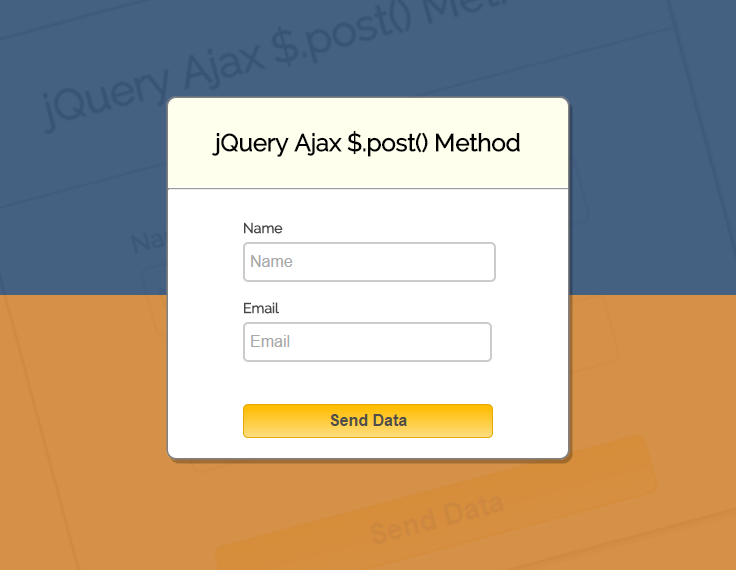
Example:
The following example uses the $.post() method to send some data along with the request.
This is jquery_send.php page that contains jQuery $.post() method which can be implemented as given below:
<html>

<head>

<link href='http://fonts.googleapis.com/css?family=Source+Sans+Pro|Open+Sans+Condensed:300|Raleway' rel='stylesheet' type='text/css'>

<!-- Include JS File Here -->

<link href="style.css" rel="stylesheet"/>

<!-- Include JS File Here -->

<script src="http://ajax.googleapis.com/ajax/libs/jquery/1.11.1/jquery.min.js"></script>

<script>

$(document).ready(function(){

$("#btn").click(function(){

var vname = $("#name").val();

var vemail = $("#email").val();

if(vname=='' && vemail=='')

{

alert("Please fill out the form");

}

else if(vname=='' && vemail!==''){alert('Name field is required')}

else if(vemail=='' && vname!==''){alert('Email field is required')}

else{

$.post("jquery_post.php", //Required URL of the page on server

{ // Data Sending With Request To Server

name:vname,

email:vemail

},

function(response,status){ // Required Callback Function

alert("*----Received Data----*\n\nResponse : " + response+"\n\nStatus : " + status);//"response" receives - whatever written in echo of above PHP script.

$("#form")[0].reset();

});

}

});

});

</script>

</head>

<body>

<div id="main">

<h2>jQuery Ajax $.post() Method</h2>

<hr>

<form id="form" method="post">

<div id="namediv"><label>Name</label>

<input type="text" name="name" id="name" placeholder="Name"/><br></div>

<div id="emaildiv"><label>Email</label>

<input type="text" name="email" id="email" placeholder="Email"/></div>

</form>

<button id="btn">Send Data</button>

</div>

</body>

</html>
And here we have “jquery_post.php” file , which contains following PHP codes, that reads the request, processes it and return the result.
<?php

if($_POST["name"])

{

$name = $_POST["name"];

$email = $_POST["email"];

// Here, you can also perform some database query operations with above values.

echo "Welcome ". $name ."!"; // Success Message

}

?>
For more reference you can visit our below link:
Form Submit Without Page Refreshing-jQuery/PHP
Conclusion:
With above tutorial you became familiar with jQuery’s $.post() method. Hope you might have liked it, to learn more & to get more coding tricks keep reading our other blogs.
jQuery Ajax Post Data Example的更多相关文章
- JQuery.Ajax()的data参数类型
假如现在有这样一个表单,是添加元素用的. <form id='addForm' action='UserAdd.action' type='post'> <label for='un ...
- jquery ajax中data属性详解
$.post.$.get是一些简单的方法,如果要处理复杂的逻辑,还是需要用到jQuery.ajax() 一.$.ajax的一般格式 $.ajax({ type: 'POST', url: url , ...
- jquery ajax 用 data 和 headers 向 java RESTful 传递参数区别
jquery 的 ajax 是非常方便的一个函数,记录一下 $.ajax 生成的 http 报文 一.使用 data 传递参数: $.ajax({ url : "webrs/test/add ...
- jquery ajax 的data 存表单的值
jsp <body> <form action="" method="post" id="formid"> < ...
- JQuery.Ajax()的data参数传递方式
最近,新学c# mvc,通过ajax post方式传递数据到controller.刚开始传递参数,controller中总是为null.现记录一下,可能不全,纯粹记个学习日记. 重点在于参数的方式,代 ...
- jquery Ajax应用总结
常见应用: 下面是Jquery中AJAX参数详细列表: 参数名 类型 描述 url String (默认: 当前页地址) 发送请求的地址. type String (默认: "GET&quo ...
- jQuery AJAX Call for posting data to ASP.Net page ( not Get but POST)
the following jQuery AJAX call to an ASP.Net page. $.ajax({ async: true, type: "POST", url ...
- 关于Jquery中ajax方法data参数用法的总结
data 发送到服务器的数据.将自动转换为请求字符串格式.GET 请求中将附加在 URL 后.查看 processData 选项说明以禁止此自动转换.必须为 Key/Value 格式.如果为数组,jQ ...
- IE8/9 JQuery.Ajax 上传文件无效
IE8/9 JQuery.Ajax 上传文件有两个限制: 使用 JQuery.Ajax 无法上传文件(因为无法使用 FormData,FormData 是 HTML5 的一个特性,IE8/9 不支持) ...
随机推荐
- Android自动化测试Uiautomator--UiDevice接口简介
Uiautomator主要分为UiDevice, UiObject, UiScrollable, UiSelector, UiCollection几个类. getUiDevice()方法可以得到一个U ...
- python基础学习笔记——生成器与推导式
生成器 首先我们来看看什么是个生成器,生成器本质就是迭代器 在python中有三种方式来获取生成器 1.通过生成器函数 2.通过各种推到式来实现生成器 3.通过数据的转换也可以获取生成器 首先,我们先 ...
- Python基础之字符串,布尔值,整数,列表,元组,字典,集合
一.str字符串 1.capitalize字符串首字母大写 name = "json" v = name.capitalize() print(v) # 输出结果:Json 2.c ...
- luogu2569 [SCOI2010]股票交易
题解看这里 #include <iostream> #include <cstring> #include <cstdio> using namespace std ...
- pycharm下多个工程项目并存显示
问题:使用pycharm新建一个工程时,出现如下提示: 无论选择哪一个,都会发现之前已经建立的工程没有并存显示 解决办法: 1. 找到file->settings: 2.点击project st ...
- centos 7安装libreoffice
centos 7安装libreoffice Centos下的LibreOffice安装: 关键字: LibreOffice , sdk ,汉化 ,解压 安装Centos7之后,系统安装了libreo ...
- Leetcode 329.矩阵中的最长递增路径
矩阵中的最长递增路径 给定一个整数矩阵,找出最长递增路径的长度. 对于每个单元格,你可以往上,下,左,右四个方向移动. 你不能在对角线方向上移动或移动到边界外(即不允许环绕). 示例 1: 输入: n ...
- 树形DP专题
DP是我的弱项, 此专题意在总结树形DP的解题思路. 最小代价遍历一棵树 给定一棵带边权的树 $T=(V,E)$ , 遍历它 (树的每个节点都访问至少一次) 所需的最小代价. 这里的代价由具体问题所定 ...
- 为什么上传文件的表单里要加个属性enctype----摘录
上传文件的表单中<form>要加属性enctype="multipart/form-data",很多人只是死记硬背知道上传表单要这么写,知其然而不知其所以然.那到底为什 ...
- 【2018.10.15】WZJ笔记(数论)
1. 证明:对于任意质数$p\gt 3$,$p^2-1$能被$24$整除. 证:平方差公式,$p^2-1 = (p-1)(p+1)$. 再把$24$分解质因数$2^3*3$. 三个相邻的自然数中至少有 ...