
Spring MVC源码——Root WebApplicationContext
Spring MVC源码——Root WebApplicationContext
打算开始读一些框架的源码,先拿 Spring MVC 练练手,欢迎点击这里访问我的源码注释.
Spring MVC 的文档一开始就给出了这样的两段示例:
public class MyWebApplicationInitializer implements WebApplicationInitializer {

    @Override

    public void onStartup(ServletContext servletCxt) {

        // Load Spring web application configuration

        AnnotationConfigWebApplicationContext ac = new AnnotationConfigWebApplicationContext();

        ac.register(AppConfig.class);

        ac.refresh();

        // Create and register the DispatcherServlet

        DispatcherServlet servlet = new DispatcherServlet(ac);

        ServletRegistration.Dynamic registration = servletCxt.addServlet("app", servlet);

        registration.setLoadOnStartup(1);

        registration.addMapping("/app/*");

    }

}
web.xml :
<web-app>

    <listener>

        <listener-class>org.springframework.web.context.ContextLoaderListener</listener-class>

    </listener>

    <context-param>

        <param-name>contextConfigLocation</param-name>

        <param-value>/WEB-INF/app-context.xml</param-value>

    </context-param>

    <servlet>

        <servlet-name>app</servlet-name>

        <servlet-class>org.springframework.web.servlet.DispatcherServlet</servlet-class>

        <init-param>

            <param-name>contextConfigLocation</param-name>

            <param-value></param-value>

        </init-param>

        <load-on-startup>1</load-on-startup>

    </servlet>

    <servlet-mapping>

        <servlet-name>app</servlet-name>

        <url-pattern>/app/*</url-pattern>

    </servlet-mapping>

</web-app>
我们按照 web.xml 中的实例来看一下 Spring MVC 初始化过程.
上下文层次结构
Spring MVC 的上下文有如下这样的层级:
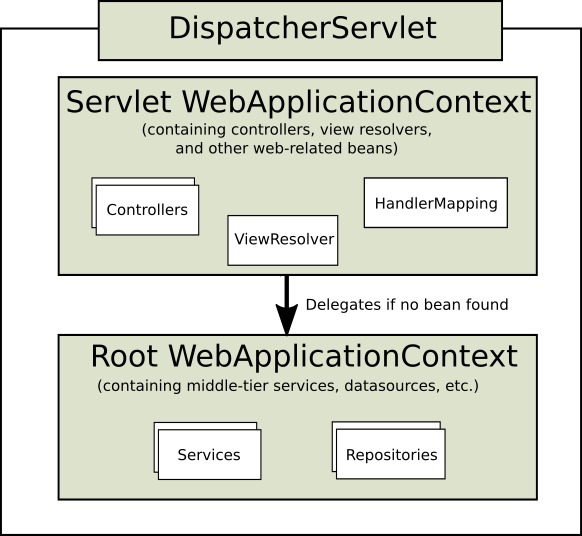
图中的 Servlet WebApplicationContext 是与 DispatcherServlet 绑定的上下文, 其中还有 controllers、ViewResolver、HandlerMapping 等组件.
Root WebApplicationContext 不是必须的上下文, 在需要时,可以用来在多个 DispatcherServlet 间共享一些 bean.
Root WebApplicationContext 初始化和销毁
ContextLoaderListener
web.xml 中配置的 ContextLoaderListener 用于启动和终止 Spring 的 root WebApplicationContext.
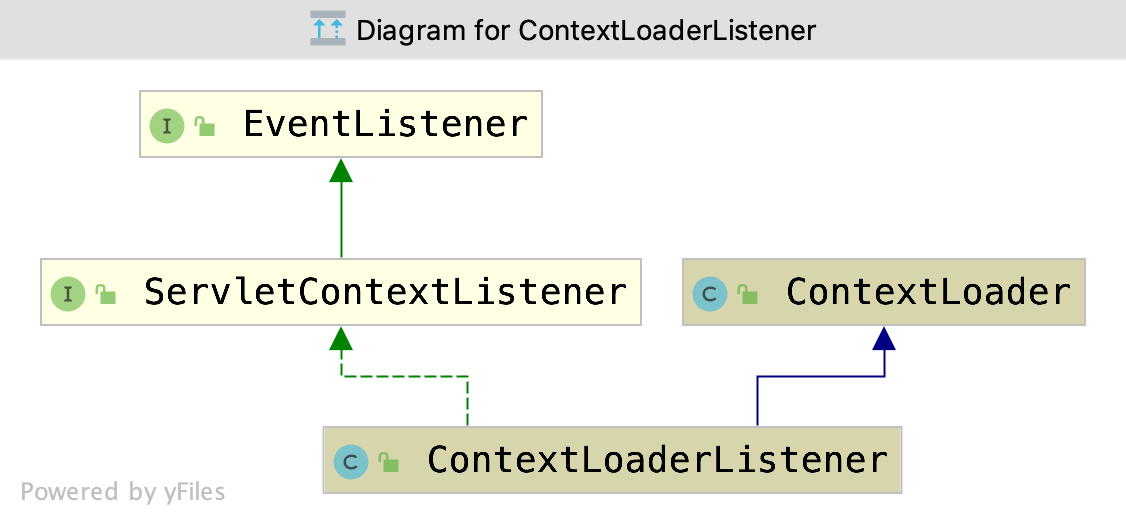
ContextLoaderListener 本身的代码十分简单:
public class ContextLoaderListener extends ContextLoader implements ServletContextListener {

	public ContextLoaderListener() {

	}

	public ContextLoaderListener(WebApplicationContext context) {

		super(context);

	}

	/**

	 * Initialize the root web application context.

	 * Servlet 上下文初始化,调用父类的方法初始化 WebApplicationContext

	 */

	@Override

	public void contextInitialized(ServletContextEvent event) {

		initWebApplicationContext(event.getServletContext());

	}

	/**

	 * Close the root web application context.

	 * Servlet 上下文被销毁,调用父类的方法销毁 WebApplicationContext

	 */

	@Override

	public void contextDestroyed(ServletContextEvent event) {

		closeWebApplicationContext(event.getServletContext());

		// 销毁 ServletContext 上实现了 DisposableBean 的属性并移除他们

		ContextCleanupListener.cleanupAttributes(event.getServletContext());

	}

}
ContextLoader
ContextLoaderListener 直接调用了父类 ContextLoader 的方法来初始化和销毁上下文.
ContextLoaderListener 在创建上下文时,会尝试读取 contextClass context-param 来指定上下文的类型,被指定的类需要实现 ConfigurableWebApplicationContext 接口. 如果没有获取到,默认会使用 WebApplicationContext.
初始化上下文时,会尝试读取 contextConfigLocation context-param, 作为 xml 文件的路径.
初始化上下文
initWebApplicationContext() 方法如下:
public WebApplicationContext initWebApplicationContext(ServletContext servletContext) {

	// 检查有没有绑定上下文

	if (servletContext.getAttribute(WebApplicationContext.ROOT_WEB_APPLICATION_CONTEXT_ATTRIBUTE) != null) {

		throw new IllegalStateException(

				"Cannot initialize context because there is already a root application context present - " +

				"check whether you have multiple ContextLoader* definitions in your web.xml!");

	}

	servletContext.log("Initializing Spring root WebApplicationContext");

	Log logger = LogFactory.getLog(ContextLoader.class);

	if (logger.isInfoEnabled()) {

		logger.info("Root WebApplicationContext: initialization started");

	}

	// 初始化开始时间

	long startTime = System.currentTimeMillis();

	try {

		// Store context in local instance variable, to guarantee that

		// it is available on ServletContext shutdown.

		// 保存上下文到本地实例变量中,保证上细纹能在 ServletContext 关闭时访问到

		if (this.context == null) {

			// 创建上下文

			this.context = createWebApplicationContext(servletContext);

		}

		if (this.context instanceof ConfigurableWebApplicationContext) {

			// 如果上下文实现了 ConfigurableWebApplicationContext

			ConfigurableWebApplicationContext cwac = (ConfigurableWebApplicationContext) this.context;

			if (!cwac.isActive()) {

				// 上下文还没有刷新,设置 父上下文(如果能找到),并且刷新

				// The context has not yet been refreshed -> provide services such as

				// setting the parent context, setting the application context id, etc

				if (cwac.getParent() == null) {

					// The context instance was injected without an explicit parent ->

					// determine parent for root web application context, if any.

					ApplicationContext parent = loadParentContext(servletContext);

					cwac.setParent(parent);

				}

				// 设置和刷新上下文

				configureAndRefreshWebApplicationContext(cwac, servletContext);

			}

		}

		// 将上下文绑定到 servletContext 的属性上

		servletContext.setAttribute(WebApplicationContext.ROOT_WEB_APPLICATION_CONTEXT_ATTRIBUTE, this.context);

		// 获取当前线程的上下文类加载器

		ClassLoader ccl = Thread.currentThread().getContextClassLoader();

		if (ccl == ContextLoader.class.getClassLoader()) {

			currentContext = this.context;

		}

		else if (ccl != null) {

			// 如果有线程上下文类加载器,而且不是 ContextLoader 本身的类加载器,放入到 currentContextPerThread 中。这是一个 static 的域

			currentContextPerThread.put(ccl, this.context);

		}

		if (logger.isInfoEnabled()) {

			long elapsedTime = System.currentTimeMillis() - startTime;

			logger.info("Root WebApplicationContext initialized in " + elapsedTime + " ms");

		}

		return this.context;

	}

	catch (RuntimeException | Error ex) {

	    // 发生异常, 把异常绑定到上下文对应的属性上,之后不会再进行初始化

		logger.error("Context initialization failed", ex);

		servletContext.setAttribute(WebApplicationContext.ROOT_WEB_APPLICATION_CONTEXT_ATTRIBUTE, ex);

		throw ex;

	}

}
initWebApplicationContext() 方法调用了 createWebApplicationContext() 方法来创建上下文;调用了 configureAndRefreshWebApplicationContext() 来对实现了 ConfigurableWebApplicationContext 接口的上下文做初始化.
createWebApplicationContext() 会调用 determineContextClass() 来获取上下文类型的 Class 对象.
protected WebApplicationContext createWebApplicationContext(ServletContext sc) {

	// 获取上下文类型

	Class<?> contextClass = determineContextClass(sc);

	// 检查是否实现了 ConfigurableWebApplicationContext

	if (!ConfigurableWebApplicationContext.class.isAssignableFrom(contextClass)) {

		throw new ApplicationContextException("Custom context class [" + contextClass.getName() +

				"] is not of type [" + ConfigurableWebApplicationContext.class.getName() + "]");

	}

	// 实例化

	return (ConfigurableWebApplicationContext) BeanUtils.instantiateClass(contextClass);

}

protected Class<?> determineContextClass(ServletContext servletContext) {

	// 获取 serveltContext 的 'contextClass' 初始化参数。

	String contextClassName = servletContext.getInitParameter(CONTEXT_CLASS_PARAM);

	if (contextClassName != null) {

		// 指定过上下文类型,加载类

		try {

			return ClassUtils.forName(contextClassName, ClassUtils.getDefaultClassLoader());

		}

		catch (ClassNotFoundException ex) {

			throw new ApplicationContextException(

					"Failed to load custom context class [" + contextClassName + "]", ex);

		}

	}

	else {

		// 去默认策略里获取默认的上下文类型名称

		contextClassName = defaultStrategies.getProperty(WebApplicationContext.class.getName());

		try {

			// 加载类

			return ClassUtils.forName(contextClassName, ContextLoader.class.getClassLoader());

		}

		catch (ClassNotFoundException ex) {

			throw new ApplicationContextException(

					"Failed to load default context class [" + contextClassName + "]", ex);

		}

	}

}
configureAndRefreshWebApplicationContext() 方法
protected void configureAndRefreshWebApplicationContext(ConfigurableWebApplicationContext wac, ServletContext sc) {

	// 用可以获取到的信息,获取一个更有意义的上下文

	if (ObjectUtils.identityToString(wac).equals(wac.getId())) {

		// The application context id is still set to its original default value

		// -> assign a more useful id based on available information

		// 获取 ServletContext 的 'contextId' 初始化参数。

		String idParam = sc.getInitParameter(CONTEXT_ID_PARAM);

		if (idParam != null) {

			wac.setId(idParam);

		}

		else {

			// Generate default id...

			// 生成默认 id

			wac.setId(ConfigurableWebApplicationContext.APPLICATION_CONTEXT_ID_PREFIX +

					ObjectUtils.getDisplayString(sc.getContextPath()));

		}

	}

	// 设置 servletContext 属性

	wac.setServletContext(sc);

	// 设置配置文件路径

	String configLocationParam = sc.getInitParameter(CONFIG_LOCATION_PARAM);

	if (configLocationParam != null) {

		wac.setConfigLocation(configLocationParam);

	}

	// The wac environment's #initPropertySources will be called in any case when the context

	// is refreshed; do it eagerly here to ensure servlet property sources are in place for

	// use in any post-processing or initialization that occurs below prior to #refresh

	// 初始化属性源, 确保 servlet 属性源到位并能够在任何 refresh 之前的后期处理和初始化中使用

	ConfigurableEnvironment env = wac.getEnvironment();

	if (env instanceof ConfigurableWebEnvironment) {

		((ConfigurableWebEnvironment) env).initPropertySources(sc, null);

	}

	// 在设置了配置文件之后上下文刷新之前,自定义上下文

	customizeContext(sc, wac);

	wac.refresh();

}

protected void customizeContext(ServletContext sc, ConfigurableWebApplicationContext wac) {

	// 根据 ServletContext 的 'contextInitializerClasses' 和 'globalInitializerClasses' 初始化参数 加载 ApplicationContextInitializer 的 class

	List<Class<ApplicationContextInitializer<ConfigurableApplicationContext>>> initializerClasses =

			determineContextInitializerClasses(sc);

	for (Class<ApplicationContextInitializer<ConfigurableApplicationContext>> initializerClass : initializerClasses) {

		// 获取范型参数类型

		Class<?> initializerContextClass =

				GenericTypeResolver.resolveTypeArgument(initializerClass, ApplicationContextInitializer.class);

		// 检查 Initializer 是否适用于当前上下文对象

		if (initializerContextClass != null && !initializerContextClass.isInstance(wac)) {

			throw new ApplicationContextException(String.format(

					"Could not apply context initializer [%s] since its generic parameter [%s] " +

					"is not assignable from the type of application context used by this " +

					"context loader: [%s]", initializerClass.getName(), initializerContextClass.getName(),

					wac.getClass().getName()));

		}

		// 创建 Initializer 实例,并添加到 contextInitializers

		this.contextInitializers.add(BeanUtils.instantiateClass(initializerClass));

	}

	// 根据 org.springframework.core.Ordered 和 org.springframework.core.annotation.Order 排序,如果没有实现或注解,会被排到最后

	AnnotationAwareOrderComparator.sort(this.contextInitializers);

	// 执行每个 initializer 的 initialize() 方法

	for (ApplicationContextInitializer<ConfigurableApplicationContext> initializer : this.contextInitializers) {

		initializer.initialize(wac);

	}

}
销毁上下文
closeWebApplicationContext() 方法如下:
public void closeWebApplicationContext(ServletContext servletContext) {

	servletContext.log("Closing Spring root WebApplicationContext");

	try {

		// 如果 context 是 ConfigurableWebApplicationContext 调用 close() 方法

		if (this.context instanceof ConfigurableWebApplicationContext) {

			((ConfigurableWebApplicationContext) this.context).close();

		}

	}

	finally {

		ClassLoader ccl = Thread.currentThread().getContextClassLoader();

		if (ccl == ContextLoader.class.getClassLoader()) {

			currentContext = null;

		}

		else if (ccl != null) {

			currentContextPerThread.remove(ccl);

		}

		// 移除 servletContext 中的 context 属性

		servletContext.removeAttribute(WebApplicationContext.ROOT_WEB_APPLICATION_CONTEXT_ATTRIBUTE);

	}

}
Servlet 3.0+ 中初始化
Servlet 3.0+ 中可以通过 ServletContext 的 addlistener() 方法来添加监听器.因此可以先把 Spring 容器先创建好,再传给 ContextLoaderListener 的构造器.这里就不自己写例子了,选了单元测试中的 ContextLoaderTests.testContextLoaderListenerWithDefaultContext() 方法:
public void testContextLoaderListenerWithDefaultContext() {

	MockServletContext sc = new MockServletContext("");

	sc.addInitParameter(ContextLoader.CONFIG_LOCATION_PARAM,

			"/org/springframework/web/context/WEB-INF/applicationContext.xml " +

			"/org/springframework/web/context/WEB-INF/context-addition.xml");

	ServletContextListener listener = new ContextLoaderListener();

	ServletContextEvent event = new ServletContextEvent(sc);

	listener.contextInitialized(event);

	String contextAttr = WebApplicationContext.ROOT_WEB_APPLICATION_CONTEXT_ATTRIBUTE;

	WebApplicationContext context = (WebApplicationContext) sc.getAttribute(contextAttr);

	assertTrue("Correct WebApplicationContext exposed in ServletContext", context instanceof XmlWebApplicationContext);

	assertTrue(WebApplicationContextUtils.getRequiredWebApplicationContext(sc) instanceof XmlWebApplicationContext);

	LifecycleBean lb = (LifecycleBean) context.getBean("lifecycle");

	assertTrue("Has father", context.containsBean("father"));

	assertTrue("Has rod", context.containsBean("rod"));

	assertTrue("Has kerry", context.containsBean("kerry"));

	assertTrue("Not destroyed", !lb.isDestroyed());

	assertFalse(context.containsBean("beans1.bean1"));

	assertFalse(context.containsBean("beans1.bean2"));

	listener.contextDestroyed(event);

	assertTrue("Destroyed", lb.isDestroyed());

	assertNull(sc.getAttribute(contextAttr));

	assertNull(WebApplicationContextUtils.getWebApplicationContext(sc));

}
参考资料
芋道源码
Spring MVC源码——Root WebApplicationContext的更多相关文章
- Spring MVC源码——Servlet WebApplicationContext
上一篇笔记(Spring MVC源码——Root WebApplicationContext)中记录了下 Root WebApplicationContext 的初始化代码.这一篇来看 Servlet ...
- 精尽Spring MVC源码分析 - WebApplicationContext 容器的初始化
该系列文档是本人在学习 Spring MVC 的源码过程中总结下来的,可能对读者不太友好,请结合我的源码注释 Spring MVC 源码分析 GitHub 地址 进行阅读 Spring 版本:5.2. ...
- 精尽Spring MVC源码分析 - 文章导读
该系列文档是本人在学习 Spring MVC 的源码过程中总结下来的,可能对读者不太友好,请结合我的源码注释 Spring MVC 源码分析 GitHub 地址 进行阅读 Spring 版本:5.2. ...
- 精尽Spring MVC源码分析 - 一个请求的旅行过程
该系列文档是本人在学习 Spring MVC 的源码过程中总结下来的,可能对读者不太友好,请结合我的源码注释 Spring MVC 源码分析 GitHub 地址 进行阅读 Spring 版本:5.2. ...
- 精尽Spring MVC源码分析 - 寻找遗失的 web.xml
该系列文档是本人在学习 Spring MVC 的源码过程中总结下来的,可能对读者不太友好,请结合我的源码注释 Spring MVC 源码分析 GitHub 地址 进行阅读 Spring 版本:5.2. ...
- 精尽Spring MVC源码分析 - HandlerMapping 组件(四)之 AbstractUrlHandlerMapping
该系列文档是本人在学习 Spring MVC 的源码过程中总结下来的,可能对读者不太友好,请结合我的源码注释 Spring MVC 源码分析 GitHub 地址 进行阅读 Spring 版本:5.2. ...
- spring mvc源码-》MultipartReques类-》主要是对文件上传进行的处理,在上传文件时,编码格式为enctype="multipart/form-data"格式,以二进制形式提交数据,提交方式为post方式。
spring mvc源码->MultipartReques类-> MultipartReques类主要是对文件上传进行的处理,在上传文件时,编码格式为enctype="multi ...
- 精尽Spring MVC源码分析 - 调式环境搭建
该系列文档是本人在学习 Spring MVC 的源码过程中总结下来的,可能对读者不太友好,请结合我的源码注释 Spring MVC 源码分析 GitHub 地址 进行阅读 Spring 版本:5.2. ...
- 精尽Spring MVC源码分析 - MultipartResolver 组件
该系列文档是本人在学习 Spring MVC 的源码过程中总结下来的,可能对读者不太友好,请结合我的源码注释 Spring MVC 源码分析 GitHub 地址 进行阅读 Spring 版本:5.2. ...
随机推荐
- 【hdu5217-括号序列】线段树
题意:给一串括号,有2个操作,1.翻转某个括号.2.查询某段区间内化简后第k个括号是在原序列中的位置.1 ≤ N,Q ≤ 200000. 题解: 可以知道,化简后的序列一定是)))((((这种形式的. ...
- 【51NOD-0】1006 最长公共子序列Lcs
[算法]经典DP [题解]经典lcs,输出路径可以记录上一个有效节点就是有点麻烦. 因为开始时写法不太明确,打印结果时初始循环地方搞错了,后来修正写法时忘了改过来,调了好久. #include< ...
- 随机生成数组函数+nth-element函数
这几天做了几道随机生成数组的题,且需要用nth-elemeng函数,并且都是北航出的多校题…… 首先我们先贴一下随机生成数组函数的代码: unsigned x = A, y = B, z = C; u ...
- 小程序var that=this
小程序的js函数中,一般第一句就是var that=this,那么此语句的必要性是什么呢?下面用一段代码来解释这个问题 Page({ //页面的初始数据 loadUsers: function () ...
- hdu 1159 Common Subsequence(最长公共子序列 DP)
题目链接:http://acm.hdu.edu.cn/showproblem.php?pid=1159 Common Subsequence Time Limit: 2000/1000 MS (Jav ...
- 使用BackgroundWorker
1,WPF应用程序为单线程模型(STAThread),所有UI控件都是主线程创建的,只有主线程能操作UI元素的显示. 2,其他工作线程要维护UI控件的显示,需调用主线程的Dispather,执行Inv ...
- SQL注入文件读取通过from for分页读取
http://103.238.227.13:10088/?id=1 在读取文件的时候发现不能够一下子全部读取出来.经过百度学习了一下,看到别人使用from for说实在此前真不知道这操作. 先来看一下 ...
- 基于ARM 构架(带MMU)的copy_from_user与copy_to_user详细分析
[转自:http://blog.chinaunix.net/uid-20543672-id-3195249.html] 在学习Linux内核驱动的时候,一开始就会碰到copy_from_use ...
- 【SCOI2010】维护序列
NOI2017的简化版…… 就是维护的时候要想清楚怎么讨论. #include<bits/stdc++.h> #define lson (o<<1) #define rson ...
- C11 标准特性研究
前言 - 需要点开头 C11标准是C语言标准的第三版(2011年由ISO/IEC发布),前一个标准版本是C99标准. 相比C99,C11有哪些变化呢!!所有的测试全部基于能够和标准贴合的特性平台. 但 ...