
java 文件的上传和下载
主要介绍使用 smartupload.jar 包中的方法对文件的上传和下载。上传时文件是存放在服务器中,我用的是tamcat。
首先建立一个servlet 类,对文件的操作
 package com.dkt.servlet;

 import java.io.File;

 import java.io.IOException;

 import java.sql.SQLException;

 import java.util.ArrayList;

 import javax.servlet.ServletException;

 import javax.servlet.http.HttpServlet;

 import javax.servlet.http.HttpServletRequest;

 import javax.servlet.http.HttpServletResponse;

 import org.lxh.smart.Files;

 import org.lxh.smart.SmartUpload;

 import org.lxh.smart.SmartUploadException;

 public class FileUpdownLoad extends HttpServlet {

     public void doGet(HttpServletRequest request, HttpServletResponse response)

             throws ServletException, IOException {

         doPost(request, response);

     }

     public void doPost(HttpServletRequest request, HttpServletResponse response)

             throws ServletException, IOException {

         response.setContentType("text/html");

         request.setCharacterEncoding("GB2312");

         response.setCharacterEncoding("GB2312");

         SmartUpload su = new SmartUpload();

         String op = request.getParameter("op");

         if (("upload").equals(op)) {

             su.initialize(getServletConfig(), request, response);//初始化

             su.setAllowedFilesList("txt,jpg,png,docx,xml,PNG,xlsx");//允许上传的文件类型,区分大小写

             try {

                 su.setDeniedFilesList("html,exe");//不允许上传的文件类型

             } catch (SQLException e) {

                 e.printStackTrace();

             }

             su.setMaxFileSize(5000000);//文件大小

             /*Files files = su.getFiles();

             org.lxh.smart.File file2 = files.getFile(0);

             System.out.println(file2.getFileName());

             for(int i=0;i<files.getCount();i++){

                 org.lxh.smart.File file = files.getFile(i);

                 String fileName = file.getFileName();

                 System.out.println("fileName---->"+fileName);

                 fileName =  new String(fileName.getBytes("ISO-8859-1"),"GB2312");

                 try {

                     file.saveAs(fileName);

                 } catch (SmartUploadException e) {

                     e.printStackTrace();

                 }

             }*/

             try {

                 su.upload();//上传

                 su.save("/smartUpdownload");//上传的路径,在tomcat下的文件夹中

                 System.out.println("上传成功!!!");

             } catch (SmartUploadException e) {

                 e.printStackTrace();

             }

             request.getRequestDispatcher("fileUpDownload.jsp").forward(request, response);

         }else if(("showFiles").equals(op)){

             //得到上传到服务器的文件夹

             String realPath = this.getServletContext().getRealPath("smartUpdownload");

             //得到所有文件的文件名,并显示在页面上

             File file = new File(realPath);

             File[] listFiles = file.listFiles();

             ArrayList<String> list = new ArrayList<String>();

             for (File fi : listFiles) {

                 list.add(fi.getName());//把所有的文件名存入集合

             }

             request.setAttribute("list", list);

             request.getRequestDispatcher("fileUpDownload.jsp").forward(request, response);

         }else if(("download").equals(op)){

             su.initialize(getServletConfig(), request, response);//初始化

             su.setContentDisposition(null);

             String filename1 = request.getParameter("filename");

             String filename = new String(filename1.getBytes("ISO-8859-1"), "GB2312");

             System.out.println(filename);

             try {

                 su.downloadFile("/smartUpdownload/"+filename);

             } catch (SmartUploadException e) {

                 e.printStackTrace();

             }

         }

     }

 }
jsp 内容如下:
这里使用到了 c 标签,所以需要两个jar包 jstl.jar 和 standard-1.1.2.jar
并使用
<%@ taglib uri="http://java.sun.com/jsp/jstl/core" prefix="c" %> 导入包
 <%@ page language="java" import="java.util.*" pageEncoding="gb2312"%>

 <%@ taglib uri="http://java.sun.com/jsp/jstl/core" prefix="c" %>

 <%@page import="org.lxh.smart.SmartUpload"%>

 <%@page import="org.lxh.smart.File"%>

 <%

 String path = request.getContextPath();

 String basePath = request.getScheme()+"://"+request.getServerName()+":"+request.getServerPort()+path+"/";

 %>

 <!DOCTYPE HTML PUBLIC "-//W3C//DTD HTML 4.01 Transitional//EN">

 <html>

   <head>

     <base href="<%=basePath%>">

     <title>My JSP 'fileUpDownload.jsp' starting page</title>

     <meta http-equiv="pragma" content="no-cache">

     <meta http-equiv="cache-control" content="no-cache">

     <meta http-equiv="expires" content="0">

     <meta http-equiv="keywords" content="keyword1,keyword2,keyword3">

     <meta http-equiv="description" content="This is my page">

     <!--

     <link rel="stylesheet" type="text/css" href="styles.css">

     -->

   </head>

   <body>

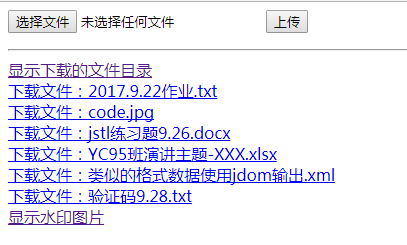
     <form action="FileUpdownLoad?op=upload"  method="post" enctype="multipart/form-data" >

             <input  type="file" name="file1" value="上传的文件">

             <input type="submit" value="上传">

     </form>

     <hr/>

     <a href = "FileUpdownLoad?op=showFiles">显示下载的文件目录</a><br/>

     <c:forEach  items="${list}" var="filename">

         <a href="FileUpdownLoad?op=download&filename=${filename }">下载文件:${filename }</a><br/>

     </c:forEach>

     <a href="ImageServlet">显示水印图片</a>

   </body>

 </html>
java 文件的上传和下载的更多相关文章
- Java 文件本地上传、下载和预览的实现
以下方法为通用版本 实测图片和pdf 都没有问题 上传方法需要前端配合post请求 ,下载前端用a标签就可以,预览 前端使用ifrme标签 ,就可以实现基本功能... 1.文件本地上传 publi ...
- java实现ftp文件的上传与下载
最近在做ftp文件的上传与下载,基于此,整理了一下资料.本来想采用java自带的方法,可是看了一下jdk1.6与1.7的实现方法有点区别,于是采用了Apache下的框架实现的... 1.首先引用3个包 ...
- 初学Java Web(7)——文件的上传和下载
文件上传 文件上传前的准备 在表单中必须有一个上传的控件 <input type="file" name="testImg"/> 因为 GET 方式 ...
- java web(四):request、response一些用法和文件的上传和下载
上一篇讲了ServletContent.ServletCOnfig.HTTPSession.request.response几个对象的生命周期.作用范围和一些用法.今天通过一个小项目运用这些知识.简单 ...
- java实现文件的上传和下载
1. servlet 如何实现文件的上传和下载? 1.1上传文件 参考自:http://blog.csdn.net/hzc543806053/article/details/7524491 通过前台选 ...
- java客户端文件的上传和下载
java客户端文件的上传和下载 //上传 public JTable upload(String id){ JTable table=new JTable(); System.out.println( ...
- Java中文件的上传与下载
文件的上传与下载主要用到两种方法: 1.方法一:commons-fileupload.jar commons-io.jar apache的commons-fileupload实现文件上传,下载 [u ...
- 在SpringMVC框架下实现文件的 上传和 下载
在eclipse中的javaEE环境下:导入必要的架包 web.xml的配置文件: <?xml version="1.0" encoding="UTF-8" ...
- Apache FtpServer 实现文件的上传和下载
1 下载需要的jar包 Ftp服务器实现文件的上传和下载,主要依赖jar包为: 2 搭建ftp服务器 参考Windows 上搭建Apache FtpServer,搭建ftp服务器 3 主要代码 在ec ...
随机推荐
- linux系统下运行java项目的脚本编写
本文主要讲linux系统下运行jar包,至于如何打包jar包,放到linux系统下可以参考其他的博客. 在linux系统下运行jar包的命令如下: 1.java -jar xxxxx.jar // ...
- 【算法】C++用链表实现一个箱子排序附源代码详解
01 箱子排序 1.1 什么是分配排序? 分配排序的基本思想:排序过程无须比较关键字,而是通过"分配"和"收集"过程来实现排序.它们的时间复杂度可达到线性阶:O ...
- c语言-求完全数的一个算法
#include<iostream> #include<math.h> using namespace std; int main() { int n,i,j=0,k,a[10 ...
- ajax跨域请求问题
ajax是不允许跨域请求的,今天在使用bootstap-table的时候,data-url使用的地址是绝对地址,而非相对地址,因此在载入数据的时候就出错了. 启动的时候使用是 http://127.0 ...
- PHP用curl远程下载图片
function http_get_data($url){ $ch = curl_init (); curl_setopt ( $ch, CURLOPT_CUSTOMREQUEST, 'GET' ); ...
- Vmtools的安装步骤
目的:实现win和centos之间的相互复制功能 1.进入centos 2.点击vm菜单的->虚拟机->安装VMware Tools 3.centos会出现一个vm的安装包 4.将文件移动 ...
- org.elasticsearch.script.Script使用
org.elasticsearch.script.Script使用 public Map<String, Object> builderMapPackage(PageBean pageBe ...
- init_config_file.lua
--[[ 读取限流配置 --]] --获取共享内存 local limit_req_store = ngx.shared.limit_req_store --初始化拒绝 URI 列表 reject_u ...
- 【javascript】javascript学习之js脚本的解析步骤
将javascript代码加入到HTML代码中,即使用<script>标签的方式有两种:直接嵌入页面中和使用外部js文件. 使用<script>标签嵌入html代码中时,需要指 ...
- Spark Streaming初探
1. 介绍 Spark Streaming是Spark生态系统中一个重要的框架,建立在Spark Core之上,与Spark SQL.GraphX.MLib相并列. Spark Streaming是 ...