
ABP+NetCore+Vue.js实现增删改查
ABP我就不多介绍了,不知道的可以自己百度
本篇开发工具VS2017,数据库SQL SERVER2012,系统Win7
1、去ABP官网下载对应的模板,下载地址:https://aspnetboilerplate.com/Templates
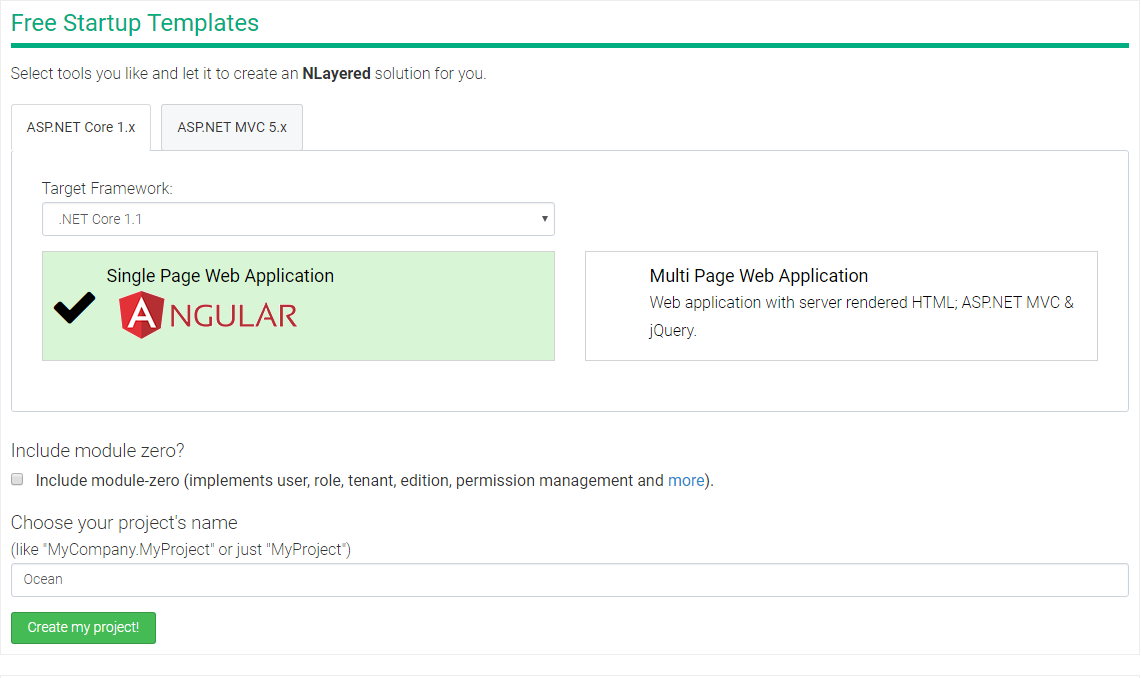
2、用VS2017打开解压后的项目,找到src下web项目下appsettings.json文件。打开后修改数据库连接字符串
图我就不截了,涉及个人隐私
3、在Core项目下添加二个文件夹,一个Entities文件夹存放所有的实体,一个IRepositories文件夹存放所有的仓储接口
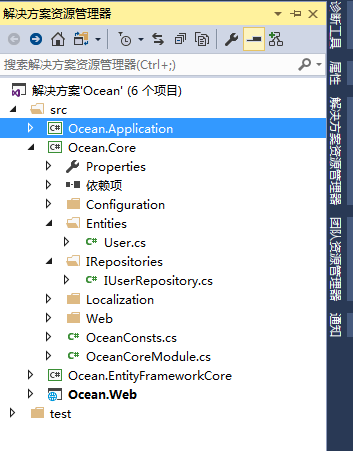
IRepositories文件夹里面的仓储接口主要是自己定义除IRepository<TEntity, TPrimaryKey>没有定义的接口,本文的增删改查IRepository<TEntity, TPrimaryKey>都已经定义了,
所以IRepositories文件夹里面东西对本文作用不大,但是作为一名高度强迫症患者,还是添加此文件夹以备不时之需
附IRepository<TEntity, TPrimaryKey>定义的接口
 using System;

 using System.Collections.Generic;

 using System.Linq;

 using System.Linq.Expressions;

 using System.Threading.Tasks;

 using Abp.Dependency;

 using Abp.Domain.Entities;

 namespace Abp.Domain.Repositories

 {

     //

     // 摘要:

     //     This interface is implemented by all repositories to ensure implementation of

     //     fixed methods.

     //

     // 类型参数:

     //   TEntity:

     //     Main Entity type this repository works on

     //

     //   TPrimaryKey:

     //     Primary key type of the entity

     public interface IRepository<TEntity, TPrimaryKey> : IRepository, ITransientDependency where TEntity : class, IEntity<TPrimaryKey>

     {

         //

         // 摘要:

         //     Gets count of all entities in this repository.

         //

         // 返回结果:

         //     Count of entities

         int Count();

         //

         // 摘要:

         //     Gets count of all entities in this repository based on given predicate.

         //

         // 参数:

         //   predicate:

         //     A method to filter count

         //

         // 返回结果:

         //     Count of entities

         int Count(Expression<Func<TEntity, bool>> predicate);

         //

         // 摘要:

         //     Gets count of all entities in this repository based on given predicate.

         //

         // 参数:

         //   predicate:

         //     A method to filter count

         //

         // 返回结果:

         //     Count of entities

         Task<int> CountAsync(Expression<Func<TEntity, bool>> predicate);

         //

         // 摘要:

         //     Gets count of all entities in this repository.

         //

         // 返回结果:

         //     Count of entities

         Task<int> CountAsync();

         //

         // 摘要:

         //     Deletes an entity.

         //

         // 参数:

         //   entity:

         //     Entity to be deleted

         void Delete(TEntity entity);

         //

         // 摘要:

         //     Deletes an entity by primary key.

         //

         // 参数:

         //   id:

         //     Primary key of the entity

         void Delete(TPrimaryKey id);

         //

         // 摘要:

         //     Deletes many entities by function. Notice that: All entities fits to given predicate

         //     are retrieved and deleted. This may cause major performance problems if there

         //     are too many entities with given predicate.

         //

         // 参数:

         //   predicate:

         //     A condition to filter entities

         void Delete(Expression<Func<TEntity, bool>> predicate);

         //

         // 摘要:

         //     Deletes an entity by primary key.

         //

         // 参数:

         //   id:

         //     Primary key of the entity

         Task DeleteAsync(TPrimaryKey id);

         //

         // 摘要:

         //     Deletes many entities by function. Notice that: All entities fits to given predicate

         //     are retrieved and deleted. This may cause major performance problems if there

         //     are too many entities with given predicate.

         //

         // 参数:

         //   predicate:

         //     A condition to filter entities

         Task DeleteAsync(Expression<Func<TEntity, bool>> predicate);

         //

         // 摘要:

         //     Deletes an entity.

         //

         // 参数:

         //   entity:

         //     Entity to be deleted

         Task DeleteAsync(TEntity entity);

         //

         // 摘要:

         //     Gets an entity with given given predicate or null if not found.

         //

         // 参数:

         //   predicate:

         //     Predicate to filter entities

         TEntity FirstOrDefault(Expression<Func<TEntity, bool>> predicate);

         //

         // 摘要:

         //     Gets an entity with given primary key or null if not found.

         //

         // 参数:

         //   id:

         //     Primary key of the entity to get

         //

         // 返回结果:

         //     Entity or null

         TEntity FirstOrDefault(TPrimaryKey id);

         //

         // 摘要:

         //     Gets an entity with given given predicate or null if not found.

         //

         // 参数:

         //   predicate:

         //     Predicate to filter entities

         Task<TEntity> FirstOrDefaultAsync(Expression<Func<TEntity, bool>> predicate);

         //

         // 摘要:

         //     Gets an entity with given primary key or null if not found.

         //

         // 参数:

         //   id:

         //     Primary key of the entity to get

         //

         // 返回结果:

         //     Entity or null

         Task<TEntity> FirstOrDefaultAsync(TPrimaryKey id);

         //

         // 摘要:

         //     Gets an entity with given primary key.

         //

         // 参数:

         //   id:

         //     Primary key of the entity to get

         //

         // 返回结果:

         //     Entity

         TEntity Get(TPrimaryKey id);

         //

         // 摘要:

         //     Used to get a IQueryable that is used to retrieve entities from entire table.

         //

         // 返回结果:

         //     IQueryable to be used to select entities from database

         IQueryable<TEntity> GetAll();

         //

         // 摘要:

         //     Used to get a IQueryable that is used to retrieve entities from entire table.

         //     One or more

         //

         // 参数:

         //   propertySelectors:

         //     A list of include expressions.

         //

         // 返回结果:

         //     IQueryable to be used to select entities from database

         IQueryable<TEntity> GetAllIncluding(params Expression<Func<TEntity, object>>[] propertySelectors);

         //

         // 摘要:

         //     Used to get all entities based on given predicate.

         //

         // 参数:

         //   predicate:

         //     A condition to filter entities

         //

         // 返回结果:

         //     List of all entities

         List<TEntity> GetAllList(Expression<Func<TEntity, bool>> predicate);

         //

         // 摘要:

         //     Used to get all entities.

         //

         // 返回结果:

         //     List of all entities

         List<TEntity> GetAllList();

         //

         // 摘要:

         //     Used to get all entities based on given predicate.

         //

         // 参数:

         //   predicate:

         //     A condition to filter entities

         //

         // 返回结果:

         //     List of all entities

         Task<List<TEntity>> GetAllListAsync(Expression<Func<TEntity, bool>> predicate);

         //

         // 摘要:

         //     Used to get all entities.

         //

         // 返回结果:

         //     List of all entities

         Task<List<TEntity>> GetAllListAsync();

         //

         // 摘要:

         //     Gets an entity with given primary key.

         //

         // 参数:

         //   id:

         //     Primary key of the entity to get

         //

         // 返回结果:

         //     Entity

         Task<TEntity> GetAsync(TPrimaryKey id);

         //

         // 摘要:

         //     Inserts a new entity.

         //

         // 参数:

         //   entity:

         //     Inserted entity

         TEntity Insert(TEntity entity);

         //

         // 摘要:

         //     Inserts a new entity and gets it's Id. It may require to save current unit of

         //     work to be able to retrieve id.

         //

         // 参数:

         //   entity:

         //     Entity

         //

         // 返回结果:

         //     Id of the entity

         TPrimaryKey InsertAndGetId(TEntity entity);

         //

         // 摘要:

         //     Inserts a new entity and gets it's Id. It may require to save current unit of

         //     work to be able to retrieve id.

         //

         // 参数:

         //   entity:

         //     Entity

         //

         // 返回结果:

         //     Id of the entity

         Task<TPrimaryKey> InsertAndGetIdAsync(TEntity entity);

         //

         // 摘要:

         //     Inserts a new entity.

         //

         // 参数:

         //   entity:

         //     Inserted entity

         Task<TEntity> InsertAsync(TEntity entity);

         //

         // 摘要:

         //     Inserts or updates given entity depending on Id's value.

         //

         // 参数:

         //   entity:

         //     Entity

         TEntity InsertOrUpdate(TEntity entity);

         //

         // 摘要:

         //     Inserts or updates given entity depending on Id's value. Also returns Id of the

         //     entity. It may require to save current unit of work to be able to retrieve id.

         //

         // 参数:

         //   entity:

         //     Entity

         //

         // 返回结果:

         //     Id of the entity

         TPrimaryKey InsertOrUpdateAndGetId(TEntity entity);

         //

         // 摘要:

         //     Inserts or updates given entity depending on Id's value. Also returns Id of the

         //     entity. It may require to save current unit of work to be able to retrieve id.

         //

         // 参数:

         //   entity:

         //     Entity

         //

         // 返回结果:

         //     Id of the entity

         Task<TPrimaryKey> InsertOrUpdateAndGetIdAsync(TEntity entity);

         //

         // 摘要:

         //     Inserts or updates given entity depending on Id's value.

         //

         // 参数:

         //   entity:

         //     Entity

         Task<TEntity> InsertOrUpdateAsync(TEntity entity);

         //

         // 摘要:

         //     Creates an entity with given primary key without database access.

         //

         // 参数:

         //   id:

         //     Primary key of the entity to load

         //

         // 返回结果:

         //     Entity

         TEntity Load(TPrimaryKey id);

         //

         // 摘要:

         //     Gets count of all entities in this repository based on given predicate (use this

         //     overload if expected return value is greather than System.Int32.MaxValue).

         //

         // 参数:

         //   predicate:

         //     A method to filter count

         //

         // 返回结果:

         //     Count of entities

         long LongCount(Expression<Func<TEntity, bool>> predicate);

         //

         // 摘要:

         //     Gets count of all entities in this repository (use if expected return value is

         //     greather than System.Int32.MaxValue.

         //

         // 返回结果:

         //     Count of entities

         long LongCount();

         //

         // 摘要:

         //     Gets count of all entities in this repository (use if expected return value is

         //     greather than System.Int32.MaxValue.

         //

         // 返回结果:

         //     Count of entities

         Task<long> LongCountAsync();

         //

         // 摘要:

         //     Gets count of all entities in this repository based on given predicate (use this

         //     overload if expected return value is greather than System.Int32.MaxValue).

         //

         // 参数:

         //   predicate:

         //     A method to filter count

         //

         // 返回结果:

         //     Count of entities

         Task<long> LongCountAsync(Expression<Func<TEntity, bool>> predicate);

         //

         // 摘要:

         //     Used to run a query over entire entities. Abp.Domain.Uow.UnitOfWorkAttribute

         //     attribute is not always necessary (as opposite to Abp.Domain.Repositories.IRepository`2.GetAll)

         //     if queryMethod finishes IQueryable with ToList, FirstOrDefault etc..

         //

         // 参数:

         //   queryMethod:

         //     This method is used to query over entities

         //

         // 类型参数:

         //   T:

         //     Type of return value of this method

         //

         // 返回结果:

         //     Query result

         T Query<T>(Func<IQueryable<TEntity>, T> queryMethod);

         //

         // 摘要:

         //     Gets exactly one entity with given predicate. Throws exception if no entity or

         //     more than one entity.

         //

         // 参数:

         //   predicate:

         //     Entity

         TEntity Single(Expression<Func<TEntity, bool>> predicate);

         //

         // 摘要:

         //     Gets exactly one entity with given predicate. Throws exception if no entity or

         //     more than one entity.

         //

         // 参数:

         //   predicate:

         //     Entity

         Task<TEntity> SingleAsync(Expression<Func<TEntity, bool>> predicate);

         //

         // 摘要:

         //     Updates an existing entity.

         //

         // 参数:

         //   entity:

         //     Entity

         TEntity Update(TEntity entity);

         //

         // 摘要:

         //     Updates an existing entity.

         //

         // 参数:

         //   id:

         //     Id of the entity

         //

         //   updateAction:

         //     Action that can be used to change values of the entity

         //

         // 返回结果:

         //     Updated entity

         TEntity Update(TPrimaryKey id, Action<TEntity> updateAction);

         //

         // 摘要:

         //     Updates an existing entity.

         //

         // 参数:

         //   id:

         //     Id of the entity

         //

         //   updateAction:

         //     Action that can be used to change values of the entity

         //

         // 返回结果:

         //     Updated entity

         Task<TEntity> UpdateAsync(TPrimaryKey id, Func<TEntity, Task> updateAction);

         //

         // 摘要:

         //     Updates an existing entity.

         //

         // 参数:

         //   entity:

         //     Entity

         Task<TEntity> UpdateAsync(TEntity entity);

     }

 }
4、自定义实体类User和仓储接口IUserRepository
 using Abp.Domain.Entities;

 using System;

 using System.Collections.Generic;

 using System.ComponentModel.DataAnnotations;

 using System.Text;

 namespace Ocean.Entities

 {

     public class User : Entity

     {

         /// <summary>

         /// 用户名

         /// </summary>

         [MaxLength()]

         public virtual string UserName { get; set; }

         /// <summary>

         /// 真实姓名

         /// </summary>

         [MaxLength()]

         public virtual string RealName { get; set; }

         /// <summary>

         /// 邮箱

         /// </summary>

         [MaxLength()]

         public virtual string Email { get; set; }

         /// <summary>

         /// 添加时间

         /// </summary>

         public virtual DateTime CreationTime { get; set; } = DateTime.Now;

         /// <summary>

         /// 用户状态

         /// </summary>

         public virtual int Status { get; set; } = ;

     }

 }
 using Abp.Domain.Repositories;

 using System;

 using System.Collections.Generic;

 using System.Text;

 namespace Ocean.IRepositories

 {

     public interface IUserRepository : IRepository

     {

         //自定义除增删改查基本操作之外的其余方法接口

     }

 }
5、去EntityFrameworkCore下EntityFrameworkCore文件夹里添加个Repositories文件夹,里面主要存放实现自定义仓储接口的方法

 using Ocean.IRepositories;

 using System;

 using System.Collections.Generic;

 using System.Text;

 namespace Ocean.EntityFrameworkCore.Repositories

 {

     public class UserRepository : IUserRepository

     {

         //

     }

 }
6、EntityFrameworkCore下找到 DbContext文件打开,添加对应的DbSet
 using Abp.EntityFrameworkCore;

 using Microsoft.EntityFrameworkCore;

 using Ocean.Entities;

 namespace Ocean.EntityFrameworkCore

 {

     public class OceanDbContext : AbpDbContext

     {

         //Add DbSet properties for your entities...

         public virtual DbSet<User> User { get; set; }

         public OceanDbContext(DbContextOptions<OceanDbContext> options)

             : base(options)

         {

             //

         }

     }

 }
7、打开工具--Nuget包管理器--程序包管理器控制台,默认项目选择EntityFrameworkCore并设定Web为解决方案的启动项目
执行命令 Add-Migration InitialCreate
成功后看Migrations文件夹里面生成的文件
然后执行命令 Update-Database
成功后就可以看到在数据库中生成的数据库和表了

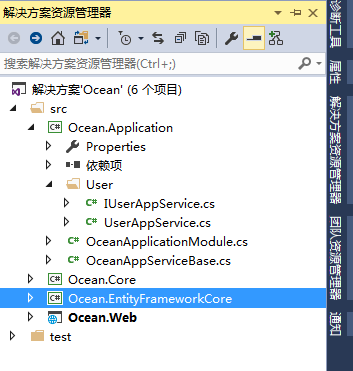
8、来到Application项目中,添加一个定义的实体类文件夹,并在文件夹中添加一个IAppservice接口和一个AppService类
 using Abp.Application.Services;

 using System;

 using System.Collections.Generic;

 using System.Text;

 namespace Ocean.User

 {

     public interface IUserAppService : IApplicationService

     {

         List<Entities.User> GetUsers();

         void UpdateUser(Entities.User entity);

         void CreateUser(Entities.User entity);

         void DeleteUser(int Id);

     }

 }
 using Abp.Domain.Repositories;

 using Ocean.Entities;

 using System;

 using System.Collections.Generic;

 using System.Linq;

 using System.Text;

 namespace Ocean.User

 {

     public class UserAppService : OceanAppServiceBase, IUserAppService

     {

         private readonly IRepository<Entities.User> _UserRepository;

         public UserAppService(IRepository<Entities.User> userRepository)

         {

             _UserRepository = userRepository;

         }

         public void CreateUser(Entities.User entity)

         {

             Logger.Info($"Created a User for entity at:{DateTime.Now}");

             try

             {

                 _UserRepository.Insert(entity);

             }

             catch (Exception ex)

             {

                 Logger.Error(ex.ToString());

             }

         }

         public void DeleteUser(int Id)

         {

             Logger.Info($"Deleted a User for Id at:{DateTime.Now}");

             try

             {

                 _UserRepository.Delete(Id);

             }

             catch (Exception ex)

             {

                 Logger.Error(ex.ToString());

             }

         }

         public List<Entities.User> GetUsers()

         {

             List<Entities.User> list = new List<Entities.User>();

             Logger.Info($"Get Users List at:{DateTime.Now}");

             try

             {

                 list = _UserRepository.GetAll().ToList();

             }

             catch (Exception ex)

             {

                 Logger.Error(ex.ToString());

             }

             return list;

         }

         public void UpdateUser(Entities.User entity)

         {

             Logger.Info($"Updated a User for entity at:{DateTime.Now}");

             try

             {

                 _UserRepository.Update(entity);

             }

             catch (Exception ex)

             {

                 Logger.Error(ex.ToString());

             }

         }

     }

 }
9、来到Web目录下,找到brower.json文件,右击选择管理Brower程序包,然后搜索Vue添加,这样就把Vue.js添加到项目中了
10、修改Startup下的OceanNavigationProvider文件,添加代码
 public override void SetNavigation(INavigationProviderContext context)

         {

             context.Manager.MainMenu

                 .AddItem(

                     new MenuItemDefinition(

                         PageNames.Home,

                         L("HomePage"),

                         url: "",

                         icon: "fa fa-home"

                         )

                 ).AddItem(

                     new MenuItemDefinition(

                         PageNames.About,

                         L("About"),

                         url: "Home/About",

                         icon: "fa fa-info"

                         )

                 ).AddItem(

                     new MenuItemDefinition(

                         PageNames.User,

                         L("User"),

                         url: "User/Index",

                         icon: "fa fa-user"

                         )

                 );

         }
别忘了打开PageNames文件,添加代码
 public class PageNames

     {

         public const string Home = "Home";

         public const string About = "About";

         public const string User = "User";

     }
11、在Controller文件夹添加控制器UserController
 namespace Ocean.Web.Controllers

 {

     public class UserController : OceanControllerBase

     {

         // GET: /<controller>/

         public ActionResult Index()

         {

             return View();

         }

     }

 }
并在Views文件夹添加User文件夹并添加Index.cshtml
 @using Ocean.Web.Startup

 @{

     ViewBag.ActiveMenu = PageNames.User;

 }

 <div id="userApp">

     <div class="row">

         <div class="col-md-12">

             <button data-toggle="modal" data-target="#userModal" class="btn btn-primary pull-right"><i class="fa fa-plus"></i>添加用户</button>

         </div>

     </div>

     <div class="row">

         <table class="table">

             <thead>

                 <tr>

                     <th>用户Id</th>

                     <th>用户名</th>

                     <th>真实姓名</th>

                     <th>用户邮箱</th>

                 </tr>

             </thead>

             <tbody>

                 <tr v-for="user in userList">

                     <td><a href="javascript:void(0)" v-on:click="updateUser(user)">{{user.id}}</a></td>

                     <td>{{user.userName}}</td>

                     <td>{{user.realName}}</td>

                     <td>{{user.email}}</td>

                 </tr>

             </tbody>

         </table>

     </div>

     <div class="modal fade" id="userModal" tabindex="-1" role="dialog" data-backdrop="static">

         <div class="modal-dialog" role="document">

             <div class="modal-content">

                 <form name="userForm" role="form" novalidate class="form-validation">

                     <div class="modal-header">

                         <h4 class="modal-title">

                             <span v-if="userModel.id">编辑用户</span>

                             <span v-if="!userModel.id">添加用户</span>

                         </h4>

                     </div>

                     <div class="modal-body">

                         <input type="hidden" v-model="userModel.id" />

                         <div class="form-group">

                             <label>用户名</label>

                             <input class="form-control" type="text" v-model="userModel.userName" required>

                         </div>

                         <div class="form-group">

                             <label>真实姓名</label>

                             <input class="form-control" type="text" v-model="userModel.realName" required>

                         </div>

                         <div class="form-group">

                             <label>用户邮箱</label>

                             <input class="form-control" type="text" v-model="userModel.email" required>

                         </div>

                     </div>

                     <div class="modal-footer">

                         <button type="button" class="btn btn-default" data-dismiss="modal">@L("Cancel")</button>

                         <button type="button" class="btn btn-primary blue" v-on:click="createUser"><i class="fa fa-save"></i> <span>@L("Save")</span></button>

                     </div>

                 </form>

             </div>

         </div>

     </div>

 </div>

 @section scripts{

     <script src="~/lib/vue/dist/vue.js"></script>

     <script src="~/js/views/user/index.js"></script>

 }
对应位置添加js文件

 //abp的调用接口abp.services.app.user

 var _userService = abp.services.app.user;

 var appVue = new Vue({

     el: "#userApp",

     data: {

         userModel: {

             id: 0,

             userName: '',

             realName: '',

             email: ''

         },

         userList: []

     },

     methods: {

         getUsers: function () {

             var own = this;

             _userService.getUsers().done(function (result) {

                 own.userList = result;

             });

         },

         createUser: function () {

             var own = this;

             if (own.userModel.id > 0) {

                 _userService.updateUser(own.userModel).done(function () {

                     location.reload();

                 })

             }

             else {

                 _userService.createUser(own.userModel).done(function () {

                     location.reload();

                 });

             }

         },

         updateUser: function (user) {

             var own = this;

             own.userModel = user;

             $('#userModal').modal();

         }

     }

 });

 appVue.getUsers();
最终效果图


最后:增改查都实现了,就是删除没有实现。删除的实现就靠你们了。我要去巩固Vue.js了
ABP+NetCore+Vue.js实现增删改查的更多相关文章
- Vue.js——3.增删改查
vue 写假后台 bootstrap 做的样式 代码 <!DOCTYPE html> <html lang="en"> <head> < ...
- 60分钟课程: 用egg.js实现增删改查,文件上传和restfulApi, webpack react es6 (一)
今天开始我将写nodejs框架egg.js, react 实现的增删改查,文件上传等常用的b/s场景,这个将分3部分来写. 会让你在60分钟内快速 入口并应用~ 你应该用es6, node,或是ph ...
- abp(net core)+easyui+efcore实现仓储管理系统——ABP WebAPI与EasyUI结合增删改查之一(二十七)
abp(net core)+easyui+efcore实现仓储管理系统目录 abp(net core)+easyui+efcore实现仓储管理系统——ABP总体介绍(一) abp(net core)+ ...
- 一起学Vue:CRUD(增删改查)
目标 使用Vue构建一个非常简单CRUD应用程序,以便您更好地了解它的工作方式. 效果页面 比如我们要实现这样列表.新增.编辑三个页面: 列表页面 新增页面 编辑页面 我们把这些用户信息保存到Todo ...
- Vue+element基本增删改查
<!DOCTYPE html> <html lang="zh"> <head> <meta charset="UTF-8&quo ...
- JS的增删改查
1.查 <script type="text/javascript"> /** * 查找 已经在html代码中存在的元素 */ /** * document.getEl ...
- Vue表格数据增删改查及搜索
<div id="app"> <div class="item"> <span class="name"> ...
- webpack4+express+mongodb+vue 实现增删改查
在讲解之前,我们先来看看效果如下所示: 1)整个页面的效果如下: 2) 新增数据效果如下: 3) 新增成功如下: 4) 编辑数据效果如下: 5) 编辑成功效果如下: 6) 删除数据效果如下: 7) 删 ...
- vue实现增删改查(内附源代码)
VUE+Element实现增删改查 @ 目录 VUE+Element实现增删改查 前言 实验步骤 总结: 源代码 前言 &最近因为一些原因,没有更博客,昨天老师布置了一个作业,用vue实现增删 ...
随机推荐
- 【BZOJ】2196: [Usaco2011 Mar]Brownie Slicing
[题意]给定n*m的数字矩阵,要求横着切A-1刀,对每块再分别竖着切B-1刀,是最小子矩阵最大. [算法]二分+贪心 [题解]还记得提高组2015跳石头吗?这道题做法一致,只不过拓展到二维而已. 二分 ...
- js监听浏览器后退事件
$(document).ready(function(e) { var counter = 0; if (window.history && ...
- js中的indexOf
1.概述 indexOf大小写敏感,其中的O要大写 2.对于字符串而言 indexOf返回字符串第一次出现的位置,若没有出现返回-1 var str = "hello world" ...
- Java多线程学习(三)volatile关键字
转载请备注地址:https://blog.csdn.net/qq_34337272/article/details/79680693 系列文章传送门: Java多线程学习(一)Java多线程入门 Ja ...
- LCD实验学习笔记(九):UART
s3c2440包含三个通用异步收发器,可工作于中断模式或DMA模式.每个UART包含两个64字节的FIFOs用于接收和发送数据.可编程设置波特率.1或2个停止位,5/6/7/8个数据位和奇偶校验状态. ...
- [Leetcode Week15]Populating Next Right Pointers in Each Node II
Populating Next Right Pointers in Each Node II 题解 原创文章,拒绝转载 题目来源:https://leetcode.com/problems/popul ...
- java===java基础学习(15)---抽象,接口
抽象 //这就是一个抽象类 abstract class Animal { String name; int age; abstract public void cry(); } //当一个类继承的父 ...
- abp 调试
概要 研究Abp(ASP.NET Boilerplate)框架有几个月了,从一遍遍的看官方文档,到现在看源码,一路走来学习了很多知识. 很多新手都很关心源码如何调试,我也是如此,在反复看Debuggi ...
- 【POJ3254】coinfield
状压dp初步. #include<iostream> #include<cstdio> #include<cstring> #include<algorith ...
- grep常见操作整理(更新)
提取邮箱和URL [root@test88 ~]# cat url_email.txt root@gmail.com,http://blog.peter.com,peter@qq.com [root@ ...