
iOS 横向菜单
现在想要实现以下效果,其中“选时间”这部分是一个NavigationBar,“日期”是横向的菜单,“电影时段”是TableView。
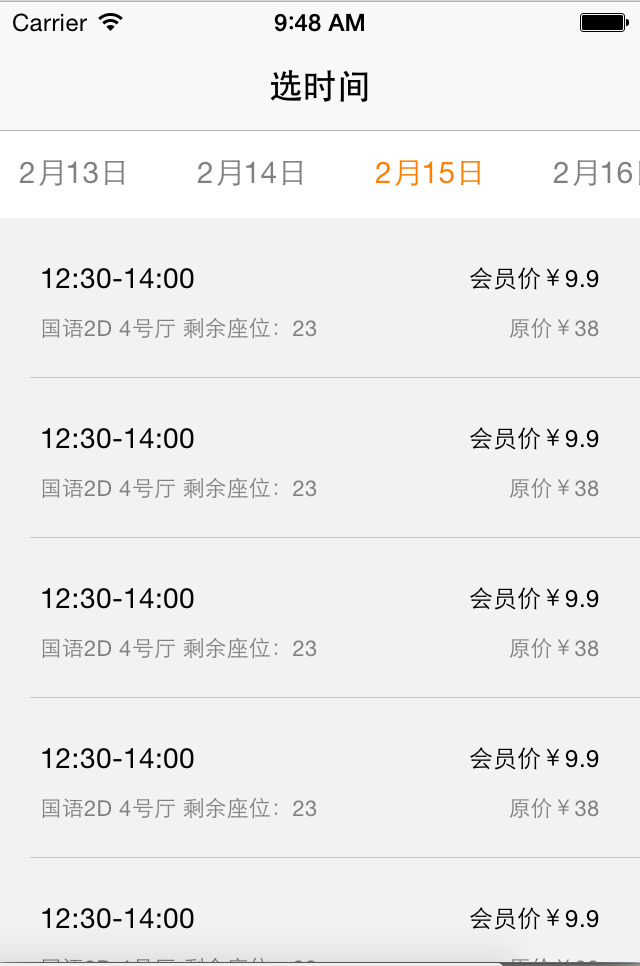
比较难实现的是横向菜单,因为没有直接的控件可以用。开始我想用之前的方法,将TableView和TableViewCell倒置,实现横向TableView;但是会出现一个问题,每个Cell中的文本,都被省略显示,类似显示“2月...”。
原因是,在倒置TableView之前,TableView的宽很小(相当于图中横向菜单的高),那么文本写在上面就会被省略显示,虽然TableView倒置过来了,但是文本还是原来的文本,并没有因为倒置后宽变长了而全部显示。
只能试试别的方法,发现MKHorizMenu这个开源库。
MKHorizMenu的实现原理是将UISrollView封装,声明DataSource协议和Delegate协议。详见。由于自带Demo是使用nib,所以我在MKHorizMenu.m中将初始化方法awakeFromNib改为initWithFrame。
//

//  MKHorizMenu.h

//  MKHorizMenuDemo

//

//  Created by Mugunth on 09/05/11.

//  Copyright 2011 Steinlogic. All rights reserved.

//  Permission granted to do anything, commercial/non-commercial with this file apart from removing the line/URL above

//  Read my blog post at http://mk.sg/8h on how to use this code

//  As a side note on using this code, you might consider giving some credit to me by

//    1) linking my website from your app's website

//    2) or crediting me inside the app's credits page

//    3) or a tweet mentioning @mugunthkumar

//    4) A paypal donation to mugunth.kumar@gmail.com

//

//  A note on redistribution

//    While I'm ok with modifications to this source code,

//    if you are re-publishing after editing, please retain the above copyright notices

#import <UIKit/UIKit.h>

@class MKHorizMenu;

@protocol MKHorizMenuDataSource <NSObject>

@required

- (UIImage*)selectedItemImageForMenu:(MKHorizMenu*)tabView;

- (UIColor*)backgroundColorForMenu:(MKHorizMenu*)tabView;

- (NSUInteger)numberOfItemsForMenu:(MKHorizMenu*)tabView;

- (NSString*)horizMenu:(MKHorizMenu*)horizMenu titleForItemAtIndex:(NSUInteger)index;

@end

@protocol MKHorizMenuDelegate <NSObject>

@required

- (void)horizMenu:(MKHorizMenu*)horizMenu itemSelectedAtIndex:(NSUInteger)index;

@end

@interface MKHorizMenu : UIScrollView

{

    int _itemCount;

    UIImage* _selectedImage;

    NSMutableArray* _titles;

    id<MKHorizMenuDataSource> dataSource;

    id<MKHorizMenuDelegate> itemSelectedDelegate;

}

@property (nonatomic, retain) NSMutableArray* titles;

@property (nonatomic, retain) id<MKHorizMenuDelegate> itemSelectedDelegate;

@property (nonatomic, retain) id<MKHorizMenuDataSource> dataSource;

@property (nonatomic, retain) UIImage* selectedImage;

@property (nonatomic, assign) int itemCount;

- (void)reloadData;

- (void)setSelectedIndex:(int)index animated:(BOOL)animated;

@end
MKHorizMenu.h
//

//  MKHorizMenu.m

//  MKHorizMenuDemo

//  Created by Mugunth on 09/05/11.

//  Copyright 2011 Steinlogic. All rights reserved.

//  Permission granted to do anything, commercial/non-commercial with this file apart from removing the line/URL above

//  Read my blog post at http://mk.sg/8h on how to use this code

//  As a side note on using this code, you might consider giving some credit to me by

//    1) linking my website from your app's website

//    2) or crediting me inside the app's credits page

//    3) or a tweet mentioning @mugunthkumar

//    4) A paypal donation to mugunth.kumar@gmail.com

//

//  A note on redistribution

//    While I'm ok with modifications to this source code,

//    if you are re-publishing after editing, please retain the above copyright notices

#import "MKHorizMenu.h"

#define kButtonBaseTag 10000

#define kLeftOffset 10

@implementation MKHorizMenu

@synthesize titles = _titles;

@synthesize selectedImage = _selectedImage;

@synthesize itemSelectedDelegate;

@synthesize dataSource;

@synthesize itemCount = _itemCount;

/**

 *    @author Norcy, 15-05-03

 *

 *    Change awakeFormNib to function below

 *

 *    @param frame

 *

 *    @return

 */

- (id)initWithFrame:(CGRect)frame

{

    if (self = [super initWithFrame:frame])

    {

        self.bounces = YES;

        self.scrollEnabled = YES;

        self.alwaysBounceHorizontal = YES;

        self.alwaysBounceVertical = NO;

        self.showsHorizontalScrollIndicator = NO;

        self.showsVerticalScrollIndicator = NO;

//        [self reloadData];

    }

    return self;

}

- (void)reloadData

{

    NSArray* viewsToRemove = [self subviews];

    for (UIView* v in viewsToRemove)

    {

        [v removeFromSuperview];

    }

    self.itemCount = [dataSource numberOfItemsForMenu:self];

//    self.backgroundColor = [dataSource backgroundColorForMenu:self];    //Norcy

    self.selectedImage = [dataSource selectedItemImageForMenu:self];

    UIFont* buttonFont = [UIFont systemFontOfSize:];

    int buttonPadding = ;

    int tag = kButtonBaseTag;

    int xPos = kLeftOffset;

    for (int i = ; i < self.itemCount; i++)

    {

        NSString* title = [dataSource horizMenu:self titleForItemAtIndex:i];

        UIButton* customButton = [UIButton buttonWithType:UIButtonTypeCustom];

        [customButton setTitle:title forState:UIControlStateNormal];

        customButton.titleLabel.font = buttonFont;

//        [customButton setBackgroundImage:self.selectedImage forState:UIControlStateSelected];    //Norcy

        [customButton setTitleColor:[UIColor grayColor] forState:UIControlStateNormal];            //Norcy

        [customButton setTitleColor:[UIColor orangeColor] forState:UIControlStateSelected];        //Norcys

        customButton.tag = tag++;

        [customButton addTarget:self action:@selector(buttonTapped:) forControlEvents:UIControlEventTouchUpInside];

//        int buttonWidth = [title sizeWithFont:customButton.titleLabel.font

//                              constrainedToSize:CGSizeMake(150, 28)

//                                  lineBreakMode:UILineBreakModeClip].width;

        int buttonWidth = [title boundingRectWithSize:CGSizeMake(, ) options:NSStringDrawingUsesLineFragmentOrigin    attributes:nil context:nil].size.width;

        customButton.frame = CGRectMake(xPos, , buttonWidth + buttonPadding, );

        xPos += buttonWidth;

        xPos += buttonPadding;

        [self addSubview:customButton];

    }

    // bretdabaker: added right padding to contentSize

    xPos += kLeftOffset;

    self.contentSize = CGSizeMake(xPos, );

    [self layoutSubviews];

}

- (void)setSelectedIndex:(int)index animated:(BOOL)animated

{

    UIButton* thisButton = (UIButton*)[self viewWithTag:index + kButtonBaseTag];

    thisButton.selected = YES;

    [self setContentOffset:CGPointMake(thisButton.frame.origin.x - kLeftOffset, ) animated:animated];

    [self.itemSelectedDelegate horizMenu:self itemSelectedAtIndex:index];

}

- (void)buttonTapped:(id)sender

{

    UIButton* button = (UIButton*)sender;

    for (int i = ; i < self.itemCount; i++)

    {

        UIButton* thisButton = (UIButton*)[self viewWithTag:i + kButtonBaseTag];

        if (i + kButtonBaseTag == button.tag)

            thisButton.selected = YES;

        else

            thisButton.selected = NO;

    }

    [self.itemSelectedDelegate horizMenu:self itemSelectedAtIndex:button.tag - kButtonBaseTag];

}

@end
MKHorizMenu.m
以下为Demo,调用MKHorizMenu的过程请直接看ViewController2.m。
//

//  AppDelegate.m

//  Tickets

//

//  Created by Norcy on 15/4/29.

//  Copyright (c) 2015年 Norcy. All rights reserved.

//

#import "AppDelegate.h"

#import "ViewController2.h"

@interface AppDelegate ()

@end

@implementation AppDelegate

- (BOOL)application:(UIApplication*)application didFinishLaunchingWithOptions:(NSDictionary*)launchOptions

{

    // Override point for customization after application launch.

    self.window = [[UIWindow alloc] initWithFrame:[[UIScreen mainScreen] bounds]];

    ViewController2 *vc = [[ViewController2 alloc] init];

    UINavigationController *nav = [[UINavigationController alloc]initWithRootViewController:vc];

    nav.view.backgroundColor = [UIColor whiteColor];

    self.window.rootViewController = nav;

    [self.window makeKeyAndVisible];

    return YES;

}

- (void)applicationWillResignActive:(UIApplication*)application

{

    // Sent when the application is about to move from active to inactive state. This can occur for certain types of temporary interruptions (such as an incoming phone call or SMS message) or when the user quits the application and it begins the transition to the background state.

    // Use this method to pause ongoing tasks, disable timers, and throttle down OpenGL ES frame rates. Games should use this method to pause the game.

}

- (void)applicationDidEnterBackground:(UIApplication*)application

{

    // Use this method to release shared resources, save user data, invalidate timers, and store enough application state information to restore your application to its current state in case it is terminated later.

    // If your application supports background execution, this method is called instead of applicationWillTerminate: when the user quits.

}

- (void)applicationWillEnterForeground:(UIApplication*)application

{

    // Called as part of the transition from the background to the inactive state; here you can undo many of the changes made on entering the background.

}

- (void)applicationDidBecomeActive:(UIApplication*)application

{

    // Restart any tasks that were paused (or not yet started) while the application was inactive. If the application was previously in the background, optionally refresh the user interface.

}

- (void)applicationWillTerminate:(UIApplication*)application

{

    // Called when the application is about to terminate. Save data if appropriate. See also applicationDidEnterBackground:.

}

@end
AppDelegate.m
//

//  ViewController2.h

//  Tickets

//

//  Created by Norcy on 15/4/30.

//  Copyright (c) 2015年 Norcy. All rights reserved.

//

#import <UIKit/UIKit.h>

#import "MKHorizMenu.h"

@interface ViewController2 : UIViewController<UITableViewDataSource, UITableViewDelegate, MKHorizMenuDataSource, MKHorizMenuDelegate>

{

    MKHorizMenu *_horizMenu;    //顶部导航条

    NSInteger lastSelectedBtnIndex;

}

@property NSArray *items;

@end
ViewController2.h
//

//  ViewController2.m

//  Tickets

//

//  Created by Norcy on 15/4/30.

//  Copyright (c) 2015年 Norcy. All rights reserved.

//

#import "ViewController2.h"

#import "TableViewCell2.h"

@interface ViewController2 ()

@end

#define kButtonBaseTag 10000

#define HORIZONMENU_HEIGHT 44

static NSString* CELL_ID = @"MyCell";

@implementation ViewController2

- (void)viewDidLoad

{

    [super viewDidLoad];

    //Navigation

    self.title = @"选时间";

    self.edgesForExtendedLayout = UIRectEdgeNone;

    //Screen

    int screenWidth = [[UIScreen mainScreen] bounds].size.width;

    int screenHeight = [[UIScreen mainScreen] bounds].size.height;

    self.items = [NSArray arrayWithObjects:@"今天", @"2月11日", @"2月12日", @"2月13日", @"2月14日", @"2月15日", @"2月16日", nil];

    lastSelectedBtnIndex = -;

    //Horizon Menu

    MKHorizMenu *horizMenu = [[MKHorizMenu alloc] initWithFrame:CGRectMake(, , screenWidth, HORIZONMENU_HEIGHT)];

    horizMenu.dataSource = self;

    horizMenu.itemSelectedDelegate = self;

    horizMenu.backgroundColor = [UIColor whiteColor];

    [horizMenu reloadData];

    [self.view addSubview:horizMenu];

    [self horizMenu:horizMenu itemSelectedAtIndex:];    //必须写在reloadData和addSubview:horizMenu后面

    //TableView

    UITableView* tableView = [[UITableView alloc] initWithFrame:CGRectMake(, horizMenu.frame.size.height, screenWidth, screenHeight - HORIZONMENU_HEIGHT - self.navigationController.navigationBar.frame.size.height - )];

    [tableView registerClass:[TableViewCell2 class] forCellReuseIdentifier:CELL_ID];

    tableView.delegate = self;

    tableView.dataSource = self;

    [self.view addSubview:tableView];

}

#pragma mark

#pragma mark TableView Data Source

- (NSInteger)numberOfSectionsInTableView:(UITableView*)tableView

{

    return ;

}

- (NSInteger)tableView:(UITableView*)tableView numberOfRowsInSection:(NSInteger)section

{

    return ;

}

- (UITableViewCell*)tableView:(UITableView*)tableView cellForRowAtIndexPath:(NSIndexPath*)indexPath

{

    TableViewCell2* cell = [tableView dequeueReusableCellWithIdentifier:CELL_ID forIndexPath:indexPath];

    cell.backgroundColor = [UIColor colorWithRed:0.95 green:0.95 blue:0.95 alpha:];

    return cell;

}

- (CGFloat)tableView:(UITableView*)tableView heightForRowAtIndexPath:(NSIndexPath*)indexPath

{

    return ;

}

- (CGFloat)tableView:(UITableView*)tableView heightForHeaderInSection:(NSInteger)section

{

    return ;

}

#pragma mark

#pragma mark TableView Delegate

- (void)tableView:(UITableView*)tableView didSelectRowAtIndexPath:(NSIndexPath*)indexPath

{

    [tableView deselectRowAtIndexPath:indexPath animated:YES];

}

#pragma mark

#pragma mark MKHorizMenu DataSource

- (UIImage*)selectedItemImageForMenu:(MKHorizMenu*)tabView

{

    return nil;

}

- (UIColor*)backgroundColorForMenu:(MKHorizMenu*)tabView

{

    return [UIColor clearColor];

}

- (NSUInteger)numberOfItemsForMenu:(MKHorizMenu*)tabView

{

    return [self.items count];

}

- (NSString*)horizMenu:(MKHorizMenu*)horizMenu titleForItemAtIndex:(NSUInteger)index

{

    return [self.items objectAtIndex:index];

}

#pragma mark

#pragma mark MKHorizMenu Delegate

- (void)horizMenu:(MKHorizMenu*)horizMenu itemSelectedAtIndex:(NSUInteger)index

{

    if (lastSelectedBtnIndex != -)

    {

        UIButton *lastButton = (UIButton*) [self.view viewWithTag:lastSelectedBtnIndex+kButtonBaseTag];

        lastButton.selected = NO;

    }

    UIButton *thisButton = (UIButton*) [self.view viewWithTag:index+kButtonBaseTag];

    thisButton.selected = YES;

    lastSelectedBtnIndex = index;

}

@end
ViewController2.m
//

//  TableViewCell2.h

//  Tickets

//

//  Created by Norcy on 15/4/30.

//  Copyright (c) 2015年 Norcy. All rights reserved.

//

#import <UIKit/UIKit.h>

@interface TableViewCell2 : UITableViewCell

@property (nonatomic, strong) UILabel *showTime;

@property (nonatomic, strong) UILabel *VIPPrice;

@property (nonatomic, strong) UILabel *Detail;

@property (nonatomic, strong) UILabel *Price;

@end
TableViewCell2.h
//

//  TableViewCell2.m

//  Tickets

//

//  Created by Norcy on 15/4/30.

//  Copyright (c) 2015年 Norcy. All rights reserved.

//

#import "TableViewCell2.h"

#define kCellEdgeInset 20

#define kCellInset 10

#define kLeftLabelWidth 180

#define kLeftLabelHeight 20

@implementation TableViewCell2

- (id)initWithStyle:(UITableViewCellStyle)style reuseIdentifier:(NSString *)reuseIdentifier

{

    self = [super initWithStyle:style reuseIdentifier:reuseIdentifier];

    if (self)

    {

        //Screen

        int screenWidth = [[UIScreen mainScreen] bounds].size.width;

        _showTime = [[UILabel alloc]initWithFrame:CGRectMake(kCellEdgeInset, kCellEdgeInset, kLeftLabelWidth, kLeftLabelHeight)];

        _showTime.text = @"12:30-14:00";

        _showTime.font = [UIFont systemFontOfSize:];

        _VIPPrice = [[UILabel alloc]initWithFrame:CGRectMake(kCellEdgeInset+kLeftLabelWidth, _showTime.frame.origin.y, screenWidth-kLeftLabelWidth-kCellEdgeInset*, kLeftLabelHeight)];

        _VIPPrice.text = @"会员价¥9.9";

        _VIPPrice.textAlignment = NSTextAlignmentRight;

        _VIPPrice.font = [UIFont systemFontOfSize:];

        _Detail = [[UILabel alloc]initWithFrame:CGRectMake(kCellEdgeInset, _showTime.frame.origin.y+_showTime.frame.size.height+kCellInset, kLeftLabelWidth, kLeftLabelHeight*0.5)];

        _Detail.text = @"国语2D 4号厅 剩余座位:23";

        _Detail.font = [UIFont systemFontOfSize:];

        [_Detail setTextColor:[UIColor grayColor]];

        _Price = [[UILabel alloc]initWithFrame:CGRectMake(kCellEdgeInset+kLeftLabelWidth, _Detail.frame.origin.y, screenWidth-kLeftLabelWidth-kCellEdgeInset*, _Detail.frame.size.height)];

        _Price.text = @"原价¥38";

        _Price.textAlignment = NSTextAlignmentRight;

        _Price.font = [UIFont systemFontOfSize:];

        [_Price setTextColor:[UIColor grayColor]];

        [self addSubview:_showTime];

        [self addSubview:_VIPPrice];

        [self addSubview:_Detail];

        [self addSubview:_Price];

    }

    return self;

}

- (void)setSelected:(BOOL)selected animated:(BOOL)animated

{

    [super setSelected:selected animated:animated];

    // Configure the view for the selected state

}

@end
TableViewCell2.m
注意 ViewController2.m中有一句
self.edgesForExtendedLayout = UIRectEdgeNone;
默认是UIRectEdgeAll,设置为UIRectEdgeNone之后有什么用呢?
请看ViewController2.m中有一句
MKHorizMenu *horizMenu = [[MKHorizMenu alloc] initWithFrame:CGRectMake(0, 0, screenWidth, HORIZONMENU_HEIGHT)];
就是当我的横向菜单的Origin起点为(0,0)的时候,系统会将其放置在状态栏和导航栏的下面,而不是真正的(0,0)。所以设置UIRectEdgeNone后我可以避免计算状态栏和导航栏的高度。
吐槽一句,虽然成功实现了这个功能,但是这个库可自定义的东西太少,特别是样式,基本都写在库里,这点很不好,一旦有什么需求就需要修改库的源码。有时间自己再写一个……
注:
其实最简单的是使GMGridview(开源)和UICollectionView。20150608
iOS 横向菜单的更多相关文章
- RDIFramework.NET V3.3 Web框架主界面新增横向菜单功能
功能描述 响应重多客户的要求与心声,RDIFramework.NET框架Web版本主界面新增横向菜单功能.横向菜单更加直观,用户可操作与展示的空间更多,符合实际应用要求. 一.效果展示 最终界面效果: ...
- [转载] ul li css 做横向菜单
原文地址: http://www.cnblogs.com/amylis_chen/archive/2011/09/24/2188398.html 第一步:建立一个无序列表 我们先建立一个无序列表,来建 ...
- iOS筛选菜单、分段选择器、导航栏、悬浮窗、转场动画、启动视频等源码
iOS精选源码 APP启动视频 自定义按钮,图片可调整图文间距SPButton 一款定制性极高的轮播图,可自定义轮播图Item的样式(或只... iOS 筛选菜单 分段选择器 仿微信导航栏的实现,让你 ...
- 实现ios常见菜单效果的思路
眼下见过的实现边側菜单的效果.比較流行的有下面三种:(效果图) 1.菜单条覆盖在部分主视图上 附上实现该效果的一个不错的源代码地址: http://code4app.com/ios/RNFrosted ...
- ios官方菜单项目重点剖析附项目源码
原版教程:https://developer.apple.com/library/content/referencelibrary/GettingStarted/DevelopiOSAppsSwift ...
- iOS UIMenuController菜单
//1:普通 //// ViewController.m// DemoTest#import "ViewController.h"@interface ViewControll ...
- iOS关于菜单滚动视图实现
菜单滚动视图也是在项目开发过程中比较常用到的功能,先直接看效果图 实现的效果如下: 当菜单个数的总长度超过一个屏宽度就计算每一个的文字宽度,若没有则只进行一个屏平分,点击菜单项时,滚动的视图位置会随着 ...
- 二级横向菜单实现——ListView
实现类似于大众点评客户端的横向listview二级列表 这种横向的listview二级列表在手机软件上还不太常见,但是使用过平板的都应该知道,在平板上市比较常见的.可能是因为平板屏幕比较大,而且也能展 ...
- iOS横向瀑布流的封装
前段时间, 做一个羡慕, 需要使用到瀑布流! 说道瀑布流, 或许大家都不陌生, 瀑布流的实现也有很多种! 从scrollView 到 tableView 书写的瀑布流, 然后再到2012年iOS6 苹 ...
随机推荐
- 算法笔记_162:算法提高 复数归一化(Java)
目录 1 问题描述 2 解决方案 1 问题描述 编写函数Normalize,将复数归一化,即若复数为a+bi,归一化结果为a/sqrt(a*a+b*b) + i*b/sqrt(a*a+b*b) . ...
- 微信小程序之趣闻
代码地址如下:http://www.demodashi.com/demo/13433.html 前言 小程序 的火热程度我就不多说了,我之前对这个就蛮有兴趣的,于是花了大概5天的时间,完成了 学习-入 ...
- sql 中 ALTER 和 UPDATE 的区别
alter 是DDL语句,是修改数据库中对象(表,数据库,视图..)的语句. 如需在表中添加列,请使用下面的语法: ALTER TABLE table_name ADD column_name dat ...
- 15个极好的Linux find命令示例
基于访问/修改/更改时间查找文件 你可以找到基于以下三个文件的时间属性的文件. 访问时间的文件.文件访问时,访问时间得到更新. 的文件的修改时间.文件内容修改时,修改时间得到更新. 更改文件的时间.更 ...
- Python-常用字符串转换实例
当字符串是:'\u4e2d\u56fd' >>>s=['\u4e2d\u56fd','\u6e05\u534e\u5927\u5b66']>>>str=s[0].d ...
- java 环境配置 maven 环境配置
1.windows 下Java 环境的安装和配置: 下载jdk并安装 配置环境变量: (1) 新建JAVA_HOME环境变量,赋值为JDK的安装目录: (2) 新建CLASSPATH环境变量,赋值为. ...
- Sublime Text的列模式
Sublime Text的列模式如何操作? 听语音 | 浏览:6551 | 更新:2014-12-09 13:27 | 标签:软件 Sublime Text的列模式如何操作?各个系统不一样,请跟进系统 ...
- JAVA Socket 底层是怎样基于TCP/IP 实现的???
首先必须明确:TCP/IP模型中有四层结构: 应用层(Application Layer).传输层(Transport Layer).网络层(Internet Layer ).链路层( ...
- 221. Add Two Numbers II【medium】
You have two numbers represented by a linked list, where each node contains a single digit. The digi ...
- poj Squares n个点,共能组成多少个正方形 二分 + 哈希
题目链接:http://poj.org/problem?id=2002 测试数据: 41 00 11 10 090 01 02 00 21 22 20 11 12 14-2 53 70 05 20 有 ...