
android中的内部存储与外部存储
我们先来考虑这样一个问题:
打开手机设置,选择应用管理,选择任意一个App,然后你会看到两个按钮,一个是清除缓存,另一个是清除数据,那么当我们点击清除缓存的时候清除的是哪里的数据?当我们点击清除数据的时候又是清除的哪里的数据?读完本文相信你会有答案。
在android开发中我们常常听到这样几个概念,内存,内部存储,外部存储,很多人常常将这三个东西搞混,那么我们今天就先来详细说说这三个东西是怎么回事?
内存,我们在英文中称作memory,内部存储,我们称为InternalStorage,外部存储我们称为ExternalStorage,这在英文中本不会产生歧义,但是当我们翻译为中文之后,前两个都简称为内存,于是,混了。
那么究竟什么是内部存储什么是外部存储呢?
首先我们打开DDMS,有一个File Explorer,如下:
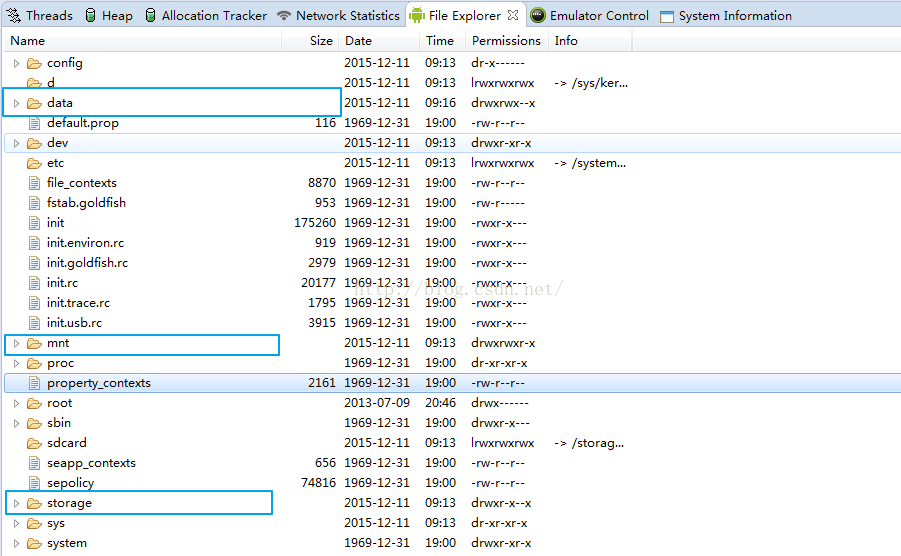
这里有三个文件夹需要我们重视,一个是data,一个是mnt,一个是storage,我们下面就详细说说这三个文件夹。
1.内部存储
data文件夹就是我们常说的内部存储,当我们打开data文件夹之后(没有root的手机不能打开该文件夹),里边有两个文件夹值得我们关注,如下:
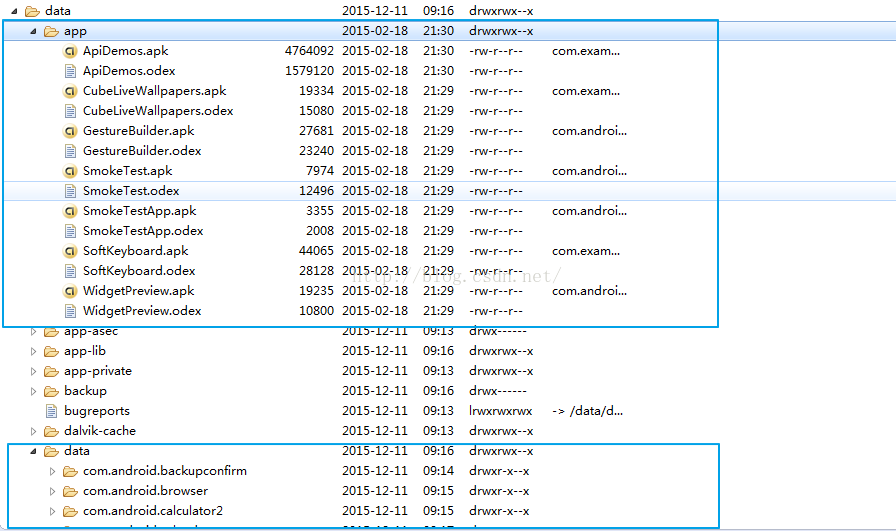
一个文件夹是app文件夹,还有一个文件夹就是data文件夹,app文件夹里存放着我们所有安装的app的apk文件,其实,当我们调试一个app的时候,可以看到控制台输出的内容,有一项是uploading …..就是上传我们的apk到这个文件夹,上传成功之后才开始安装。另一个重要的文件夹就是data文件夹了,这个文件夹里边都是一些包名,打开这些包名之后我们会看到这样的一些文件:
1.data/data/包名/shared_prefs
2.data/data/包名/databases
3.data/data/包名/files
4.data/data/包名/cache
如果打开过data文件,应该都知道这些文件夹是干什么用的,我们在使用sharedPreferenced的时候,将数据持久化存储于本地,其实就是存在这个文件中的xml文件里,我们App里边的数据库文件就存储于databases文件夹中,还有我们的普通数据存储在files中,缓存文件存储在cache文件夹中,存储在这里的文件我们都称之为内部存储。
2.外部存储
外部存储才是我们平时操作最多的,外部存储一般就是我们上面看到的storage文件夹,当然也有可能是mnt文件夹,这个不同厂家有可能不一样。
一般来说,在storage文件夹中有一个sdcard文件夹,这个文件夹中的文件又分为两类,一类是公有目录,还有一类是私有目录,其中的公有目录有九大类,比如DCIM、DOWNLOAD等这种系统为我们创建的文件夹,私有目录就是Android这个文件夹,这个文件夹打开之后里边有一个data文件夹,打开这个data文件夹,里边有许多包名组成的文件夹。
说到这里,我想大家应该已经可以分清楚什么是内部存储什么是外部存储了吧?好,分清楚之后我们就要看看怎么来操作内部存储和外部存储了。
3.操作存储空间
首先,经过上面的分析,大家已经明白了,什么是内部存储,什么是外部存储,以及这两种存储方式分别存储在什么位置,一般来说,我们不会自己去操作内部存储空间,没有root权限的话,我们也没法操作内部存储空间,事实上内部存储主要是由系统来维护的。不过在代码中我们是可以访问到这个文件夹的。由于内部存储空间有限,在开发中我们一般都是操作外部存储空间,Google官方建议我们App的数据应该存储在外部存储的私有目录中该App的包名下,这样当用户卸载掉App之后,相关的数据会一并删除,如果你直接在/storage/sdcard目录下创建了一个应用的文件夹,那么当你删除应用的时候,这个文件夹就不会被删除。
经过以上的介绍,我们可以总结出下面一个表格:
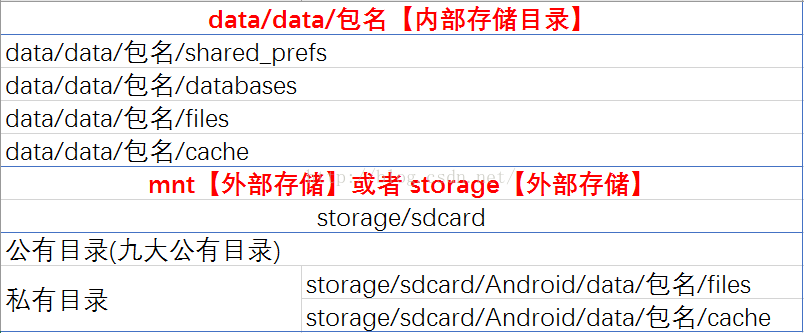
一目了然,什么是内部存储,什么是外部存储。
如果按照路径的特征,我们又可以将文件存储的路径分为两大类,一类是路径中含有包名的,一类是路径中不含有包名的,含有包名的路径,因为和某个App有关,所以对这些文件夹的访问都是调用Context里边的方法,而不含有包名的路径,和某一个App无关,我们可以通过Environment中的方法来访问。如下图:
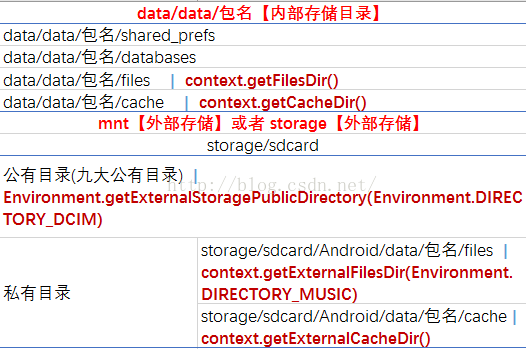
大家看到,有包名的路径我们都是调用Context中的方法来获得,没有包名的路径,我们直接调用Environment中的方法获得,那么其中有两个方法需要传入一个String类型的参数,这个参数我们使用了Environment中的常量,参数的意思是我们要访问这个路径下的哪个文件夹,比如getExternalFilesDir方法,我们看看它的源码:
|
1
2
3
4
5
6
7
8
9
10
11
12
13
14
15
16
17
18
19
20
21
22
23
|
/**** @param type The type of files directory to return. May be null for* the root of the files directory or one of* the following Environment constants for a subdirectory:* {@link android.os.Environment#DIRECTORY_MUSIC},* {@link android.os.Environment#DIRECTORY_PODCASTS},* {@link android.os.Environment#DIRECTORY_RINGTONES},* {@link android.os.Environment#DIRECTORY_ALARMS},* {@link android.os.Environment#DIRECTORY_NOTIFICATIONS},* {@link android.os.Environment#DIRECTORY_PICTURES}, or* {@link android.os.Environment#DIRECTORY_MOVIES}.** @return The path of the directory holding application files* on external storage. Returns null if external storage is not currently* mounted so it could not ensure the path exists; you will need to call* this method again when it is available.** @see #getFilesDir* @see android.os.Environment#getExternalStoragePublicDirectory*/@Nullablepublic abstract File getExternalFilesDir(@Nullable String type); |
它的注释非常多,我这里只列出其中一部分,我们看到,我们可以访问files文件夹下的Music文件夹、Movies文件夹等等好几种。
说到这里,我想大家对内部存储、外部存储该有了一个清晰的认识了吧。我们在开发中,不建议往内部存储中写太多的数据,毕竟空间有限。外部存储在使用的时候最好能够将文件存放在私有目录下,这样有利于系统维护,也避免用户的反感。
现在我们再来看看我们一开始提出的问题,当我们点击清除数据的时候清除的是哪里的数据呢?毫无疑问,当然是内部存储目录中相应的files和cache文件夹中的文件和外部存储中相应的files和cache文件夹中的文件,至于这些文件夹的路径我想你应该已经明白了。
好了,最后再送给大家一个文件操作工具类:
|
1
2
3
4
5
6
7
8
9
10
11
12
13
14
15
16
17
18
19
20
21
22
23
24
25
26
27
28
29
30
31
32
33
34
35
36
37
38
39
40
41
42
43
44
45
46
47
48
49
50
51
52
53
54
55
56
57
58
59
60
61
62
63
64
65
66
67
68
69
70
71
72
73
74
75
76
77
78
79
80
81
82
83
84
85
86
87
88
89
90
91
92
93
94
95
96
97
98
99
100
101
102
103
104
105
106
107
108
109
110
111
112
113
114
115
116
117
118
119
120
121
122
123
124
125
126
127
128
129
130
131
132
133
134
135
136
137
138
139
140
141
142
143
144
145
146
147
148
149
150
151
152
153
154
155
156
157
158
159
160
161
162
163
164
165
166
167
168
169
170
171
172
173
174
175
176
177
178
179
180
181
182
183
184
185
186
187
188
189
190
191
192
193
194
195
196
197
198
199
200
201
202
203
204
205
206
207
208
209
210
211
212
213
214
215
216
217
218
219
220
221
222
223
224
225
226
227
228
229
230
231
232
233
234
235
236
237
238
239
240
241
242
243
244
245
246
247
248
249
250
251
252
253
254
255
|
public class SDCardHelper { // 判断SD卡是否被挂载 public static boolean isSDCardMounted() { // return Environment.getExternalStorageState().equals("mounted"); return Environment.getExternalStorageState().equals( Environment.MEDIA_MOUNTED); } // 获取SD卡的根目录 public static String getSDCardBaseDir() { if (isSDCardMounted()) { return Environment.getExternalStorageDirectory().getAbsolutePath(); } return null; } // 获取SD卡的完整空间大小,返回MB public static long getSDCardSize() { if (isSDCardMounted()) { StatFs fs = new StatFs(getSDCardBaseDir()); long count = fs.getBlockCountLong(); long size = fs.getBlockSizeLong(); return count * size / 1024 / 1024; } return 0; } // 获取SD卡的剩余空间大小 public static long getSDCardFreeSize() { if (isSDCardMounted()) { StatFs fs = new StatFs(getSDCardBaseDir()); long count = fs.getFreeBlocksLong(); long size = fs.getBlockSizeLong(); return count * size / 1024 / 1024; } return 0; } // 获取SD卡的可用空间大小 public static long getSDCardAvailableSize() { if (isSDCardMounted()) { StatFs fs = new StatFs(getSDCardBaseDir()); long count = fs.getAvailableBlocksLong(); long size = fs.getBlockSizeLong(); return count * size / 1024 / 1024; } return 0; } // 往SD卡的公有目录下保存文件 public static boolean saveFileToSDCardPublicDir(byte[] data, String type, String fileName) { BufferedOutputStream bos = null; if (isSDCardMounted()) { File file = Environment.getExternalStoragePublicDirectory(type); try { bos = new BufferedOutputStream(new FileOutputStream(new File(file, fileName))); bos.write(data); bos.flush(); return true; } catch (Exception e) { e.printStackTrace(); } finally { try { bos.close(); } catch (IOException e) { // TODO Auto-generated catch block e.printStackTrace(); } } } return false; } // 往SD卡的自定义目录下保存文件 public static boolean saveFileToSDCardCustomDir(byte[] data, String dir, String fileName) { BufferedOutputStream bos = null; if (isSDCardMounted()) { File file = new File(getSDCardBaseDir() + File.separator + dir); if (!file.exists()) { file.mkdirs();// 递归创建自定义目录 } try { bos = new BufferedOutputStream(new FileOutputStream(new File(file, fileName))); bos.write(data); bos.flush(); return true; } catch (Exception e) { e.printStackTrace(); } finally { try { bos.close(); } catch (IOException e) { // TODO Auto-generated catch block e.printStackTrace(); } } } return false; } // 往SD卡的私有Files目录下保存文件 public static boolean saveFileToSDCardPrivateFilesDir(byte[] data, String type, String fileName, Context context) { BufferedOutputStream bos = null; if (isSDCardMounted()) { File file = context.getExternalFilesDir(type); try { bos = new BufferedOutputStream(new FileOutputStream(new File(file, fileName))); bos.write(data); bos.flush(); return true; } catch (Exception e) { e.printStackTrace(); } finally { try { bos.close(); } catch (IOException e) { // TODO Auto-generated catch block e.printStackTrace(); } } } return false; } // 往SD卡的私有Cache目录下保存文件 public static boolean saveFileToSDCardPrivateCacheDir(byte[] data, String fileName, Context context) { BufferedOutputStream bos = null; if (isSDCardMounted()) { File file = context.getExternalCacheDir(); try { bos = new BufferedOutputStream(new FileOutputStream(new File(file, fileName))); bos.write(data); bos.flush(); return true; } catch (Exception e) { e.printStackTrace(); } finally { try { bos.close(); } catch (IOException e) { // TODO Auto-generated catch block e.printStackTrace(); } } } return false; } // 保存bitmap图片到SDCard的私有Cache目录 public static boolean saveBitmapToSDCardPrivateCacheDir(Bitmap bitmap, String fileName, Context context) { if (isSDCardMounted()) { BufferedOutputStream bos = null; // 获取私有的Cache缓存目录 File file = context.getExternalCacheDir(); try { bos = new BufferedOutputStream(new FileOutputStream(new File(file, fileName))); if (fileName != null && (fileName.contains(".png") || fileName.contains(".PNG"))) { bitmap.compress(Bitmap.CompressFormat.PNG, 100, bos); } else { bitmap.compress(Bitmap.CompressFormat.JPEG, 100, bos); } bos.flush(); } catch (Exception e) { e.printStackTrace(); } finally { if (bos != null) { try { bos.close(); } catch (IOException e) { e.printStackTrace(); } } } return true; } else { return false; } } // 从SD卡获取文件 public static byte[] loadFileFromSDCard(String fileDir) { BufferedInputStream bis = null; ByteArrayOutputStream baos = new ByteArrayOutputStream(); try { bis = new BufferedInputStream(new FileInputStream(new File(fileDir))); byte[] buffer = new byte[8 * 1024]; int c = 0; while ((c = bis.read(buffer)) != -1) { baos.write(buffer, 0, c); baos.flush(); } return baos.toByteArray(); } catch (Exception e) { e.printStackTrace(); } finally { try { baos.close(); bis.close(); } catch (IOException e) { e.printStackTrace(); } } return null; } // 从SDCard中寻找指定目录下的文件,返回Bitmap public Bitmap loadBitmapFromSDCard(String filePath) { byte[] data = loadFileFromSDCard(filePath); if (data != null) { Bitmap bm = BitmapFactory.decodeByteArray(data, 0, data.length); if (bm != null) { return bm; } } return null; } // 获取SD卡公有目录的路径 public static String getSDCardPublicDir(String type) { return Environment.getExternalStoragePublicDirectory(type).toString(); } // 获取SD卡私有Cache目录的路径 public static String getSDCardPrivateCacheDir(Context context) { return context.getExternalCacheDir().getAbsolutePath(); } // 获取SD卡私有Files目录的路径 public static String getSDCardPrivateFilesDir(Context context, String type) { return context.getExternalFilesDir(type).getAbsolutePath(); } public static boolean isFileExist(String filePath) { File file = new File(filePath); return file.isFile(); } // 从sdcard中删除文件 public static boolean removeFileFromSDCard(String filePath) { File file = new File(filePath); if (file.exists()) { try { file.delete(); return true; } catch (Exception e) { return false; } } else { return false; } }} |
本文相关笔记和源码下载http://download.csdn.net/detail/u012702547/9348985
转载请注明:Android开发中文站 » 彻底理解android中的内部存储与外部存储
android中的内部存储与外部存储的更多相关文章
- 彻底了解android中的内部存储与外部存储
我们先来考虑这样一个问题: 打开手机设置,选择应用管理,选择任意一个App,然后你会看到两个按钮,一个是清除缓存,另一个是清除数据,那么当我们点击清除缓存的时候清除的是哪里的数据?当我们点击清除数据的 ...
- 彻底理解android中的内部存储与外部存储
我们先来考虑这样一个问题: 打开手机设置,选择应用管理,选择任意一个App,然后你会看到两个按钮,一个是清除缓存,另一个是清除数据,那么当我们点击清除缓存的时候清除的是哪里的数据?当我们点击清除数据的 ...
- android中的文件操作详解以及内部存储和外部存储(转载)
原文链接:http://m.blog.csdn.net/article/details?id=17725989 摘要 其实安卓文件的操作和java在pc环境下的操作并无二致,之所以需要单独讲解是因为安 ...
- 【转】 android中的文件操作详解以及内部存储和外部存储
摘要 其实安卓文件的操作和Java在pc环境下的操作并无二致,之所以需要单独讲解是因为安卓系统提供了不同于pc的访问文件系统根路径的api,同时对一个应用的私有文件做了统一的管理.根据我的经验,初学者 ...
- 【转】彻底理解android中的内部存储与外部存储
我们先来考虑这样一个问题: 打开手机设置,选择应用管理,选择任意一个App,然后你会看到两个按钮,一个是清除缓存,另一个是清除数据,那么当我们点击清除缓存的时候清除的是哪里的数据?当我们点击清除数据的 ...
- Android内存解析(二)— 详解内存,内部存储和外部存储
总述 觉得十分有必要搞清楚内存,内部存储和外部存储的区别,还有我们在开发中真正将数据存在了手机的哪儿. 先提一个问题:手机设置的应用管理中,每个App下都有清除数据和清除缓存,清除的分别是哪里的数据? ...
- Android中使用File文件进行数据存储
Android中使用File文件进行数据存储 上一篇学到使用SharedPerences进行数据存储,接下来学习一下使用File进行存储 我们有时候可以将数据直接以文件的形式保存在设备中, 例如:文本 ...
- Android数据存储之内部存储、外部存储
首先来介绍下什么是内部存储? 在Android平台下,有着自己独立的数据存储规则,在windows平台下,应用程序能够自由的或者在特定的訪问权限基础上訪问或改动其它应用程序下的文件资源. 可是在And ...
- Android Environment.getExternalStorageDirectory() 获取的是内部存储还是外部存储? - z
这几天在做Android应用的远程更新功能,将下载的更新包放在移动设备上指定的目录.用的是 Environment.getExternalStorageDirectory() 这个方法,然后在获取的 ...
随机推荐
- vscode安装golang插件失败问题
vscode安装golang插件失败问题 dlv go-outline go-symbols gocode-gomod gocode 代码补全 godef 代码跳转 golint gopkgs gor ...
- Java - 冒泡排序的优化算法(尚学堂第七章数组)
import java.util.Arrays; public class TestBubbleSort2 { public static void main(String[] args) { int ...
- touch插件
第一种: <script> (function($) { var options, Events, Touch; options = { x: 20, y: 20 }; Events = ...
- MySQL数据表的修改
数据表的修改包括列的增加.列的删除.约束的添加.约束的删除等. 添加单列 ALTER TABLE tbl_name ADD [COLUMN] col_name column_definition [F ...
- CMS: DNN And Umbraco
在比较了众多CMS系统后,还是把焦点定在DNN和Umbraco两个系统上,这两个系统都可以使用UserControl扩展自己需要的功能. DNN的架构比较复杂,Module.Skin.Containe ...
- 等待页面元素(webdriverwait)
前言 在脚本中加入太多的 sleep 后会影响脚本的执行速度,虽然 implicitly_wait ()这种方法隐式等待方法一定程度上节省了很多时间.但是一旦页面上某些 js 无法加载出来(其实界面元 ...
- 理解session和cookie
Session 与 Cookie 的作用都是为了保持访问用户与后端服务器的交互状态.它们有各自的优点,也有各自的缺陷,然而具有讽刺意味的是它们的优点和它们的使用场景又是矛盾的.例如,使用 Cookie ...
- cloudera-scm-server启动时出现Caused by: javax.persistence.PersistenceException: org.hibernate.exception.GenericJDBCException: Could not open connection问题解决方法(图文详解)
问题现象 查看 [root@cmbigdata1 cloudera-scm-server]# pwd /var/log/cloudera-scm-server [root@cmbigdata1 clo ...
- Java开发规范(MySQL开发规范)-《阿里巴巴Java开发手册》
官方介绍:https://yq.aliyun.com/articles/69327 官方GitHub(包括IDE规范检查插件):https://github.com/alibaba/p3c 1.0.2 ...
- [转]用Excel制作甘特图并管理项目
对于比较简单的项目管理,或绘制甘特图,选用电子表格工具——比如价格高也最强大的Excel.开源的OpenOffice.免费的WPS——可能比项目管理软件更方便. 1. XL-Easy Gantt 模板 ...