
web项目跨域访问
1.同域相互访问
假设A.html 与 b.html domain都是localhost (同域)
A.html中iframe 嵌入 B.html,name=myframe
A.html有js function fMain()
B.html有js function fIframe()
需要实现 A.html 调用 B.html 的 fIframe(),B.html 调用 A.html 的 fMain()
A.html
<!DOCTYPE HTML PUBLIC "-//W3C//DTD HTML 4.01 Transitional//EN" "http://www.w3.org/TR/html4/loose.dtd">

<html>

 <head>

  <meta http-equiv="content-type" content="text/html; charset=utf-8">

  <title> main window </title>

  <script type="text/javascript">

  // main js function

  function fMain(){

	alert('main function execute success');

  }

  // exec iframe function

  function exec_iframe(){

	window.myframe.fIframe();

  }

  </script>

 </head>

 <body>

  <p>A.html main</p>

  <p><input type="button" value="exec iframe function" onclick="exec_iframe()"></p>

  <iframe src="B.html" name="myframe" width="500" height="100"></iframe>

 </body>

</html>
B.html
<html>

 <head>

  <meta http-equiv="content-type" content="text/html; charset=utf-8">

  <title> iframe window </title>

  <script type="text/javascript">

  // iframe js function

  function fIframe(){

	alert('iframe function execute success');

  }

  // exec main function

  function exec_main(){

	parent.fMain();

  }

  </script>

 </head>

 <body>

  <p>B.html iframe</p>

  <p><input type="button" value="exec main function" onclick="exec_main()"></p>

 </body>

</html>
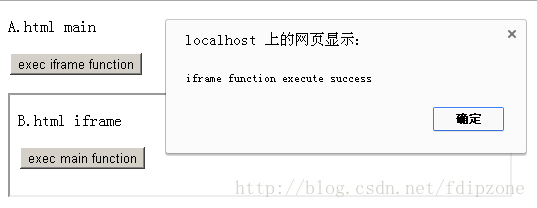
点击A.html 的 exec iframe function button,执行成功,弹出iframe function execute success。如下图
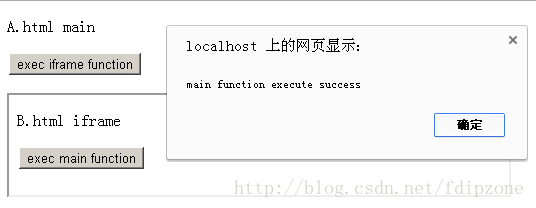
点击B.html 的 exec main function button,执行成功,弹出 main function execute success。如下图
2.跨域互相访问
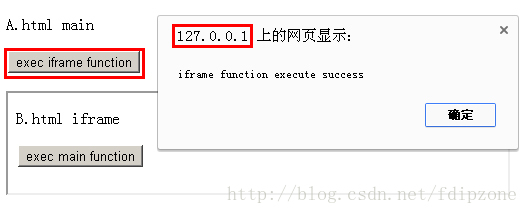
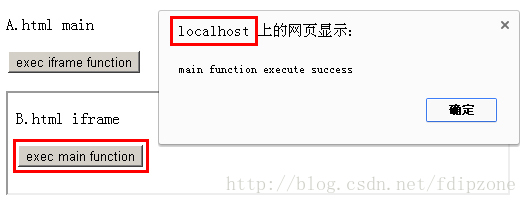
假设 A.html domain是 localhost, B.html domain 是 127.0.0.1 (跨域)
这里使用 localhost 与 127.0.0.1 只是方便测试,localhost 与 127.0.0.1已经不同一个域,因此执行效果是一样的。
实际使用时换成 www.domaina.com 与 www.domainb.com 即可。
A.html中iframe 嵌入 B.html,name=myframe
A.html有js function fMain()
B.html有js function fIframe()
需要实现 A.html 调用 B.html 的 fIframe(),B.html 调用 A.html 的 fMain() (跨域调用)
如果使用上面同域的方法,浏览器判断A.html 与 B.html 不同域,会有错误提示。
Uncaught SecurityError: Blocked a frame with origin "http://localhost" from accessing a frame with origin "http://127.0.0.1". Protocols, domains, and ports must match.
实现原理:
因为浏览器为了安全,禁止了不同域访问。因此只要调用与执行的双方是同域则可以相互访问。
首先,A.html 如何调用B.html的 fIframe方法
1.在A.html 创建一个 iframe
2.iframe的页面放在 B.html 同域下,命名为execB.html
3.execB.html 里有调用B.html fIframe方法的js调用
<script type="text/javascript">

parent.window.myframe.fIframe(); // execute parent myframe fIframe function

</script>
这样A.html 就能通过 execB.html 调用 B.html 的 fIframe 方法了。
同理,B.html 需要调用A.html fMain方法,需要在B.html 嵌入与A.html 同域的 execA.html
execA.html 里有调用 A.html fMain 方法的js 调用
<script type="text/javascript">

parent.parent.fMain(); // execute main function

</script>
这样就能实现 A.html 与 B.html 跨域相互调用。
A.html
<!DOCTYPE HTML PUBLIC "-//W3C//DTD HTML 4.01 Transitional//EN" "http://www.w3.org/TR/html4/loose.dtd">

<html>

 <head>

  <meta http-equiv="content-type" content="text/html; charset=utf-8">

  <title> main window </title>

  <script type="text/javascript">

  // main js function

  function fMain(){

	alert('main function execute success');

  }

  // exec iframe function

  function exec_iframe(){

	if(typeof(exec_obj)=='undefined'){

		exec_obj = document.createElement('iframe');

		exec_obj.name = 'tmp_frame';

		exec_obj.src = 'http://127.0.0.1/execB.html';

		exec_obj.style.display = 'none';

		document.body.appendChild(exec_obj);

	}else{

		exec_obj.src = 'http://127.0.0.1/execB.html?' + Math.random();

	}

  }

  </script>

 </head>

 <body>

  <p>A.html main</p>

  <p><input type="button" value="exec iframe function" onclick="exec_iframe()"></p>

  <iframe src="http://127.0.0.1/B.html" name="myframe" width="500" height="100"></iframe>

 </body>

</html>
B.html
<!DOCTYPE HTML PUBLIC "-//W3C//DTD HTML 4.01 Transitional//EN" "http://www.w3.org/TR/html4/loose.dtd">

<html>

 <head>

  <meta http-equiv="content-type" content="text/html; charset=utf-8">

  <title> iframe window </title>

  <script type="text/javascript">

  // iframe js function

  function fIframe(){

	alert('iframe function execute success');

  }

  // exec main function

  function exec_main(){

	if(typeof(exec_obj)=='undefined'){

		exec_obj = document.createElement('iframe');

		exec_obj.name = 'tmp_frame';

		exec_obj.src = 'http://localhost/execA.html';

		exec_obj.style.display = 'none';

		document.body.appendChild(exec_obj);

	}else{

		exec_obj.src = 'http://localhost/execA.html?' + Math.random();

	}

  }

  </script>

 </head>

 <body>

  <p>B.html iframe</p>

  <p><input type="button" value="exec main function" onclick="exec_main()"></p>

 </body>

</html>
execA.html
<!DOCTYPE HTML PUBLIC "-//W3C//DTD HTML 4.01 Transitional//EN" "http://www.w3.org/TR/html4/loose.dtd">

<html>

 <head>

  <meta http-equiv="content-type" content="text/html; charset=utf-8">

  <title> exec main function </title>

 </head>

 <body>

 	<script type="text/javascript">

		parent.parent.fMain(); // execute main function

	</script>

 </body>

</html>
execB.html
<!DOCTYPE HTML PUBLIC "-//W3C//DTD HTML 4.01 Transitional//EN" "http://www.w3.org/TR/html4/loose.dtd">

<html>

 <head>

  <meta http-equiv="content-type" content="text/html; charset=utf-8">

  <title> exec iframe function </title>

 </head>

 <body>

	<script type="text/javascript">

		parent.window.myframe.fIframe(); // execute parent myframe fIframe function

	</script>

 </body>

</html>
执行如下图:
web项目跨域访问的更多相关文章
- Web Api跨域访问配置及调用示例
1.Web Api跨域访问配置. 在Web.config中的system.webServer内添加以下代码: <httpProtocol> <customHeaders> &l ...
- JAVA - SpringBoot项目跨域访问
JAVA - SpringBoot添加支持CORS跨域访问 CORS(Cross-Origin Resource Sharing)“跨域资源共享”,是一个W3C标准,它允许浏览器向跨域服务器发送Aja ...
- Web API 跨域访问(CORS)
1.在web.config里把“ <remove name="OPTIONSVerbHandler" /> ”删掉. 2. 到nuget上装一个包: ht ...
- ssm项目跨域访问
最近使用ssm开发了一个项目,为了项目的开发速度,采用的是前后端同时开发,所以前端文件没有集成在项目中,最后在调试时涉及到了跨域.跨域的解决方法很多,我采用的是最简单的一种,代码如下: 新建一个过滤器 ...
- ASP.NET Web API 跨域访问(CORS)
一.客户端用JSONP请求数据 如果你想用JSONP来获得跨域的数据,WebAPI本身是不支持javascript的callback的,它返回的JSON是这样的: {"YourSignatu ...
- 两个java项目,跨域访问时,浏览器不能正确解析数据问题
@Controller@RequestMapping(value = "api/item/cat")public class ApiItemCatController { @Aut ...
- ASP.NET Web API 跨域访问(CORS)要注意的地方
一.客户端用JSONP请求数据 如果你想用JSONP来获得跨域的数据,WebAPI本身是不支持javascript的callback的,它返回的JSON是这样的: {"YourSignatu ...
- ASP.NET Web API 跨域访问
自定义特性 要在WebApi中实现JSONP,一种方式是实现自定义特性 http://stackoverflow.com/questions/9421312/jsonp-with-asp-net-w ...
- web api 跨域访问
在工程中 Install-Package Microsoft.AspNet.WebApi.Cors 在 webapiconfig.cs中 config.EnableCors(); 在 控制器中, [E ...
随机推荐
- winrar3.7-winrar4.0的注冊码
首先新建记事本文件(txt文件),把下面红色代码复制进去,然后将文件另存为以 rarreg.key 为文件名称的文件(当然因为设置的不同,可能出现你保存后的文件为 rarreg.key.txt 没关系 ...
- openwrt network interface(openwrt中的网络接口)
这篇算是对openwrt网络接口的一个翻译吧,源地址:http://wiki.openwrt.org/doc/networking/network.interfaces network的接口类型:物理 ...
- C++ 用libcurl库进行http通讯网络编程[转]
http://www.cnblogs.com/moodlxs/archive/2012/10/15/2724318.html 目录索引: 一.LibCurl基本编程框架 二.一些基本的函数 三.cur ...
- android怎样写一个循环文字滚动的TextView
效果图: 在layout中这样来声明: <com.kaixin001.view.ScrollText android:id="@+id/news_statustxt" and ...
- 《第一行代码》学习笔记37-服务Service(4)
一个比较完整的自定义AsyncTask写成如下: class DownloadTask extends AsyncTask<Void, Integer, Boolean> { @Overr ...
- 怎么用C#获取Scenario step在specflow里
公司最近在用specflow 这种BDD的模式,但PM还是想把case再存进TestManager里面一份儿一遍后期集成TestManager 自动runcase用.所以我们需要获取每个scenari ...
- OC基础 文件管理
OC基础 文件管理 1.文件管理类NSFileManager对象的创建: NSFileManager *fm = [NSFileManager defaultManager]; 2.文件操作: (1 ...
- Ubuntu中安装编译并测试HTK语音识别库
1.在网上看到首先必须确保电脑上安装了g++和libx11 g++ --version //检测g++版本 sudo apt-get install libx11-dev:i386 2.然后可从HTK ...
- Sicily 2005.Lovely Number
题目地址:2005.Lovely Number 思路: 若测试数据出现的次数为奇数,则输出它. 所以,可以先排序,若前后相等,前后都设为0,最后不为0的则可以输出. 具体代码如下: #include ...
- tomcat启动报错总结
错误一 webapps\ROOT does not exist or is not a readable directory 错误原因:在tomcat的server.xml的context中配置了不存 ...