
php,ajax登陆退出
利用ajax可以做到页面无刷新登陆。
运行效果
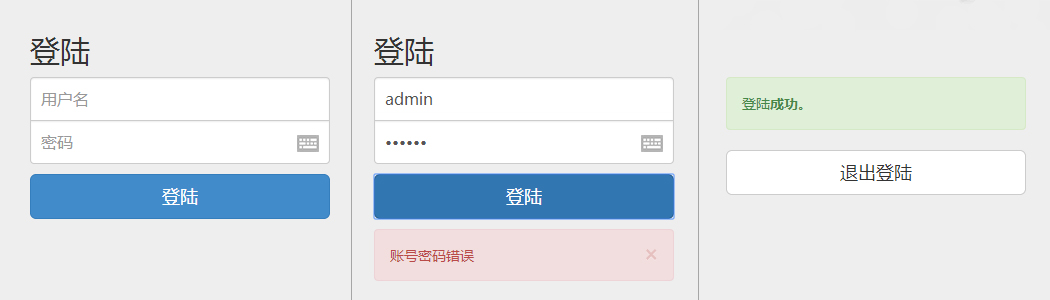
目录结构
site/

    css/

    images/

    js/
site/css/bootstrap.css(bootstrap样式表)
site/js/bootstrap.js(bootstrap脚本)
site/js/jquery-2.1.0.js(jQuery)
site/images/ajax-loader.gif 
site/index.php
<?php

  session_start();

?>

<!doctype html>

<html lang="zh">

<head>

<meta charset="utf-8">

<meta name="viewport" content="width=device-width, initial-scale=1.0">

<title>ajax,php登陆</title>

<!--bootstrap样式表-->

<link href="css/bootstrap.css" rel="stylesheet" media="screen">

<link href="css/main.css" rel="stylesheet" media="screen">

</head>

<body>

<div class="container">

<?php

if(!isset($_SESSION['username'])){

    echo '

    <form method="post" class="form-signin">

        <h2 class="form-signin-heading">登陆</h2>

        <input type="text" placeholder="用户名" class="form-control"  id="username" />

        <input type="password" placeholder="密码" class="form-control"   id="password" />

        <button id="submit" type="submit" class="btn btn-lg btn-primary btn-block">登陆</button>

        <div id="message"></div>

    </form>

    ';

} else {

    echo '

    <div class="form-signin">

        <div class="alert alert-success">登陆<strong>成功</strong>。</div>

        <a href="logout.php" class="btn btn-default btn-lg btn-block">退出登陆</a>

    </div>

    ';

}

?>

</div>

</body>

<!--jQuery-->

<script src="js/jquery-2.1.0.js"></script>

<!--booststrap库,一些方便的组件-->

<script src="js/bootstrap.js"></script>

<!--AJAX登陆脚本-->

<script src="js/login.js"></script>

</html>
site/css/main.css
body {

  padding-top: 40px;

  padding-bottom: 40px;

  background-color: #eee;

}

.form-signin {

  max-width: 330px;

  padding: 15px;

  margin:  auto;

}

.form-signin .form-signin-heading,

.form-signin .checkbox {

  margin-bottom: 10px;

}

.form-signin .checkbox {

  font-weight: normal;

}

.form-signin .form-control {

  position: relative;

  font-size: 16px;

  height: auto;

  padding: 10px;

  -webkit-box-sizing: border-box;

     -moz-box-sizing: border-box;

          box-sizing: border-box;

}

.form-signin .form-control:focus {

  z-index: ;

}

.form-signin input[type="text"] {

  margin-bottom: -1px;

  border-bottom-left-radius: ;

  border-bottom-right-radius: ;

}

.form-signin input[type="password"] {

  margin-bottom: 10px;

  border-top-left-radius: ;

  border-top-right-radius: ;

}

.form-signin .btn {

  margin-bottom: 10px;

}
site/js/login.js
$('#submit').click(function(e){

    var username = $('#username').val();

    var password = $('#password').val();

    $.ajax({

        type:"POST",

        url: "checklogin.php",

        data: "myusername="+username+"&mypassword="+password,

        success: function(html){

             if(html=='true') {

                window.location="index.php";

              }

              else {

                $("#message").html(html);

              }

        },

        beforeSend:function()

        {

          $("#message").html("<p class='text-center'><img src='images/ajax-loader.gif'></p>")

        }

    })

    return false;

})
site/checklogin.php
<?php
// 会话开始
session_start();
include_once 'config.php';
// 连接数据库
$mysqli = mysqli_connect($host, $username, $password, $db_name) or die("数据库链接失败");
// 获取用户名密码
$myusername = $_POST['myusername'];
$mypassword = $_POST['mypassword'];
// 防MySQL注入
$myusername = mysqli_real_escape_string($mysqli,$myusername);
$mypassword = mysqli_real_escape_string($mysqli,$mypassword);
$sql="SELECT * FROM $tbl_name WHERE username='$myusername' and password='$mypassword'";
$result= mysqli_query( $mysqli,$sql);
// Mysql_num_row 获取结果数
$count=mysqli_num_rows($result);
// If result matched $myusername and $mypassword, table row must be 1 row
if($count==1){
// 打印 "true",并且将账号密码注册到session
echo "true";
$_SESSION['username'] = 'myusername';
$_SESSION['password'] = 'mypassword';
}
else {
// 返回错误信息,×为X号
echo "<div class=\"alert alert-danger alert-dismissable\"><button type=\"button\" class=\"close\" data-dismiss=\"alert\" aria-hidden=\"true\">×</button>账号密码错误</div>";
}
?>
site/logout.php
<?php

    // 销毁session

    session_start();

    session_destroy();

    header("location:index.php");

?>
site/config.php
<?php

    $host="localhost"; // Host

    $username="root"; // Mysql用户名

    $password="12345"; // Mysql密码

    $db_name="test"; // 数据库名

    $tbl_name="members"; // 表名

?>
php,ajax登陆退出的更多相关文章
- iframe 的使用和登陆退出的实现——整个页面跳转
iframe中如果只是页面跳转的话,我们依然只是部分的加载的了,为了实现整个页面的所有内容跳转,下面提供了整个页面跳转的方法. iframe例子 1.总的iframe页面(访问就访问这个) all. ...
- 基于ThinkPHP3.23的简单ajax登陆案例
本文将给小伙伴们做一个基于ThinkPHP3.2.的简单ajax登陆demo.闲话不多说.直接进入正文吧. 可能有些小伙伴认为TP自带的跳转页面挺好,但是站在网站安全的角度来说,我们不应该让会员看到任 ...
- laravel前后端分离的用户登陆 退出 中间件的接口与session的使用
在项目开发的过程中,需要有用户的登陆 退出 还有校验用户是否登陆的中间件; 基本思路: 登陆: 前端请求接口的参数校验 用户名 密码规则的校验 用户名密码是否正确的校验; 如果上面的校验都通过的了,把 ...
- Ajax登陆,使用Spring Security缓存跳转到登陆前的链接
Spring Security缓存的应用之登陆后跳转到登录前源地址 什么意思? 用户访问网站,打开了一个链接:(origin url)起源链接 请求发送给服务器,服务器判断用户请求了受保护的资源. 由 ...
- Spring Security 使用Ajax登陆无法跳转页面解决方法
使用Security的朋友都知道,使用Security后,不再需要我们自己过多的(还需要写少量代码)写登陆的逻辑,只需要自己在html的登陆表单上面定义好输入框name为:username和passw ...
- Yii2 前后台登陆退出分离、登陆验证
这里用的yii2高级模板, 基本模板的配置文件在一个文件里,方法基本没什么区别, 1.用户表要有两个用户表, 当然一个也行,分开是省得麻烦,既然是分离了就彻底分开, 前台表user,后台表user_b ...
- netMVC 搭建Ucenter 同步登陆退出discuz
先看一下效果
- 用户登陆,退出等基本Action
用户登陆页面user_login.jsp对应action为login.do: <!DOCTYPE html PUBLIC "-//W3C//DTD XHTML 1.0 Transiti ...
- IE浏览器下使用AJAX登陆接口请求缓存与登陆不了的问题解决
问题: 在IE浏览器下面,登陆的时候老是登陆不上,但是打开控制台的时候再登陆却能登陆上. 分析: 通过抓包,发现,在不打开控制台的时候,少了一个接口的请求,却返回了改接口的返回信息,但是返回信息并不是 ...
随机推荐
- 续前篇---数据挖掘之聚类算法k-mediod(PAM)原理及实现
上一篇博文中介绍了聚类算法中的kmeans算法.无可非议kmeans由于其算法简单加之分类效率较高 已经广泛应用于聚类应用中. 然而kmeans并非十全十美的.其对于数据中的噪声和孤立点的聚类带来的误 ...
- CentOS bridge br0 kvm libvirt-xml
1,kvm bridge br0配置文件内容实例: ifcfg-em1配置文件内容Example: DEVICE=em1 Bridge=br0 TYPE=Ethernet onboot=yes NM_ ...
- 面向对象继承实例(a如何继承b)
<!DOCTYPE html> <html> <head> <meta charset="utf-8"> <title> ...
- 编译hadoop2.2.0源码时报错
编译hadoop2.2.0源码时, mvn install -DskipTests 报错: [ERROR] COMPILATION ERROR : [INFO] ------------------- ...
- springMVC在JSP页面取map值
在springmMVC中.jsp页面取得map值. 在controller层: Map<String, Object> map = new HashMap<String, Objec ...
- 使用CSS3 Media Queries实现网页自适应(转)
当今银屏分辨率从 320px (iPhone)到 2560px (大屏显示器)或者更大.人们也不再仅仅用台式机来浏览网页,现在有手机,平板电脑等等.所以传统的固定宽度设计形式将不再是个最佳选择,网页设 ...
- c#中的数据类型简介(string)
Sting 字符串 引入话题 字符串是一个引用类型,从string数据类型的代码定义中也可以看出它实现了IEnumerable<char>接口和IEnumerable接口,因此字符串可以看 ...
- 享受一下大神的感觉, unity中用C#自己封装dll
第一次写博客,有什么不对的地方,欢迎大家指出 (1)打开vs(本人用的是vs2013)然后建一个项目,如下图所示,选择.ENT3.5的框架,或者低于3.5的,这是因为Unity里面用的框架可能在3.5 ...
- DataTable中执行DataTable.Select("条件"),
我们在使用Sql ******这些数据库时,可以轻松的通过Sum.Aver.Count等统计出相关结果,那么,在已经把数据检索出来的DataSet(DataTable)中呢?特别是通过Web Serv ...
- Android Intent的花样启动
刚开始看郭大神的<>,实现以下里面的一些例子.Intent的花样启动 显示Intent的使用. 实例化一个Intent,并且制定当前的activity和要跳转到的activity Inte ...