
[JS,Canvas]日历时钟
[JS,Canvas]日历时钟
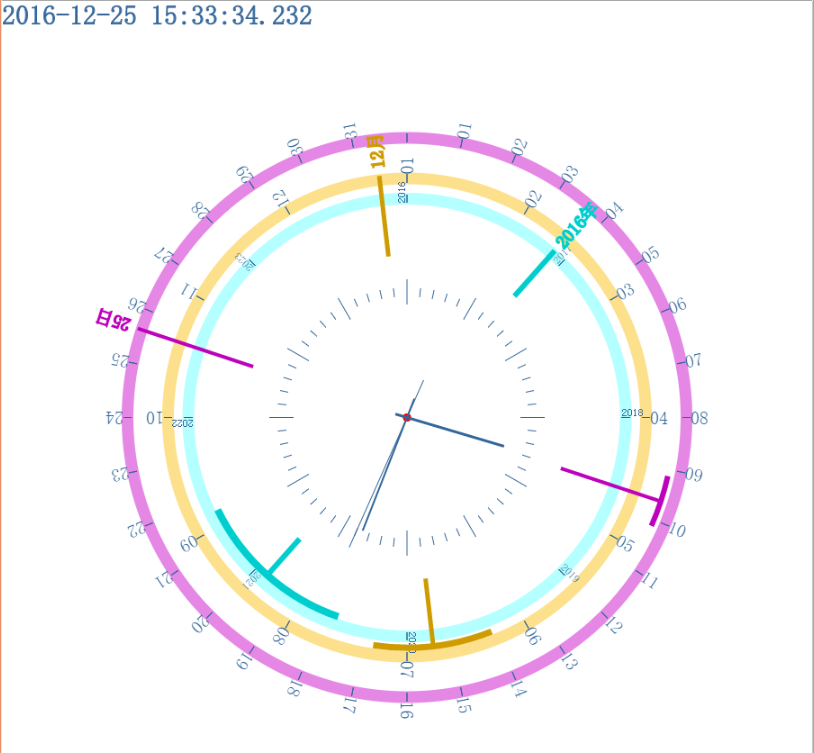
Html:
 <!doctype html>

 <html>

 <head>

 <meta charset="UTF-8">

 <title>Document</title>

 <script src="requestNextAnimationFrame.js"></script>

 <script src="calendarWithTime.js"></script>

 </head>

 <body>

 <style>

 * {margin:0; padding:0;}

 #calendarWithTime{

     margin : 0;

 }

 </style>

 <canvas id="calendarWithTime"></canvas>

 </body>

 </html>
js:
;var calendarWithTime = function(){

    v = navigator.userAgent.toLowerCase().indexOf("android") != -1 || navigator.userAgent.toLowerCase().indexOf("iphone") != -1 || navigator.userAgent.toLowerCase().indexOf("ipad") != -1;

    // 浏览器可见区域

    appWidth =  (window.innerWidth || document.documentElement.clientWidth || document.body.clientWidth);

    appHeight =  (window.innerHeight || document.documentElement.clientHeight || document.body.clientHeight) - 3; // chrome下,高度一样是,会出现下拉滚动条

    // 中心点

    centerPoint = {'x':appWidth*0.5,'y':appHeight*0.5};

    // 动画用

    lastFpsUpdateTime = (+new Date);

    // canvas对象

    caObj = null;

    // canvas context对象

    ctxtObj = null;

    // 现在时间

    timeNow = "";

    // 开始年份

    startY = 1988;

    init = function(){

        window.onload=function(){this.initCanvas();}

    }();

    getDomId = function(id){return document.getElementById(id);}

    initCanvas = function(id){

        this.caObj = this.getDomId("calendarWithTime");

        this.ctxtObj = this.caObj.getContext("2d");

        // 全屏canvas

        this.caObj.style.width = (this.appWidth+'px');

        this.caObj.style.height = (this.appHeight+'px');

        this.caObj.width = this.appWidth;

        this.caObj.height = this.appHeight;

        if (v) {

            caObj.style.border = "none";

        }

        // 开始年份

        startY = Math.floor((new Date()).getFullYear() / 8) * 8;

        // test

        // startY = Math.floor(2010 / 8) * 8;

        this.lastFpsUpdateTime = (+new Date);

        this.animate();

    }

    doDraw = function(){

        this.ctxtObj.clearRect(0, 0, this.caObj.width, this.caObj.height);

        var date = new Date();

        // test

        /*date.setDate(29);

        date.setMonth(3);

        date.setFullYear(2010);*/

        var afterGap = 8 - (date.getFullYear() - startY);

        var allYears = date.getFullYear()-this.startY+afterGap;

        var allDays = this.getCountDays(date.getFullYear(),date.getMonth());

        this.doDrawDayPanel(31,allDays);

        this.doDrawMonthPanel();

        this.doDrawYearPanel(this.startY,date.getFullYear(),afterGap);

        // 画时间针

        this.doDrawTPanel();

        this.drawYMDHMS(0,0.35,0,0.1,date.getSeconds(),0,30,'s','');

        this.drawYMDHMS(0,0.3,0,0.05,date.getMinutes(),date.getSeconds()/60,30,'m','');

        this.drawYMDHMS(0,0.25,0,0.03,date.getHours() % 12,date.getMinutes()/60,6,'h','');

        this.drawYMDHMS(0.4,0.7,0.4,0.66,date.getDate(),date.getHours()/24,Math.ceil(31*0.5),'d',date.getDate());

        this.drawYMDHMS(0.4,0.6,0.4,0.568,(date.getMonth()),date.getDate()/(allDays+1),6,'M',date.getMonth()+1);

        this.drawYMDHMS(0.4,0.55,0.4,0.52,(date.getFullYear() - this.startY),(date.getMonth()+1)/13,Math.ceil(allYears*0.5),'y',date.getFullYear());

        // 显示时间

        this.getTimeNow();

        this.ctxtObj.save();

        this.ctxtObj.beginPath();

        this.ctxtObj.fillStyle = "#369";

        this.ctxtObj.strokeStyle = "#369";

        this.ctxtObj.font = "30px bold 微软雅黑";

        this.ctxtObj.textAlign="start";

        this.ctxtObj.textBaseline="top";

        this.ctxtObj.fillText(this.timeNow,0,0);

        this.ctxtObj.strokeText(this.timeNow,0,0);

        this.ctxtObj.restore();

        /*

        fillText(String text,float x,float y,[float maxwidth]):填充字符串

        strokeText(String text,float x,float y,[float maxwidth]):绘制边框

        font="bold 45px 宋体"

        textAlign:设置绘制字符串的水平对齐方式,start|end|right|center

        textBaseline:垂直对齐方式:top|hanging|middle|alphabetic|bottom

        */

    }

    doChangeToFront = function(i,x){

        // 转换为画面值

        return (i +Math.ceil(x/4)) % 60;

    }

    doChangeToEnd = function(i,x){

        // 转换为后台值

        return (i +Math.ceil(x/4*3)) % 60;

    }

    doDrawTPanel = function(){

        // 画时钟面板

        var minsLen = Math.min( this.caObj.width, this.caObj.height)*0.5*0.3;

        var mineLen = Math.min( this.caObj.width, this.caObj.height)*0.5*0.32;

        var maxsLen = Math.min( this.caObj.width, this.caObj.height)*0.5*0.28;

        var maxeLen = Math.min( this.caObj.width, this.caObj.height)*0.5*0.34;

        var gap = Math.PI/30;

        futoNum = 5;

        this.ctxtObj.save();

            this.ctxtObj.fillStyle = "#369";

        this.ctxtObj.strokeStyle = "#369";

        for(var i =0;i<=59;i++){

            if(i % futoNum==0){

                sLen = maxsLen;

                eLen = maxeLen;

            }else{

                sLen = minsLen;

                eLen = mineLen;

            }

            this.ctxtObj.beginPath();

            this.ctxtObj.moveTo(Math.cos(i*gap)*sLen + this.centerPoint.x ,Math.sin(i*gap)*sLen + this.centerPoint.y);

            this.ctxtObj.lineTo(Math.cos(i*gap)*eLen + this.centerPoint.x,Math.sin(i*gap)*eLen + this.centerPoint.y);

            this.ctxtObj.stroke();

            this.ctxtObj.closePath();

            /*iDiff = this.doChangeToFront(i); // i => iDiff

            //iDiff2 = this.doChangeToEnd(iDiff,60); // iDiff => i

            this.ctxtObj.font = "2px bold 微软雅黑";

            this.ctxtObj.textAlign="center"

            this.ctxtObj.textBaseline="middle"

            this.ctxtObj.fillText(iDiff,Math.cos(i*gap)*eLen + this.centerPoint.x,Math.sin(i*gap)*eLen + this.centerPoint.y);

            */

        }

        this.ctxtObj.beginPath();

        this.ctxtObj.arc(this.centerPoint.x,this.centerPoint.y,Math.min( this.caObj.width, this.caObj.height)*0.5*0.01,0,360,false);

        this.ctxtObj.fillStyle="red";

        this.ctxtObj.fill();

        this.ctxtObj.closePath();

        this.ctxtObj.restore();

    }

    doDrawYearPanel = function(startYear,nowYear,afterGap){

        // 画年份面板

        var sLen = Math.min( this.caObj.width, this.caObj.height)*0.5*0.53;

        var eLen = Math.min( this.caObj.width, this.caObj.height)*0.5*0.55;

        var labelLen = Math.min( this.caObj.width, this.caObj.height)*0.5*0.60;

        var allYears = nowYear-startYear+afterGap;

        var gap = Math.PI/Math.ceil(allYears*0.5);

        this.ctxtObj.save();

            this.ctxtObj.fillStyle = "#b4ffff";

        this.ctxtObj.beginPath();

        this.ctxtObj.arc(this.centerPoint.x,this.centerPoint.y,eLen+2,0,360,false);

        this.ctxtObj.closePath();

        this.ctxtObj.fill();

            this.ctxtObj.fillStyle = "white";

        this.ctxtObj.beginPath();

        this.ctxtObj.arc(this.centerPoint.x,this.centerPoint.y,sLen-2,0,360,false);

        this.ctxtObj.closePath();

        this.ctxtObj.fill();

        this.ctxtObj.restore();

            this.ctxtObj.fillStyle = "#369";

        this.ctxtObj.strokeStyle = "#369";

            for(var i =-2;i<=allYears-3;i++){

            this.ctxtObj.save();

            this.ctxtObj.beginPath();

            this.ctxtObj.moveTo(Math.cos(i*gap)*sLen + this.centerPoint.x ,Math.sin(i*gap)*sLen + this.centerPoint.y);

            this.ctxtObj.lineTo(Math.cos(i*gap)*eLen + this.centerPoint.x,Math.sin(i*gap)*eLen + this.centerPoint.y);

            this.ctxtObj.closePath();

            this.ctxtObj.stroke();

            iDiff = this.doChangeToFront(i,allYears) + startYear;

            this.ctxtObj.translate(this.centerPoint.x, this.centerPoint.y);

             this.ctxtObj.rotate(i*gap);

            this.ctxtObj.font = "10px bold 微软雅黑";

            this.ctxtObj.textAlign="start";

            this.ctxtObj.textBaseline="bottom";

            this.ctxtObj.fillText(iDiff,sLen,0);

            this.ctxtObj.restore();

        }

    }

    doDrawMonthPanel = function(){

        // 画年份面板

        var sLen = Math.min( this.caObj.width, this.caObj.height)*0.5*0.58;

        var eLen = Math.min( this.caObj.width, this.caObj.height)*0.5*0.6;

        var labelLen = Math.min( this.caObj.width, this.caObj.height)*0.5*0.70;

        var gap = Math.PI/6;

        this.ctxtObj.save();

            this.ctxtObj.fillStyle = "#fde08c";

        this.ctxtObj.beginPath();

        this.ctxtObj.arc(this.centerPoint.x,this.centerPoint.y,eLen+2,0,360,false);

        this.ctxtObj.closePath();

        this.ctxtObj.fill();

            this.ctxtObj.fillStyle = "white";

        this.ctxtObj.beginPath();

        this.ctxtObj.arc(this.centerPoint.x,this.centerPoint.y,sLen-2,0,360,false);

        this.ctxtObj.closePath();

        this.ctxtObj.fill();

        this.ctxtObj.restore();

            this.ctxtObj.fillStyle = "#369";

        this.ctxtObj.strokeStyle = "#369";

            for(var i =-2;i<=9;i++){

            this.ctxtObj.save();

            this.ctxtObj.beginPath();

            this.ctxtObj.moveTo(Math.cos(i*gap)*sLen + this.centerPoint.x ,Math.sin(i*gap)*sLen + this.centerPoint.y);

            this.ctxtObj.lineTo(Math.cos(i*gap)*eLen + this.centerPoint.x,Math.sin(i*gap)*eLen + this.centerPoint.y);

            this.ctxtObj.closePath();

            this.ctxtObj.stroke();

            iDiff = (this.doChangeToFront(i,12)) % 12+1;

            this.ctxtObj.translate(this.centerPoint.x, this.centerPoint.y);

             this.ctxtObj.rotate(i*gap);

            this.ctxtObj.font = "20px bold 微软雅黑";

            this.ctxtObj.textAlign="start";

            this.ctxtObj.textBaseline="middle";

            this.ctxtObj.fillText((iDiff+'').PadLeft(2,0),eLen,0);

            this.ctxtObj.restore();

        }

    }

    doDrawDayPanel = function(dayCount,realAllDay){

        // 画年份面板

        var sLen = Math.min( this.caObj.width, this.caObj.height)*0.5*0.68;

        var eLen = Math.min( this.caObj.width, this.caObj.height)*0.5*0.7;

        var labelLen = Math.min( this.caObj.width, this.caObj.height)*0.5*0.80;

        var gap = Math.PI/Math.ceil(dayCount*0.5);

        this.ctxtObj.save();

        this.ctxtObj.fillStyle = "#e587e5";

        this.ctxtObj.beginPath();

        this.ctxtObj.arc(this.centerPoint.x,this.centerPoint.y,eLen+2,0,360,false);

        this.ctxtObj.closePath();

        this.ctxtObj.fill();

        this.ctxtObj.fillStyle = "white";

        this.ctxtObj.beginPath();

        this.ctxtObj.arc(this.centerPoint.x,this.centerPoint.y,sLen-2,0,360,false);

        this.ctxtObj.closePath();

        this.ctxtObj.fill();

        this.ctxtObj.restore();

        this.ctxtObj.fillStyle = "#369";

        this.ctxtObj.strokeStyle = "#369";

        for(var i =-2;i<=dayCount-2;i++){

            this.ctxtObj.save();

            this.ctxtObj.beginPath();

            this.ctxtObj.moveTo(Math.cos(i*gap)*sLen + this.centerPoint.x ,Math.sin(i*gap)*sLen + this.centerPoint.y);

            this.ctxtObj.lineTo(Math.cos(i*gap)*eLen + this.centerPoint.x,Math.sin(i*gap)*eLen + this.centerPoint.y);

            this.ctxtObj.closePath();

            this.ctxtObj.stroke();

            iDiff = (this.doChangeToFront(i,dayCount)) % (dayCount+1);

            if(iDiff<=realAllDay && iDiff!=0){

                this.ctxtObj.translate(this.centerPoint.x, this.centerPoint.y);

                 this.ctxtObj.rotate(i*gap);

                this.ctxtObj.font = "20px bold 微软雅黑";

                this.ctxtObj.textAlign="start";

                this.ctxtObj.textBaseline="middle";

                this.ctxtObj.fillText((iDiff+'').PadLeft(2,0),eLen,0);

            }

            this.ctxtObj.restore();

        }

    }

    drawYMDHMS = function(slen,elen,cslen,celen,main,sub,gapM,type,value){

        // 画日期时间针

        var date = new Date();

        var siM = main;

        var siS = sub;

        var gap = Math.PI/gapM;

        var sLen = Math.min( this.caObj.width, this.caObj.height)*0.5*slen;

        var eLen = Math.min( this.caObj.width, this.caObj.height)*0.5*elen;

        var csLen = Math.min( this.caObj.width, this.caObj.height)*0.5*cslen;

        var ceLen = Math.min( this.caObj.width, this.caObj.height)*0.5*celen;

        i = this.doChangeToEnd(siM+siS,gapM*2);

        ci = (i+gapM) % (gapM*2);

        this.ctxtObj.save();

        this.ctxtObj.beginPath();

        if(type=='y'){

            this.ctxtObj.strokeStyle="#00cece";

            this.ctxtObj.lineWidth = 6;

        }else if(type=='M'){

            this.ctxtObj.strokeStyle="#ce9b00";

            this.ctxtObj.lineWidth = 5;

        }else if(type=='d'){

            this.ctxtObj.strokeStyle="#bd01bd";

            this.ctxtObj.lineWidth = 4;

        }else if(type=='h'){

            this.ctxtObj.lineWidth = 3;

        }else if(type=='m'){

            this.ctxtObj.lineWidth = 2;

        }else if(type=='s'){

            this.ctxtObj.lineWidth = 1;

        }

        this.ctxtObj.moveTo(Math.cos(i*gap)*sLen + this.centerPoint.x ,Math.sin(i*gap)*sLen + this.centerPoint.y);

        this.ctxtObj.lineTo(Math.cos(i*gap)*eLen + this.centerPoint.x,Math.sin(i*gap)*eLen + this.centerPoint.y);

        this.ctxtObj.moveTo(Math.cos(ci*gap)*csLen + this.centerPoint.x ,Math.sin(ci*gap)*csLen + this.centerPoint.y);

        this.ctxtObj.lineTo(Math.cos(ci*gap)*ceLen + this.centerPoint.x,Math.sin(ci*gap)*ceLen + this.centerPoint.y);

        this.ctxtObj.stroke();

        this.ctxtObj.closePath();

        this.ctxtObj.restore();

        var cpi = ci*gap*360/Math.PI;

        if(type=='y'){

            this.ctxtObj.save();

                this.ctxtObj.fillStyle = "#00cece";

            this.ctxtObj.strokeStyle="#00cece";

            this.ctxtObj.lineWidth = 8;

            this.ctxtObj.beginPath();

            this.ctxtObj.arc(this.centerPoint.x,this.centerPoint.y,ceLen,ci*gap-gap*0.5,ci*gap+gap*0.5,false);

            this.ctxtObj.stroke();

            this.ctxtObj.closePath();

            this.ctxtObj.translate(this.centerPoint.x, this.centerPoint.y);

             this.ctxtObj.rotate(i*gap);

            this.ctxtObj.font = "20px bold 微软雅黑";

            this.ctxtObj.textAlign="start";

            this.ctxtObj.textBaseline="middle";

            this.ctxtObj.lineWidth = 2;

            this.ctxtObj.fillText(value + '年',eLen*1.03,0);

            this.ctxtObj.strokeText(value + '年',eLen*1.03,0);

            this.ctxtObj.restore();

        }else if(type=='M'){

            this.ctxtObj.save();

            this.ctxtObj.beginPath();

                this.ctxtObj.fillStyle = "#ce9b00";

            this.ctxtObj.strokeStyle="#ce9b00";

            this.ctxtObj.lineWidth = 7;

            this.ctxtObj.arc(this.centerPoint.x,this.centerPoint.y,ceLen,ci*gap-gap*0.5,ci*gap+gap*0.5,false);

            this.ctxtObj.stroke();

            this.ctxtObj.closePath();

            this.ctxtObj.translate(this.centerPoint.x, this.centerPoint.y);

             this.ctxtObj.rotate(i*gap);

            this.ctxtObj.font = "20px bold 微软雅黑";

            this.ctxtObj.textAlign="start";

            this.ctxtObj.textBaseline="middle";

            this.ctxtObj.lineWidth = 2;

            this.ctxtObj.fillText(value + '月',eLen*1.03,0);

            this.ctxtObj.strokeText(value + '月',eLen*1.03,0);

            this.ctxtObj.restore();

        }else if(type=='d'){

            this.ctxtObj.save();

            this.ctxtObj.beginPath();

                this.ctxtObj.fillStyle = "#bd01bd";

            this.ctxtObj.strokeStyle="#bd01bd";

            this.ctxtObj.lineWidth = 6;

            this.ctxtObj.arc(this.centerPoint.x,this.centerPoint.y,ceLen,ci*gap-gap*0.5,ci*gap+gap*0.5,false);

            this.ctxtObj.stroke();

            this.ctxtObj.closePath();

            this.ctxtObj.translate(this.centerPoint.x, this.centerPoint.y);

             this.ctxtObj.rotate(i*gap);

            this.ctxtObj.font = "20px bold 微软雅黑";

            this.ctxtObj.textAlign="start";

            this.ctxtObj.textBaseline="middle";

            this.ctxtObj.lineWidth = 2;

            this.ctxtObj.fillText(value + '日',eLen*1.03,0);

            this.ctxtObj.strokeText(value + '日',eLen*1.03,0);

            this.ctxtObj.restore();

        }

        this.ctxtObj.restore();

    }

    animate = function(){

        var now = (+new Date);

        if (now - this.lastFpsUpdateTime > 60) {

            this.lastFpsUpdateTime = now;

            this.doDraw();

        }

        window.requestNextAnimationFrame(this.animate);

    }

    getCountDays = function (year,month) {

        var curDate = new Date();

        curDate.setFullYear(year);

        curDate.setMonth(month+1);

        curDate.setDate(0);

        return curDate.getDate();

    }

    getTimeNow = function(){

        var date = new Date();

        var seperator1 = "-";

        var seperator2 = ":";

        this.timeNow = date.getFullYear()

                + seperator1 + (date.getMonth()+1+'').PadLeft(2,0)

                + seperator1 + (date.getDate()+'').PadLeft(2,0)

            + " " + (date.getHours()+'').PadLeft(2,0)

                + seperator2 + (date.getMinutes()+'').PadLeft(2,0)

            + seperator2 + (date.getSeconds()+'').PadLeft(2,0)

                + '.' +(date.getMilliseconds()+'').PadLeft(3,0);

    }

    // objects

}

var cwt = new calendarWithTime();

//=================================================

String.prototype.PadLeft = function(totalWidth, paddingChar)

{

 if ( paddingChar != null )

 {

  return this.PadHelper(totalWidth, paddingChar, false);

 } else {

  return this.PadHelper(totalWidth, ' ', false);

 }

}

String.prototype.PadRight = function(totalWidth, paddingChar)

{

 if ( paddingChar != null )

 {

  return this.PadHelper(totalWidth, paddingChar, true);

 } else {

  return this.PadHelper(totalWidth, ' ', true);

 }

}

String.prototype.PadHelper = function(totalWidth, paddingChar, isRightPadded)

{

 if ( this.length < totalWidth)

 {

  var paddingString = new String();

  for (i = 1; i <= (totalWidth - this.length); i++)

  {

   paddingString += paddingChar;

  }

  if ( isRightPadded )

  {

   return (this + paddingString);

  } else {

   return (paddingString + this);

  }

 } else {

  return this;

 }

}
源码下载地址:
http://download.csdn.net/download/wangxsh42/9720724
@wangxinsheng http://www.cnblogs.com/wangxinsheng/
[JS,Canvas]日历时钟的更多相关文章
- js canvas 转动时钟实例
源码:https://pan.baidu.com/s/1R12MwZYs0OJw3OWKsc8WNw 样本:http://js.zhuamimi.cn/shizhong/ 我的百度经验:https:/ ...
- 利用js+canvas实现的时钟效果图
canvas+js时钟特效 运用js+canvas方面的知识完成一个时钟的效果图,再利用for循环实现指针的转动效果: <!--网页文档的声明--> <!doctype html&g ...
- canvas粒子时钟
前面的话 本文将使用canvas实现粒子时钟效果 效果展示 点阵数字 digit.js是一个三维数组,包含的是0到9以及冒号(digit[10])的二维点阵.每个数字的点阵表示是7*10大小的二维数组 ...
- canvas画时钟,重拾乐趣!
canvas时钟--效果图 一.先来简单介绍画时钟需要的canvas知识 1.在HTML页面中添加canvas元素,必须定义canvas元素的id属性值以便接下来的调用. HTML代码: <ca ...
- HTML5 Canvas爱心时钟代码
这是一款数字时钟动画,数字又多个小爱心组成,又何问起整理,随着时间推进,每一秒钟新数字替换旧数字,旧数字离去使用天女散花动画,花是五颜六色的. 查看效果:http://hovertree.com/te ...
- 【微信小程序项目实践总结】30分钟从陌生到熟悉 web app 、native app、hybrid app比较 30分钟ES6从陌生到熟悉 【原创】浅谈内存泄露 HTML5 五子棋 - JS/Canvas 游戏 meta 详解,html5 meta 标签日常设置 C#中回滚TransactionScope的使用方法和原理
[微信小程序项目实践总结]30分钟从陌生到熟悉 前言 我们之前对小程序做了基本学习: 1. 微信小程序开发07-列表页面怎么做 2. 微信小程序开发06-一个业务页面的完成 3. 微信小程序开发05- ...
- 用canvas绘制时钟
用canvas做时钟其实很简单,下面是我做出的效果: 是不是还挺漂亮的? 下面上代码: html <div class="whole"> <canvas id=& ...
- js简易日历
js简易日历中设计的知识点:选项卡切换 数组 innerHTML 连接符 与选项卡的区别:div的个数不同 连接符中需要注意的:(优先级) "abc"+12+3+&qu ...
- 使用canvas绘制时钟
使用canvas绘制时钟 什么使canvas呢?HTML5 <canvas> 元素用于图形的绘制,通过脚本 (通常是JavaScript)来完成.<canvas> 标签只是图 ...
随机推荐
- window7系统怎么找到开始运行命令
右击开始->属性->开始菜单->自定义>点击运行命令(选择)->确定
- CentOS 6.3下 安装 Mono 3.2 和Jexus 5.4
最新更新参看: Centos 7.0 安装Mono 3.4 和 Jexus 5.6 2012年初写过一篇<32和64位的CentOS 6.0下 安装 Mono 2.10.8 和Jexus 5.0 ...
- Xamarin.Android通知详解
一.发送通知的机制 在日常的app应用中经常需要使用通知,因为服务.广播后台活动如果有事件需要通知用户,则需要通过通知栏显示,而在Xamarin.Android下的通知需要获取Notification ...
- 一年之计在于春,2015开篇:PDF.NET SOD Ver 5.1完全开源
前言: 自从我2014年下半年到现在的某电商公司工作后,工作太忙,一直没有写过一篇博客,甚至连14年股票市场的牛市都错过了,现在马上要过年了,而今天又是立春节气,如果再不动手,那么明年这个无春的年,也 ...
- SurfaceView 绘制分形图
之前一直做的是应用类,这次抽时间,参考网上资料实践了下SurfaceView.目标是在页面上画一个科赫曲线的分形图. 代码如下: package com.example.fredric.demo02; ...
- 【完全开源】知乎日报UWP版(下篇):商店APP、github源码、功能说明。Windows APP 良心出品。
目录 说明 功能 截图+视频 关于源码和声明 说明 陆陆续续大概花了一个月的时间,APP算是基本完成了.12月份一直在外出差,在出差期间进行了两次功能完善,然后断断续续修补了一些bug,到目前为止,我 ...
- ASP.NET Web API Model-ModelMetadata
ASP.NET Web API Model-ModelMetadata 前言 前面的几个篇幅主要围绕控制器的执行过程,奈何执行过程中包含的知识点太庞大了,只能一部分一部分的去讲解,在上两篇中我们看到在 ...
- xib文件的加载方法
xib文件的加载方法 以UITableViewCell的cell为例 很多时候因为系统的cell无法满足我们的日常需求,我们都会自定义cell 因为cell的界面比较固定,所以通常都会选择用xib来描 ...
- js基本类型和引用类型
先来两个例题 //1. var person; person.age=10; console.log(person.age) //undefined person是字符串而不是对象,没有属性 //2. ...
- java终端获取输入
上一篇博客已经介绍了System.in这个输入流这次谈谈java如何获取终端(控制台)的输入 (1)BufferedReader JDK 1.4 及以下的版本中要想从控制台中输入数据只有一种办法,即使 ...