
python中matplotlib画折线图实例(坐标轴数字、字符串混搭及标题中文显示)
最近在用python中的matplotlib画折线图,遇到了坐标轴 “数字+刻度” 混合显示、标题中文显示、批量处理等诸多问题。通过学习解决了,来记录下。如有错误或不足之处,望请指正。
一、最简单的基本框架如下:已知x,y,画出折线图并保存。此时x和y均为数字。
 # -*- coding: utf-8 -*-

 import matplotlib.pyplot as plt #引入matplotlib的pyplot子库,用于画简单的2D图

 import random

 x= range(0,20)

 y= [random.randint(0,20) for _ in range(20)]

 #建立对象

 fig = plt.figure(figsize=(8,6))

 ax = fig.add_subplot()

 #画图

 plt.plot(x,y,'o-',label=u"线条")    #画图

 plt.show()

 plt.savefig("temp.png")
二、坐标轴增加字母元素:
用到了如下语句和函数【参考:http://matplotlib.org/examples/ticks_and_spines/tick_labels_from_values.html】:
from matplotlib.ticker import FuncFormatter, MaxNLocator
labels = list('abcdefghijklmnopqrstuvwxyz')
def format_fn(tick_val, tick_pos):
if int(tick_val) in xs:
return labels[int(tick_val)]
else:
return ''
ax.xaxis.set_major_formatter(FuncFormatter(format_fn))
ax.xaxis.set_major_locator(MaxNLocator(integer=True))
稍微改动,用到了之前的程序里:
 # -*- coding: utf-8 -*-

 import matplotlib.pyplot as plt    #引入matplotlib的pyplot子库,用于画简单的2D图

 from matplotlib.ticker import FuncFormatter, MaxNLocator

 import random

 x= range(20)

 y= [random.randint(0,20) for _ in range(20)]

 fig = plt.figure(figsize=(8,6))

 ax = fig.add_subplot(111)              #建立对象

 labels = [1,2,3,4,5,6,7,8,9,10,'a','b','cc','d','e','f','g','h','*%$','']

 def format_fn(tick_val, tick_pos):

     if int(tick_val) in x:

         return labels[int(tick_val)]

     else:

         return ''

 ax.xaxis.set_major_formatter(FuncFormatter(format_fn))

 ax.xaxis.set_major_locator(MaxNLocator(integer=True))

 plt.plot(x,y,'o-',label=u"线条")    #画图

 plt.show()

 plt.savefig("temp.png")
这样坐标轴既可以含有字符串,同时也可以含有数字。
三、标题等的中文显示:
用到了如下库和语句:
from matplotlib.font_manager import FontProperties
font1 = FontProperties(fname=r"c:\windows\fonts\simsun.ttc",size=8) #可指定计算机内的任意字体,size为字体大小
plt.title(u"标题",fontproperties=font1)
plt.xlabel(u"x轴)",fontproperties=font1)
plt.ylabel(u"Y轴",fontproperties=font1)
ax.legend(prop=font1, loc="upper right")
这样用到上面程序里,则可以显示中文:
# -*- coding: utf-8 -*-

import matplotlib.pyplot as plt    #引入matplotlib的pyplot子库,用于画简单的2D图

from matplotlib.ticker import FuncFormatter, MaxNLocator

import random

from matplotlib.font_manager import FontProperties

x= range(20)

y= [random.randint(0,20) for _ in range(20)]

fig = plt.figure(figsize=(8,6))

ax = fig.add_subplot(111)              #建立对象

labels = [1,2,3,4,5,6,7,8,9,10,'a','b','cc','d','e','f','g','h','*%$','']

def format_fn(tick_val, tick_pos):

    if int(tick_val) in x:

        return labels[int(tick_val)]

    else:

        return ''

ax.xaxis.set_major_formatter(FuncFormatter(format_fn))

ax.xaxis.set_major_locator(MaxNLocator(integer=True))

#可指定计算机内的任意字体,size为字体大小

font1 = FontProperties(fname=r"c:\windows\fonts\simsun.ttc",size=20)

plt.title(u"标题",fontproperties=font1)

plt.xlabel(u"x轴",fontproperties=font1)

plt.ylabel(u"Y轴",fontproperties=font1)

plt.plot(x,y,'o-',label=u"线条")    #画图

ax.legend(prop=font1, loc="upper right")

plt.show()

plt.savefig("temp.png")
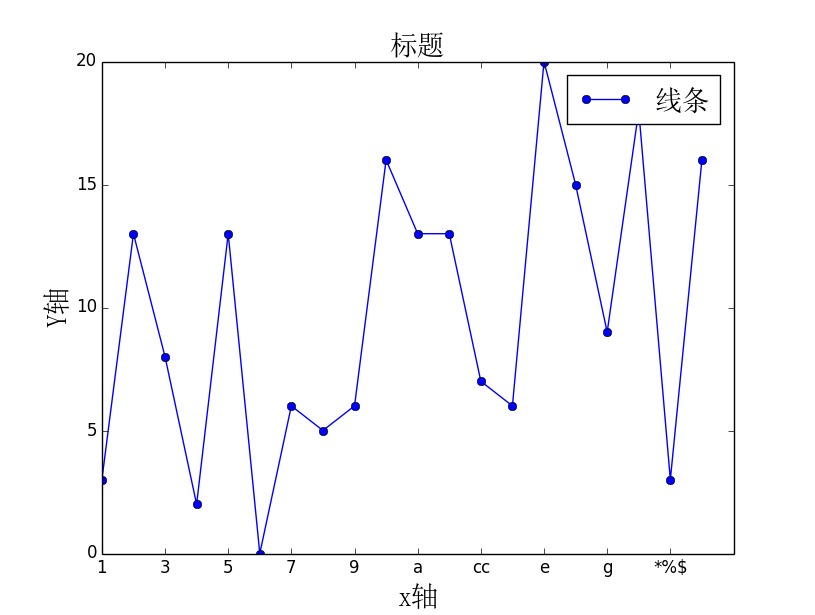
画出的图如下:
四、不显示图片,以便进行批处理:
import matplotlib
matplotlib.use('Agg')
需加在 import matplotlib.pyplot as plt 之前,然后删掉plt.show()即可。
python中matplotlib画折线图实例(坐标轴数字、字符串混搭及标题中文显示)的更多相关文章
- python用matplotlib画折线图
折线图: import matplotlib.pyplot as plt y1=[10,13,5,40,30,60,70,12,55,25] x1=range(0,10) x2=range(0,10) ...
- Matplotlib学习---用matplotlib画折线图(line chart)
这里利用Jake Vanderplas所著的<Python数据科学手册>一书中的数据,学习画图. 数据地址:https://raw.githubusercontent.com/jakevd ...
- python使用matplotlib绘制折线图教程
Matplotlib是一个Python工具箱,用于科学计算的数据可视化.借助它,Python可以绘制如Matlab和Octave多种多样的数据图形.下面这篇文章主要介绍了python使用matplot ...
- 【Python】matplotlib绘制折线图
一.绘制简单的折线图 import matplotlib.pyplot as plt squares=[1,4,9,16,25] plt.plot(squares) plt.show() 我们首先导入 ...
- Python3 使用 matplotlib 画折线图
ChartUtil.py import matplotlib.pyplot as plt from pylab import mpl def plotLine(xData,yData,xLabel,c ...
- SAS 画折线图PROC GPLOT
虽然最后做成PPT里的图表会被要求用EXCEL画,但当我们只是在分析的过程中,想看看数据的走势,直接在SAS里画会比EXCEL画便捷的多. 修改起来也会更加的简单,,不用不断的修改程序然后刷新EXCE ...
- python 中matplotlib 绘图
python 中matplotlib 绘图 数学建模需要,对于绘图进行简单学习 matpoltlib之类的包安装建议之间用anaconda 绘制一条y=x^2的曲线 #比如我们要绘制一条y=x^2的曲 ...
- Matplotlib学习---用matplotlib画雷达图(radar chart)
雷达图常用于对多项指标的全面分析.例如:HR想要比较两个应聘者的综合素质,用雷达图分别画出来,就可以进行直观的比较. 用Matplotlib画雷达图需要使用极坐标体系,可点击此链接,查看对极坐标体系的 ...
- echars画折线图的一种数据处理方式
echars画折线图的一种数据处理方式 <!DOCTYPE html> <html> <head> <meta charset="utf-8&quo ...
随机推荐
- EL操作 web 对象的常用方法
11个常见的web对象 pageScope :获得pageContext对象中存的数据 requestScope :获得request对象中存的数据 sessionScope :获得session对象 ...
- css中background背景属性概
css中background背景属性概 background:url(背景图片路径) no-repeat;/*不重复默认在左上方*/background:url(背景图片路径) no-repeat ...
- MyBatis的初始化方式
1. 加载配置文件 public static void main(String[] args) throws IOException { //mybatis的配置文件 String resource ...
- 在db2数据库上模拟死锁场景 还是z上的
如果条件允许,起两个线程互相抢资源就行了,但问题是,时间上还需要同步,要做到完美控制,还得加其他逻辑,忒费事,所以可以用下面的办法: 在目标表上直接加个锁……简单,粗暴,直接……很好…… LOCK T ...
- 深入Java核心 Java中多态的实现机制(1)
在疯狂java中,多态是这样解释的: 多态:相同类型的变量,调用同一个方法时,呈现出多中不同的行为特征, 这就是多态. 加上下面的解释:(多态四小类:强制的,重载的,参数的和包含的) 同时, 还用人这 ...
- _stdcall,_cdecl区别
(1) _stdcall调用 _stdcall是Pascal程序的缺省调用方式,参数采用从右到左的压栈方式,被调函数自身在返回前清空堆栈. WIN32 Api都采用_stdcall调用方式,这样的宏定 ...
- DB2 license过期的问题
今天启动DB2,无论如何都启动不了,报一个错误:“Windows 不能在 本地计算机 启动 DB2 - DB2COPY - DB2-0.有关更多信息,查阅系统事件日志.如果这是非 Microsoft ...
- java中的权限修饰符的理解
首先了解概念: 在java中有四种权限修饰符:范围从大到小分别是:public.protect.default(friendly).private,它们之间的区别是: public: Java语言中访 ...
- SqlServer禁用启用触发器、外键约束
--禁用指定名称触发器 ALTER TABLE tbname DISABLE TRIGGER trigname --恢复指定名称触发器 ALTER TABLE tbname ENABLE TRIGGE ...
- weinre targets none 的问题
安装了weinre之后,target 老是是none.问题就是处在localhost或者127.0.0.1. 因为手机或者虚拟机要通讯,相当于另外一台电脑,用localhost怎么能实现通讯嘛.得用本 ...