
(转)Selenium-11: Execute JavaScript with JavascriptExecutor
Outline
Sometimes we cannot handle some conditions or problems with Webdriver, web controls don’t react well against selenium commands. In this kind of situations, we use Javascript. It is useful for custom synchronizations, hide or show the web elements, change values, test flash/HTML5 and so on. In order to do these, we can use Selenium’s JavascriptExecutor interface which executes JavaScript through Selenium driver. It has “executeScript” & “executeAsyncScript” methods, to run JavaScript on current browser.
Please, also check my “Selenium Webdriver wait for JavaScript JQuery and Angular” article to learn how to wait Asynchronous calls in your test automation codes.
Before sync and async JavaScript theory and examples, I want to show how to see and run javascript commands on a browser’s console tab. For example, when you go http://www.anaesthetist.com/mnm/javascript/calc.htmwebsite you will see a calculator which is written with Javascript.
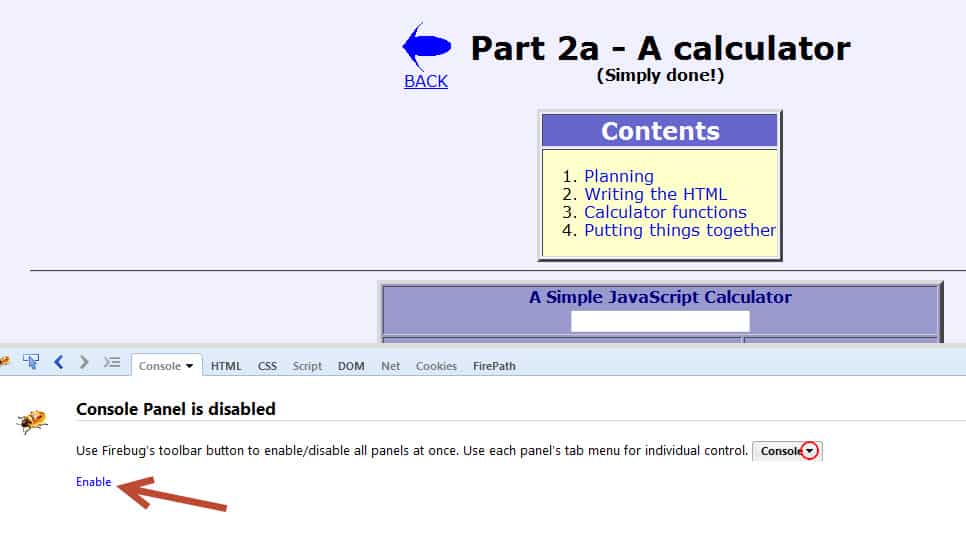
First of all, we have to enable Script and Console panels.
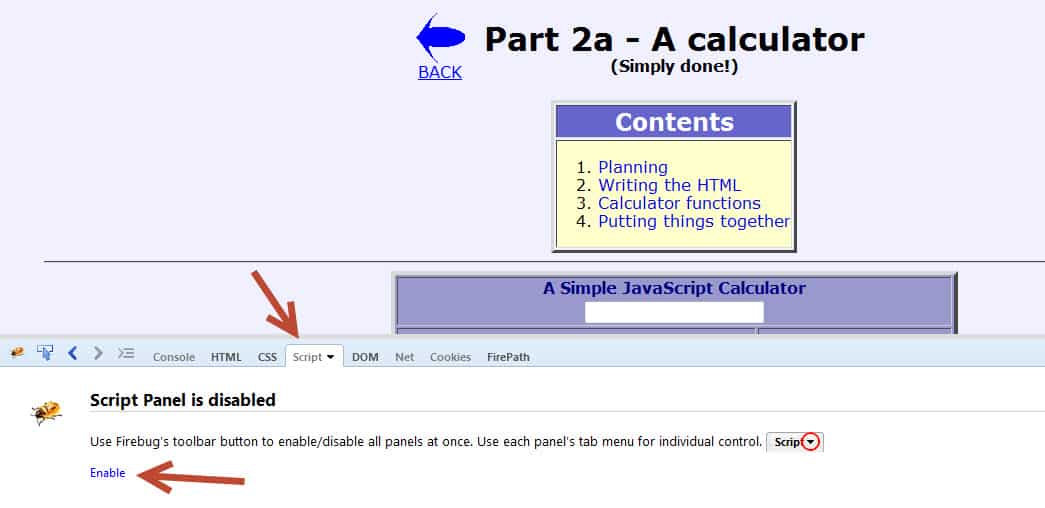
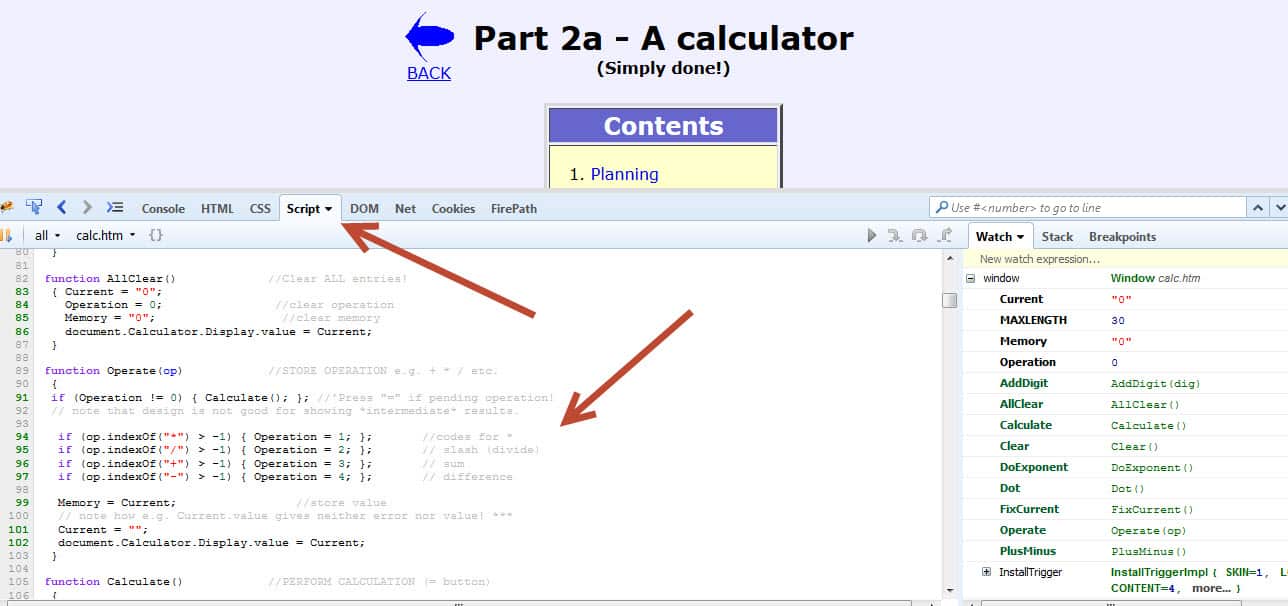
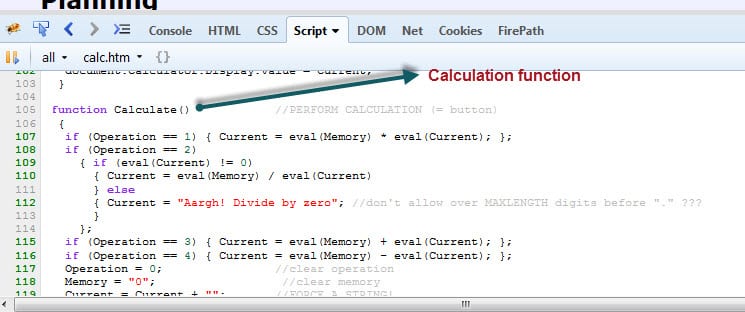
In Script tab you can see the written Javascript code.
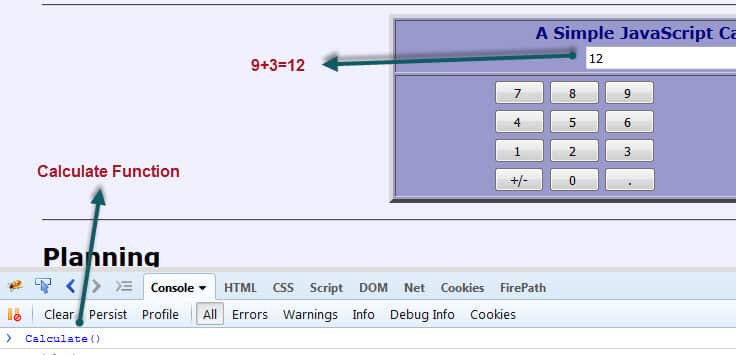
In Console tab you can call JavaScript functions and see their results.

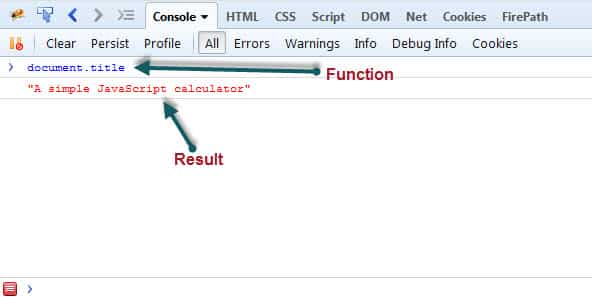
Let’s do an example. In our example page as you see below calculation is done by “Calculate()” function. If we click “9” and then click “+” and then click “3” and at last step call “Calculate()” function on Console tab, we will get the “12” as a result.
Now, let’s do this example with Selenium JavascriptExecutor.
Test Scenario
- Go to http://www.anaesthetist.com/mnm/javascript/calc.htm
- Click “9”
- Click “+”
- Click “3”
- Declare JavascriptExecutor and Call Calculate() method.
- Assert that result is 12
Test Code:
Java
|
1
2
3
4
5
6
7
8
9
10
11
12
13
14
15
16
17
18
19
20
21
22
23
24
25
26
27
28
29
30
31
32
33
34
35
36
37
38
39
40
41
42
43
44
45
46
47
48
49
50
51
|
package Javascript;
import org.junit.AfterClass;
import org.junit.BeforeClass;
import org.junit.Test;
import org.openqa.selenium.By;
import org.openqa.selenium.JavascriptExecutor;
import org.openqa.selenium.WebDriver;
import org.openqa.selenium.WebElement;
import org.openqa.selenium.firefox.FirefoxDriver;
import static org.hamcrest.MatcherAssert.assertThat;
import static org.hamcrest.Matchers.is;
public class CalculatorExampleTest {
static WebDriver driver;
private static String url = "http://www.anaesthetist.com/mnm/javascript/calc.htm";
//Setup Driver
@BeforeClass
public static void setupTest() {
driver = new FirefoxDriver();
driver.navigate().to(url);
driver.manage().window().maximize();
}
@Test
public void calculatorJavaScriptTest() {
//1-) Click "9"
driver.findElement(By.name("nine")).click();
//2-) Click "+"
driver.findElement(By.name("add")).click();
//3-) Click "3"
driver.findElement(By.name("three")).click();
//4-) Declare JavaScriptExecutor and call "Calculate()" function
JavascriptExecutor js =(JavascriptExecutor)driver;
js.executeScript("Calculate();");
//5-) Assert that result is 12
WebElement result = driver.findElement(By.name("Display"));
assertThat(result.getAttribute("value"), is("12"));
}
//Close Driver
@AfterClass
public static void quitDriver() {
driver.quit();
}
}
|
Execute JavaScript with executeScript() Method
JavascriptExecutor interface comprises of executeScript() method that executes JavaScript in the context of the currently selected frame or window.
Within the script, use document to refer to the current document. Local variables will not be available once the script has finished executing, though global variables will persist.
If the script has a return value (i.e. if the script contains a return statement), then the following steps will be taken: [1]
• For an HTML element, this method returns a WebElement
• For a decimal, a Double is returned
• For a non-decimal number, a Long is returned
• For a boolean, a Boolean is returned
• For all other cases, a String is returned.
• For an array, return a List<Object> with each object following the rules above. We support nested lists.
• Unless the value is null or there is no return value, in which null is returned.
Arguments must be a number, a boolean, a String, WebElement, or a list of any combination of the above. An exception will be thrown if the arguments do not meet these criteria. [1]

I want to give extra examples that shows you what can you do with JavascriptExecutor.
Alert Pop window
Java
|
1
2
3
|
JavascriptExecutor js =(JavascriptExecutor)driver;
js.executeScript("alert('SW Test Academy!');");
driver.switchTo().alert().accept();
|
Get Page Title
Java
|
1
2
3
|
JavascriptExecutor js =(JavascriptExecutor)driver;
String title = js.executeScript("return document.title;").toString();
assertThat(driver.getTitle(), is(title));
|
Refresh Browser Window
Java
|
1
2
|
JavascriptExecutor js =(JavascriptExecutor)driver;
js.executeScript("history.go(0);");
|
Scroll-Down Until an Element Displayed
Java
|
1
2
3
|
WebElement element = driver.findElement(By.xpath("//*[text()[contains(.,'JavaScript for DoExponent')]]"));
JavascriptExecutor js =(JavascriptExecutor)driver;
js.executeScript("arguments[0].scrollIntoView(true);",element);
|
Highlight an Element
Java
|
1
2
3
|
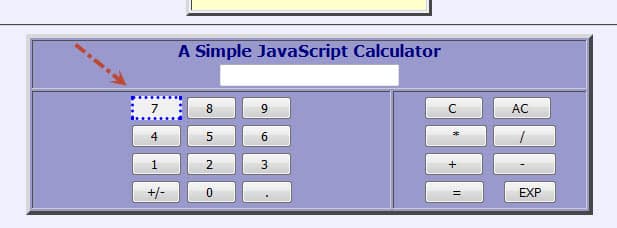
WebElement sevenButton = driver.findElement(By.name("seven"));
JavascriptExecutor js = (JavascriptExecutor) driver;
js.executeScript("arguments[0].style.border='3px dotted blue'", sevenButton);
|
Hide and Show an Element
Java
|
1
2
3
4
5
|
JavascriptExecutor js = (JavascriptExecutor) driver;
//Hide an element
js.executeScript("document.getElementsByName('five')[0].style.display='none'");
//Show an element
js.executeScript("document.getElementsByName('five')[0].style.display='block'");
|

Create an Anonymous Function and add it to the Global Window
Java
|
1
2
3
4
5
6
7
8
9
10
11
12
13
14
15
16
17
18
|
JavascriptExecutor js =(JavascriptExecutor)driver;
//Change title with JavascriptExecutor
js.executeScript("document.title='Title is changed manually!';");
assertThat(driver.getTitle(), Is.is("Title is changed manually!"));
//Create an anonymous function that will stored and added into the global window
js.executeScript("window.changetitle = function(){document.title='Title is changed by function!';};"+
"window.changetitle.call();");
assertThat(driver.getTitle(), Is.is("Title is changed by function!"));
//Change title manually
js.executeScript("document.title='Title is changed manually!';");
assertThat(driver.getTitle(), Is.is("Title is changed manually!"));
//Change title with Function
js. executeScript ("window.changetitle.call();");
assertThat(driver.getTitle(), Is.is("Title is changed by function!"));
|
Navigate to Other Page
Java
|
1
2
|
JavascriptExecutor js =(JavascriptExecutor)driver;
js.executeScript("window.location = 'http://www.swtestacademy.com/'");
|
» Source Code of All Examples for executeScript() Method «
Java
|
1
2
3
4
5
6
7
8
9
10
11
12
13
14
15
16
17
18
19
20
21
22
23
24
25
26
27
28
29
30
31
32
33
34
35
36
37
38
39
40
41
42
43
44
45
46
47
48
49
50
51
52
53
54
55
56
57
58
59
60
61
62
63
64
65
66
67
68
69
70
71
72
73
74
75
76
77
78
79
80
81
82
83
84
85
86
87
88
89
90
91
92
93
94
95
96
97
98
99
100
101
102
103
104
105
106
107
108
109
110
111
112
113
114
115
116
117
118
119
120
121
122
123
124
125
126
|
package Javascript;
import org.hamcrest.core.Is;
import org.junit.AfterClass;
import org.junit.BeforeClass;
import org.junit.FixMethodOrder;
import org.junit.Test;
import org.junit.runners.MethodSorters;
import org.openqa.selenium.By;
import org.openqa.selenium.JavascriptExecutor;
import org.openqa.selenium.WebDriver;
import org.openqa.selenium.WebElement;
import org.openqa.selenium.firefox.FirefoxDriver;
import static org.hamcrest.CoreMatchers.is;
import static org.junit.Assert.assertEquals;
import static org.junit.Assert.assertThat;
@FixMethodOrder(MethodSorters.NAME_ASCENDING)
public class ExecuteScriptTest {
static WebDriver driver;
private static String url = "http://www.anaesthetist.com/mnm/javascript/calc.htm";
//Setup Driver
@BeforeClass
public static void setupTest() {
driver = new FirefoxDriver();
driver.navigate().to(url);
driver.manage().window().maximize();
}
@Test
public void T01_returnTest(){
JavascriptExecutor js =(JavascriptExecutor)driver;
assertEquals("Addition Javascript Test!", 20L,
js.executeScript("return (arguments[0]+arguments[1]);", 10, 10));
}
@Test
public void T02_alertPopUpWindow(){
JavascriptExecutor js =(JavascriptExecutor)driver;
js.executeScript("alert('SW Test Academy!');");
driver.switchTo().alert().accept();
}
@Test
public void T03_getTitle(){
JavascriptExecutor js =(JavascriptExecutor)driver;
String title = js.executeScript("return document.title;").toString();
assertThat(driver.getTitle(), is(title));
}
@Test
public void T04_refreshBrowser(){
JavascriptExecutor js =(JavascriptExecutor)driver;
js.executeScript("history.go(0);");
}
@Test
public void T05_ccrollDownUntilAnElementDisplayed(){
WebElement element = driver.findElement(By.xpath("//*[text()[contains(.,'JavaScript for DoExponent')]]"));
JavascriptExecutor js =(JavascriptExecutor)driver;
js.executeScript("arguments[0].scrollIntoView(true);",element);
}
@Test
public void T06_getURL(){
JavascriptExecutor js =(JavascriptExecutor)driver;
String currentUrl= (String) js.executeScript("return document.URL;");
assertThat(currentUrl, is(driver.getCurrentUrl()));
}
@Test
public void T07_highLightAnElement(){
WebElement sevenButton = driver.findElement(By.name("seven"));
JavascriptExecutor js = (JavascriptExecutor) driver;
js.executeScript("arguments[0].style.border='3px dotted blue'", sevenButton);
}
@Test
public void T08_hideAndShowElement(){
JavascriptExecutor js = (JavascriptExecutor) driver;
//Hide an element
js.executeScript("document.getElementsByName('five')[0].style.display='none'");
//Show an element
js.executeScript("document.getElementsByName('five')[0].style.display='block'");
}
@Test
public void T09_createAnAnonymousFunction(){
JavascriptExecutor js =(JavascriptExecutor)driver;
//Change title with JavascriptExecutor
js.executeScript("document.title='Title is changed manually!';");
assertThat(driver.getTitle(), Is.is("Title is changed manually!"));
//Create an anonymous function that will stored and added into the global window
js.executeScript("window.changetitle = function(){document.title='Title is changed by function!';};"+
"window.changetitle.call();");
assertThat(driver.getTitle(), Is.is("Title is changed by function!"));
//Change title manually
js.executeScript("document.title='Title is changed manually!';");
assertThat(driver.getTitle(), Is.is("Title is changed manually!"));
//Change title with Function
js.executeScript("window.changetitle.call();");
assertThat(driver.getTitle(), Is.is("Title is changed by function!"));
}
@Test
public void T10_navigateToOtherPage(){
JavascriptExecutor js =(JavascriptExecutor)driver;
js.executeScript("window.location = 'http://www.swtestacademy.com/'");
}
//Close Driver
@AfterClass
public static void quitDriver() {
driver.quit();
}
}
|
Execute JavaScript with executeAsyncScript() Method
JavascriptExecutor interface comprises of executeAsyncScript() method that is called an additional final argument “arguments[arguments.lenght-1];” which is a callback function to signal that async execution has finished. We have to call from JavaScript, to tell Webdriver, that our Asynchronous execution has finished. If we do not do that, then executeAsyncScpript will timeout and throw a timeout exception.
The first argument passed to the callback function will be used as the script’s result. This value will be handled as follows: [1]
- For an HTML element, this method returns a WebElement
- For a number, a Long is returned
- For a boolean, a Boolean is returned
- For all other cases, a String is returned.
- For an array, return a List<Object> with each object following the rules above. We support nested lists.
- Unless the value is null or there is no return value, in which null is returned
Before we execute AsyncScript, we have to make sure to set the script timeout. Its default is 0. If we do not set a script timeout, our executeAsyncScript will immediately timeout and it won’t work.
Make sure you set the script timeout before you call it.
I want to show you two examples for AsyncScript. One of them is sleep browser for 4 seconds (4000 milliseconds). The second one is about injecting XMLHttpRequest and wait for the result.
First Example: Performing a sleep in the browser under test.
Test Scenario:
- First I will get the start time before waiting 4 seconds by using executeAsyncScript() method.
- Then, I will use executeAsyncScript() to wait 4 seconds.
- Then, I will get the current time
- I will subtract (current time – start time) = passed time
- Assert that passed time is greater than 4 seconds.
Test Code:
Java
|
1
2
3
4
5
6
7
8
9
10
11
12
13
14
15
16
17
18
19
20
21
22
23
24
25
26
27
28
29
30
31
32
33
34
35
36
37
38
39
40
41
42
43
44
45
46
47
48
49
50
51
52
53
|
package Javascript;
import org.junit.AfterClass;
import org.junit.BeforeClass;
import org.junit.Test;
import org.openqa.selenium.JavascriptExecutor;
import org.openqa.selenium.WebDriver;
import org.openqa.selenium.firefox.FirefoxDriver;
import java.util.concurrent.TimeUnit;
import static org.junit.Assert.assertTrue;
public class ExecuteAsycSleepBrowserTest {
static WebDriver driver;
private static String url = "http://phppot.com/demo/jquery-dependent-dropdown-list-countries-and-states/";
//Setup Driver
@BeforeClass
public static void setupTest() {
driver = new FirefoxDriver();
driver.navigate().to(url);
driver.manage().window().maximize();
}
@Test
public void browserSleepExampleTest() {
//Set ScriptTimeout
driver.manage().timeouts().setScriptTimeout(10, TimeUnit.SECONDS);
//Declare and set start time
long startTime = System.currentTimeMillis();
//Declare JavascriptExecutor
JavascriptExecutor js =(JavascriptExecutor)driver;
//Call executeAsyncScript() method
js.executeAsyncScript("window.setTimeout(arguments[arguments.length - 1], 4000);");
//Get the difference (currentTime - startTime) it should be greater than 1500
System.out.println("Passed time: " + (System.currentTimeMillis() - startTime));
//Assert that the time difference is greater than 4000
assertTrue("Time difference must be greater than 4000 milliseconds",
(System.currentTimeMillis() - startTime) > 4000);
}
//Close Driver
@AfterClass
public static void quitDriver() {
driver.quit();
}
}
|
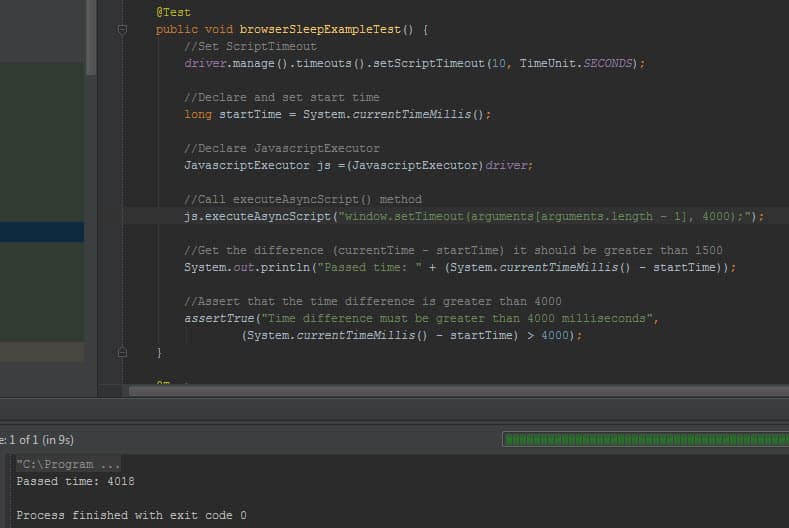
Console Output:
Second Example: Injecting a XMLHttpRequest with POST Method
Our test site is: http://phppot.com/demo/jquery-dependent-dropdown-list-countries-and-states/
It contains a getState(val) function to gather cities according to the country parameter.
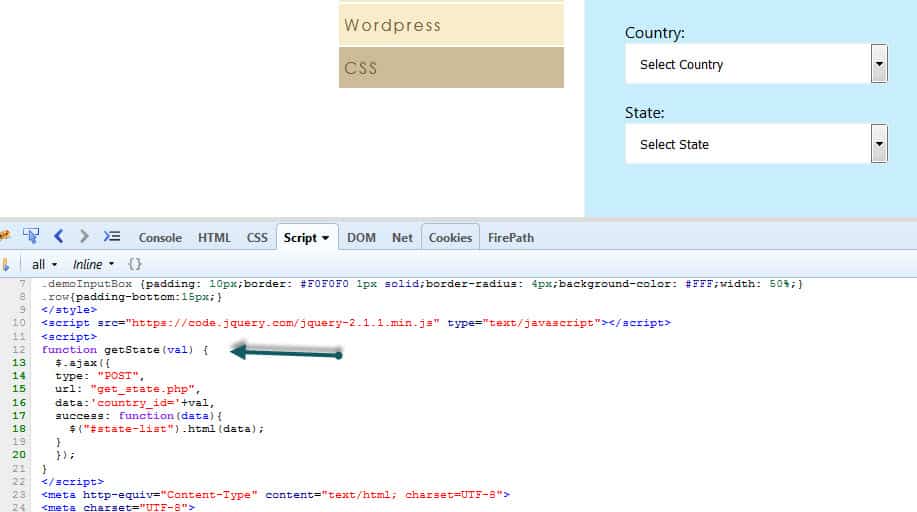
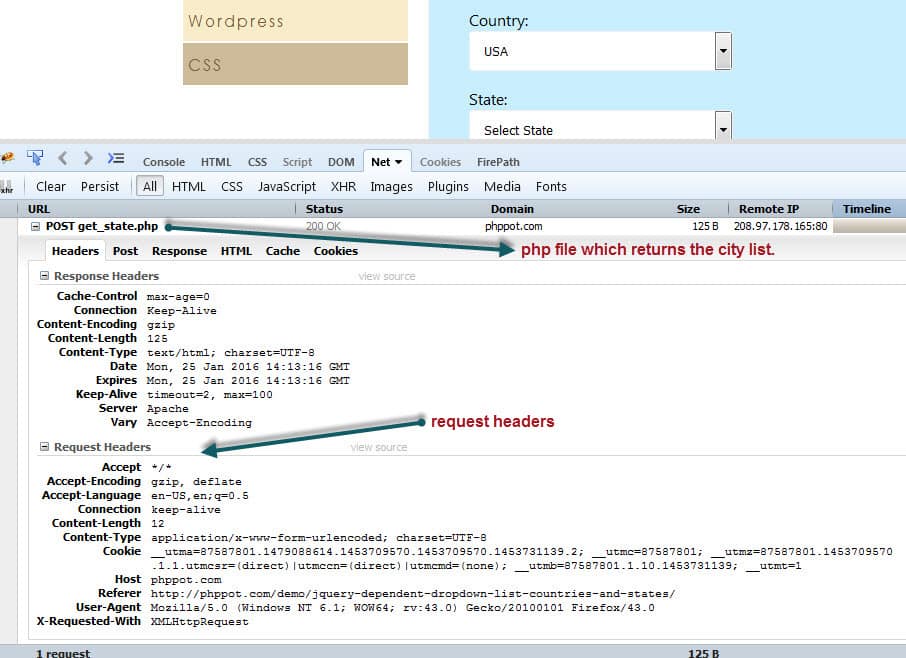
Before selecting country lets open Firefox or Chrome’s network tab and then select “USA” as a country.
Then you will see the POST request details as shown below:
Headers:
You can see the all details about headers as shown below.
Post:
Then click the POST tab to see parameters that we send by POST method. In this example our parameter is “country_id” and its value is “5”.

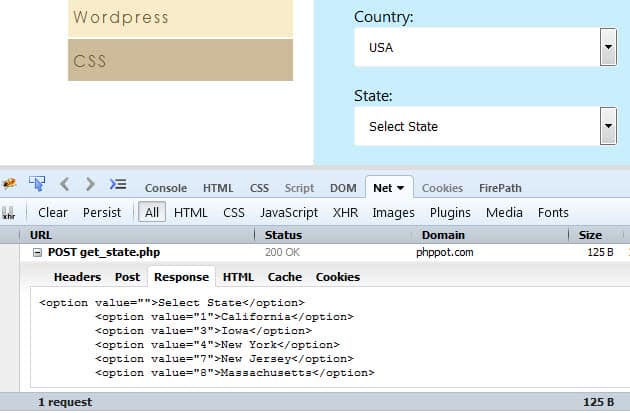
Response:
In this tab, you can see the response of the POST method.
Now it is time to test below scenario.
- Select USA as a country.
- Use executeAsyncScript() method to wait callback function executed. It signals that async execution has finished.
- Assert that response contains “New York”
Test Code:
Java
|
1
2
3
4
5
6
7
8
9
10
11
12
13
14
15
16
17
18
19
20
21
22
23
24
25
26
27
28
29
30
31
32
33
34
35
36
37
38
39
40
41
42
43
44
45
46
47
48
49
50
51
52
53
54
55
56
57
58
59
60
61
62
63
64
65
66
67
68
69
70
71
72
73
74
75
76
77
78
79
80
81
82
|
package Javascript;
import org.junit.AfterClass;
import org.junit.BeforeClass;
import org.junit.Test;
import org.openqa.selenium.JavascriptExecutor;
import org.openqa.selenium.UnhandledAlertException;
import org.openqa.selenium.WebDriver;
import org.openqa.selenium.firefox.FirefoxDriver;
import java.util.concurrent.TimeUnit;
import static org.hamcrest.Matchers.containsString;
import static org.junit.Assert.assertThat;
/**
* Created by ONUR BASKIRT on 25.01.2016.
*/
public class ExecuteAsyncXMLHttpRequestTest {
static WebDriver driver;
private static String url = "http://phppot.com/demo/jquery-dependent-dropdown-list-countries-and-states/";
//Setup Driver
@BeforeClass
public static void setupTest() {
driver = new FirefoxDriver();
driver.navigate().to(url);
driver.manage().window().maximize();
}
@Test
public void sendXMLHTTPRequestTest() {
Object response = null;
//Set ScriptTimeout
driver.manage().timeouts().setScriptTimeout(10, TimeUnit.SECONDS);
//Declare JavascriptExecutor
JavascriptExecutor js =(JavascriptExecutor)driver;
//Injecting a XMLHttpRequest and waiting for the result
//Ref1: https://seleniumhq.github.io/selenium/docs/api/java/org/openqa/selenium/JavascriptExecutor.html
//Ref2: http://www.openjs.com/articles/ajax_xmlhttp_using_post.php
try {
response = js.executeAsyncScript(
//Declare callback first!
"var callback = arguments[arguments.length - 1];" +
//Declare url, parameters and method for POST
//Send country_id=5 (USA)
"var http = new XMLHttpRequest();" +
"var url = 'get_state.php';" + //url
"var params = 'country_id=5';" + //parameters
"http.open('POST', url, true);" +
//Send the proper header information along with the request
"http.setRequestHeader('Content-type', 'application/x-www-form-urlencoded');" +
"http.setRequestHeader('Content-length', params.length);" +
"http.setRequestHeader('Connection', 'close');" +
//Call a function when the state changes.
"http.onreadystatechange = function() {" +
" if(http.readyState == 4) {" +
" callback(http.responseText);" +
" };" +
"};" +
"http.send(params);");
} catch (UnhandledAlertException e) {
System.err.println("Error Occured!");
}
//Assert that returned cities are related with USA
System.out.println((String)response);
assertThat((String) response, containsString("<option value=\"4\">New York</option>"));
}
//Close Driver
@AfterClass
public static void quitDriver() {
driver.quit();
}
}
|
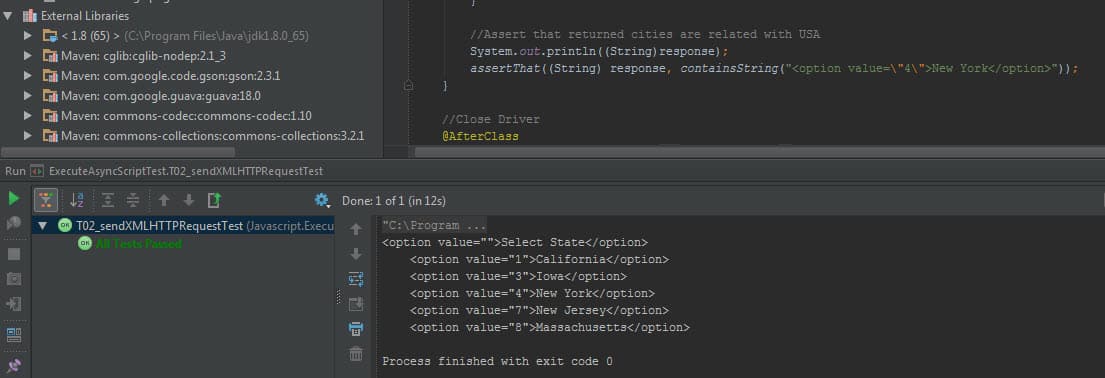
Console Output:
References
[1] https://seleniumhq.github.io/selenium/docs/api/java/org/openqa/selenium/JavascriptExecutor.html
About the Author: Onur Baskirt

11 Comments
- Nitish March 6, 2016 at 1:50 pm- Reply
Gained a lot of information and techniques through this article !
- Manoj Pahuja March 10, 2016 at 4:21 am- Reply
Very useful
- Vladimir Belorusets March 11, 2016 at 4:57 am- Reply
Very good work!
- Sampath May 4, 2016 at 5:49 pm- Reply
Thanks a lot for sharing,
Can you share your thoughts on how to perform with DragAndDrop Action using javascript?
 Onur Baskirt May 5, 2016 at 2:28 am- Reply
Hi Sampath,
Thanks for your valuable comments. I suggest you to check below two links.
Python Version: http://stackoverflow.com/questions/29381233/how-to-simulate-html5-drag-and-drop-in-selenium-webdriver#_=_
Java Version: https://github.com/vikramvi/Selenium-Java/commit/a1354ca5854315fded8fc80ba24a4717927d08c7
- Sumanta September 8, 2016 at 3:22 pm- Reply
I have one question on selenium…..How to scroll up or down on modal pop-up window? When i try to scroll the modal pop-up by programmatically, it only scrolls the background page but not the modal pop-up. Anybody can help me on this?
- Onur Baskirt September 8, 2016 at 8:32 pm- Reply
Maybe you can try this with JAVASCRIPTEXECUTOR $(‘#yourmodal-id’).scrollTop($(‘#suggestDetails’).offset().top);
Also, please check this solutions on stackoverflow:
http://stackoverflow.com/questions/22709200/selenium-webdriver-scrolling-inside-a-div-popup
http://stackoverflow.com/questions/28212634/scrolling-to-a-element-in-bootstrap-modal-in-web-driver-is-not-working
- Amol September 26, 2016 at 1:34 pm- Reply
Hello Onur,
Can you please help me understand what is wrong in the below mentioned
return (boolean) js.executeScript(“$(arguments[0]).hasAttribute($(arguments[1]))”, element, attr);…..element is the WebElement and attr is the attribute which I want to search in the element and js is the JavaScriptExecutor
- Onur Baskirt September 26, 2016 at 1:54 pm- Reply
Hi Amol,
Please try below code.
JavascriptExecutor js = (JavascriptExecutor) driver;
WebElement element = driver.findElement(By.linkText(“Click ME”)); //This should be your element
return js.executeScript(“arguments[0].hasAttribute(‘attr’)”,element);
- Sri Laks December 20, 2016 at 12:49 am- Reply
Hi Onur
I want to login to facebook and post. Able to login to facebook. Once i logged in, we have placeholder to post. It is being displayed as “What’s in your mind”.
I am able to control the container through javascript executor but unable to click. It means we have to make the container to be active to click. Do we really need to use Javascript executor or any other way to click and post in facebook (our) home page. Can i request you to clarify? Please do the needful. Please input facebook credentials to run this below code.
import org.openqa.selenium.By;
import org.openqa.selenium.JavascriptExecutor;
import org.openqa.selenium.WebDriver;
import org.openqa.selenium.WebElement;
import org.openqa.selenium.firefox.FirefoxDriver;
import org.openqa.selenium.interactions.Actions;
import org.openqa.selenium.support.ui.ExpectedConditions;
import org.openqa.selenium.support.ui.WebDriverWait;public class FBTextArea {
WebDriver driver;
public FBTextArea()
{
driver = new FirefoxDriver();
}private void login(String userName, String password)
{
driver.get(“http://www.facebook.com”);
driver.findElement(By.id(“email”)).sendKeys(userName);
driver.findElement(By.id(“pass”)).sendKeys(password);
driver.findElement(By.id(“loginbutton”)).click();
}private WebElement waitAndGet(By by)
{
WebDriverWait wait = new WebDriverWait(driver, 30);
return wait.until(ExpectedConditions.visibilityOfElementLocated(by));
}public void textAreaPostActions()
{
JavascriptExecutor js = (JavascriptExecutor) driver;
js.executeScript(“document.getElementById(‘feedx_container’).style.display=’block'”);
js.executeScript(“arguments[0].click();”, driver.findElement(By.xpath(“//div[@class=’_1mf _1mj’]”)));
}
public static void main(String[] args) {FBTextArea Fbt = new FBTextArea();
Fbt.login(“”,””);
Fbt.textAreaPostActions();}
}
- SW Test Academy January 15, 2017 at 6:26 pm- Reply
Hi Sri,
As I know you are doing the right. I really could not figure out whats wrong with that solution. Maybe it is better to put some breakpoints and some debugging texts in your code and examine the problem. If you find a solution, please let us know. One more thing if the page use AJAX call, it is better to wait it with Jquery active property as shown below. Reference: http://stackoverflow.com/questions/33348600/selenium-wait-for-ajax-content-to-load-universal-approach
public boolean waitForJSandJQueryToLoad() {
WebDriverWait wait = new WebDriverWait(driver, 30);
// wait for jQuery to load
ExpectedCondition jQueryLoad = new ExpectedCondition() {
@Override
public Boolean apply(WebDriver driver) {
try {
return ((Long)((JavascriptExecutor)getDriver()).executeScript(“return jQuery.active”) == 0);
}
catch (Exception e) {
// no jQuery present
return true;
}
}
};// wait for Javascript to load
ExpectedCondition jsLoad = new ExpectedCondition() {
@Override
public Boolean apply(WebDriver driver) {
return ((JavascriptExecutor)getDriver()).executeScript(“return document.readyState”)
.toString().equals(“complete”);
}
};return wait.until(jQueryLoad) && wait.until(jsLoad);
}


(转)Selenium-11: Execute JavaScript with JavascriptExecutor的更多相关文章
- Execute Javascript in iOS Applications
In this tutorial, I have covered How to execute JavaScript in iOS / Objective-C. You can execute Jav ...
- 2019年11个javascript机器学习库
Credits: aijs.rocks 虽然python或r编程语言有一个相对容易的学习曲线,但是Web开发人员更喜欢在他们舒适的javascript区域内做事情.目前来看,node.js已经开始向每 ...
- [Robot Framework] Robot Framework用Execute Javascript对XPath表示的元素执行scrollIntoView操作
有些元素需要通过滚动条滚动才能变得可见. 如果这些元素在DOM结构里面存在,可以通过scrollIntoView让其可见,但如果在DOM结构里面不存在那就要通过拖动滚动条让其变的可见. Execute ...
- [Robot Framework] Robot Framework用Execute Javascript对XPath表示的元素执行Click操作
Execute Javascript document.evaluate("//a[contains(@href,'createBook')]", document, null, ...
- 转:selenium webdriver 执行javascript代码
在用selenium webdriver 编写web页面的自动化测试代码时,可能需要执行一些javascript代码,selenium本身就支持执行js,我们在代码中import org.openqa ...
- selenium webdriver ——执行javascript代码
在代码中import org.openqa.selenium.JavascriptExecutor;就可以使用executeScript.executeAsyncScript这两个方法了 execut ...
- Selenium WebDriver之JavaScript
WebDriver提供了方法来同步/异步执行JavaScript代码,这是因为JavaScript可以完成一些WebDriver本身所不能完成的功能,从而让WebDriver更加灵活和强大. 本文中所 ...
- Selenium+java - 调用JavaScript操作
前言 在做web自动化时,有些情况selenium的api无法完成,需要通过第三方手段比如js来完成实现,比如去改变某些元素对象的属性或者进行一些特殊的操作,本文将来讲解怎样来调用JavaScript ...
- 11条javascript知识
1.局部变量和全局变量 var操作符定义的变量将成为定义该变量作用域中的局部变量.这个局部变量会在函数退出后销毁.不同于其他语言,javaScript不存在块级作用域. 全局变量就是window对象的 ...
随机推荐
- XMPP 客户端和服务端
GPLv2授权不能商用 XMPP协议的客户端软件列表 http://zh.wikipedia.org/wiki/XMPP%E5%8D%94%E8%AD%B0%E7%9A%84%E5%AE%A2%E6% ...
- 斐波那契数列-java实现
1,1,2,3,5,8,13,21...... 以上的数列叫斐波那契数列,今天的面试第一题,输出前50个,这里记录下. 方式一 package com.geenk.demo.my; /** * @au ...
- sys模块 进度条百分比
用于提供对Python解释器相关的操作: sys.argv 命令行参数List,第一个元素是程序本身路径 sys.exit(n) 退出程序,正常退出时exit(0) ...
- css知多少(1)——我来问你来答(转)
css知多少(1)——我来问你来答 1. 引言 各位前端或者伪前端(比如作者本人)的同志们,css对你们来说不是很陌生.比如我,在几年之前上大学的时候,给外面做网站就用css,而且必须用css.这 ...
- POJ 1151 扫描线 线段树
题意:给定平面直角坐标系中的N个矩形,求它们的面积并. 题解:建立一个四元组(x,y1,y2,k).(假设y1<y2)用来储存每一条线,将每一条线按x坐标排序.记录所有的y坐标以后排序离散化.离 ...
- Flow Layout
--------------siwuxie095 将根面板 contentPane 的布局切换为 Flow Layout Flow La ...
- Java C++ Socket通讯
import java.net.*; import javax.swing.plaf.SliderUI; /** * 与c语言通信(java做client,c/c++做server,传送一个结构) * ...
- Mongo client - cross-platform MongoDB management tool
Mongo client for Ubuntu or Windows http://robomongo.org/download.html
- Java-马士兵设计模式学习笔记-策略模式-模拟Comparable接口
一.情况 1.目标:要在专门用于排序数据的DataSorter.java中实现对所有A类,B类,C类,D类等等的排序 2.初步想法:DataSorter.java的代码如下 public class ...
- Luogu 3586 [POI2015]LOG
考虑离散化后开权值线段树. 设序列中不小于$s$的数有$cnt$个,小于$s$的数的和为$sum$. 那么操作Z能成功的充要条件是$sum \geq (c - cnt) * s$. 如果序列中不小于$ ...