
整合ssm集成框架
第一步:配置pom.xml

该代码放在<dependencies>里面
<!--spring 所需要的jar包 web、aop、jdbc、webmvc-->

      <!--1、spring web包-->

    <dependency>

    <groupId>org.springframework</groupId>

    <artifactId>spring-web</artifactId>

    <version>5.1.0.RELEASE</version>

    </dependency>

        <!--2、spring aop包-->

    <dependency>

    <groupId>org.springframework</groupId>

    <artifactId>spring-aop</artifactId>

    <version>5.1.0.RELEASE</version>

    </dependency>

        <!--3、spring jdbc包-->

    <dependency>

      <groupId>org.springframework</groupId>

      <artifactId>spring-jdbc</artifactId>

      <version>5.1.0.RELEASE</version>

    </dependency>

       <!--4、spring webmvc包-->

    <dependency>

      <groupId>org.springframework</groupId>

      <artifactId>spring-webmvc</artifactId>

      <version>5.1.0.RELEASE</version>

    </dependency>

      <!--MyBatis 所需要的包-->

        <!--1、mybatis包-->

    <dependency>

      <groupId>org.mybatis</groupId>

      <artifactId>mybatis</artifactId>

      <version>3.4.6</version>

    </dependency>

        <!--2、MyBatis spring包-->

    <dependency>

      <groupId>org.mybatis</groupId>

      <artifactId>mybatis-spring</artifactId>

      <version>1.3.2</version>

    </dependency>

        <!--数据库相关jar包  使用mariadb-->

    <dependency>

      <groupId>org.mariadb.jdbc</groupId>

      <artifactId>mariadb-java-client</artifactId>

      <version>2.3.0</version>

    </dependency>

    <dependency>

      <groupId>com.mchange</groupId>

      <artifactId>c3p0</artifactId>

      <version>0.9.5.2</version>

    </dependency>

    <!--JSTL-->

    <dependency>

      <groupId>javax.servlet</groupId>

      <artifactId>jstl</artifactId>

      <version>1.2</version>

    </dependency>
第二步:添加mvc公共的包和文件
1、在main目录下添加个java文件 (放源代码)
2、在java目录下创建包
3、包目录下创建分层
4、main目录下创建resources文件(资源文件、配置信息)
5、resources下创建mapper(映射器)
6、在WEB-INF目录下创建views (视图)

第三步:创建xml文件
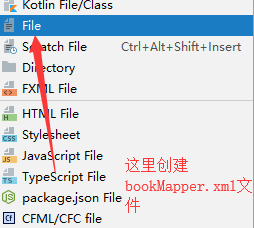
1、在mapper文件下创建bookMapper.xml
2、在resources目录下创建spring-root.xml
3、在resourecs目录下创建spring-web.xml

bookMapper.xml文件
<?xml version="1.0" encoding="utf-8" ?>

<!DOCTYPE mapper PUBLIC "-//mybatis.org//DTD Mapper 3.0//EN" "http://mybatis.org/dtd/mybatis-3-mapper.dtd">

<!--映射器-->

<mapper namespace="com.wbg.book_ssm.dao.BookDAO">

  <!--数据库语句-->

</mapper>
spring-root.xml文件

<?xml version="1.0" encoding="UTF-8"?>

<beans xmlns="http://www.springframework.org/schema/beans"

       xmlns:xsi="http://www.w3.org/2001/XMLSchema-instance"

       xmlns:context="http://www.springframework.org/schema/context"

       xsi:schemaLocation="http://www.springframework.org/schema/beans http://www.springframework.org/schema/beans/spring-beans.xsd http://www.springframework.org/schema/context http://www.springframework.org/schema/context/spring-context.xsd">

    <!--1、扫描注释-->

    <context:component-scan base-package="com.wbg.book_ssm.service"/>

    <!--2、创建数据源-->

    <bean id="dataSource" class="com.mchange.v2.c3p0.ComboPooledDataSource">

        <!--数据库驱动-->

        <property name="driverClass" value="org.mariadb.jdbc.Driver"/>

        <!--服务器地址-->

        <property name="jdbcUrl" value="jdbc:mariadb://localhost:3306/book_ssm"/>

        <!--用户名-->

        <property name="user" value="root"/>

        <!--密码-->

        <property name="password" value="123456"/>

    </bean>

    <!--3、配置mybatis-->

    <bean id="sqlSessionFactory" class="org.mybatis.spring.SqlSessionFactoryBean">

        <property name="dataSource" ref="dataSource"/>

        <property name="typeAliasesPackage" value="com.wbg.book_ssm.dao"/>

        <property name="mapperLocations" value="classpath:mapper/bookMapper.xml"/>

    </bean>

    <!--4、设置工厂会话-->

    <bean class="org.mybatis.spring.mapper.MapperScannerConfigurer">

        <property name="sqlSessionFactoryBeanName" value="sqlSessionFactory"/>

        <property name="basePackage" value="com.wbg.book_ssm.dao"/>

    </bean>

    <!--5、配置事务管理-->

</beans>
spring-web.xml文件
<?xml version="1.0" encoding="UTF-8"?>

<beans xmlns="http://www.springframework.org/schema/beans"

       xmlns:xsi="http://www.w3.org/2001/XMLSchema-instance"

       xmlns:contxt="http://www.springframework.org/schema/context"

       xmlns:mvc="http://www.springframework.org/schema/mvc"

       xsi:schemaLocation="http://www.springframework.org/schema/beans http://www.springframework.org/schema/beans/spring-beans.xsd http://www.springframework.org/schema/context http://www.springframework.org/schema/context/spring-context.xsd http://www.springframework.org/schema/cache http://www.springframework.org/schema/cache/spring-cache.xsd http://www.springframework.org/schema/mvc http://www.springframework.org/schema/mvc/spring-mvc.xsd">

    <!--扫描-->

    <contxt:component-scan base-package="com.wbg.book_ssm.web"/>

    <!--启动注释驱动-->

    <mvc:annotation-driven/>

    <!--处理所有静态资源-->

    <mvc:default-servlet-handler/>

    <!--配置解析-->

    <bean class="org.springframework.web.servlet.view.InternalResourceViewResolver">

        <property name="viewClass" value="org.springframework.web.servlet.view.JstlView"/>

        <property name="prefix" value="/WEB-INF/views"/>

        <property name="suffix" value=".jsp"/>

    </bean>

</beans>
第四步:实现类和业务
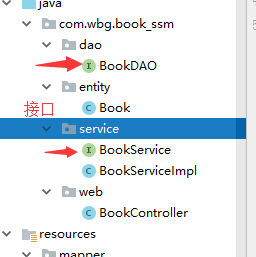
1、实体类,在entity目录创建Book类
2、数据访问,在dao目录创建BookDAO接口
3、服务,在service目录下创建BookService接口和BookServiceImpl类
4、控制,在web目录下创建BookController类
整合ssm集成框架的更多相关文章
- 整合ssm三大框架使用注解开发查询用户信息
整合ssm三大框架使用注解开发查询用户信息 一.基础知识准备之spring mvc工作原理 二.分析 第一步:发起请求到前端控制器(DispatcherServlet) 第二步:前端控制器请求Hand ...
- 学习SpringBoot整合SSM三大框架源码之SpringBoot
Spring Boot源码剖析 一.Spring Boot 项目的启动入口流程分析 Spring Boot项目的启动入口main线程上有一个@SpringBootApplication( @Confi ...
- ssm项目框架搭建(增删改查案例实现)——(SpringMVC+Spring+mybatis项目整合)
Spring 常用注解 内容 一.基本概念 1. Spring 2. SpringMVC 3. MyBatis 二.开发环境搭建 1. 创建 maven 项目 2. SSM整合 2.1 项目结构图 2 ...
- SSM三大框架整合详细教程(Spring+SpringMVC+MyBatis)【转】
使用SSM(Spring.SpringMVC和Mybatis)已经有三个多月了,项目在技术上已经没有什么难点了,基于现有的技术就可以实现想要的功能,当然肯定有很多可以改进的地方.之前没有记录SSM整合 ...
- SSM三大框架整合详细教程(Spring+SpringMVC+MyBatis)(转)
使用 SSM ( Spring . SpringMVC 和 Mybatis )已经有三个多月了,项目在技术上已经没有什么难点了,基于现有的技术就可以实现想要的功能,当然肯定有很多可以改进的地方.之前没 ...
- SSM三大框架整合详细教程(Spring+SpringMVC+MyBatis)
使用 SSM ( Spring . SpringMVC 和 Mybatis )已经有三个多月了,项目在技术上已经没有什么难点了,基于现有的技术就可以实现想要的功能,当然肯定有很多可以改进的地方.之前没 ...
- SSM三大框架整合详细教程
使用SSM(Spring.SpringMVC和Mybatis)已经有三个多月了,项目在技术上已经没有什么难点了,基于现有的技术就可以实现想要的功能,当然肯定有很多可以改进的地方.之前没有记录SSM整合 ...
- shiro权限控制(一):shiro介绍以及整合SSM框架
shiro安全框架是目前为止作为登录注册最常用的框架,因为它十分的强大简单,提供了认证.授权.加密和会话管理等功能 . shiro能做什么? 认证:验证用户的身份 授权:对用户执行访问控制:判断用户是 ...
- SpringMVC详解(四)------SSM三大框架整合之登录功能实现
为了后面讲解的需要,我们取数据都会从数据库中获取,所以这里先讲讲三大框架(Spring.SpringMVC.MyBatis)的整合.前面讲解 MyBatis 时,写了一篇 MyBatis 和 Spri ...
随机推荐
- tcp/ip 性能优化问题的思考学习
首先要看TCP/IP协议,涉及到四层:链路层,网络层,传输层,应用层. 其中以太网(Ethernet)的数据帧在链路层 IP包在网络层 TCP或UDP包在传输层 TCP或UDP中的数据(Data)在 ...
- c++中 函数的默认参数 学习
默认参数指的是当函数调用中省略了实参时 自动使用一个默认的值. 对于带参数列表的函数,必须从右向左添加默认值 (就是说她的右边肯定是先有默认的值) fun(int ,1,2,3) 不能 fu ...
- js字符串与数字之间的比较
//1.纯数字之间比较 console.log(1<3);//true //2.纯字符串比较,先转成ASCII码,按位依次比较 console.log("1"<&quo ...
- Choose and divide(唯一分解定理)
首先说一下什么是唯一分解定理 唯一分解定理:任何一个大于1的自然数N,如果N不是质数,那么N可以分解成有限个素数的乘积:例:N=(p1^a1)*(p2^a2)*(p3^a3)......其中p1< ...
- ubuntu14.04通过 gvm 安装 go语言开发环境
最近用回了ubuntu ,所以打算安装golang学习当下比较火热的这个语言 本来打算使用 sudo apt-get install golang的 安装后发现 是1.2.1不是最新版 所以上网上搜了 ...
- pat1044. Shopping in Mars (25)
1044. Shopping in Mars (25) 时间限制 100 ms 内存限制 65536 kB 代码长度限制 16000 B 判题程序 Standard 作者 CHEN, Yue Shop ...
- MachineLearningPreface
机器学习(包括监督学习, 无监督学习, 半监督学习与强化学习) 监督学习(包括分类与线性回归) 分类(标签的值为散列的"yes"或者"no", "go ...
- HDU 4612——Warm up——————【边双连通分量、树的直径】
Warm up Time Limit:5000MS Memory Limit:65535KB 64bit IO Format:%I64d & %I64u Submit Stat ...
- td标签里内容不换行
在一些页面开发中,除自己操作外,引起换行的情况一般有: Ex一.td标签里内容长度过长引起换行: Ex二.div标签(或其他标记)里内容有文本和图片引起换行: 解决方法: 针对例子一用<nobr ...
- cf1059D. Nature Reserve(三分)
题意 题目链接 Sol 欲哭无泪啊qwq....昨晚一定是智息了qwq 说一个和标算不一样做法吧.. 显然\(x\)轴是可以三分的,半径是可以二分的. 恭喜你获得了一个TLE的做法.. 然后第二维的二 ...