
转一篇关于Unity的PlayMaker
这篇文章转自http://va.lent.in/should-you-use-playmaker-in-production/
此文作者大概深受其苦,吐槽了playmaker的多个蛋疼的地方,这其实说明了两个问题,一个是作者能力有限,对工具的应用和理解不到位。另一个是警示,不要完全依赖其他工具,拿来要会改会用。
So, should you use Playmaker in production? Short answer is:

Long answer follows.
Playmaker
Playmaker is a visual scripting tool for Unity. It has been a top-selling asset in the Asset Store for a couple of years.
Learning environment
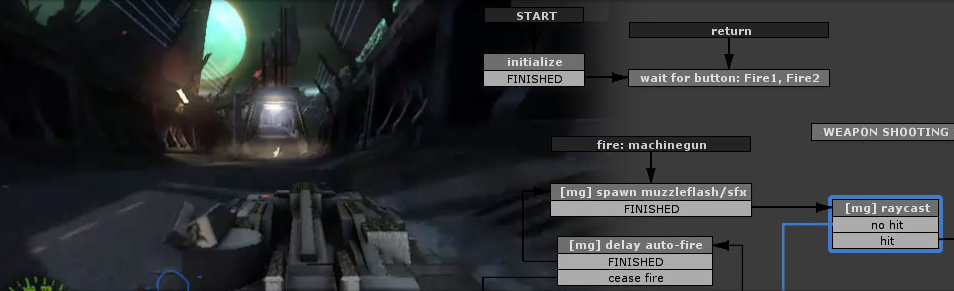
I get invited to host Unity workshops from time to time. One of these workshops consisted of 6 lessons and the audience didn't know anything about programming. That's where I finally decided to try to build an entire game using Playmaker.
The game was really small with Unity physics doing most of the work, but anyway many small scripts to handle interactivity were needed. And here Playmaker worked really great.
The concept of states and actions appears to be very intuitive, so even people with near to no programming experience could "script" simple interactions very fast.
So, for teaching Unity I will definitely use Playmaker again.
State machines
Well, I'm a huge fan of state machines. I usually structure my code so I know exactly in which states all the modules of my application are. And every action is controlled from top to bottom in a hierarchy of simple state machines. This apporach keeps the code very simple and easy to follow and debug.
It seemed that Playmaker being a visual state machine framework would fit fine in my pipeline. But, oh God, how I was wrong.
Code, OOP and software architecture
If you are an experienced software engineer you know how important it is to structure your code right.
We all remember those days spent trying to debug a spaghetti mess of interlinked code promising to God to never be so lazy again if he helps us find why this monstrosity doesn't work.
Sooner or later you inevitably come to a set of good practices of software architecture and code structuring. If you do everything right and use a good IDE like Visual Studio which allows you to easily browse code and jump to lines where a function is defined or called, it's really easy to follow what's going on in your code and usually is not hard to figure out why something is not working.
The critical features here are:
- Ability to see where methods are called from,
- Transparent control hierarchy (i.e. a chain of command with no global events or variables),
- Right encapsulation with no external state exposed.
Playmaker violates all these statemens and adds even more ugly stuff.
Playmaker in production
Now I'm going to list all the problems I found in Playmaker I could remember while working on a real project. In no particular order.
If you know a good workaround for any of these problems feel free to post them in comments at the end of the article.
1. Playmaker breaks encapsulation
If you don't want to shoot yourself in a foot you absolutely shouldn't expose object's internal state to the world.
Well, Playmaker does just that. It completely breaks encapsulation.
Most likely you would have a script on the same object with Playmaker FSM which exposes API to control the object. This script does some work and makes the FSM to change state. It's a normal behavior but here you have state moved outside of the object, visible to everyone, state which can be modified by anything any time.
Even if you are an experieced developer and you understand possible consequences of this decision, believe me, you WILL be tempted to do the wrong thing and modify this state bypassing proper API calls. Young programmers will do this immediately if you give them any chance at all.
2. Playmaker makes it impossible to see control flow
Any action in any state can call any method or change a local or global variable. There's no way to find out what changes what except going through every state and every action by hand.
There's no Find Usages or Go to Definition like in any good IDE, if someone decides to bypass the API (and they will) you will have a very hard time trying to find out what really is happening there.
3. Playmaker is incompatible with git
Seriously, we had so much pain in the ass because of how Playmaker saves its graphs into Unity scene. It seems that it does this the most unmergeable way possible. And you don't even know that something was damaged during a merge right away. Beleive me or not it was happening a lot even if someone just moved some states around to make them look better...
4. Playmaker makes scripts more complicated
Playmaker was created to make coding simpler, right? Not really.
Playmaker makes small "code" simpler to write but large complicated code becomes a complete mess.
This is actually a problem of all visual languages. Believe me, I worked a lot with visual scripting environments.
In a visual language you connect nodes which do simple tasks, like adding two numbers or calling a method. And there's a threshold where you have to delete all your "visual" code and reimplement this logic as anode or an action in Playmaker terminology. Because visual "code" becomes too complicated very quickly.
Sooner or later you'll end up with this.
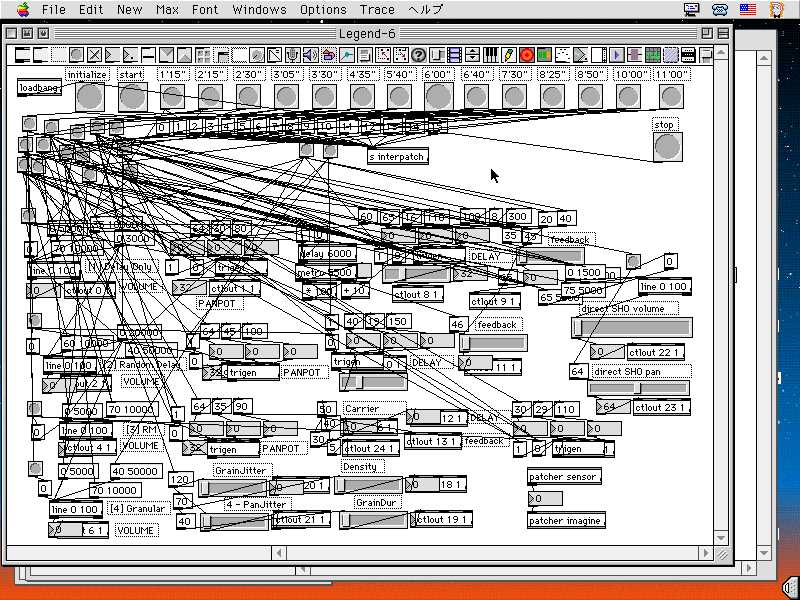
Which is MUCH harder to follow than code.
Of course, you can develop common practices to try to fix this mess. Like, having one action with major logic per state or design your action in some modular fashion. But you can't get rid of this problem completely especially when you have a set of actions which you probably can combine into a Frankenstein's monster to do what you want. Because the cost of making a new action (multiplied by laziness) is higher.
4.1 Passing data
Unlike dataflow visual languages where you pass modified data around, to pass something from one action to another you have to use variables. Which is (a) another huge layer of complexity and (b) makes one more huge hole in encapsulation.
So, instead of doing action2(action1("hi")); in code you have to (a) add one or more variables, (b) add variable support to both actions, (c)configure to use same variables on both instances of these actions.Which is adding a lot of unnecessary complexity.
4.2 Events on state change
It's surprising, but there's no way for a script to be notified when a FSM changes state. If you want to sync a FSM's state with something else you will have to put a special action in every state yourself. Which makes states even bigger.
5. Playmaker uses global variables and events
You probably know or at least heard that global variables and global events are evil. Usually it's wrong to say that something is 100% bad or 100% good because world is not black and white. There are ways to use global variables/singletons and global events/messages without driving yourself crazy.
But how global events and global variables are implemented in Playmaker is the same as giving you a loaded machine gun and aiming it to your foot.
Anything can dispatch an event or change a global variable, and any other object can react to this. And due to (2) you have no way of debugging this.
And because Playmaker encourages you to use global events and global variables, even if you are aware of the consequences, sooner or later you will start using them. And you'll regret about this decision at the end...
6. Playmaker makes state machines excessively complicated
This one might be my personal choice, but anyway these are my personal thoughts so I ought to list it too.
There are several ways to implement a state machine. Different implementations might be called a Mealy machine, or a Moore machine, or another way to combine current state and current input into action.
The thing is that Playmaker forces you to have all the logic in states.So, to execute something you have to change state. This gets even more complicated considering the execute in every frame flag which many actions have. Because in current system it's either a transition from a state to itself (while during this transition not all the actions get executed) or a piece of logic which executes without a transition. Both of these options break the execution model Playmaker offers.
What's more, if you want to add a constant logic for an event which behaves the same in most of the states you will have to add this logic to all states in Playmaker.
I think you can use several FSMs to deal with this problem but having several FSMs just adds even more complexity.
Another model (which I use in my code) would be to use states as filters what to do with incoming events. In this case you need much less states and all your event handlers will look like this:
private void EventHandler() {

    switch (currentState) {

        case State.One:

            // ignore

            break;

        case State.Two:

            doSomeStuff();

            break;

        case State.Three:

            doOtherStuff();

            break;

    }

}
I don't have to change states when I want to execute some logic in response to an event. Also, I'm absolutely sure that this event will have no effect if current state is State.One.
Of course, you can have some logic executed right when state changes. Anyway, this abstraction of state machines allows to have less states and is easy to read in code.
Good stuff
But there are some good points. When I was trying to list good sides of Playmaker I came up only with two:
- Visual representation of states and transitions,
- Usually it's easy to see what is being done in a state.
I am an experienced software engineer and I can keep in mind most of the nested graphs of state machines in my app. But it's always better to have a visual representation.
One of my less experienced colleague told me that he really liked working with Playmaker, because he was able to see actual state graphs.
Of course, guess who was in charge of fixing all the mess Playmaker introduced with these shiny graphs... But he has a point. Visualizing control flow and state graphs does help.
As for individual states, if you structure and name all the actions rightit's really easier to read what's going on in the state comparing to reading a bunch of unrelated methods in source code. But as I noticed this type of "coding" actively uses another part of your brain and keeps wasting brain power on how "code" looks instead of focusing on how it works.
Not that it's a completely bad thing but it easily drives you from what you need to do into some sort of "playing with fonts" procrastination.
Conclusion
First of all, I will never use Playmaker in my app again.
Second, there might be a better paradigm and a better way to use a visual state machine in Unity. The one which doesn't have all the flaws Playmaker has.
This is just another field for me to explore.
转一篇关于Unity的PlayMaker的更多相关文章
- 【浅墨Unity3D Shader编程】之二 雪山飞狐篇:Unity的基本Shader框架写法&颜色、光照与材质
本系列文章由@浅墨_毛星云 出品,转载请注明出处. 文章链接:http://blog.csdn.net/poem_qianmo/article/details/40955607 作者:毛星云(浅墨) ...
- 【Unity3D技术文档翻译】第1.9篇 使用 Unity AssetBundle Browser tool (AssetBundle系列完结)
上一章:[Unity3D技术文档翻译]第1.8篇 AssetBundles 问题及解决方法 本章原文所在章节:[Unity Manual]→[Working in Unity]→[Advanced D ...
- Playmaker Input篇教程之Playmaker购买下载和导入
Playmaker Input篇教程之Playmaker购买下载和导入 Playmaker Input篇认识Playmaker Playmaker是Unity的插件,其标志如图1-1所示.开发者使用它 ...
- 用好lua+unity,让性能飞起来——luajit集成篇/平台相关篇
luajit集成篇 大家都知道luajit比原生lua快,快在jit这三个字上. 但实际情况是,luajit的行为十分复杂.尤其jit并不是一个简单的把代码翻译成机器码的机制,背后有很多会影响性能的因 ...
- Unity性能优化(4)-官方教程Optimizing graphics rendering in Unity games翻译
本文是Unity官方教程,性能优化系列的第四篇<Optimizing graphics rendering in Unity games>的翻译. 相关文章: Unity性能优化(1)-官 ...
- Unity性能优化(2)-官方教程Diagnosing performance problems using the Profiler window翻译
本文是Unity官方教程,性能优化系列的第二篇<Diagnosing performance problems using the Profiler window>的简单翻译. 相关文章: ...
- unity之初识shader
自己做个总结先.当然文中很多内容都是从各位大神的文档当中看的.我只是站在巨人的肩膀上. 首先什么是shader?其实就是一个在显示屏当中的显示程序,俗称着色器.它可以定义物体在硬件显示屏当 ...
- 对想进入Unity开发新人的一些建议
提前声明:本文只是写给那些非职业游戏开发人士,只面向那些在校本科生,或已就业但无unity背景的同学们,当然是面对程序员方向的.本人刚工作也没多久,资历尚浅,之前在网上有一位同学让我谈谈一些想法,所以 ...
- Unity协程(Coroutine)原理深入剖析
Unity协程(Coroutine)原理深入剖析 By D.S.Qiu 尊重他人的劳动,支持原创,转载请注明出处:http.dsqiu.iteye.com 其实协程并没有那么复杂,网上很多地方都说是多 ...
随机推荐
- iOS获取手机型号,类似iphone 7这种 含swift和OC
获取手机设备信息,如name.model.version等,但如果想获取具体的手机型号,如iphone5.5s这种,就需要如下这种 swift: func phonetype () -> Str ...
- 腾讯TOS
腾讯TOS 手机操作系统 3月3日开启内测[日期:2015-02-11] 来源:Linux社区 作者:Linux [字体:大 中 小] 腾讯TOS 操作系统 3月3日开启内测 2月1 ...
- java怎么建立JAVA工程项目?
File->New->Java Project;src->New->Class; 出现packet,运行出错的问题 然后如果不要包packet 的话,不要在此处填写包的名称就行 ...
- 深入理解C语言
语言只是一种工具,任何语言之间都是相通的,一通则百通,关键是要理解语言背后的思想,理解其思想,任何语言,拿来用就行了.语言没有好坏之分,任何语言既然存在自然有它存在的价值. 在一个到处是OOP的年代, ...
- netsh端口转发
使用多个虚拟机,将开发环境和工作沟通环境分开(即时通,办公系统都只能在windows下使用…),将开发环境的服务提供给外部访问时,需要在主机上通过代理配置数据转发. VirtualBox提供了端口 ...
- arc如何破循环或交叉引用
IOS两种常见的循环引用: 1,两个类之间互相定义对方的引用 如下: //ARC code @interface A : NSObject @property (nonatomic,strong) B ...
- 学习OpenStack之 (1):安装devstack
1. 系统准备 ubuntu 12.04 server 虚拟机. 2G内存. 依次运行以下命令来安装git: sudo apt-get update sudo apt-get upgrade sudo ...
- 从〇开始构架前端(NLDV框架)
从〇开始构架前端(NLDV框架) 框架 设计模式 摘要:一个普通应用,大到微信, 小到豆瓣FM,必不可少的都包括四部分:Network.Logic.Data.View(NLDV).如何把他们组合起来, ...
- Unity Camera的两种模式
http://www.cnblogs.com/zhaoqingqing/p/3302484.html
- Android驱动入门-LED--HAL硬件访问服务层②
硬件平台: FriendlyARM Tiny4412 Cortex-A9 操作系统: UBUNTU 14.04 LTS 时间:2016-09-21 16:58:56 为了避免访问冲突,则创建了硬件访 ...