
手把手教你如何扩展(破解)mybatisplus的sql生成
mybatisplus 的常用CRUD方法
众所周知,mybatisplus提供了强大的代码生成能力,他默认生成的常用的CRUD方法(例如插入、更新、删除、查询等)的定义,能够帮助我们节省很多体力劳动。
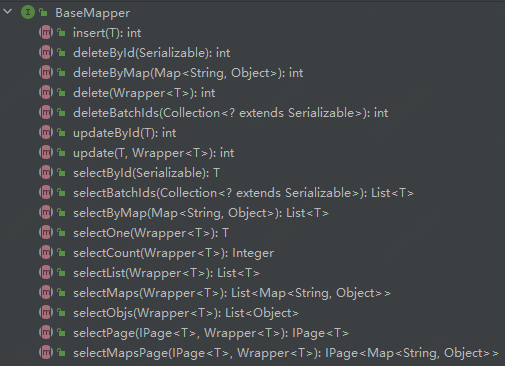
他的BaseMapper中定义了这些常用的CRUD方法,我们在使用时,继承这个BaseMapper类就默认拥有了这些能力。
如果我们的业务中,需要类似的通用Sql时,该如何实现呢?
是每个Mapper中都定义一遍类似的Sql吗?
显然这是最笨的一种方法。
此时我们可以借助mybatisplus这个成熟框架,来实现我们想要的通用Sql。
扩展常用CRUD方法
新增一个通用sql
比如有一个这样的需求,项目中所有表或某一些表,都要执行一个类似的查询,如`SelectByErp`,那么可以这样实现。(这是一个最简单的sql实现,使用时可以根据业务需求实现更为复杂的sql:比如多租户系统自动增加租户id参数、分库分表系统增加分库分表字段条件判断)
定义一个
SelectByErp类,继承AbstractMethod类,并实现injectMappedStatement方法定义sql方法名、sql模板、实现sql的拼接组装
/**

 * 新增一个通用sql

 */

public class SelectByErp extends AbstractMethod {

     // 需要查询的列名

    private final String erpColumn = "erp";

    // sql方法名

    private final String method = "selectByErp";

    // sql模板

    private final String sqlTemplate = "SELECT %s FROM %s WHERE %s=#{%s} %s";

    @Override

    public MappedStatement injectMappedStatement(Class<?> mapperClass, Class<?> modelClass, TableInfo tableInfo) {

       	// 获取需要查询的字段名及属性名

        TableFieldInfo erpFiled = getErpProperty(tableInfo);

        // 拼接组装sql

        SqlSource sqlSource = new RawSqlSource(configuration, String.format(sqlTemplate,

                sqlSelectColumns(tableInfo, false),

                tableInfo.getTableName(),

                erpFiled.getColumn(), erpFiled.getProperty(),

                tableInfo.getLogicDeleteSql(true, false)), Object.class);

        return this.addSelectMappedStatementForTable(mapperClass, method, sqlSource, tableInfo);

}

	/**

     * 查询erp列信息

     */

    private TableFieldInfo getErpProperty(TableInfo tableInfo) {

        List<TableFieldInfo> fieldList = tableInfo.getFieldList();

        TableFieldInfo erpField = fieldList.stream().filter(filed -> filed.getColumn().equals(erpColumn)).findFirst().get();

        return erpField;

    }
3.定义一个sql注入器GyhSqlInjector,添加SelectByErp对象
// 需注入到spring容器中

@Component

public class GyhSqlInjector extends DefaultSqlInjector {

    @Override

    public List<AbstractMethod> getMethodList(Class<?> mapperClass) {

        List<AbstractMethod> methodList = super.getMethodList(mapperClass);

        // 增加 SelectByErp对象,程序启动后自动加载

        methodList.add(new SelectByErp());

        return methodList;

    }

}
4.定义一个基础MapperGyhBaseMapper,添加selectByErp方法
/**

 * 自定义的通用Mapper

 */

public interface GyhBaseMapper<T> extends BaseMapper<T> {

    List<T> selectByErp(String erp);

}
5.应用中需要使用该SelectByErp方法的表,都继承GyhBaseMapper,那么这些表将都拥有了selectByErp这个查询方法,程序启动后会自动为这些表生成该sql。
public interface XXXMapper extends GyhBaseMapper<XXXTable>
添加一个mybatisplus已有sql
1.mybatisplus 常用CRUD方法如最上图,这些方法已经默认会自动生成,但mybatisplus其实提供了更多的方法,如下图,只要我们在启动时添加进去,就可以使用了。
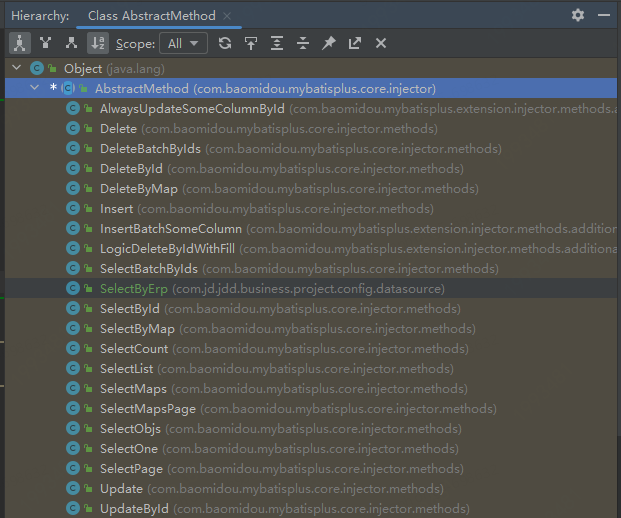
2.比如我想使用AlwaysUpdateSomeColumnById方法,该方法可以在更新时只更新我需要的字段,不进行全字段更新。添加步骤如下。
3.定义一个sql注入器 ,如GyhSqlInjector,添加AlwaysUpdateSomeColumnById对象
@Component

public class GyhSqlInjector extends DefaultSqlInjector {

    @Override

    public List<AbstractMethod> getMethodList(Class<?> mapperClass) {

        List<AbstractMethod> methodList = super.getMethodList(mapperClass);

        // 添加 AlwaysUpdateSomeColumnById 对象

        methodList.add(new AlwaysUpdateSomeColumnById());

        return methodList;

    }

}
4.定义一个基础Mapper 如GyhBaseMapper,添加alwaysUpdateSomeColumnById方法
/**

 * 自定义的通用Mapper

 */

public interface GyhBaseMapper<T> extends BaseMapper<T> {

    int alwaysUpdateSomeColumnById(@Param(Constants.ENTITY) T entity);

}
5.继承GyhBaseMapper的其他Mapper,将自动拥有alwaysUpdateSomeColumnById方法
/**

 * 自定义的通用Mapper

 */

public interface GyhBaseMapper<T> extends BaseMapper<T> {

    int alwaysUpdateSomeColumnById(@Param(Constants.ENTITY) T entity);

}
6.继承GyhBaseMapper的其他Mapper,将自动拥有alwaysUpdateSomeColumnById方法
编辑一个mybatisplus已有sql
1.如果想编辑一个mybatisplus已有sql,比如分库分表系统,执行updateById操作时,虽然主键Id已确定,但目标表不确定,此时可能导致该sql在多张表上执行,造成资源浪费,并且分库分表字段不可修改,默认的updateById不能用,需要改造。以下以shardingsphere分库分表为例。
2.定义一个UpdateByIdWithSharding类,继承UpdateById类
public class UpdateByIdWithSharding extends UpdateById {

    private String columnDot = "`";

    private YamlShardingRuleConfiguration yamlShardingRuleConfiguration;

    // 注入shardingsphere的分库分表配置信息

    public UpdateByIdWithSharding(YamlShardingRuleConfiguration yamlShardingRuleConfiguration) {

        this.yamlShardingRuleConfiguration = yamlShardingRuleConfiguration;

    }

    @Override

    public MappedStatement injectMappedStatement(Class<?> mapperClass, Class<?> modelClass, TableInfo tableInfo) {

        String tableName = tableInfo.getTableName();

        // shardingsphere 分库分表配置信息

        Map<String, YamlTableRuleConfiguration> tables = yamlShardingRuleConfiguration.getTables();

        // 判断当前表是否设置了分表字段

        if (tables.containsKey(tableName)) {

            YamlTableRuleConfiguration tableRuleConfiguration = tables.get(tableName);

            // 获取分表字段

            String shardingColumn = tableRuleConfiguration.getTableStrategy().getStandard().getShardingColumn();

            // 构建sql

            boolean logicDelete = tableInfo.isLogicDelete();

            SqlMethod sqlMethod = SqlMethod.UPDATE_BY_ID;

            // 增加分表字段判断

            String shardingAdditional = getShardingColumnWhere(tableInfo, shardingColumn);

            // 是否判断逻辑删除字段

            final String additional = optlockVersion() + tableInfo.getLogicDeleteSql(true, false);

            shardingAdditional = shardingAdditional + additional;

            String sql = String.format(sqlMethod.getSql(), tableInfo.getTableName(),

                    getSqlSet(logicDelete, tableInfo, shardingColumn),

                    tableInfo.getKeyColumn(), ENTITY_DOT + tableInfo.getKeyProperty(),

                    shardingAdditional);

            SqlSource sqlSource = languageDriver.createSqlSource(configuration, sql, modelClass);

            return addUpdateMappedStatement(mapperClass, modelClass, sqlMethod.getMethod(), sqlSource);

        } else {

            return super.injectMappedStatement(mapperClass, modelClass, tableInfo);

        }

    }

    /**

     * where条件增加分表字段

     */

    private String getShardingColumnWhere(TableInfo tableInfo, String shardingColumn) {

        StringBuilder shardingWhere = new StringBuilder();

        shardingWhere.append(" AND ").append(shardingColumn).append("=#{");

        shardingWhere.append(ENTITY_DOT);

        TableFieldInfo fieldInfo = tableInfo.getFieldList().stream()

                .filter(f -> f.getColumn().replaceAll(columnDot, StringUtils.EMPTY).equals(shardingColumn))

                .findFirst().get();

        shardingWhere.append(fieldInfo.getEl());

        shardingWhere.append("}");

        return shardingWhere.toString();

    }

    /**

     * set模块去掉分表字段

     */

    public String getSqlSet(boolean ignoreLogicDelFiled, TableInfo tableInfo, String shardingColumn) {

        List<TableFieldInfo> fieldList = tableInfo.getFieldList();

        // 去掉分表字段的set设置,即不修改分表字段

        String rmShardingColumnSet = fieldList.stream()

                .filter(i -> ignoreLogicDelFiled ? !(tableInfo.isLogicDelete() && i.isLogicDelete()) : true)

                .filter(i -> !i.getColumn().equals(shardingColumn))

                .map(i -> i.getSqlSet(ENTITY_DOT))

                .filter(Objects::nonNull).collect(joining(NEWLINE));

        return rmShardingColumnSet;

    }

}
3.定义一个sql注入器GyhSqlInjector,添加UpdateByIdWithSharding对象
// 需注入到spring容器中

@Component

public class GyhSqlInjector extends DefaultSqlInjector {

    /**

     * shardingsphere 配置信息

     */

    @Autowired

    private YamlShardingRuleConfiguration yamlShardingRuleConfiguration;

    @Override

    public List<AbstractMethod> getMethodList(Class<?> mapperClass) {

        List<AbstractMethod> methodList = super.getMethodList(mapperClass);

        // 添加 UpdateByIdWithSharding 对象,并注入分库分表信息

        methodList.add(new UpdateByIdWithSharding(yamlShardingRuleConfiguration));

        return methodList;

    }

}
4.定义一个基础MapperGyhBaseMapper,添加新的selectById方法
/**

 * 自定义的通用Mapper

 */

public interface GyhBaseMapper<T> extends BaseMapper<T> {

   int updateById(@Param(Constants.ENTITY) T entity);

}
5.所有参与分表的表,在定义Mapper时继承GyhBaseMapper,那么在使用他的updateById方法时,将自动增加分库分表判断,准确命中目标表,减少其他分表查询的资源浪费。
以上是针对mybatisplus的一些简单改造,希望能为你提供一点点帮助~
作者:京东科技 郭艳红
来源:京东云开发者社区 转载请注明来源
手把手教你如何扩展(破解)mybatisplus的sql生成的更多相关文章
- 手把手教你Chrome扩展开发:本地存储篇
手把手教你开发chrome扩展一:开发Chrome Extenstion其实很简单 手把手教你开发Chrome扩展二:为html添加行为 手把手教你开发Chrome扩展三:关于本地存储数据 HTML5 ...
- 【前端工具】Chrome 扩展程序的开发与发布 -- 手把手教你开发扩展程序
关于 chrome 扩展的文章,很久之前也写过一篇.清除页面广告?身为前端,自己做一款简易的chrome扩展吧. 本篇文章重在分享一些制作扩展的过程中比较重要的知识及难点. 什么是 chrome 扩展 ...
- ----转载----【前端工具】Chrome 扩展程序的开发与发布 -- 手把手教你开发扩展程序
关于 chrome 扩展的文章,很久之前也写过一篇.清除页面广告?身为前端,自己做一款简易的chrome扩展吧. 本篇文章重在分享一些制作扩展的过程中比较重要的知识及难点. 什么是 chrome 扩展 ...
- 手把手教你开发chrome扩展一:开发Chrome Extenstion其实很简单
手把手教你开发chrome扩展一:开发Chrome Extenstion其实很简单 手把手教你开发chrome扩展一:开发Chrome Extenstion其实很简单 手把手教你开发Chrome扩 ...
- 菜鸟-手把手教你把Acegi应用到实际项目中(8)-扩展UserDetailsService接口
一个能为DaoAuthenticationProvider提供存取认证库的的类,它必须要实现UserDetailsService接口: public UserDetails loadUserByUse ...
- 手把手教你开发chrome扩展
转载:http://www.cnblogs.com/walkingp/archive/2011/04/04/2003875.html 手把手教你开发chrome扩展一:开发Chrome Extenst ...
- 手把手教你开发Chrome扩展三:关于本地存储数据
手把手教你开发chrome扩展一:开发Chrome Extenstion其实很简单 手把手教你开发Chrome扩展二:为html添加行为 手把手教你开发Chrome扩展三:关于本地存储数据 HTML5 ...
- 手把手教你开发Chrome扩展二:为html添加行为
手把手教你开发chrome扩展一:开发Chrome Extenstion其实很简单 手把手教你开发Chrome扩展二:为html添加行为 手把手教你开发Chrome扩展三:关于本地存储数据 上一节我们 ...
- 手把手教你破解文件密码、wifi密码、网页密码
手把手教你破解文件密码.wifi密码.网页密码 1.破解文件密码: 有时候我们在网上下载一个压缩包后,必须要关注或者支付一定费用才给你解压密码,实属比较恶心.在这里手把手叫你实现破解文件解压密码. 1 ...
- 手把手教从零开始在GitHub上使用Hexo搭建博客教程(二)-Hexo参数设置
前言 前文手把手教从零开始在GitHub上使用Hexo搭建博客教程(一)-附GitHub注册及配置介绍了github注册.git相关设置以及hexo基本操作. 本文主要介绍一下hexo的常用参数设置. ...
随机推荐
- Linux 脚本:shell
# 以脚本所在目录作为脚本执行时的当前路径. -P 选项寻找物理上的地址,忽略软连接. SCRIPT_DIR=$(cd $(dirname $0); pwd -P) # 在任意位置执行自己的可执行程序 ...
- 好用工具: Carbon--代码美化工具
问题背景 当进行PPT展示时,如果只是简单的复制粘贴代码.会看起来很难看,因此产生美化的想法. 使用方式 官网链接 https://carbon.now.sh
- 王道oj/problem10
地址:http://oj.lgwenda.com/problem/10 思路:首先创建字符串赋初值,其次用gets()输入字符串[fgets()相对于gets()会多识别"\n", ...
- 掌握Spring条件装配的秘密武器
本文分享自华为云社区<Spring高手之路9--掌握Spring条件装配的秘密武器>,作者:砖业洋__. 在Spring框架中,条件装配是一个强大的功能,可以帮助我们更好地管理和控制Bea ...
- 因为此网站发送了 Google Chrome 无法处理的杂乱凭据
原文地址 thisisunsafe this is unsafe 这是不安全的,呵呵~ 具体描述 在chrome该页面上,直接键盘敲入这11个字符:thisisunsafe (鼠标点击当前页面任意位置 ...
- 语音合成技术3:HierVST: Hierarchical Adaptive Zero-shot Voice Style Transfer
HierVST: 分层自适应零样本语音风格转换 摘要: 尽管语音风格转换(VST)领域取得了快速进展,但最近的零样本VST系统仍然缺乏将新的说话者的语音风格进行转换的能力.在本文中,我们提出了Hier ...
- xshell批量新建会话
1,xshell的会话形式就是文件夹和文件,我们只需要修改文件名称即可,但是一个个弄很麻烦,可以利用这个程序来批量新建(程序很烂,但能用) 基于python编写,文件处理 --> 文件下载 提取 ...
- 4.4 C++ Boost 数据集序列化库
Boost 库是一个由C/C++语言的开发者创建并更新维护的开源类库,其提供了许多功能强大的程序库和工具,用于开发高质量.可移植.高效的C应用程序.Boost库可以作为标准C库的后备,通常被称为准标准 ...
- torch.nn基础学习教程 | PyTorch nn Basic Tutorial
基于torch.nn搭建神经网络的基础教程大纲: 1. 引言 在我们开始深入探讨torch.nn之前,我们首先需要理解PyTorch及其神经网络库的基础知识.这一部分的内容将帮助你对PyTorch有一 ...
- 《SQL与数据库基础》10. 存储引擎
目录 存储引擎 MySQL体系结构 存储引擎简介 三种经典存储引擎 InnoDB 逻辑存储结构 MyISAM Memory 区别及特点 存储引擎选择 本文以 MySQL 为例 存储引擎 MySQL体系 ...