
分布式文件存储-FastDFS
1.1 FastDFS简介
1.1.1 FastDFS体系结构
FastDFS是一个开源的轻量级分布式文件系统,它对文件进行管理,功能包括:文件存储、文件同步、文件访问(文件上传、文件下载)等,解决了大容量存储和负载均衡的问题。特别适合以文件为载体的在线服务,如相册网站、视频网站等等。
FastDFS为互联网量身定制,充分考虑了冗余备份、负载均衡、线性扩容等机制,并注重高可用、高性能等指标,使用FastDFS很容易搭建一套高性能的文件服务器集群提供文件上传、下载等服务。
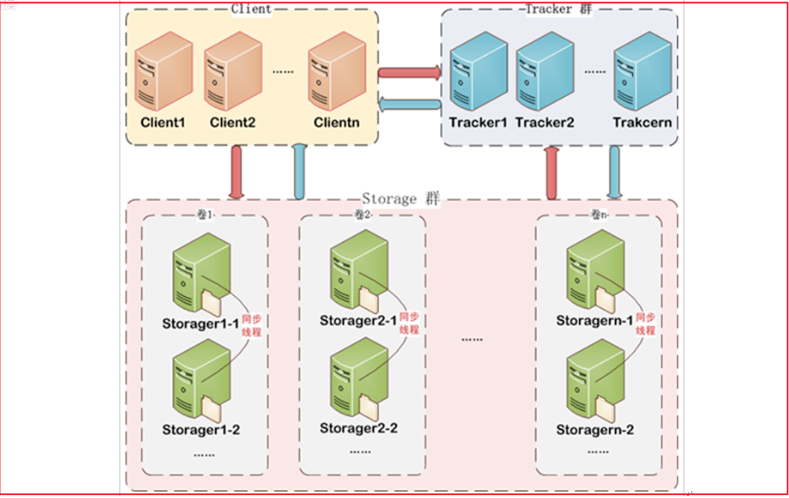
FastDFS 架构包括 Tracker server 和 Storage server。客户端请求 Tracker server 进行文件上传、下载,通过Tracker server 调度最终由 Storage server 完成文件上传和下载。
Tracker server 作用是负载均衡和调度,通过 Tracker server 在文件上传时可以根据一些策略找到Storage server 提供文件上传服务。可以将 tracker 称为追踪服务器或调度服务器。Storage server 作用是文件存储,客户端上传的文件最终存储在 Storage 服务器上,Storageserver 没有实现自己的文件系统而是利用操作系统的文件系统来管理文件。可以将storage称为存储服务器。
1.1.2 上传流程

客户端上传文件后存储服务器将文件 ID 返回给客户端,此文件 ID 用于以后访问该文件的索引信息。文件索引信息包括:组名,虚拟磁盘路径,数据两级目录,文件名。

组名:文件上传后所在的 storage 组名称,在文件上传成功后有storage 服务器返回,需要客户端自行保存。
虚拟磁盘路径:storage 配置的虚拟路径,与磁盘选项store_path*对应。如果配置了
store_path0 则是 M00,如果配置了 store_path1 则是 M01,以此类推。
数据两级目录:storage 服务器在每个虚拟磁盘路径下创建的两级目录,用于存储数据
文件。
文件名:与文件上传时不同。是由存储服务器根据特定信息生成,文件名包含:源存储
服务器 IP 地址、文件创建时间戳、文件大小、随机数和文件拓展名等信息。
1.2 FastDFS搭建
我们使用Docker搭建FastDFS的开发环境
拉取镜像
docker pull morunchang/fastdfs
运行tracker
docker run -d --name tracker --net=host morunchang/fastdfs sh tracker.sh
运行storage
docker run -d --name storage --net=host -e TRACKER_IP=<your tracker server address>:22122 -e GROUP_NAME=<group name> morunchang/fastdfs sh storage.sh
使用的网络模式是–net=host, <your tracker server address> 替换为你机器的Ip即可
<group name> 是组名,即storage的组
如果想要增加新的storage服务器,再次运行该命令,注意更换 新组名
(4)修改nginx的配置
进入storage的容器内部,修改nginx.conf
docker exec -it storage /bin/bash
进入后
vi /data/nginx/conf/nginx.conf
添加以下内容
location /group1/M00 {

   proxy_next_upstream http_502 http_504 error timeout invalid_header;

     proxy_cache http-cache;

     proxy_cache_valid  200 304 12h;

     proxy_cache_key $uri$is_args$args;

     proxy_pass http://fdfs_group1;

     expires 30d;

 }
(5)退出容器
exit
(6)重启storage容器
docker restart storage
1.3 文件存储微服务
创建文件管理微服务changgou_service_file,该工程主要用于实现文件上传以及文件删除等功能。
(1)修改pom.xml,引入依赖
<dependency>

    <groupId>net.oschina.zcx7878</groupId>

    <artifactId>fastdfs-client-java</artifactId>

    <version>1.27.0.0</version>

</dependency>
(2)在resources文件夹下创建fasfDFS的配置文件fdfs_client.conf
connect_timeout = 60

network_timeout = 60

charset = UTF-8

http.tracker_http_port = 8080

tracker_server = 192.168.6.121:22122
connect_timeout:连接超时时间,单位为秒。
network_timeout:通信超时时间,单位为秒。发送或接收数据时。假设在超时时间后还不能发送或接收数据,则本次网络通信失败
charset: 字符集
http.tracker_http_port :.tracker的http端口
tracker_server: tracker服务器IP和端口设置
(3)在resources文件夹下创建application.yml
spring:

  servlet:

    multipart:

      max-file-size: 10MB

      max-request-size: 10MB

server:

  port: 8805
max-file-size是单个文件大小,max-request-size是设置总上传的数据大小
(4)启动类 ,创建启动类FileApplication
@SpringBootApplication

public class FileApplication {

    public static void main(String[] args) {

        SpringApplication.run(FileApplication.class);

    }

}
1.4 文件上传
1.4.1 文件信息封装
文件上传一般都有文件的名字、文件的内容、文件的扩展名、文件的md5值、文件的作者等相关属性,我们可以创建一个对象封装这些属性,代码如下:
创建.FastDFSFile
package com.mmren.edu.hfang.file.model;

/**

 * 欢迎来到牧码人教育,做Java我们是专业的

 *

 * @创建人: 牧码人教育-Gerry

 * @创建时间: 2020-5-22

 * @功能描述: FastDFS文件属性类

 */

public class FastDFSFile {

    //文件名字

    private String name;

    //文件内容

    private byte[] content;

    //文件扩展名

    private String ext;

    //文件MD5摘要值

    private String md5;

    //文件创建作者

    private String author;

    public FastDFSFile(String name, byte[] content, String ext, String height,

                       String width, String author) {

        super();

        this.name = name;

        this.content = content;

        this.ext = ext;

        this.author = author;

    }

    public FastDFSFile(String name, byte[] content, String ext) {

        super();

        this.name = name;

        this.content = content;

        this.ext = ext;

    }

    public String getName() {

        return name;

    }

    public void setName(String name) {

        this.name = name;

    }

    public byte[] getContent() {

        return content;

    }

    public void setContent(byte[] content) {

        this.content = content;

    }

    public String getExt() {

        return ext;

    }

    public void setExt(String ext) {

        this.ext = ext;

    }

    public String getMd5() {

        return md5;

    }

    public void setMd5(String md5) {

        this.md5 = md5;

    }

    public String getAuthor() {

        return author;

    }

    public void setAuthor(String author) {

        this.author = author;

    }

}
1.4.2 文件操作
创建FastDFSClient类,放在中实现FastDFS信息获取以及文件的相关操作,
代码如下:
package com.mmren.edu.hfang.file.client;

import com.mmren.edu.hfang.file.model.FastDFSFile;

import org.csource.common.NameValuePair;

import org.csource.fastdfs.ClientGlobal;

import org.csource.fastdfs.FileInfo;

import org.csource.fastdfs.ServerInfo;

import org.csource.fastdfs.StorageClient;

import org.csource.fastdfs.StorageServer;

import org.csource.fastdfs.TrackerClient;

import org.csource.fastdfs.TrackerServer;

import org.slf4j.LoggerFactory;

import org.springframework.core.io.ClassPathResource;

import java.io.ByteArrayInputStream;

import java.io.IOException;

import java.io.InputStream;

/**

 * 欢迎来到牧码人教育,做Java我们是专业的

 *

 * @创建人: 牧码人教育-Gerry

 * @创建时间: 2020-5-22

 * @功能描述: FastDFS客户端调用工具类

 */

public class FastDFSClient {

    private static org.slf4j.Logger logger = LoggerFactory.getLogger(FastDFSClient.class);

    /***

     * 初始化加载FastDFS的TrackerServer配置

     */

    static {

        try {

            String filePath = new ClassPathResource("fdfs_client.conf").getFile().getAbsolutePath();

            ClientGlobal.init(filePath);

        } catch (Exception e) {

            logger.error("FastDFS Client Init Fail!",e);

        }

    }

    /***

     * 文件上传

     * @param file

     * @return 1.文件的组名  2.文件的路径信息

     */

    public static String[] upload(FastDFSFile file) {

        //获取文件的作者

        NameValuePair[] meta_list = new NameValuePair[1];

        meta_list[0] = new NameValuePair("author", file.getAuthor());

        //接收返回数据

        String[] uploadResults = null;

        StorageClient storageClient=null;

        try {

            //创建StorageClient客户端对象

            storageClient = getTrackerClient();

            /***

             * 文件上传

             * 1)文件字节数组

             * 2)文件扩展名

             * 3)文件作者

             */

            uploadResults = storageClient.upload_file(file.getContent(), file.getExt(), meta_list);

        } catch (Exception e) {

            logger.error("Exception when uploadind the file:" + file.getName(), e);

        }

        if (uploadResults == null && storageClient!=null) {

            logger.error("upload file fail, error code:" + storageClient.getErrorCode());

        }

        //获取组名

        String groupName = uploadResults[0];

        logger.info("group:" + groupName);

        //获取文件存储路径

        String remoteFileName = uploadResults[1];

        logger.error("file path:" + remoteFileName);

        return uploadResults;

    }

    /***

     * 获取文件信息

     * @param groupName:组名

     * @param remoteFileName:文件存储完整名

     * @return

     */

    public static FileInfo getFile(String groupName, String remoteFileName) {

        try {

            StorageClient storageClient = getTrackerClient();

            return storageClient.get_file_info(groupName, remoteFileName);

        } catch (Exception e) {

            logger.error("Exception: Get File from Fast DFS failed", e);

        }

        return null;

    }

    /***

     * 文件下载

     * @param groupName

     * @param remoteFileName

     * @return

     */

    public static InputStream downFile(String groupName, String remoteFileName) {

        try {

            //创建StorageClient

            StorageClient storageClient = getTrackerClient();

            //下载文件

            byte[] fileByte = storageClient.download_file(groupName, remoteFileName);

            InputStream ins = new ByteArrayInputStream(fileByte);

            return ins;

        } catch (Exception e) {

            logger.error("Exception: Get File from Fast DFS failed", e);

        }

        return null;

    }

    /***

     * 文件删除

     * @param groupName

     * @param remoteFileName

     * @throws Exception

     */

    public static void deleteFile(String groupName, String remoteFileName)

            throws Exception {

        //创建StorageClient

        StorageClient storageClient = getTrackerClient();

        //删除文件

        int i = storageClient.delete_file(groupName, remoteFileName);

    }

    /***

     * 获取Storage组

     * @param groupName

     * @return

     * @throws IOException

     */

    public static StorageServer[] getStoreStorages(String groupName)

            throws IOException {

        //创建TrackerClient

        TrackerClient trackerClient = new TrackerClient();

        //获取TrackerServer

        TrackerServer trackerServer = trackerClient.getConnection();

        //获取Storage组

        return trackerClient.getStoreStorages(trackerServer, groupName);

    }

    /***

     * 获取Storage信息,IP和端口

     * @param groupName

     * @param remoteFileName

     * @return

     * @throws IOException

     */

    public static ServerInfo[] getFetchStorages(String groupName,

                                                String remoteFileName) throws IOException {

        TrackerClient trackerClient = new TrackerClient();

        TrackerServer trackerServer = trackerClient.getConnection();

        return trackerClient.getFetchStorages(trackerServer, groupName, remoteFileName);

    }

    /***

     * 获取Tracker服务地址

     * @return

     * @throws IOException

     */

    public static String getTrackerUrl() throws IOException {

        return "http://"+getTrackerServer().getInetSocketAddress().getHostString()+":"+ClientGlobal.getG_tracker_http_port()+"/";

    }

    /***

     * 获取Storage客户端

     * @return

     * @throws IOException

     */

    private static StorageClient getTrackerClient() throws IOException {

        TrackerServer trackerServer = getTrackerServer();

        StorageClient storageClient = new StorageClient(trackerServer, null);

        return  storageClient;

    }

    /***

     * 获取Tracker

     * @return

     * @throws IOException

     */

    private static TrackerServer getTrackerServer() throws IOException {

        TrackerClient trackerClient = new TrackerClient();

        TrackerServer trackerServer = trackerClient.getConnection();

        return  trackerServer;

    }

}
1.4.3 文件上传
创建一个FileController,在该控制器中实现文件上传操作,代码如下:
package com.mmren.edu.hfang.file.controller;

import com.alibaba.fastjson.JSON;

import com.google.common.collect.Lists;

import com.mmren.edu.hfang.common.AppResult;

import com.mmren.edu.hfang.common.AppResultBuilder;

import com.mmren.edu.hfang.common.ResultCode;

import com.mmren.edu.hfang.file.client.FastDFSClient;

import com.mmren.edu.hfang.file.execption.FileServiceException;

import com.mmren.edu.hfang.file.model.FastDFSFile;

import org.apache.commons.lang3.StringUtils;

import org.springframework.web.bind.annotation.PostMapping;

import org.springframework.web.bind.annotation.RequestMapping;

import org.springframework.web.bind.annotation.RequestParam;

import org.springframework.web.bind.annotation.RestController;

import org.springframework.web.multipart.MultipartFile;

import java.util.List;

/**

 * 欢迎来到牧码人教育,做Java我们是专业的

 *

 * @创建人: 牧码人教育-Gerry

 * @创建时间: 2020-5-22

 * @功能描述: 暴露文件上传的api类

 */

@RestController

@RequestMapping("/file")

public class FastDFSFileController {

    @PostMapping("/single/upload")

    public AppResult uploadFile(@RequestParam("file") MultipartFile file){

        try{

            //判断文件是否存在

            if (file == null){

                throw new FileServiceException("文件不存在");

            }

            //获取文件的完整名称

            String originalFilename = file.getOriginalFilename();

            if (StringUtils.isEmpty(originalFilename)){

                throw new FileServiceException("文件不存在");

            }

            //获取文件的扩展名称  abc.jpg   jpg

            String extName = originalFilename.substring(originalFilename.lastIndexOf(".") + 1);

            //获取文件内容

            byte[] content = file.getBytes();

            //创建文件上传的封装实体类

            FastDFSFile fastDFSFile = new FastDFSFile(originalFilename,content,extName);

            //基于工具类进行文件上传,并接受返回参数  String[]

            String[] uploadResult = FastDFSClient.upload(fastDFSFile);

            //封装返回结果

            String url = FastDFSClient.getTrackerUrl()+uploadResult[0]+"/"+uploadResult[1];

            return AppResultBuilder.success(url);

        }catch (Exception e){

            e.printStackTrace();

        }

        return AppResultBuilder.error(ResultCode.UPLOAD_FILE_ERROR);

    }

    @PostMapping("/multi/upload")

    public AppResult uploadFiles(@RequestParam("files") MultipartFile[] files){

        // 创建一个集合用于存储多文件上传后的路径

        List<String> urlList = Lists.newArrayList();

        try{

            //判断文件是否存在

            if (files == null && files.length == 0){

                throw new FileServiceException("文件不存在");

            }

            for (int i = 0; i < files.length; i++) {

                MultipartFile file  = files[i];

                //获取文件的完整名称

                String originalFilename = file.getOriginalFilename();

                if (StringUtils.isEmpty(originalFilename)){

                    throw new FileServiceException("文件不存在");

                }

                //获取文件的扩展名称  abc.jpg   jpg

                String extName = originalFilename.substring(originalFilename.lastIndexOf(".") + 1);

                //获取文件内容

                byte[] content = file.getBytes();

                //创建文件上传的封装实体类

                FastDFSFile fastDFSFile = new FastDFSFile(originalFilename,content,extName);

                //基于工具类进行文件上传,并接受返回参数  String[]

                String[] uploadResult = FastDFSClient.upload(fastDFSFile);

                //封装返回结果

                String url = FastDFSClient.getTrackerUrl()+uploadResult[0]+"/"+uploadResult[1];

                // 存储到list集合

                urlList.add(url);

            }

            // 返回上传后文件列表信息

            return AppResultBuilder.success(JSON.toJSONString(urlList));

        }catch (Exception e){

            e.printStackTrace();

        }

        return AppResultBuilder.error(ResultCode.UPLOAD_FILE_ERROR);

    }

}
1.5 Postman测试文件上传
步骤:
1、选择post请求方式,输入请求地址 http://localhost:8001/upload
2、填写Headers
Key:Content-Type

Value:multipart/form-data
3、填写body
选择form-data 然后选择文件file 点击添加文件,最后发送即可。
分布式文件存储-FastDFS的更多相关文章
- (转) 分布式文件存储FastDFS(一)初识FastDFS
http://blog.csdn.net/xingjiarong/article/details/50559849 一.FastDFS简介 FastDFS是一款开源的.分布式文件系统(Distribu ...
- 分布式文件存储FastDFS(一)初识FastDFS
一.FastDFS简单介绍 FastDFS是一款开源的.分布式文件系统(Distributed File System),由淘宝开发平台部资深架构师余庆开发.作为一个分布式文件系统,它对文件进行管理. ...
- Centos7部署分布式文件存储(Fastdfs)
目录 FastDFS介绍 楼主目标:前可H5撩妹,后可Linux搞运维 环境:Centos7 软件: 软件链接: 安装前所有准备,上传软件到Centos7上的/opt的目录下 安装依赖软件和类库(安装 ...
- 分布式文件存储FastDFS(七)FastDFS配置文件具体解释
配置FastDFS时.改动配置文件是非常重要的一个步骤,理解配置文件里每一项的意义更加重要,所以我參考了大神的帖子,整理了配置文件的解释.原帖例如以下:http://bbs.chinaunix.net ...
- (转) 分布式文件存储FastDFS(七)FastDFS配置文件详解
http://blog.csdn.net/xingjiarong/article/details/50752586 配置FastDFS时,修改配置文件是很重要的一个步骤,理解配置文件中每一项的意义更加 ...
- (转)分布式文件存储FastDFS(四)配置fastdfs-apache-module
http://blog.csdn.net/xingjiarong/article/details/50560605 在前边我们已经配置好了FastDFS的环境,但是此时的FastDFS还不能通过htt ...
- (转)分布式文件存储FastDFS(三)FastDFS配置
http://blog.csdn.net/xingjiarong/article/details/50559768 在上一节中我们一起搭建了一个单节点的FastDFS系统,但是仅仅将系统搭建起来是远远 ...
- (转)分布式文件存储FastDFS(六)FastDFS多节点配置
http://blog.csdn.net/xingjiarong/article/details/50759918 前面几篇关于FastDFS的博客中介绍了如何在一台机器上搭建一个简易的FastDFS ...
- (转)分布式文件存储FastDFS(二)FastDFS安装
http://blog.csdn.net/xingjiarong/article/details/50559761 在前面的一篇中,我们分析了FastDFS的架构,知道了FastDFS是由客户端,跟踪 ...
- (转)分布式文件存储FastDFS(五)FastDFS常用命令总结
http://blog.csdn.net/xingjiarong/article/details/50561471 1.启动FastDFS tracker: /usr/local/bin/fdfs_t ...
随机推荐
- Python基础之程序与用户交互
[一]Python基础之程序与用户交互 [一]程序如何与用户交互 用户通过input命令在窗口内与输入就可以让用户和窗口进行交流 input接受的所有数据类型都是 str 类型 username = ...
- PWR & 低功耗三种模式
睡眠模式: int main(void) { OLED_Init(); OLED_ShowString(1, 1, "RxData:"); Serial_Init(); while ...
- folder-alias vscode左侧目录树 起别名 插件 (git decorations)
folder-alias vscode左侧目录树 起别名 插件 插件 效果 不足 文件路径或目录路径中包含中文 会挂不上别名,纯英文路径没问题 有修改后,git会覆盖,不显示别名 个人意见 我的项目都 ...
- 移远4G数传模块EC800M开发总结之基本备忘
一 前记 1 EC800M模块是移远推出的小尺寸低功耗针对可穿戴市场的数传产品.笔者在几个产品上使用过程中,遇到了一些问题. 这里做个备忘吧. 二 梳理 1 工具,这个串口的默认波特率为115200. ...
- Markdown表情参考
emoji-github 文章内容来源 https://github.com/hoangdqvn/emoji-github/blob/master/README.md ️ Emoji-GIT Peop ...
- 【stars-one】B站视频下载通
一键下载B站的普通视频.番剧.电影的小工具 获取软件 由于软件还未完善,目前打赏价定位5.88元,后面软件完善价格会提高 >>>点击跳转打赏页面 目前Android版还在开发中 电脑 ...
- 14_编译FFmpeg
本文来详细讲解一下:如何在Mac.Windows环境下成功编译FFmpeg. 目标 这里先提前说明一下,最后希望达到的效果: 编译出ffmpeg.ffprobe.ffplay三个命令行工具 只产生动态 ...
- .gvfs 文件夹 异常
PS:要转载请注明出处,本人版权所有. PS: 这个只是基于<我自己>的理解, 如果和你的原则及想法相冲突,请谅解,勿喷. 前置说明 本文作为本人csdn blog的主站的备份.(Bl ...
- 编码ascii码,unicode码,utf-8编码
1. ASCII ASCII 只有127个字符,表示英文字母的大小写.数字和一些符号,但由于其他语言用ASCII 编码表示字节不够,例如:常用中文需要两个字节,且不能和ASCII冲突,中国定制了GB2 ...
- 求正整数 n 的所有正因数的个数,qq 次询问。
https://ac.nowcoder.com/acm/contest/22769/A 链接:https://ac.nowcoder.com/acm/contest/22769/A来源:牛客网 时间限 ...