
vue模拟el-table演示插槽用法
vue模拟el-table演示插槽用法
很多人知道插槽分为三种,但是实际到elementui当中为什么这么用,就一脸懵逼,接下来就跟大家聊一聊插槽在elementui中的应用,并且自己写一个类似el-table的组件
vue的slot分为三种::匿名插槽,具名插槽, 作用域插槽,主要作用:让父组件可以向子组件指定位置插入 html 结构,也是一种组件间通信的方式,适用于父组件=>子组件
1、匿名插槽
匿名组件相当于一个占位符,将父组件的数据传入子组件的slot标签内
父组件:
<template>

  <ChildSlot>父组件调用</ChildSlot>

</template>

<script>

import ChildSlot from "@/components/ChildSlot";

export default {

  components:{

    ChildSlot

  }

}

</script>
子组件:
<template>

  <h1>我是子组件</h1>

  <slot></slot>

</template>

<script>

export default {

  name: "ChildSlot"

}

</script>
运行结果如下:
此时父组件中的“父组件调用”这段内容就传递到了子组件,并填入了slot挖的坑当中

2、具名插槽
具名插槽相当于给插槽添加了一个名字(给插槽加入name属性就是具名插槽)
父组件:
<template>

    <child-slot>

      <template v-slot:username>我是父组件传递的用户姓名</template>

    </child-slot>

    <child-slot>

      <template v-slot:age>我是父组件传递的年龄</template>

    </child-slot>

</template>

<script>

import ChildSlot from "@/components/ChildSlot";

export default {

  components:{

    ChildSlot

  }

}

</script>
子组件:
<template>

  <h1>我是子组件</h1>

  <slot name="username"></slot>

  <slot name="age"></slot>

</template>

<script>

export default {

  name: "ChildSlot"

}

</script>
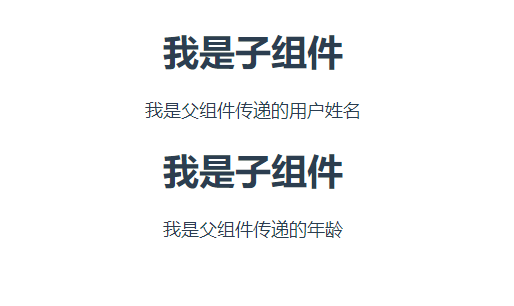
运行结果如下:
此时父组件中的根据slot的name,将内容填入了slot挖的坑当中,一个萝卜一个坑
3、作用域插槽
与前两者的不同 slot自定义:name="值" 子组件可向父组件传递信息
父组件:
<template>

    <child-slot>

      <template v-slot="{username}">我是子组件传递的用户姓名:{{username}}</template>

    </child-slot>

</template>

<script>

import ChildSlot from "@/components/ChildSlot";

export default {

  components:{

    ChildSlot

  }

}

</script>
子组件:
<template>

  <h1>我是子组件</h1>

  <slot :username="username"></slot>

</template>

<script>

export default {

  name: "ChildSlot",

  data(){

    return{

        username:'java',

    }

  }

}

</script>
运行结果如下:
通过作用域插槽,我们可以将子组件中的值传入到父组件,在父组件进行数据处理后,填坑到子组件

4、模拟写一个el-table
先看一个el-table的例子,当需要对一行中的某一个单元格的内容进行处理的时候,需要用到slot插槽,例如下面的姓名name的处理
<template>

  <el-table

      :data="tableData"

      style="width: 100%">

    <el-table-column

        label="姓名"

        width="180">

        <template slot-scope="scope">

          <el-popover trigger="hover" placement="top">

            <p>姓名: {{ scope.row.name }}</p>

            <p>住址: {{ scope.row.address }}</p>

            <div slot="reference" class="name-wrapper">

              <el-tag size="medium">{{ scope.row.name }}</el-tag>

            </div>

          </el-popover>

        </template>

    </el-table-column>

    <el-table-column

        prop="address"

        label="地址">

    </el-table-column>

  </el-table>

</template>
参照el-table,实现我们自己的table组件,讲解下为什么需要用插槽,用了哪些插槽
4.1为了传递table,首先通过匿名插槽,写一个的组件,目的就是模拟下面这三行内容
<el-table
:data="tableData"
style="width: 100%">
<template>

  <div>

      <slot></slot>

  </div>

</template>

<script>

export default {

  name: "MyTable"

}

</script>
4.2实现el-table-column,通过作用域插槽,写我们自己的el-table-column
<template>

  <div>

    <div>

      <!--通过传递label标签,展示表头-->

      <span v-if="label">{{ label }}</span>

    </div>

    <!--获取主页面的data值:$parent.$parent.$data.tableList-->

    <div v-for="(user,index) in $parent.$parent.$data.tableList" :key="index">

      <!--当传递prop属性的时候,就取user用户的数据-->

      <div v-if="prop">{{user[prop]}}</div>

      <!--当不传递prop属性的时候,将用户的数据通过row属性,传递到父组件当中,也就是app.vue-->

      <slot v-else :row="user"></slot>

    </div>

  </div>

</template>

<script>

export default {

  name: "MyTableColumn",

  props: {

    prop: {type: String},

    label: {type: String}

  }

}

</script>
4.2调用my-table,my-table-column
我们通过my-table标签,将内容my-table和my-table-column放置到my-table的匿名插槽中,并通过子组件的props属性,接收prop和label。如同elementui一样,如果prop为空,子附件将父组件的user通过作用域插槽传递到父组件,并在父组件进行处理
<template>

  <div>

    <my-table :data="tableList" style="display: flex; flex-direction: row;">

      <my-table-column prop="name" label="姓名"></my-table-column>

      <my-table-column prop="sex" label="性别"></my-table-column>

      <my-table-column label="地址">

        <template v-slot="scope">

          <span style="background-color: deepskyblue">{{scope.row.address}}</span>

        </template>

      </my-table-column>

    </my-table>

  </div>

</template>

<script>

import MyTable from "@/components/MyTable";

import MyTableColumn from "@/components/MyTableColumn";

export default {

  name: 'App',

  components:{

    MyTableColumn,

    MyTable

  },

  data(){

    return{

      tableList:[

        {

          name: 'java大师1',

          sex: '男',

          address: '西藏1'

        },

        {

          name: 'java大师2',

          sex: '男',

          address: '西藏2'

        },

        {

          name: 'java大师3',

          sex: '男',

          address: '西藏3'

        },

        {

          name: 'java大师4',

          sex: '男',

          address: '西藏4'

        }

      ]

    }

  }

}

</script>
展示结果如下:

vue模拟el-table演示插槽用法的更多相关文章
- vue插槽用法(极客时间Vue视频笔记)
vue插槽 插槽是用来传递复杂的内容,类似方法 <!DOCTYPE html> <html lang="en"> <head> <meta ...
- 使用vue模拟购物车小球动画
使用vue模拟购物车小球动画 1.效果演示 2.相关代码 <!DOCTYPE html> <html lang="en"> <head> < ...
- Vue基础01vue的基本示例,vue的双向数据绑定,vue中常见的几种用法,vue相关常见指令
自学vue框架,每天记录重要的知识点,与大家分享!有不足之处,希望大家指正. 本篇将讲述:vue的基本示例,vue的双向数据绑定,vue中常见的几种用法,vue相关常见指令 前期学习基础,使用vue. ...
- Azure Table storage 基本用法 -- Azure Storage 之 Table
Azure Storage 是微软 Azure 云提供的云端存储解决方案,当前支持的存储类型有 Blob.Queue.File 和 Table,其中的 Table 就是本文的主角 Azure Tabl ...
- EL表达式 requestScope initParam用法
EL表达式 requestScope initParam用法: servlet: package com.stono.servlet; import java.io.IOException; impo ...
- Lua表(table)的用法_个人总结
Lua表(table)的用法_个人总结 1.表的创建及表的介绍 --table 是lua的一种数据结构用来帮助我们创建不同的数据类型.如:数组和字典--lua table 使用关联型数组,你可以用任意 ...
- 使用VUE实现在table中文字信息超过5个隐藏,鼠标移到时弹窗显示全部
使用VUE实现在table中文字信息超过5个隐藏,鼠标移到时弹窗显示全部 <template> <div> <table> <tr v-for="i ...
- table的各种用法
使用 colgroup 和 col 实现响应式表格(table的各种用法):http://coderlt.coding.me/2017/11/20/table-colgroup/
- Vue+element ui table 导出到excel
需求: Vue+element UI table下的根据搜索条件导出当前所有数据 参考: https://blog.csdn.net/u010427666/article/details/792081 ...
- Vue. 之 Element table 单元格内容隐藏
Vue. 之 Element table 单元格内容隐藏 在table显示数据时,若某个单元格的内容过多,需要进行隐层,在这一列的单元格属性添加::show-overflow-tooltip=&quo ...
随机推荐
- 【AI 全栈 SOTA 综述 】这些你都不知道,怎么敢说会 AI?【语音识别原理 + 实战】
章目录 前言语音识别原理 信号处理,声学特征提取 识别字符,组成文本 声学模型 语言模型 词汇模型语音声学特征提取:MFCC和LogFBank算法的原理实战一 ASR语音识别模型 ...
- 使用cmd命令行安装 windows系统
条件:Microsoft WindowsPE 或其他第三方 WindowsPE 1. 使用 diskpart 分区: list disk:列出所有磁盘 select disk 编号:选择某块磁盘 c ...
- LeetCode刷题笔记 - 2022
这篇博客集中整理在LeetCode的刷题记录,方便查阅 258. 各位相加 - 力扣(LeetCode) (leetcode-cn.com) 代码 class Solution { public: i ...
- Hugging News #0331: Hugging Papers 来啦,快来认领你的论文!
每一周,我们的同事都会向社区的成员们发布一些关于 Hugging Face 相关的更新,包括我们的产品和平台更新.社区活动.学习资源和内容更新.开源库和模型更新等,我们将其称之为「Hugging Ne ...
- vue之input输入框的几个事件
目录 事件简介 示例 事件简介 click 点击事件,一般不会用于input输入框,会用于按钮,用于输入框就有点像focus了,当点击输入框时会触发 blur 失去焦点事件,当失去焦点时会触发. fo ...
- [网络/Linux]网络嗅探工具——nmap
1 nmap 简介 Nmap 即 Network Mapper,最早是Linux下的网络扫描和嗅探工具包. nmap是网络扫描和主机检测的工具,用nmap进行信息收集和检测漏洞,功能有: 检测存活主机 ...
- SSL CA 证书生成shell
gencert ssl证书生成 要保证Web浏览器到服务器的安全连接,HTTPS几乎是唯一选择.HTTPS其实就是HTTP over SSL,也就是让HTTP连接建立在SSL安全连接之上. SSL使用 ...
- Sql批量替换字段字符,Sql批量替换多字段字符,Sql替换字符
update phome_ecms_news_check set filename= replace(filename,'Under4-',''); update phome_ecms_news_ch ...
- T-SQL基础教程Day3
第三章 联接3.1交叉联接交叉联接是最简单的联接类型.交叉联接仅执行一个逻辑查询处理阶段--笛卡尔乘积将一个输入表的每一行与另一个表的所有行匹配SQL Server支持交叉联接的两种标准语法:ANSI ...
- 自定义Mybatis-plus插件(限制最大查询数量)
自定义Mybatis-plus插件(限制最大查询数量) 需求背景 一次查询如果结果返回太多(1万或更多),往往会导致系统性能下降,有时更会内存不足,影响系统稳定性,故需要做限制. 解决思路 1.经 ...