
JavaFx 打开一个新窗口和窗口交互(四)
JavaFx 打开一个新窗口和窗口交互(四)
JavaFX 从入门入门到入土系列
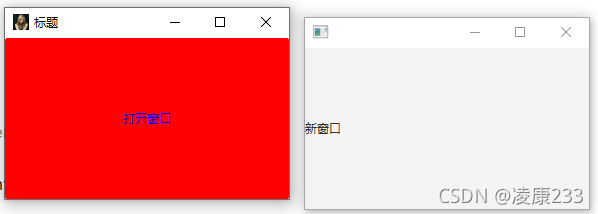
前面我演示的demo都是单个窗口,那么如何实现多个窗口呢?使用Stage secondStage = new Stage();然后secondStage.show();展示即可。
import javafx.application.Application;

import javafx.event.ActionEvent;

import javafx.event.EventHandler;

import javafx.scene.Scene;

import javafx.scene.control.Button;

import javafx.scene.control.Label;

import javafx.scene.image.Image;

import javafx.stage.Stage;

/**

 * @author lingkang

 * @date 2021/9/17 22:29

 * @description

 */

public class WindowsDemo extends Application {

    public void start(Stage stage) throws Exception {

        stage.setTitle("标题");

        stage.getIcons().add(new Image("img/avatar.jpg"));

        stage.setHeight(200);

        stage.setWidth(300);

        Button button = new Button("打开窗口");

        // 添加一个点击事件

        button.setOnAction(new EventHandler<ActionEvent>() {

            @Override

            public void handle(ActionEvent actionEvent) {

                // 创建新的stage

                Stage newStage = new Stage();

                newStage.setWidth(300);

                newStage.setHeight(200);

                Label label = new Label("新窗口");

                newStage.setScene(new Scene(label));

                // 显示

                newStage.show();

            }

        });

        // 直接添加样式

        button.setStyle("-fx-background-color: red;-fx-text-fill: blue;");

        stage.setScene(new Scene(button));

        stage.show();

    }

    public static void main(String[] args) {

        launch(args);

    }

}
效果如下
那么他们怎么交互呢?
简单关闭第一个窗口可以在显示第二个窗口时调用 stage.close();关闭第一个窗口第一个窗口
Button button = new Button("打开窗口");

        // 添加一个点击事件

        button.setOnAction(new EventHandler<ActionEvent>() {

            @Override

            public void handle(ActionEvent actionEvent) {

                // 创建新的stage

                Stage newStage = new Stage();

                newStage.setWidth(300);

                newStage.setHeight(200);

                Label label = new Label("新窗口");

                newStage.setScene(new Scene(label));

                // 显示

                newStage.show();

                // 关闭第一个窗口

                stage.close();

            }

        });
窗口间交互
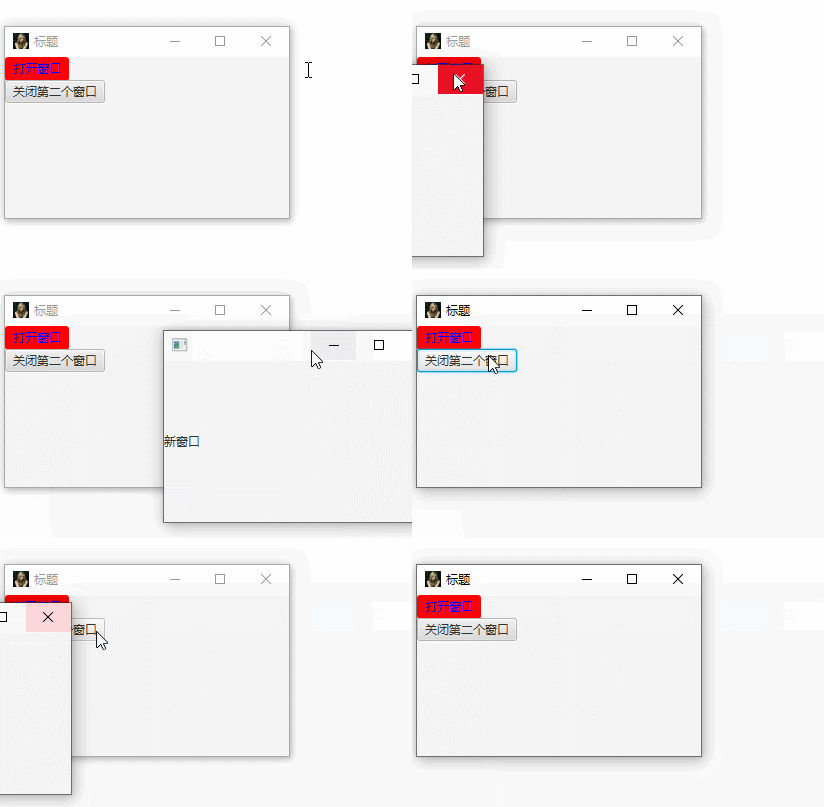
窗口间交互通过公共静态map进行,后面的文章我会用RxJava异步事件实现。
import javafx.application.Application;

import javafx.event.ActionEvent;

import javafx.event.EventHandler;

import javafx.scene.Scene;

import javafx.scene.control.Button;

import javafx.scene.control.Label;

import javafx.scene.image.Image;

import javafx.scene.layout.VBox;

import javafx.stage.Stage;

import java.util.concurrent.ConcurrentHashMap;

import java.util.concurrent.ConcurrentMap;

/**

 * @author lingkang

 * @date 2021/9/17 22:29

 * @description

 */

public class WindowsDemo extends Application {

    public static ConcurrentMap<String, Stage> stageManage = new ConcurrentHashMap<>();

    public void start(Stage stage) throws Exception {

        stage.setTitle("标题");

        stage.getIcons().add(new Image("img/avatar.jpg"));

        stage.setHeight(200);

        stage.setWidth(300);

        Button button = new Button("打开窗口");

        // 添加一个点击事件

        button.setOnAction(new EventHandler<ActionEvent>() {

            @Override

            public void handle(ActionEvent actionEvent) {

                // 创建新的stage

                Stage newStage = new Stage();

                newStage.setWidth(300);

                newStage.setHeight(200);

                Label label = new Label("新窗口");

                newStage.setScene(new Scene(label));

                // 显示

                newStage.show();

                // 关闭第一个窗口

                //stage.close();

                // 放到静态map中共用,从而达到状态管理

                stageManage.put("second", newStage);

            }

        });

        Button closeNewStage = new Button("关闭第二个窗口");

        closeNewStage.setOnAction(new EventHandler<ActionEvent>() {

            @Override

            public void handle(ActionEvent actionEvent) {

                // 通过共用的map,关闭第二个窗口

                stageManage.get("second").close();

            }

        });

        // 直接添加样式

        button.setStyle("-fx-background-color: red;-fx-text-fill: blue;");

        VBox vBox = new VBox();

        vBox.getChildren().add(button);

        vBox.getChildren().add(closeNewStage);

        stage.setScene(new Scene(vBox));

        stage.show();

        // 放到静态map中共用,从而达到状态管理

        stageManage.put("first", stage);

    }

    public static void main(String[] args) {

        launch(args);

    }

}
效果
JavaFx 打开一个新窗口和窗口交互(四)的更多相关文章
- windbg学习---.browse打开一个新的command 窗口
.browse r eax .browse <command>将会显示新的命令浏览窗口和运行给出的命令
- Window.open 实现导航与打开窗口,导航到一个特定链接地址,也可以打开一个新的浏览器窗体
语法 window.open(strUrl,strWindowName,strWindowFeatures ,replace) strUrl: 打开资源的地址 strWindowName: 表示窗体名 ...
- JS 点击元素发ajax请求 打开一个新窗口
JS 点击元素发ajax请求 打开一个新窗口 经常在项目中会碰到这样的需求,点击某个元素后,需要发ajax请求,请求成功以后,开发需要把链接传给前端(或者说请求成功后打开新窗口),前端需要通过新窗口打 ...
- vue中使用router打开一个新的窗口
一个单页应用打开一个新的窗口不是很好控制,比如权限的处理,因为原先的页面不会自动刷新,方法很简单: let routeData = this.$router.resolve({ name: " ...
- 使用javascript打开一个新页而不被浏览器屏蔽
使用javascript打开一个新页面可以有几种方式,但各有利弊,以下做下分析 1.window.open(url) 这是新手最常用的方法,好处是简单易用,坏处,很简单,会被很多浏览器拦截而导致功能失 ...
- 在做爬虫或者自动化测试时新打开一个新标签页,必须使用windows切换
在做爬虫或者自动化测试时,有时会打开一个新的标签页或者新的窗口,直接使用xpath定位元素会发现找不到元素,在firefox中定位了元素还是找不到, 经过多次发现,在眼睛视野内看到这个窗口是在最前面, ...
- Virtualbox中不能为虚拟机打开一个新任务的原因及解决方法
VirtualBox新建虚拟机时报错,不能为虚拟机打开一个新任务的原因 解决办法如下 1.保证bios里的virtualization technology的选项开启,不同电脑BIOS设置可能会不一样 ...
- Android课程---Oracle VM VirtualBox出现不能为虚拟机打开一个新任务
因工作需要在Win7下增添了Win7虚拟系统,随着VirtualBox 4.326的版本更新,用户们也开始升级.一用户在升级后发现原来创建的虚拟机无法打开,提示信息为:不能为虚拟电脑win7打开一个新 ...
- VirtualBox不能为虚拟电脑 Ubuntu 打开一个新任务
今天在用Vbox中的Ubuntu系统准备测试Python代码时,Vbox报了一个错误:"不能为虚拟电脑 Ubuntu 打开一个新任务".因为之前用的时候还好好的,也不知道是不是最近 ...
- 不能为虚拟电脑 ubuntu 打开一个新任务.
使用virtualbox报错: 不能为虚拟电脑 ubuntu3 打开一个新任务. The virtual machine 'ubuntu3' has terminated unexpectedly d ...
随机推荐
- HashMap底层源码分析
HashMap底层原理实现 1.HashMap初始化 jdk1.8版本之后:数组+链表+红黑树实现,先去观看HashMap的构造方法: 构造方法: public HashMap() { this.lo ...
- 【知识杂谈#1】Linux如何安装net-tools和sbin配置PATH
1. Linux下载net-tools 在Linux上下载net-tools包的方法可能会因你所使用的Linux发行版而有所不同.在某些现代的Linux发行版中,net-tools已经被弃用,而推荐使 ...
- 教学法学期末考试MOOC01
期末考试 返回 期末考试试卷为客观题,总分为100分,占课程成绩的40%.其中包含16道单选题,2道多选题.共18道题.单选题每道5分,多选题每道10分,限时90分钟完成. 倒计时: 01:13:4 ...
- 2023_10_10_MYSQL_DAY_02_课后题
2023_10_10_MYSQL_DAY_02_课后题 #06章1--7题 #1. 查询10号部门所有员工的员工姓名,员工工资,工资级别. SELECT e.ename 员工姓名,e.`sal` 员工 ...
- C#学习笔记--复杂数据类型、函数和结构体
C#基础 复杂数据类型 特点:多个数据变量地一个集合体,可以自己命名 种类:枚举.数组和结构体 枚举:整型常量的集合 数组:任意变量类型的顺序存储的数据集合 结构体:任意变量类型的数据组合成的数据块 ...
- C语言存储类别
对于C语言中的变量,存储类别可分为4种:auto(自动存储).static(静态存储).register(寄存器存储).extern(外部存储). auto自动存储 函数中的局部变量,如果不专门声明为 ...
- Hugging Face 分词器新增聊天模板属性
一个幽灵,格式不正确的幽灵,在聊天模型中游荡! 太长不看版 现存的聊天模型使用的训练数据格式各各不同,我们需要用这些格式将对话转换为单个字符串并传给分词器.如果我们在微调或推理时使用的格式与模型训练时 ...
- chatgpt镜像站汇总 - 聚合GPT【即时更新】
自荐下由我开发的聚合GPT网站,这边的GPT镜像站均为免费.无登录.无次数限制的!会及时剔除失效.添加可用地址[欢迎STAR.PR] 地址:https://ele-cat.gitee.io/comp- ...
- 『STAOI』G - Round 1 半个游记
很刺激. 挂个链接
- CF671D Roads in Yusland 题解
题目链接 题目要求我们求出选出若干条路径并最小化花费,如果这是在链上,我们可以考虑直接枚举每条路径的右端点 dp,那树呢?把路径剖分整个覆盖的集合就不一定连续了,没法 dp,况且题目里给了很强的条件: ...