
rasa train nlu详解:1.2-_train_graph()函数
本文使用《使用ResponseSelector实现校园招聘FAQ机器人》中的例子,主要详解介绍_train_graph()函数中变量的具体值。
一.rasa/model_training.py/_train_graph()函数
_train_graph()函数实现,如下所示:
def _train_graph(

    file_importer: TrainingDataImporter,

    training_type: TrainingType,

    output_path: Text,

    fixed_model_name: Text,

    model_to_finetune: Optional[Union[Text, Path]] = None,

    force_full_training: bool = False,

    dry_run: bool = False,

    **kwargs: Any,

) -> TrainingResult:

    if model_to_finetune:  # 如果有模型微调

        model_to_finetune = rasa.model.get_model_for_finetuning(model_to_finetune)  # 获取模型微调

        if not model_to_finetune:  # 如果没有模型微调

            rasa.shared.utils.cli.print_error_and_exit(  # 打印错误并退出

                f"No model for finetuning found. Please make sure to either "   # 没有找到微调模型。请确保

                f"specify a path to a previous model or to have a finetunable " # 要么指定一个以前模型的路径,要么有一个可微调的

                f"model within the directory '{output_path}'."                  # 在目录'{output_path}'中的模型。

            )

        rasa.shared.utils.common.mark_as_experimental_feature(  # 标记为实验性功能

            "Incremental Training feature"  # 增量训练功能

        )

    is_finetuning = model_to_finetune is not None  # 如果有模型微调

    config = file_importer.get_config()  # 获取配置

    recipe = Recipe.recipe_for_name(config.get("recipe"))  # 获取配方

    config, _missing_keys, _configured_keys = recipe.auto_configure(  # 自动配置

        file_importer.get_config_file_for_auto_config(),  # 获取自动配置的配置文件

        config,  # 配置

        training_type,  # 训练类型

    )

    model_configuration = recipe.graph_config_for_recipe(  # 配方的graph配置

        config,  # 配置

        kwargs,  # 关键字参数

        training_type=training_type,  # 训练类型

        is_finetuning=is_finetuning,  # 是否微调

    )

    rasa.engine.validation.validate(model_configuration)  # 验证

    tempdir_name = rasa.utils.common.get_temp_dir_name()  # 获取临时目录名称

    # Use `TempDirectoryPath` instead of `tempfile.TemporaryDirectory` as this leads to errors on Windows when the context manager tries to delete an already deleted temporary directory (e.g. https://bugs.python.org/issue29982)

    # 翻译:使用TempDirectoryPath而不是tempfile.TemporaryDirectory,因为当上下文管理器尝试删除已删除的临时目录时,这会导致Windows上的错误(例如https://bugs.python.org/issue29982)

    with rasa.utils.common.TempDirectoryPath(tempdir_name) as temp_model_dir:  # 临时模型目录

        model_storage = _create_model_storage(  # 创建模型存储

            is_finetuning, model_to_finetune, Path(temp_model_dir)  # 是否微调,模型微调,临时模型目录

        )

        cache = LocalTrainingCache()  # 本地训练缓存

        trainer = GraphTrainer(model_storage, cache, DaskGraphRunner)  # Graph训练器

        if dry_run:  # dry运行

            fingerprint_status = trainer.fingerprint(                        # fingerprint状态

                model_configuration.train_schema, file_importer              # 模型配置的训练模式,文件导入器

            )

            return _dry_run_result(fingerprint_status, force_full_training)  # 返回dry运行结果

        model_name = _determine_model_name(fixed_model_name, training_type)  # 确定模型名称

        full_model_path = Path(output_path, model_name)                # 完整的模型路径

        with telemetry.track_model_training(                    # 跟踪模型训练

            file_importer, model_type=training_type.model_type  # 文件导入器,模型类型

        ):

            trainer.train(                               # 训练

                model_configuration,                     # 模型配置

                file_importer,                           # 文件导入器

                full_model_path,                         # 完整的模型路径

                force_retraining=force_full_training,    # 强制重新训练

                is_finetuning=is_finetuning,             # 是否微调

            )

            rasa.shared.utils.cli.print_success(         # 打印成功

                f"Your Rasa model is trained and saved at '{full_model_path}'."  # Rasa模型已经训练并保存在'{full_model_path}'。

            )

        return TrainingResult(str(full_model_path), 0)   # 训练结果
1.传递来的形参数据

2._train_graph()函数组成
该函数主要由3个方法组成,如下所示:
- model_configuration = recipe.graph_config_for_recipe(*)
- trainer = GraphTrainer(model_storage, cache, DaskGraphRunner)
- trainer.train(model_configuration, file_importer, full_model_path, force_retraining, is_finetuning)
二._train_graph()函数中的方法
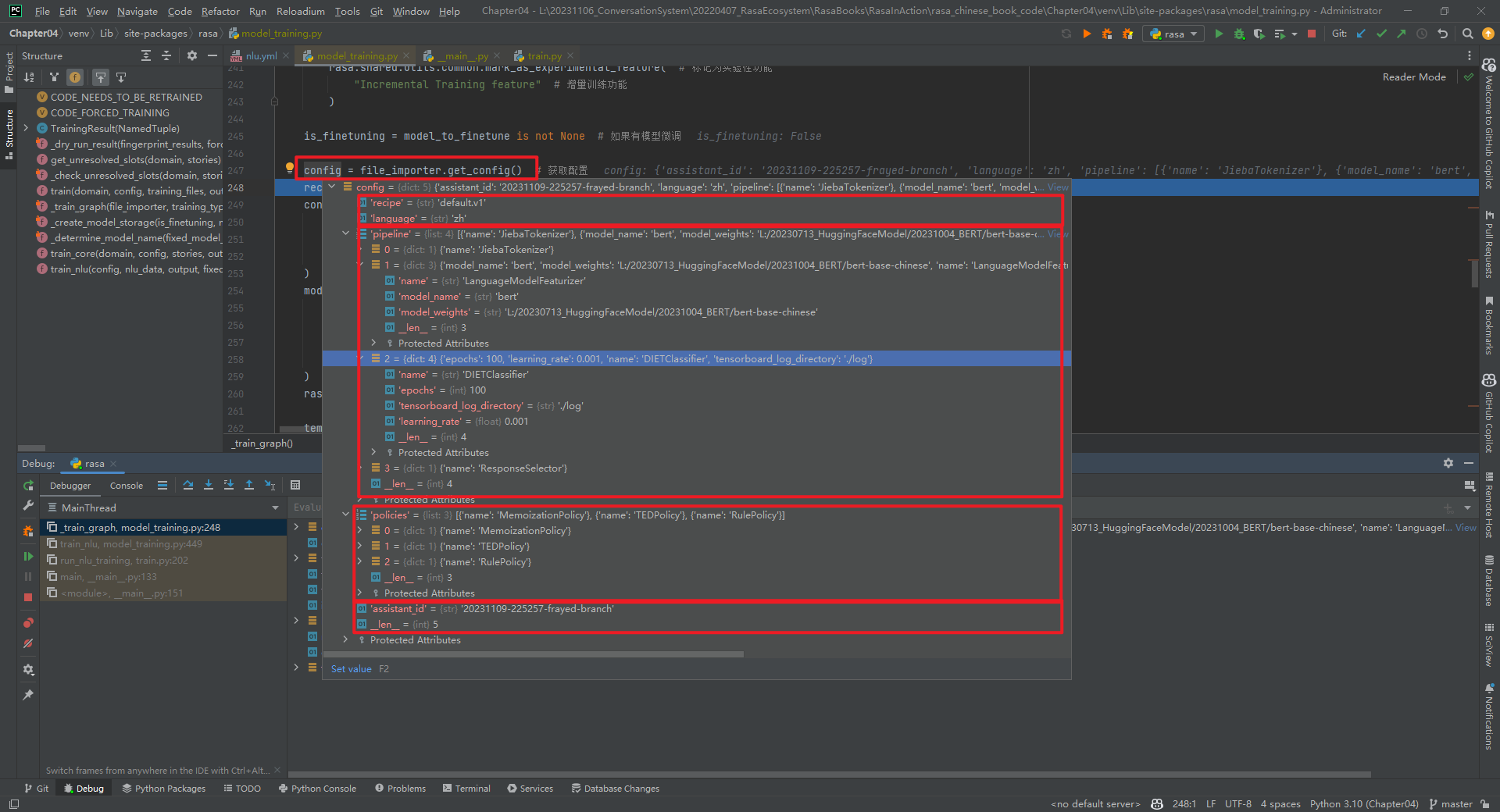
1.file_importer.get_config()
将config.yml文件转化为dict类型,如下所示:
2.Recipe.recipe_for_name(config.get("recipe"))

(1)ENTITY_EXTRACTOR = ComponentType.ENTITY_EXTRACTOR
实体抽取器。
(2)INTENT_CLASSIFIER = ComponentType.INTENT_CLASSIFIER
意图分类器。
(3)MESSAGE_FEATURIZER = ComponentType.MESSAGE_FEATURIZER
消息特征化。
(4)MESSAGE_TOKENIZER = ComponentType.MESSAGE_TOKENIZER
消息Tokenizer。
(5)MODEL_LOADER = ComponentType.MODEL_LOADER
模型加载器。
(6)POLICY_WITHOUT_END_TO_END_SUPPORT = ComponentType.POLICY_WITHOUT_END_TO_END_SUPPORT
非端到端策略支持。
(7)POLICY_WITH_END_TO_END_SUPPORT = ComponentType.POLICY_WITH_END_TO_END_SUPPORT
端到端策略支持。
3.model_configuration = recipe.graph_config_for_recipe(*)
model_configuration.train_schema和model_configuration.predict_schema的数据类型都是GraphSchema类对象,分别表示在训练和预测时所需要的SchemaNode,以及SchemaNode在GraphSchema中的依赖关系。
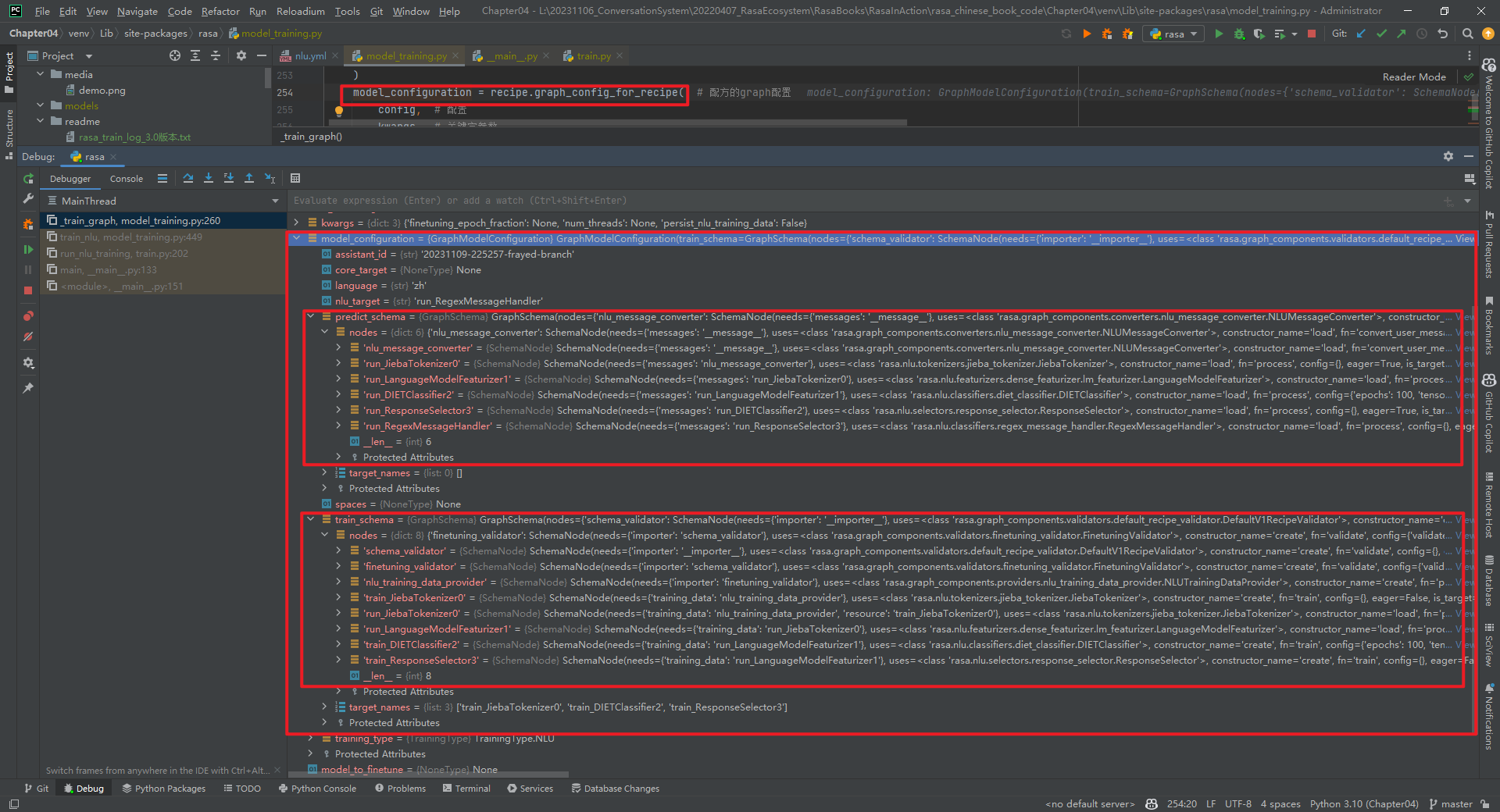
(1)model_configuration.train_schema
- schema_validator:rasa.graph_components.validators.default_recipe_validator.DefaultV1RecipeValidator类中的validate方法
- finetuning_validator:rasa.graph_components.validators.finetuning_validator.FinetuningValidator类中的validate方法
- nlu_training_data_provider:rasa.graph_components.providers.nlu_training_data_provider.NLUTrainingDataProvider类中的provide方法
- train_JiebaTokenizer0:rasa.nlu.tokenizers.jieba_tokenizer.JiebaTokenizer类中的train方法
- run_JiebaTokenizer0:rasa.nlu.tokenizers.jieba_tokenizer.JiebaTokenizer类中的process_training_data方法
- run_LanguageModelFeaturizer1:rasa.nlu.featurizers.dense_featurizer.lm_featurizer.LanguageModelFeaturizer类中的process_training_data方法
- train_DIETClassifier2:rasa.nlu.classifiers.diet_classifier.DIETClassifier类中的train方法
- train_ResponseSelector3:rasa.nlu.selectors.response_selector.ResponseSelector类中的train方法
说明:ResponseSelector类继承自DIETClassifier类。
(2)model_configuration.predict_schema
- nlu_message_converter:rasa.graph_components.converters.nlu_message_converter.NLUMessageConverter类中的convert_user_message方法
- run_JiebaTokenizer0:rasa.nlu.tokenizers.jieba_tokenizer.JiebaTokenizer类中的process方法
- run_LanguageModelFeaturizer1:rasa.nlu.featurizers.dense_featurizer.lm_featurizer.LanguageModelFeaturizer类中的process方法
- run_DIETClassifier2:rasa.nlu.classifiers.diet_classifier.DIETClassifier类中的process方法
- run_ResponseSelector3:rasa.nlu.selectors.response_selector.ResponseSelector类中的process方法
- run_RegexMessageHandler:rasa.nlu.classifiers.regex_message_handler.RegexMessageHandler类中的process方法
4.tempdir_name
'C:\Users\ADMINI~1\AppData\Local\Temp\tmpg0v179ea'
5.trainer = GraphTrainer(*)和trainer.train(*)
这里执行的代码是rasa/engine/training/graph_trainer.py中GraphTrainer类的train()方法,实现功能为训练和打包模型并返回预测graph运行程序。
6.Rasa中GraphComponent的子类

参考文献:
[1]https://github.com/RasaHQ/rasa
[2]rasa 3.2.10 NLU模块的训练:https://zhuanlan.zhihu.com/p/574935615
[3]rasa.engine.graph:https://rasa.com/docs/rasa/next/reference/rasa/engine/graph/
rasa train nlu详解:1.2-_train_graph()函数的更多相关文章
- SQL 中详解round(),floor(),ceiling()函数的用法和区别?
SQL 中详解round(),floor(),ceiling()函数的用法和区别? 原创 2013年06月09日 14:00:21 摘自:http://blog.csdn.net/yueliang ...
- 第7.25节 Python案例详解:使用property函数定义与实例变量同名的属性会怎样?
第7.25节 Python案例详解:使用property函数定义与实例变量同名的属性会怎样? 一. 案例说明 我们上节提到了,使用property函数定义的属性不要与类内已经定义的普通实例变量重 ...
- 第7.24节 Python案例详解:使用property函数定义属性简化属性访问代码实现
第7.24节 Python案例详解:使用property函数定义属性简化属性访问代码实现 一. 案例说明 本节将通过一个案例介绍怎么使用property定义快捷的属性访问.案例中使用Rectan ...
- 详解wait和waitpid函数
#include <sys/types.h> /* 提供类型pid_t的定义 */ #include <sys/wait.h> pid_t wait(int *status) ...
- Linux 信号详解一(signal函数)
信号列表 SIGABRT 进程停止运行 SIGALRM 警告钟 SIGFPE 算述运算例外 SIGHUP 系统挂断 SIGILL 非法指令 SIGINT 终端中断 SIGKILL 停止进程(此信号不能 ...
- (译)详解javascript立即执行函数表达式(IIFE)
写在前面 这是一篇译文,原文:Immediately-Invoked Function Expression (IIFE) 原文是一篇很经典的讲解IIFE的文章,很适合收藏.本文虽然是译文,但是直译的 ...
- 《Windows驱动开发技术详解》之派遣函数
驱动程序的主要功能是负责处理I/O请求,其中大部分I/O请求是在派遣函数中处理的.用户模式下所有对驱动程序的I/O请求,全部由操作系统转化为一个叫做IRP的数据结构,不同的IRP数据会被“派遣”到不同 ...
- [二] java8 函数式接口详解 函数接口详解 lambda表达式 匿名函数 方法引用使用含义 函数式接口实例 如何定义函数式接口
函数式接口详细定义 package java.lang; import java.lang.annotation.*; /** * An informative annotation type use ...
- 详解MySQL中concat函数的用法(连接字符串)
MySQL中concat函数 使用方法: CONCAT(str1,str2,…) 返回结果为连接参数产生的字符串.如有任何一个参数为NULL ,则返回值为 NULL. 注意: 如果所有参数均为非二进制 ...
- 详解javascript立即执行函数表达式(IIFE)
立即执行函数,就是在定义函数的时候直接执行,这里不是申明函数而是一个函数表达式 1.问题 在javascript中,每一个函数在被调用的时候都会创建一个执行上下文,在函数内部定义的变量和函数只能在该函 ...
随机推荐
- Meteors 题解
Meteors 蒟蒻初学整体二分,写一篇题解记录一下思考与看法. 题目大意 在一个环形的轨道上分别着若干国家的空间站,在接下来的一段时间内会出现若干次陨石,每次出现在环形的某一段轨道,每个国家都想收集 ...
- 如何写出优雅的代码?试试这些开源项目「GitHub 热点速览」
又是一期提升开发效率的热点速览,无论是本周推特的检查 Python 语法和代码格式的 ruff,或者是 JS.TS 编译器 oxc,都是不错的工具,有意思的是它们都是 Rust 写的. 此外,还有用来 ...
- angular:响应式表单(Reactive Forms)和模板驱动表单(Template-Driven Forms)分别进行验证
2022-01-18 响应式表单 响应式表单是围绕Observable的流构建的. 使用响应式表单时,FormControl类是最基本的构造类. 在使用响应式表单前,需要先导入 ReactiveFor ...
- Odoo—货运管理—odoo时差问题
第一次踩odoo时差的坑,才知道原来odoo在存储日期数据时,是以UTC0时区存放的,和北京时间相差8个小时.只是odoo本身能很好的处理日期数据的存储和展示,所以刚开始接触odoo,不容易发现这个问 ...
- 持续进化,快速转录,Faster-Whisper对视频进行双语字幕转录实践(Python3.10)
Faster-Whisper是Whisper开源后的第三方进化版本,它对原始的 Whisper 模型结构进行了改进和优化.这包括减少模型的层数.减少参数量.简化模型结构等,从而减少了计算量和内存消耗, ...
- VMPFC可以融合既有的片段信息来模拟出将来的情感场景
Ventromedial prefrontal cortex supports affective future simulation by integrating distributed knowl ...
- .NET周刊【11月第2期 2023-11-12】
国内文章 一个基于百度飞桨封装的.NET版本OCR工具类库 - PaddleOCRSharp https://www.cnblogs.com/Can-daydayup/p/17818557.html ...
- 1. Shell 基本用法
重点: 条件测试. read. Shell 环境配置. case. for. find. xargs. gzip,bzip2,xz. tar. sed. 1)编程基础 Linus 说:Talk is ...
- 中间件IIS监控指标、配置和Windbg调试分析
1. 关键性能计数器指标 a. Web服务(W3SVC)性能计数器 当前连接数(Current Connections):显示当前所有HTTP连接的数量.过高的数值可能表明网站流量过大或连接无法及时释 ...
- 解决启动Typora时候,出现This beta version of Typora is expired,please download and install a newer version.
一.问题说明 出现以下问题说明,该软件进行了对系统的时间检测,如果是最新的时间,就会报错,如果是之前的时间就不会.(比如2021年的时间) 二.问题解决 1.手动更改系统时间 打开"控制面板 ...