
ubuntu系统下安装最新版的MySQL
下载mysql源
打开mysql官网
mysql官网文档
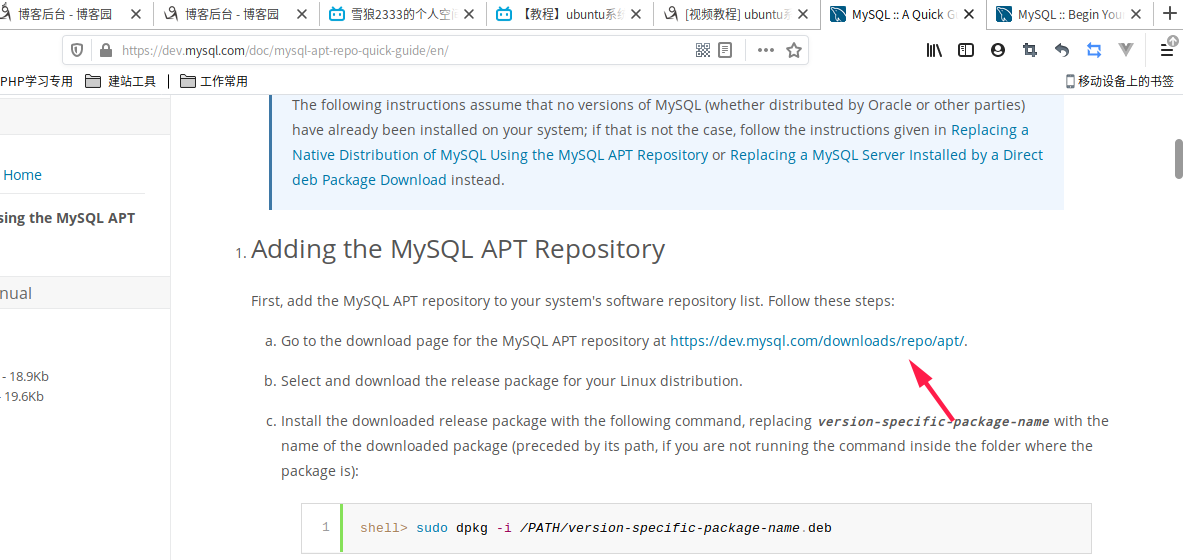
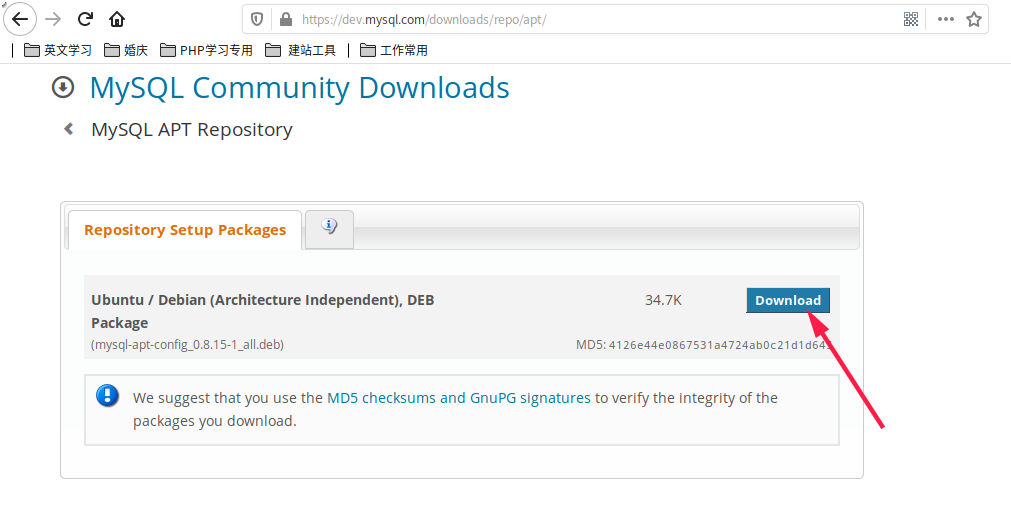
进入下载地址页面

下载mysql源
apt-get install -y wget #如果没有wget命令就安装一下
wget https://dev.mysql.com/get/mysql-apt-config_0.8.15-1_all.deb
dpkg -i mysql-apt-config_0.8.15-1_all.deb
选择1,2,4
root@7c609eaf61d3:/usr/local/src# dpkg -i mysql-apt-config_0.8.15-1_all.deb

(Reading database ... 8304 files and directories currently installed.)

Preparing to unpack mysql-apt-config_0.8.15-1_all.deb ...

Unpacking mysql-apt-config (0.8.15-1) over (0.8.15-1) ...

Setting up mysql-apt-config (0.8.15-1) ...

debconf: unable to initialize frontend: Dialog

debconf: (No usable dialog-like program is installed, so the dialog based frontend cannot be used. at /usr/share/perl5/Debconf/FrontEnd/Dialog.pm line 76.)

debconf: falling back to frontend: Readline

debconf: unable to initialize frontend: Readline

debconf: (Can't locate Term/ReadLine.pm in @INC (you may need to install the Term::ReadLine module) (@INC contains: /etc/perl /usr/local/lib/x86_64-linux-gnu/perl/5.26.1 /usr/local/share/perl/5.26.1 /usr/lib/x86_64-linux-gnu/perl5/5.26 /usr/share/perl5 /usr/lib/x86_64-linux-gnu/perl/5.26 /usr/share/perl/5.26 /usr/local/lib/site_perl /usr/lib/x86_64-linux-gnu/perl-base) at /usr/share/perl5/Debconf/FrontEnd/Readline.pm line 7.)

debconf: falling back to frontend: Teletype

Configuring mysql-apt-config

----------------------------

MySQL APT Repo features MySQL Server along with a variety of MySQL components. You may select the appropriate product to choose the version

that you wish to receive.

Once you are satisfied with the configuration then select last option 'Ok' to save the configuration, then run 'apt-get update' to load

package list. Advanced users can always change the configurations later, depending on their own needs.

  1. MySQL Server & Cluster (Currently selected: mysql-8.0)  3. MySQL Preview Packages (Currently selected: Disabled)

  2. MySQL Tools & Connectors (Currently selected: Enabled)  4. Ok

Which MySQL product do you wish to configure? 1

This configuration program has determined that mysql-8.0 is configured on your system, and has highlighted the most appropriate repository

package. If you are not sure which version to install, do not change the auto-selected version. Advanced users can always change the

version as needed later. Note that MySQL Cluster also contains MySQL Server.

  1. mysql-5.7  2. mysql-8.0  3. mysql-cluster-7.5  4. mysql-cluster-7.6  5. mysql-cluster-8.0  6. None

Which server version do you wish to receive? 2

MySQL APT Repo features MySQL Server along with a variety of MySQL components. You may select the appropriate product to choose the version

that you wish to receive.

Once you are satisfied with the configuration then select last option 'Ok' to save the configuration, then run 'apt-get update' to load

package list. Advanced users can always change the configurations later, depending on their own needs.

  1. MySQL Server & Cluster (Currently selected: mysql-8.0)  3. MySQL Preview Packages (Currently selected: Disabled)

  2. MySQL Tools & Connectors (Currently selected: Enabled)  4. Ok

Which MySQL product do you wish to configure? 4

Warning: apt-key should not be used in scripts (called from postinst maintainerscript of the package mysql-apt-config)

OK
  apt-get update #更新mysql源

  注意看一下是否更新成功,有时候会出现connect time out,多试几次就可以了

  apt-get install mysql-server #安装mysql

  输入密码 123456

  确认密码 123456

  选 1. Use Strong Password Encryption (RECOMMENDED) #选择1强密码加密

  安装完成后,官网说直接使用service就可以启动,service mysql start,但是我这里报找不到这个service启动脚本。

  因为在/etc/init.d/目录里没有这个mysql的启动命令

  使用mysqld来启动,直接使用mysqld命令启动,报错不允许使用root用户执行

  [Server] Fatal error: Please read "Security" section of the manual to find out how to run mysqld as root!

  使用mysql用户执行

  mysqld --user=mysql &  #启动并后台运行

  ps aux | grep mysql   #查看已经启动了mysqld

  kill 进程号可以停止mysql服务

  mysql -uroot -p

  输入密码123456

  show databases; #查看现有的库
root@7c609eaf61d3:/etc/init.d# mysql -uroot -p

Enter password:

Welcome to the MySQL monitor.  Commands end with ; or \g.

Your MySQL connection id is 8

Server version: 8.0.21 MySQL Community Server - GPL

Copyright (c) 2000, 2020, Oracle and/or its affiliates. All rights reserved.

Oracle is a registered trademark of Oracle Corporation and/or its

affiliates. Other names may be trademarks of their respective

owners.

Type 'help;' or '\h' for help. Type '\c' to clear the current input statement.

mysql> show databases;

+--------------------+

| Database           |

+--------------------+

| information_schema |

| mysql              |

| performance_schema |

| sys                |

+--------------------+

4 rows in set (0.00 sec)

mysql> exit #退出msyql
whereis mysql #查看mysql安装的位置
到此已经成功安装上8.0.21 MySQL
ubuntu系统下安装最新版的MySQL的更多相关文章
- [视频教程] ubuntu系统下安装最新版的MySQL
视频地址: https://www.bilibili.com/video/av69256331/ 官网文档https://dev.mysql.com/doc/mysql-apt-repo-quick- ...
- [视频教程] ubuntu系统下安装最新版PHP7.3.X环境
视频地址: https://www.bilibili.com/video/av69088870/ 笔记: 先安装一下这个命令 add-apt-repositoryapt-get install sof ...
- ubuntu系统下安装pyspider:搭建pyspider服务器新手教程
首先感谢“巧克力味腺嘌呤”的博客和Debian 8.1 安装配置 pyspider 爬虫,本人根据他们的教程在ubuntu系统中进行了实际操作,发现有一些不同,也出现了很多错误,因此做此教程,为新手服 ...
- Ubuntu系统下安装并配置hive-2.1.0
说在前面的话 默认情况下,Hive元数据保存在内嵌的Derby数据库中,只能允许一个会话连接,只适合简单的测试.实际生产环境中不使用,为了支持多用户会话, 则需要一个独立的元数据库,使用MySQL作为 ...
- CentOS和Ubuntu系统下安装 HttpFS (助推Hue部署搭建)
不多说,直接上干货! 我的集群机器情况是 bigdatamaster(192.168.80.10).bigdataslave1(192.168.80.11)和bigdataslave2(192.168 ...
- ubuntu系统下安装pip3及第三方库的安装
ubuntu系统下会自带python2.x和python3.x坏境,不需要我们去安装.并且ubuntu系统下还会自动帮助我们安装python2.x坏境下的pip安装工具, 但是没有python3.x坏 ...
- ubuntu系统下安装pyspider:安装命令集合。
本篇内容的前提是你已安装好python 3.5.在ubuntu系统中安装pyspider最大的困难是要依赖组件经常出错,特别是pycurl,但把对应的依赖组件安装好,简单了.下面直接上代码,所有的依赖 ...
- CentOS和Ubuntu系统下安装vsftp(助推大数据部署搭建)
不多说,直接上干货! 同时,声明,我这里安装的vsftp,仅仅只为我的大数据着想,关于网上的复杂安装,那是服务和运维那块.我不多牵扯,也不多赘述. 一.CentOS系统里安装vsftp 第一步:使用y ...
- Python 基础之在ubuntu系统下安装双版本python
前言:随着python升级更新,新版本较于老版本功能点也有不同地方,作为一个初学者应该了解旧版本的规则,也要继续学习新版本的知识.为了能更好去学习python,我在ubuntu安装python2和py ...
- ubuntu系统下安装gstreamer的ffmpeg支持
当您在安装gstreamer到您的ubuntu系统中时,为了更好地进行流媒体开发,需要安装ffmpeg支持,但一般情况下,直接使用 sudo apt-get install gstreamer0.10 ...
随机推荐
- C++中std::function常见用法
C++标准库中的std::function是一个通用的函数封装,可以用来存储.复制.调用任何可调用对象(函数.函数指针.成员函数指针.lambda表达式等).以下是std::function的一些常见 ...
- 关于Java 线程的运行状态
首先需要说明的是,所指状态为JVM线程状态,而非操作系统线程状态.同一时间,一个线程只会存在于一种状态. 线程状态,enum State: 1.NEW 已创建,未运行. 2.RUNNABLE 线程于J ...
- #DP#CF9D How many trees?
题目 用\(n\)个点组成二叉树,问高度\(\geq h\)的有多少个. 分析 首先前缀和相减就能得到答案,做dp 设\(dp[n][h]\)表示节点数为\(n\),高度不超过\(h\)的树的个数 那 ...
- springboot整合redis之发送手机验证码
阿里云服务发送手机短信验证码-----(第二篇) 文章概述:springboot整合redis之发送手机验证码注册登录 注:搭建springboot项目可以参考这篇文章: 前言:短信验证码是通过发送验 ...
- 基于OT与CRDT协同算法的文档划词评论能力实现
基于OT与CRDT协同算法的文档划词评论能力实现 当我们实现在线文档平台时,划词评论的功能是非常必要的,特别是在重文档管理流程的在线文档产品中,文档反馈是非常重要的一环,这样可以帮助文档维护者提高文档 ...
- openGauss/MogDB-3.0.0 dcf测试(非om安装)
openGauss/MogDB-3.0.0 dcf 测试(非 om 安装) 本文出处:https://www.modb.pro/db/402037 IP 地址 ... LERDER ... FOLLO ...
- Avalonia下拉可搜索树(TreeComboBox)
1.需求分析 树形下拉的功能是ComboBox和TreeView的功能结合起来,再结合数据模板来实现这一功能. 2.代码实现 1.创建UserControl集成TreeView控件 2.将 ...
- 为你推荐一款高效的IO组件——okio
原文:https://mp.weixin.qq.com/s/XnNhSq8ESoslb2DQEzMbCQ,点击链接查看更多技术内容. 前不久,三方组件库上新了一批JS/eTS组件,其中就包括oki ...
- 重新点亮linux 命令树————grub配置文件[二十]
前言 简单介绍一下grub 配置文件. 正文 grub 是什么呢? 引导配置. grub 配置文件: /etc/default/grub 默认grub配置文件 /etc/grub.d/ /boot/g ...
- ping 介绍
前言 因为要整理网络这一块,所以打算先把概念写下.这节介绍ping的实现原理. 正文 先看一下图: 又没有发现和我们的icmp很像?对头.在icmp中,我写道:icmp有两种报文,一种是差错报文,一种 ...